Hosting pages are full of short words that sound like they should be obvious: bandwidth, nameserver, inode, TTL. They are not, and misreading one can cost you money or leave your site slow or unprotected. This glossary defines the terms you will actually meet, in plain English, and links to our full guides where we have one.
What is a web hosting glossary?
Quick answer: A web hosting glossary explains the terms you meet when you buy and run a website. In short, web hosting is the server space that keeps your site online, a domain name is its address, and DNS connects the two. Bandwidth, storage, uptime and SSL describe how well the service performs.
Key takeaways
- Hosting stores your site, a domain names it, and DNS links the two.
- Shared, VPS, cloud and dedicated hosting are steps on one ladder of power, control and price.
- Bandwidth is traffic out, storage is files kept. They are different limits.
- Uptime of 99.9 percent still means a few hours offline a year.
- This page has 92 terms from A to Z. Jump straight to a letter below.
Start here: the 10 terms beginners meet first
If you are buying your first hosting plan, learn these ten before anything else. Each one links to its full entry further down.
- Web hosting, the space that keeps your site online
- Domain name, your site’s address
- DNS, turns the address into a server location
- Shared hosting, the cheapest way to start
- VPS, the usual next step up
- Bandwidth, how much data you can send to visitors
- Disk space, room for your files
- SSL/TLS certificate, the padlock and HTTPS
- Uptime, how often your site is actually online
- cPanel, the dashboard most plans give you
How does a domain name reach a web server?
When someone types your domain, their browser asks DNS for the matching IP address, connects to the server at that address, agrees on encryption through your SSL/TLS certificate, and then downloads the page. The whole trip normally takes a fraction of a second, and it is why domain, DNS and hosting must all be set up correctly.
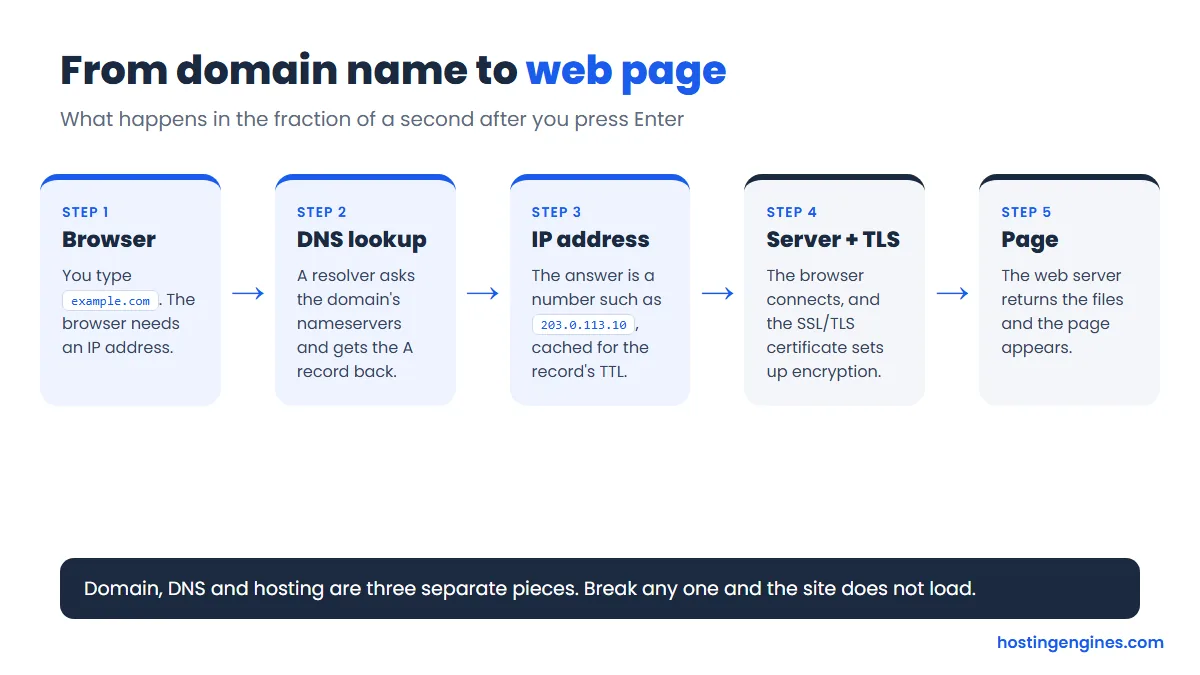
Most “my site is down” problems after a move sit at step 2 or 3: the domain still points to the old server, or the certificate is missing on the new one. Our guides on how DNS works and SSL/TLS certificates cover those two steps in detail.
What are the main types of web hosting?
The main types are shared, VPS, cloud and dedicated hosting. Shared splits one server among many sites, a VPS gives you a reserved virtual slice, cloud spreads your site across connected servers, and dedicated gives you a whole machine. More control and power cost more and need more know-how.
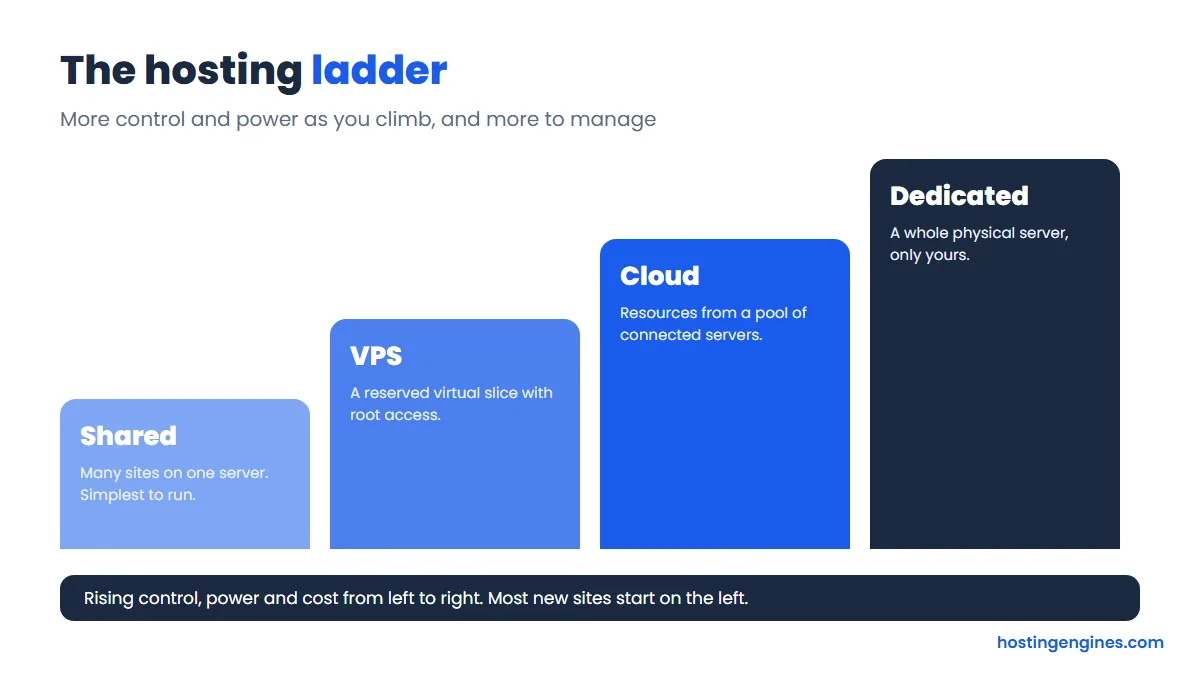
- Shared hosting: lowest cost, nothing to manage, limited resources.
- VPS hosting: guaranteed resources and root access, a good step up once a site grows.
- Cloud hosting: resources scale quickly and a failed server does not take you down.
- Dedicated hosting: a whole server for you, for high traffic or strict requirements.
- Managed plans add hands-on server care, while unmanaged plans leave it to you.
Not sure which fits? Start with our overview of the types of web hosting, or the comparison of shared vs VPS hosting.
Bandwidth vs storage: what is the difference?
Storage is how much your files, databases and email take up on the server. Bandwidth is how much data the server sends out to visitors over time. A small site with heavy traffic can use little storage and a lot of bandwidth, and the reverse is also true.
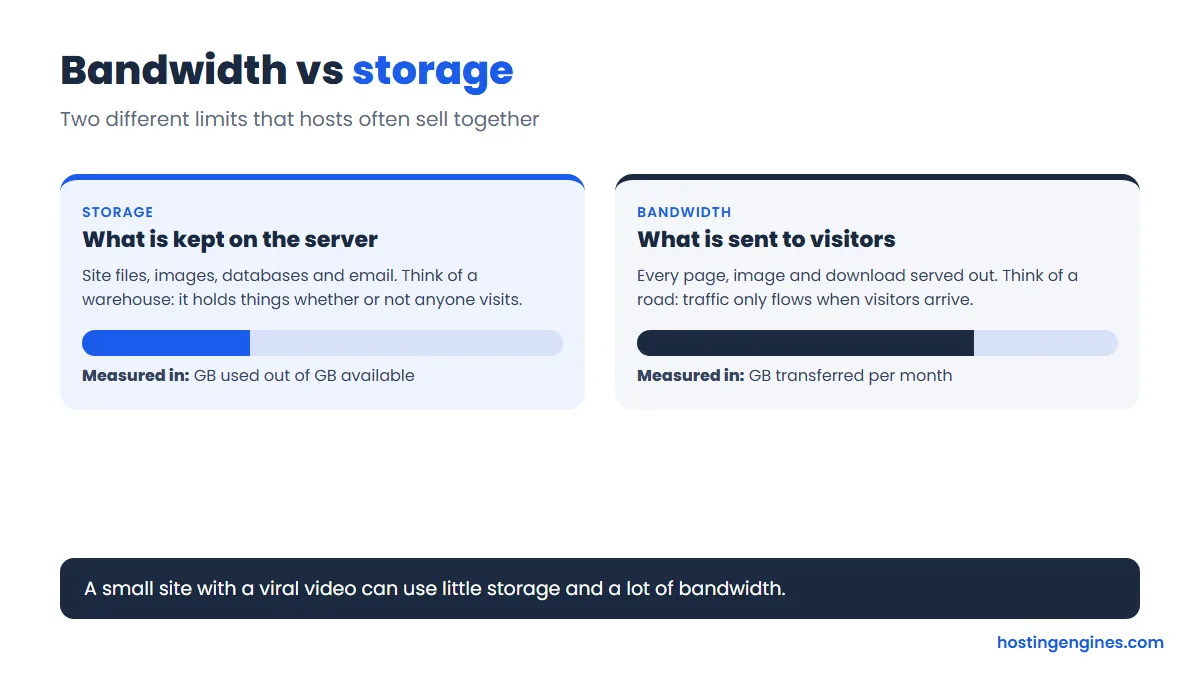
Hosts sell both as “unlimited” in marketing, with fair-use rules in the small print. See what bandwidth is and how to estimate the bandwidth your site needs.
Which DNS records should you know?
Six record types cover most day-to-day work: A and AAAA point a name to an IP address, CNAME makes an alias, MX routes email, TXT holds verification and email-security text, and NS names the nameservers. You edit them in your registrar’s or host’s DNS editor.
| Record | What it does | Example value |
|---|---|---|
| A | Name to IPv4 address | 203.0.113.10 |
| AAAA | Name to IPv6 address | 2001:db8::10 |
| CNAME | Name is an alias of another name | www → example.com |
| MX | Which servers accept email | 10 mail.example.com |
| TXT | Text for SPF, DKIM, DMARC and verification | v=spf1 … ~all |
| NS | Which nameservers hold the zone | ns1.example.net |
What does an uptime percentage really mean?
Uptime is the share of time your site is reachable. 99.9 percent allows about 8.8 hours of downtime in a year, or roughly 43 minutes in a 30-day month, and each extra nine cuts that by ten. So a 99 percent promise sounds close but allows over three and a half days offline.
| Uptime | Downtime per year | Downtime per 30-day month |
|---|---|---|
| 99% | about 3.6 days | about 7.2 hours |
| 99.9% | about 8.8 hours | about 43 minutes |
| 99.99% | about 53 minutes | about 4.3 minutes |
| 99.999% | about 5.3 minutes | about 26 seconds |
Each extra nine cuts the downtime by ten. A host’s guarantee usually pays credit when it misses. It does not stop the downtime.
A guarantee is a promise of credit, not a promise of zero downtime. Read what an uptime guarantee covers and what uptime is before you trust a number.
Web hosting terms from A to Z
Jump to a letter: A · B · C · D · E · F · H · I · L · M · N · O · P · R · S · T · U · V · W · Z
A
Add-on domain
An extra domain you attach to one hosting account so it can run its own website from the same plan. Shared plans often limit how many you can add.
Apache
A free, open-source web server program that has powered websites since the 1990s. Many shared hosts use it, and it reads per-folder settings from .htaccess files.
A record
A DNS record that points a domain name to an IPv4 address, such as 203.0.113.10. It is the record that tells browsers which server holds your site. Its IPv6 twin is the AAAA record. Read more: What DNS is and how it works.
AutoSSL
A cPanel feature that automatically issues and renews free SSL certificates for every domain on your account, so you do not have to install them by hand.
B
Backup
A saved copy of your site files, databases and email that you can restore after a hack, a bad update or a mistake. A backup kept only on the same server as the site is not enough. Read more: Automatic backups explained.
Bandwidth
The amount of data your site can send to visitors in a month (or the speed of the connection, depending on how the host uses the word). Every page view uses some of it. Read more: What bandwidth is in web hosting.
Brute-force attack
An attack where a bot tries thousands of username and password guesses until one works. Strong passwords, login limits and two-factor authentication stop most of them.
C
Cache
A stored copy of a page or file that can be served again without rebuilding it. Caching, at the browser, server or CDN level, is one of the cheapest ways to speed up a site.
CDN (content delivery network)
A network of servers around the world that keeps copies of your static files and serves each visitor from the closest one. It cuts load time and takes traffic off your host. Read more: What a CDN is and how it works.
Cloud hosting
Hosting that runs your site on a pool of connected servers instead of one machine, so resources can be added quickly and one failed server does not take you offline. Read more: What cloud hosting is.
CMS (content management system)
Software that lets you create and edit a website without writing code. WordPress is the best-known example, and Joomla and Drupal are others. Read more: What WordPress is.
CNAME record
A DNS record that makes one name an alias of another name, for example www pointing to your main domain. It cannot sit on the bare root domain next to other records.
Colocation
Renting rack space, power and network in someone else’s data center for a server that you own and manage yourself. You bring the hardware, the facility provides the rest. Read more: What colocation hosting is.
Control panel
A web dashboard for managing a hosting account: files, email, databases, domains and backups, without typing commands. cPanel, Plesk, DirectAdmin and Hostinger’s hPanel are common ones.
cPanel
The most widely used hosting control panel. It runs on Linux servers and manages one hosting account, while its companion WHM manages the whole server.
Cron job
A task the server runs automatically on a schedule, such as sending a daily report or clearing temporary files. WordPress uses a pseudo version of it to run scheduled posts and updates.
D
Data center
A building full of servers with backup power, cooling, fire protection and fast network links. Where your host’s data center sits affects how quickly nearby visitors get your pages. Read more: How to choose a server location.
DDoS attack
An attack that floods a site with fake traffic from many machines at once so real visitors cannot get through. Good hosts and CDNs filter most of it before it reaches you.
Dedicated hosting
Renting an entire physical server for your site alone, with no neighbors sharing its resources. It gives the most power and control, and costs the most. Read more: What dedicated hosting is.
Disk space (storage)
The room on the server for your files, databases and email. It is measured in GB and is separate from bandwidth, which measures data sent out to visitors.
DKIM
An email authentication method that adds a digital signature to each message you send, so the receiving server can check it was not changed and really came from your domain. It is defined in RFC 6376.
DMARC
A policy record that tells receiving mail servers what to do with messages that fail SPF and DKIM checks (nothing, quarantine or reject) and where to send reports. It is defined in RFC 7489.
DNS (Domain Name System)
The internet’s phone book. It translates a domain name like example.com into the IP address of the server that hosts it, so browsers know where to go. Read more: What DNS is and how it works.
DNS propagation
The time it takes for a DNS change to reach resolvers around the world. It can take minutes or a day or two, depending on the old records’ TTL and each resolver’s caching.
Document root
The folder on the server that your domain serves to the public. On cPanel hosting the main site’s document root is usually called public_html.
Domain name
The readable address of a website, like hostingengines.com. You register it through a registrar for a yearly fee and point it at your hosting with DNS. Read more: How much a domain name costs.
Domain registrar
A company accredited to sell and manage domain registrations, such as Namecheap or GoDaddy. Registering a domain and buying hosting are separate things, even when one company sells both. Read more: How much a domain name costs.
E
E-commerce hosting
Hosting set up for online stores, with the extras a shop needs: SSL, fast checkout pages, payment-friendly security and room to grow during sales. Read more: What eCommerce hosting is.
Email hosting
A service that stores and delivers email for your own domain ([email protected]). It can come bundled with web hosting or as a separate mailbox service. Read more: Best email hosting providers.
F
File Manager
The file browser built into most control panels. You can upload, edit, move, zip and delete site files from your browser without an FTP program.
Firewall
Software or hardware that blocks unwanted traffic before it reaches your server, using rules about addresses, ports and behavior. Read more: Hosting security features to look for.
Free hosting
A no-cost hosting plan, usually with tight limits, ads or a branded subdomain. It works for testing and hobby pages, less so for anything that needs to look professional. Read more: What free web hosting is.
FTP and SFTP
Ways to transfer files between your computer and your server. FTP sends data unencrypted, so use SFTP, which runs over SSH and encrypts the session.
H
.htaccess
A per-folder configuration file used by Apache and LiteSpeed. People use it for redirects, password protection and rewriting URLs.
HTTP and HTTPS
HTTP is the protocol browsers use to request web pages. HTTPS is the same thing wrapped in TLS encryption, shown by the padlock. Modern sites should use HTTPS only. Read more: How SSL/TLS certificates work.
HTTP status code
A three-digit number a server returns with each response. 200 means OK, 301 a permanent redirect, 404 not found, and 500 a server error.
I
IMAP
A protocol for reading email that keeps messages on the server, so the same mailbox looks identical on your phone, laptop and webmail. It usually uses port 993 with encryption.
Inode
An entry the server uses to track one file or folder. Many shared hosts cap the number of inodes per account (every file and email counts), and hitting the cap can block uploads.
IP address
A number that identifies a device on a network. IPv4 addresses are 32 bits (like 203.0.113.10) and IPv6 addresses are 128 bits, which gives a vastly larger pool. Read more: How DNS maps names to IP addresses.
L
LAMP stack
A common set of software for running websites: Linux, Apache, MySQL (or MariaDB) and PHP. WordPress and many other apps run on it.
Latency
The delay, measured in milliseconds, between a request leaving a visitor’s device and the first reply arriving. A server closer to the visitor usually means lower latency. Read more: How server location affects speed.
Let’s Encrypt
A free, automated certificate authority that issues domain-validated SSL/TLS certificates. Many hosts use it behind the scenes for free HTTPS. Read more: Installing a Let’s Encrypt certificate.
Linux hosting
Hosting on servers running Linux. It is the most common kind, it works with PHP, MySQL and WordPress, and it is what cPanel runs on.
LiteSpeed
A web server that is a drop-in replacement for Apache and is known for speed. Its WordPress caching plugin is popular on hosts that run it.
Load balancer
A system that spreads incoming traffic across several servers so none is overloaded. It is a core building block of cloud hosting.
M
Malware
Malicious software planted on a site or server, such as hidden spam links, redirects or backdoors. Updates, scanning and backups are the usual defense. Read more: Hosting security features to look for.
Managed hosting
A plan where the host handles server setup, updates, security and often performance tuning for you, so you focus on the site. Read more: What managed hosting is, managed vs unmanaged.
Migration
Moving a website, with its files, database and email, from one host to another. Many hosts offer free migration for new customers. Read more: How to migrate a WordPress site.
MX record
A DNS record that says which mail servers accept email for your domain, each with a priority number. Wrong MX records are the usual reason email stops arriving.
MySQL and MariaDB
Database systems that store a site’s content, users and settings in tables. MariaDB is a drop-in fork of MySQL, and most hosts run one or the other.
N
Nameserver
A server that holds the DNS records for a domain and answers questions about them. You set your domain’s nameservers at the registrar to choose who controls your DNS. Read more: What DNS is and how it works.
Nginx
A fast web server often used as a front end for busy sites. It handles static files and many connections efficiently, and does not read .htaccess files.
NVMe
A fast type of SSD that connects over PCIe rather than the older SATA link. Many hosts use NVMe drives for quicker file and database access. Read more: How SSDs improve hosting speed.
O
Overselling
When a host sells more resources than its servers can deliver, betting that not everyone will use their full share. It is why “unlimited” plans still have fair-use rules. Read more: What unlimited bandwidth really means.
P
Pay as you go (PAYG)
A pricing model where you pay for what you use, usually by the hour or month, instead of a fixed plan. Cloud and VPS providers often bill this way. Read more: What PAYG pricing is.
PHP
A programming language that runs on the server and powers WordPress and many other apps. Hosts let you choose the PHP version, and you should stay on a supported one.
phpMyAdmin
A browser-based tool for viewing and editing MySQL or MariaDB databases. It ships with most control panels.
POP3
An older email protocol that downloads messages to one device and usually removes them from the server. IMAP is the better choice if you read mail on more than one device.
Port
A numbered doorway on a server for a specific service. Web traffic uses 80 (HTTP) and 443 (HTTPS), SSH uses 22, and cPanel uses 2083.
R
RAM (memory)
The fast, temporary memory a server uses to run programs. A site that runs out of RAM slows down or throws errors, which is the usual reason people outgrow shared hosting. Read more: Signs you have outgrown shared hosting.
Redirect (301 and 302)
An instruction that sends visitors and search engines from one URL to another. A 301 is permanent and passes ranking signals, while a 302 is temporary.
Reseller hosting
A plan where you rent server space in bulk and resell it to your own clients under your brand, usually managed through WHM. Read more: What reseller hosting is, how it works.
Resource limits
Caps on CPU, RAM, processes, inodes and entry processes that keep one account from starving others on a shared server. Hitting them gives slow pages or 508 and 503 errors.
Root access
Full administrator control of a server. You get it on VPS, cloud and dedicated plans, and not on shared hosting.
S
Server
A computer that stores website files and sends them to visitors on request. Hosting companies run thousands of them in data centers. Read more: How web hosting works.
Shared hosting
Hosting where many websites live on one server and split its resources. It is the cheapest and simplest type, and a good fit for new and small sites. Read more: What shared hosting is, shared vs VPS.
SLA (service level agreement)
The written promise a host makes about service, most often an uptime percentage and the credit you get if it misses. Read how credits are claimed, not just the headline number. Read more: What an uptime guarantee is.
SMTP
The protocol used to send email from a client to a server and between servers. Mail apps usually send through port 587 with encryption.
Softaculous
A popular one-click app installer found inside many control panels. It installs WordPress and hundreds of other apps with a short form.
SPF
A DNS record that lists which servers may send email for your domain, so receivers can spot forged senders. It is defined in RFC 7208.
SSD (solid-state drive)
Storage with no moving parts, much faster than old spinning hard drives. Most good hosts use SSD or NVMe storage. Read more: How SSDs improve hosting performance.
SSH
A secure way to log in to a server and run commands over an encrypted connection, usually on port 22. Developers use it for deployment and maintenance.
SSL/TLS certificate
A digital certificate that proves a site’s identity and turns on encryption, giving you HTTPS and the padlock. SSL is the old name, and TLS is what is actually used today. Read more: How SSL/TLS certificates work, the definitive SSL guide.
Staging site
A private copy of your live site where you test updates and changes before applying them to the real one.
Subdomain
A prefix on your domain that works as its own address, like blog.example.com or shop.example.com. Each can point to a different site or server.
T
Throttling
A host slowing down or limiting your account when it uses too much CPU, bandwidth or connections, instead of cutting it off outright.
TLD (top-level domain)
The last part of a domain name, such as .com, .org or .net. Country codes like .uk and .de are also TLDs. Read more: How much a domain costs.
TTFB (time to first byte)
How long it takes from a browser’s request until the first byte of the response arrives. It reflects server speed, caching and distance, and is a quick check of a host’s performance. Read more: How hosting affects speed.
TTL (time to live)
A number on a DNS record, in seconds, that tells resolvers how long they may cache it. Lower it before a migration so changes take effect sooner.
Two-factor authentication (2FA)
A second proof of identity, usually a code from an app, on top of your password. It means a stolen password alone cannot log in to your hosting account.
U
Unmanaged hosting
A server you run yourself, with the host providing only the hardware or virtual machine and network. You handle software, updates and security. Read more: What unmanaged hosting is.
Uptime
The share of time your site is online and reachable, shown as a percentage. 99.9 percent allows about 8.8 hours of downtime a year. Read more: What uptime is, why it matters.
V
Virtualization
Software that splits one physical server into several isolated virtual machines. It is what makes VPS and cloud hosting possible. Read more: What VPS hosting is.
VPS (virtual private server)
A virtual slice of a physical server with its own guaranteed CPU, RAM and storage, plus root access. It sits between shared and dedicated hosting in price and power. Read more: What VPS hosting is, shared vs VPS.
W
WAF (web application firewall)
A firewall that inspects web requests and blocks common attacks like SQL injection and malicious bots before they reach your site. Cloudflare and many hosts offer one. Read more: Hosting security features to look for.
Web hosting
A service that stores your website’s files on a server connected to the internet so anyone can visit it. Without hosting, a domain name has nothing to point to. Read more: What web hosting is, how it works.
Webmail
An email inbox you use in a web browser instead of a mail app. Roundcube is the one cPanel hosts commonly provide.
Web server
Software such as Apache, Nginx or LiteSpeed that receives browser requests and sends back pages and files. It is also used for the machine running that software.
WHM (Web Host Manager)
The server-level companion to cPanel. Resellers and server owners use it to create accounts, set limits and manage the whole machine.
WHOIS
A public lookup of who registered a domain and when. Many registrars now hide the owner’s personal details behind privacy protection.
WordPress hosting
Hosting tuned for WordPress, from simple shared plans with a one-click installer to fully managed platforms with caching, staging and automatic updates. Read more: What WordPress hosting is.
Z
Zone file (DNS zone)
The collection of DNS records for one domain: A, MX, CNAME, TXT and the rest. You edit it in your registrar’s or host’s DNS editor. Read more: What DNS is and how it works.
FAQ
What is the difference between web hosting and a domain name?
Web hosting is the server space that stores your site’s files. A domain name is the address people type to reach it. You buy them separately, even when one company sells both, and DNS links the domain to the hosting.
What are the most important web hosting terms for beginners?
Learn web hosting, domain name, DNS, shared hosting, bandwidth, storage, SSL certificate, uptime and control panel first. They cover what you buy, what limits apply, and how your site stays secure and online.
Is bandwidth the same as storage?
No. Storage is the space your files take on the server. Bandwidth is the data sent to visitors over a period, usually a month. A video-heavy site with many visitors can run out of bandwidth long before it fills its storage.
What is the difference between SSL and TLS?
SSL is the original encryption protocol and is long retired. TLS replaced it, and TLS 1.3 (RFC 8446) is the current version. People still say SSL certificate out of habit, but every modern HTTPS connection uses TLS.
What does 99.9 percent uptime mean?
It means the host aims to keep your site online for 99.9 percent of the time, which allows about 8.8 hours of downtime per year, or around 43 minutes in a 30-day month. It is usually a service target with credits, not a hard guarantee.
Do I need cPanel to host a website?
No. cPanel is one popular control panel, not a requirement. Many hosts use their own dashboards or others like Plesk and DirectAdmin, and developers often manage servers over SSH with no panel at all.
How long does DNS propagation take?
Often minutes, sometimes up to a day or two. It depends on each record’s TTL and how long resolvers keep cached answers. Lowering the TTL a day before a move makes the switch faster.
Where to go next
You now have the vocabulary. The next useful step is putting it to work: read how to choose a web hosting provider if you are still shopping. Spotted a term we missed? Tell us and we will add it.
Sources for the technical definitions: RFC 8446 (TLS 1.3) and the MDN glossary.