
Use this free DNS lookup to see the live A, AAAA, CNAME, MX, NS, TXT, SOA and CAA records for any domain, or the reverse DNS for an IP address. No sign-up, and every answer comes fresh with its TTL.
How to use the DNS lookup
- Type a domain like
example.comor a subdomain likemail.example.com. You can paste a full URL too; the tool strips thehttps://and the path for you. - Leave the menu on All records for a full report, or pick one type. SRV, PTR and DS are only in the menu, since they aren’t part of the full scan.
- Click Look up. To check reverse DNS, just enter an IPv4 or IPv6 address instead of a domain.
The queries go out over DNS-over-HTTPS to Cloudflare’s 1.1.1.1 resolver, with Google’s 8.8.8.8 as a backup if Cloudflare doesn’t answer. So you see what the public internet sees right now, not a copy cached by your own computer or ISP.
How to read the results
At the top you get a summary: how many records were found and whether the answer was DNSSEC validated. Below that, each record type gets its own table with four columns.
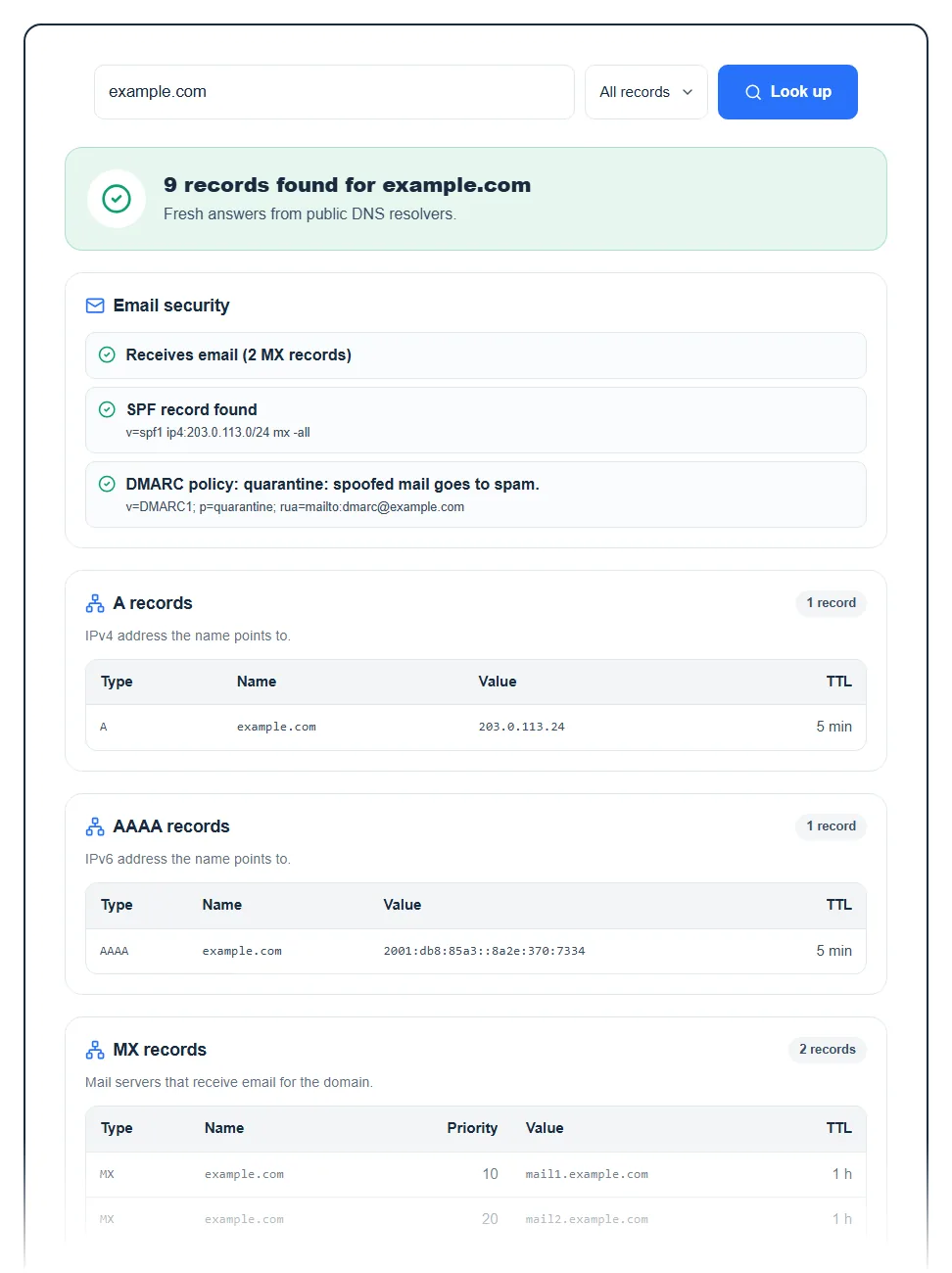
- Type: the record type. In the A table you may also see a CNAME row, which means the name is an alias and the IP belongs to the name it points to.
- Name: the hostname the record belongs to.
- Value: the answer itself, such as an IP address, a mail server or a TXT string. Long TXT records that come in several pieces are joined into one line.
- TTL: how long resolvers may cache the answer, shown as seconds, minutes, hours or days. Hover over it to see the exact number of seconds.
MX tables add a Priority column and are sorted lowest first. A lower number means that server gets tried first.
What each record type tells you
| Record | What it shows |
|---|---|
| A / AAAA | The IPv4 / IPv6 address the name points to, so usually your web server. |
| CNAME | An alias to another hostname (common for www and CDN setups). |
| MX | The servers that receive email for the domain. |
| NS | The nameservers in charge of the domain’s DNS. Edits only count if you make them there. |
| TXT | SPF, site verification codes for Google or Microsoft, and other text values. |
| SOA | The primary nameserver, the admin contact and the zone serial number. |
| CAA | Which certificate authorities are allowed to issue SSL certificates for the domain. |
| PTR | Reverse DNS: the hostname attached to an IP address. |
The email security check
When you look up all records, the tool also runs a quick email check. It tells you whether the domain receives email (it has MX records), whether an SPF record exists, and what the DMARC policy is, read from _dmarc.yourdomain.
A DMARC policy of reject or quarantine means spoofed mail gets blocked or sent to spam. A policy of none only monitors, so fake messages still get delivered. If SPF or DMARC is missing, anyone can send mail that claims to come from your domain, and your real emails are more likely to land in spam. DKIM isn’t checked here, because you need to know the selector name to look it up.
Common results and what to do
- “does not exist” (NXDOMAIN): the DNS says this name doesn’t exist. Check the spelling first. If it’s your domain, it may have expired, or the subdomain record was never created.
- “No records found”: the name exists but has none of the requested records. A domain with no A record won’t load a website, and one with no MX record can’t receive email.
- Old values still showing: you changed a record but the lookup shows the old one. Make sure you edited the zone at the nameservers listed in the NS table. If you did, the old answer is cached and will expire within its TTL.
- “The resolver did not answer this query”: a temporary hiccup at the resolver. Run the lookup again in a moment.
To keep the tool fast for everyone, each visitor can run up to 40 lookups every 10 minutes. If you hit the limit, the tool tells you how many minutes to wait.
When a DNS lookup helps
- Moving to a new host: confirm the A record points to the new server’s IP before you cancel the old plan. Our guide on pointing a domain to your server walks through the steps.
- Fixing email: check that MX points to your mail provider and that SPF and DMARC exist.
- SSL errors: a CAA record can block your certificate authority from issuing a certificate. After fixing it, test the site with our SSL checker.
- Checking someone else’s setup: the NS and MX records show who runs a domain’s DNS and email. To see who hosts the website itself, use the website hosting checker.
FAQ
What is a DNS lookup?
A DNS lookup asks the Domain Name System for the records stored under a name, like the IP address of a website or the mail servers of a domain. Your browser does one every time you visit a site. This tool shows you the raw answers.
How long does DNS propagation take?
It takes as long as the old record’s TTL, which is usually anywhere from a few minutes to a day. DNS changes aren’t pushed out; resolvers keep the old answer until its TTL runs out. Changing nameservers can take longer, because the registry’s NS records have long TTLs too. Lowering the TTL a day before a planned change makes the switch much faster.
Why does this tool show a different result than my computer?
Your computer or ISP is probably still serving a cached answer. This tool asks a public resolver directly, so it usually picks up changes sooner. Flushing your local DNS cache or waiting out the TTL fixes it.
Can I do a reverse DNS lookup here?
Yes. Enter an IPv4 or IPv6 address and the tool returns its PTR record, the hostname that the owner of the IP set for it. Many shared hosting and cloud IPs return a generic hostname, and some return nothing.
What does NXDOMAIN mean?
NXDOMAIN means the name doesn’t exist in DNS. It’s a clear “no” from the authoritative nameserver, not a connection problem. Typos, expired domains and subdomains that were never added are the usual causes.
How do I check if a domain is available instead?
An NXDOMAIN result is a hint that a domain may be free, but it isn’t proof, since a registered domain can have no DNS at all. Use our domain availability checker for a real answer.