Hostinger is a web hosting company that has been providing affordable and reliable hosting services to customers around the world since 2004.
In this review, we will take a closer look at Hostinger’s features, pricing, and performance to help you decide if it’s the right web host for your website.
Key Takeaways:
- Hostinger is one of the best shared web hosting services.
- Hostinger prices are pretty low: web hosting starts at $2.99/month on a 48-month term (renewing at $10.99/month).
- The Hostinger loading speed and performance are hard to find in any shared hosting.
- No web host can compete with Hostinger in terms of simplicity and clean design. It’s user-friendly and easy to use.
- Overall, Hostinger is a great choice for those who are looking for a budget-friendly user-friendly web host.
About Hostinger
Hostinger is a well-known, privately owned web hosting company (its founders and team hold most of it) that has been in the industry for over two decades.
It was first established in November of 2004 in Kaunas, Lithuania where a group of junior entrepreneurs began this small company and first named it Hosting Media. In 2007 it launched the free host 000webhost, and in 2011 the Hostinger brand was born.
Today Hostinger has more than 1,000 employees and says it serves over 4 million clients. The company puts a lot of weight on customer satisfaction and offers 24/7 support.
In addition, the company offers a wide range of hosting services including web (shared) hosting, cloud hosting, WordPress hosting, and VPS hosting, making it a solid choice for both personal and business websites.
Who Is Hostinger Best For?
Hostinger is best used by individuals who do not have that much technical knowledge about website building and would require support during their journey.
It is also best for small businesses that do not have a huge employee base and require a website that operates well but is still on the cheaper side.
Therefore, if you are just beginning your small business, blogging site, or a small online store, and looking for something within a lower price range, great performance and reliability, and your technical background is not that strong, then Hostinger is the best match for you!
Pros and Cons of Hostinger
It’s important to consider the Pros and Cons before making a decision. Let’s take a closer look at the advantages and disadvantages of Hostinger.
The Pros:
- 24/7 Customer Support: Hostinger offers 24/7/365 live chat (an AI assistant answers first, and a human specialist can step in) plus email support. In addition, Hostinger provides step-by-step easy-to-follow detailed tutorials and blogs explaining how certain things are done so you won’t face any difficulty.
- Low pricing plans: Because Hostinger focuses on shared hosting it provides its clientele with cheap or low-cost prices that are affordable even for users that just want to try it out.
- User friendly: Hostinger is extremely user-friendly and is easy to set up and manage for a user who has no technical knowledge or background in web hosting. Everything can be done with just a few clicks and no complications.
- Performance: Taking its pricing plans into account Hostinger’s performance is considered excellent, backed by a 99.9% uptime guarantee.
- Loading Speed: In addition to having good uptime Hostinger delivers a really good loading speed. So if you are considering Hostinger you can sleep knowing that your website’s speed will be optimum.
- Multiple data centers: With Hostinger running data centers in Europe, Asia, North America, and South America, you can easily install or change your server location to be near your customers.
- 30-day refund guarantee: Hostinger has a 30-day refund policy that gives you back your money within 30 days if you are dissatisfied with its hosting capabilities.
The Cons:
- No daily backups on the cheapest plan: There are very few issues you might face with Hostinger, and the first is that the entry Premium plan only includes weekly backups. Daily backups start with the Unlimited plan, or you can set up your own backup routine.
- Limitations, We have already figured out that Hostinger is affordable well the catch or the downside to it being affordable is that there are certain limitations with the basic and the entry plans. However, if your website grows you can change your plan to either cloud or VPS which will allow you to remove the limitations.
- No phone support: Even though Hostinger offers 24/7 support, it does not have a phone line, so you can’t call their help center directly.
Hostinger Plans and Pricing
Hostinger offers several plans that meet several needs which ensure that whatever website you wish to host hostinger will provide.
1. Shared web hosting:
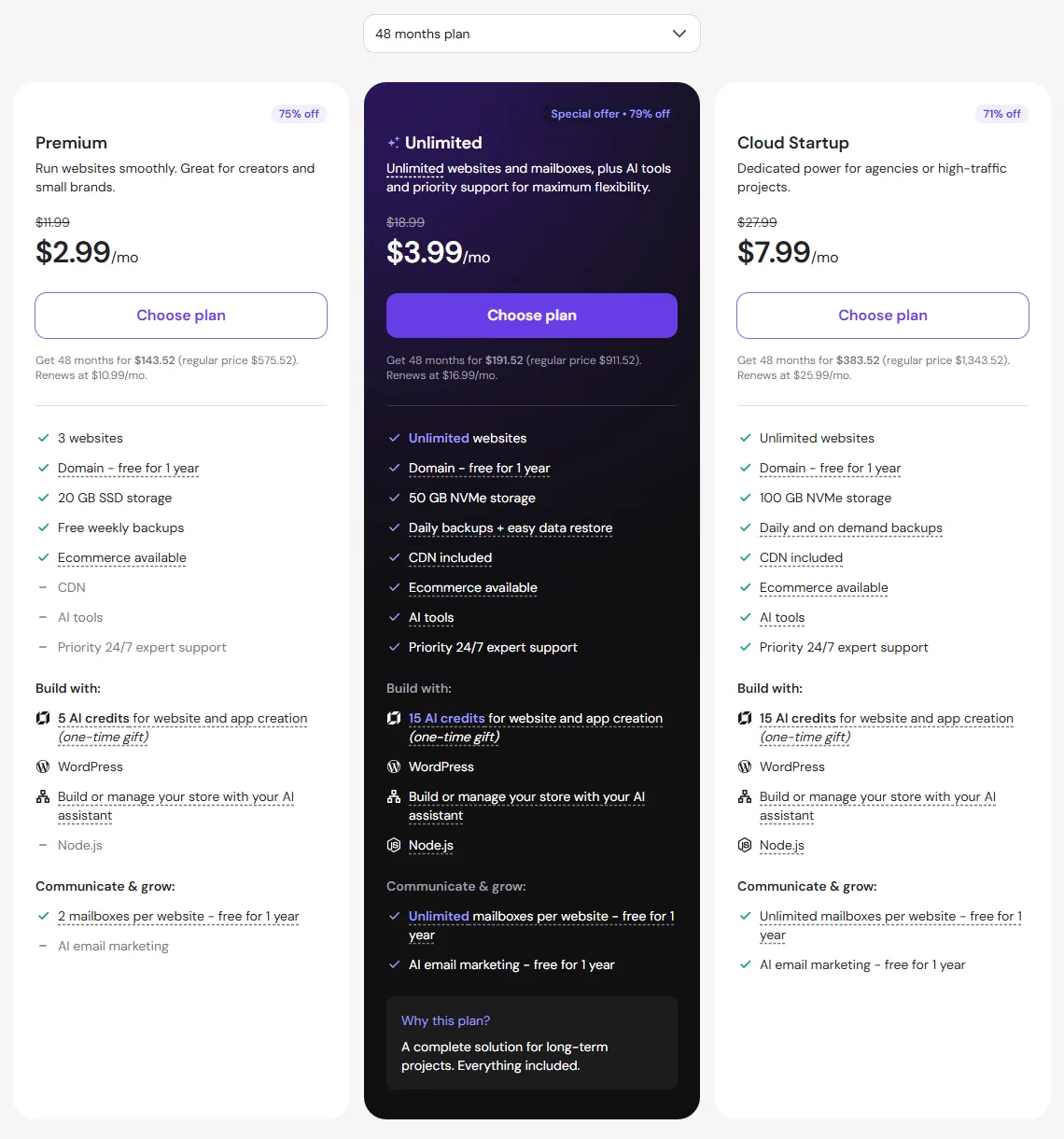
Hostinger’s web hosting lineup has changed since we first wrote this review. The old Single, Premium, and Business trio is now Premium, Unlimited, and Cloud Startup, and all three are paid upfront for the full term. The plan details below reflect Hostinger’s US pricing page (USD) in October 2026, and the screenshot below is from that same page.
Premium Web Hosting plan:
If you are just beginning your website journey, Premium is now Hostinger’s entry plan. It starts at $2.99 per month on a 48-month term ($143.52 upfront) and renews at $10.99 per month. You get 3 websites, 20 GB SSD storage, unmetered bandwidth, 2 mailboxes per site (free for the first year), and weekly backups. The CDN isn’t part of Premium, though; it starts on the Unlimited plan.
Good news for beginners: unlike the old Single plan, Premium includes a free domain for the first year.
A domain name may otherwise cost you anywhere between $6 and $15 a year, so that free first year is a nice saving. Just keep in mind it renews at the normal price after that.
Premium has some limits (3 sites, 20 GB, weekly backups) that won’t matter much when you’re just starting out, which makes it a good fit for a new site on a tight budget.
Unlimited Web Hosting plan:
The Unlimited plan is the step up from Premium. Once your site is growing or you want to run more than three websites, this is the plan to look at.
It starts at $3.99 per month on a 48-month term ($191.52 upfront) and renews at $16.99 per month. You get unlimited websites, 50 GB NVMe storage, unlimited mailboxes per site (free for the first year), daily backups with easy restore, and a free domain for the first year.
The two big upgrades over Premium are the faster NVMe storage and daily backups instead of weekly ones.
The Unlimited plan removes the site cap and more than doubles your storage, which fits growing sites much better.
Cloud Startup Plan:
Once your business starts booming and your site gets serious traffic, the Cloud Startup plan is the top of the web hosting lineup and a good fit for small and medium businesses.
Cloud Startup starts at $7.99 per month on a 48-month term ($383.52 upfront) and renews at $25.99 per month. It offers unlimited websites, 100 GB NVMe storage, 4 CPU cores, 4 GB RAM, unlimited mailboxes per site (free for the first year), daily and on-demand backups, and a free domain for the first year.
With Cloud Startup you get more CPU power and memory (4 cores and 4 GB RAM) on top of the bigger storage, which helps busy sites stay quick.
Hostinger Shared Hosting Comparison:
| Comparison | Premium | Unlimited | Cloud Startup |
|---|---|---|---|
| Starting price (48 months) | $2.99/mo | $3.99/mo | $7.99/mo |
| Renews at | $10.99/mo | $16.99/mo | $25.99/mo |
| Free Domain (1st year) | Yes | Yes | Yes |
| No. of Websites | 3 websites | Unlimited | Unlimited |
| Storage Space | 20 GB SSD | 50 GB NVMe | 100 GB NVMe |
| Backups | Weekly | Daily | Daily + on-demand |
| Free SSL | Yes | Yes | Yes |
| Money-back guarantee | 30 days | 30 days | 30 days |
2. Cloud Hosting:
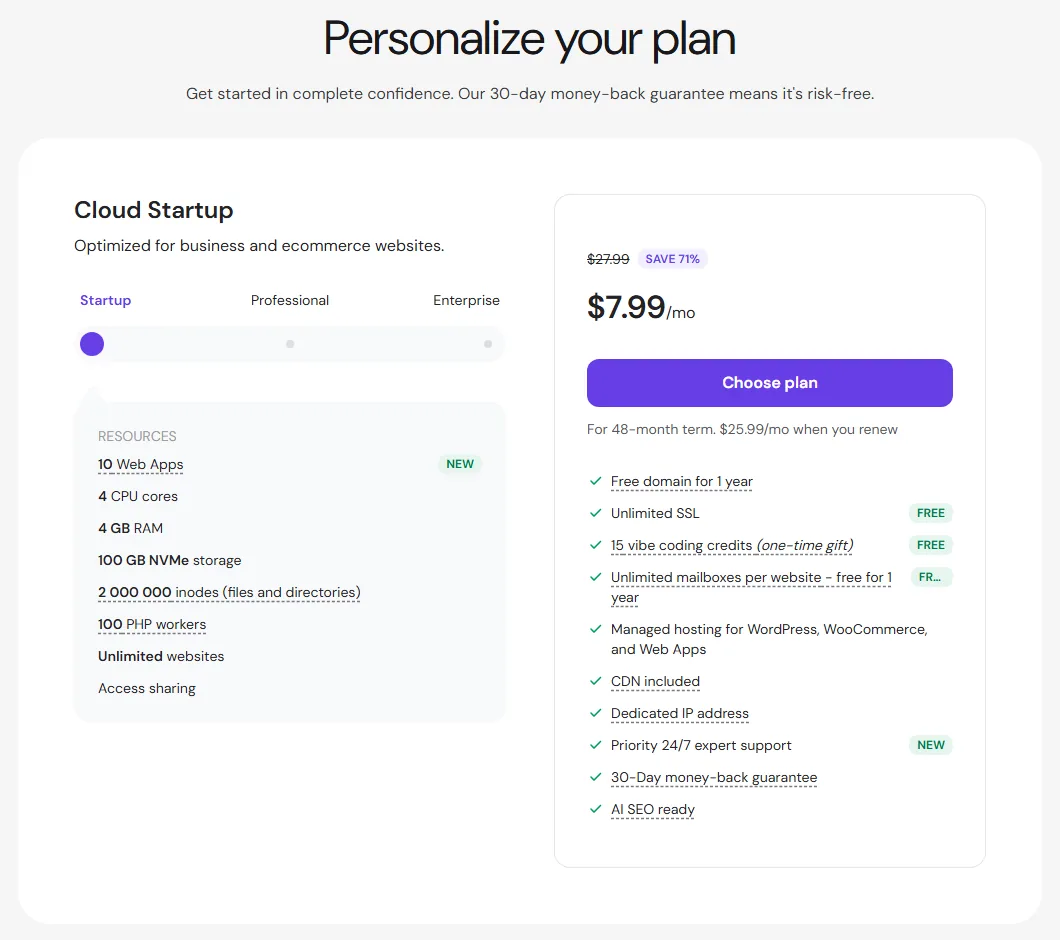
Cloud hosting is another type of hosting that works best for medium to large projects. Hostinger offers three Cloud hosting plans: Cloud Startup starts at $7.99/month, Cloud Professional at $15.99/month, and Cloud Enterprise at $29.99/month (all on a 48-month term). Cloud Startup, for example, gives you 4 CPU cores, 4 GB RAM, and 100 GB NVMe storage, and renews at $25.99/month.
3. WordPress Hosting:
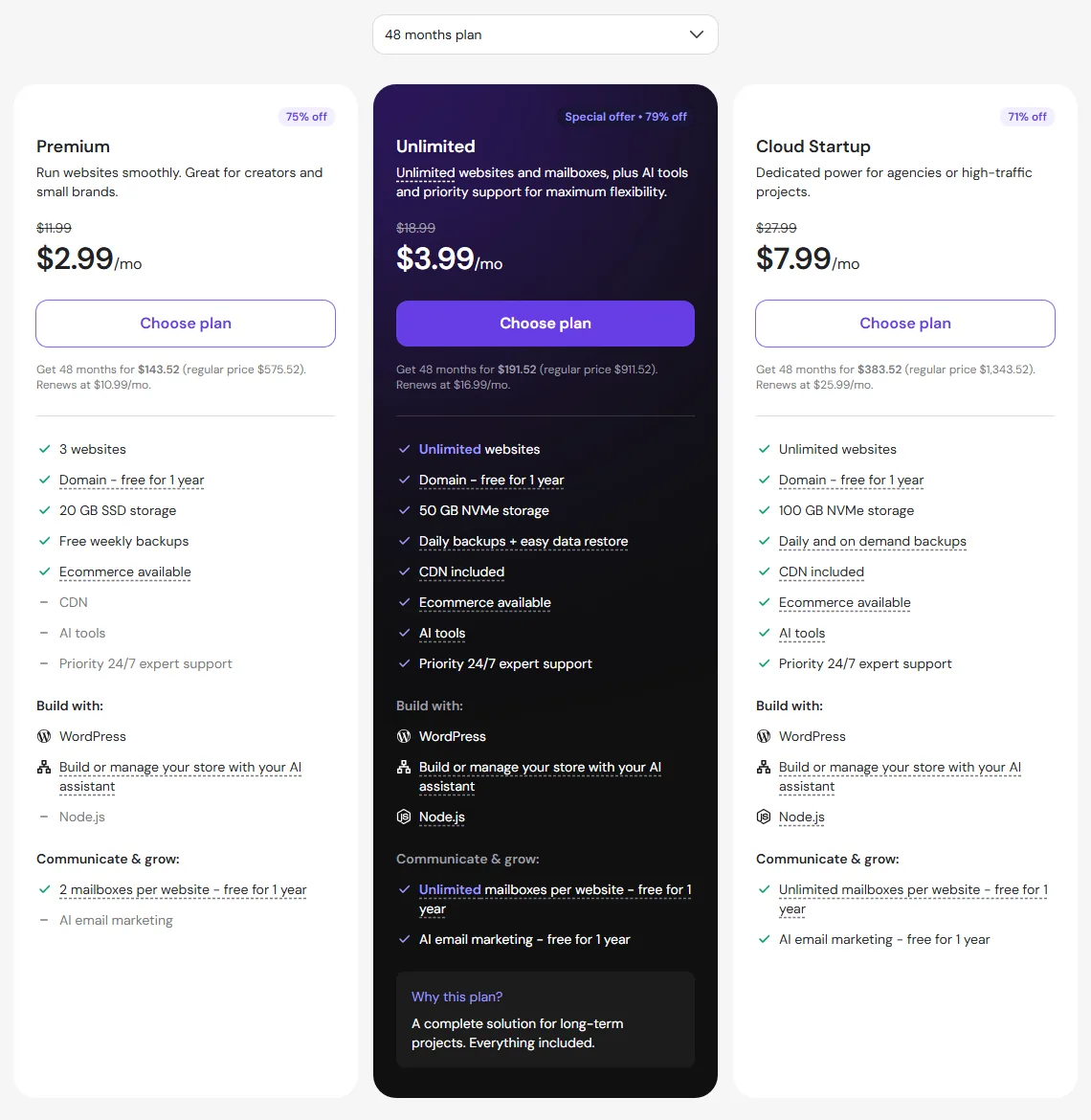
WordPress hosting is optimized for websites that use WordPress. The old four-plan WordPress lineup (Single, Starter, Business, and Pro) is gone: Hostinger’s WordPress hosting now uses the same Premium, Unlimited, and Cloud Startup plans and prices as its web hosting, with managed WordPress features such as a one-click staging tool on top.
4. VPS Hosting:
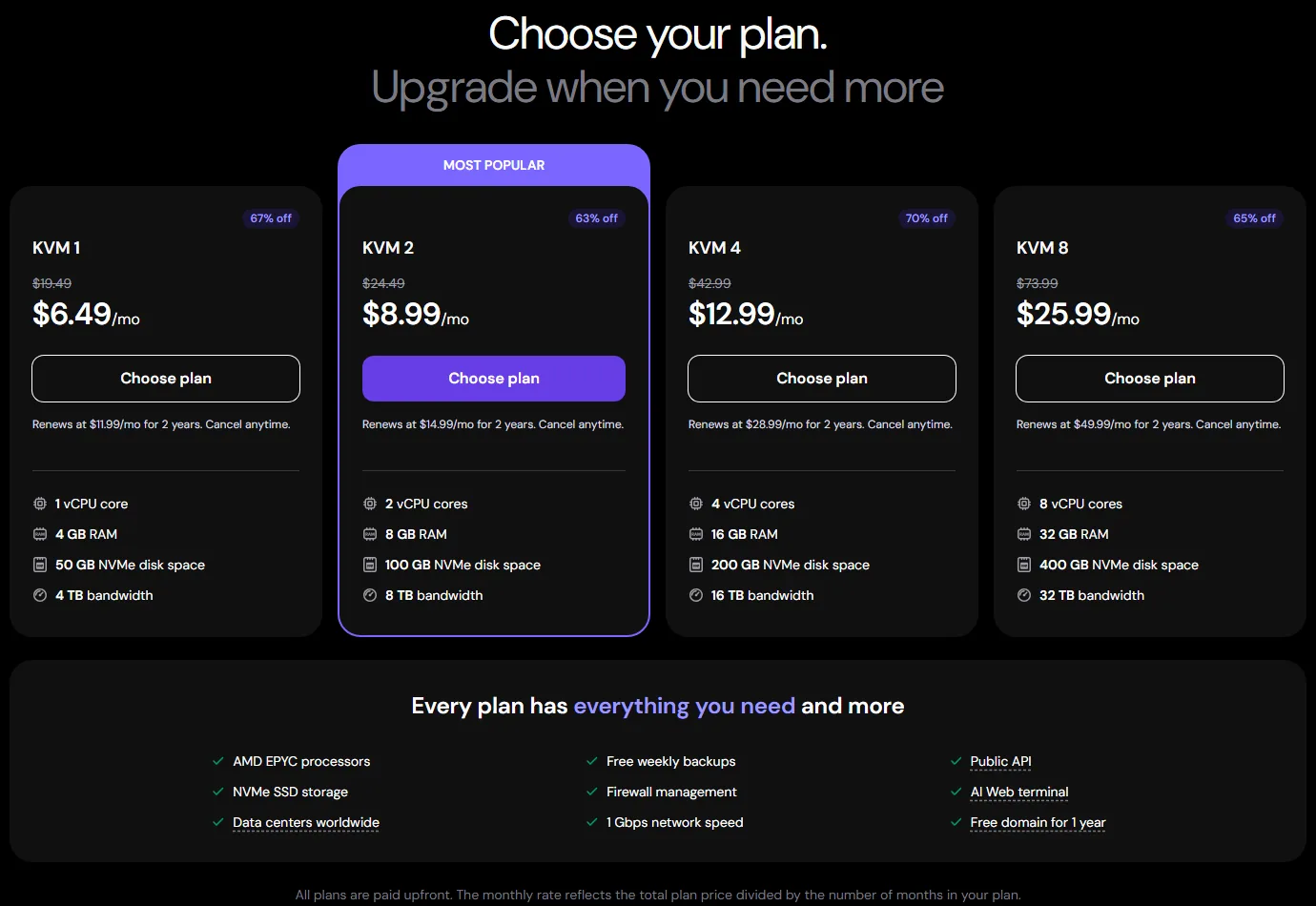
Virtual Private Server hosting is another option offered by Hostinger. There are now 4 KVM plans, from KVM 1 (1 vCPU, 4 GB RAM, 50 GB NVMe) at $6.49/month up to KVM 8 (8 vCPU, 32 GB RAM, 400 GB NVMe) at $25.99/month, with renewals from $11.99/month. VPS hosting is best for websites that have more traffic and need their own virtual server.
Hostinger Performance
Hostinger is best known for its amazing performance compared to its low-price plans. Now, what exactly is a measure of this performance?
Uptime:
One of the most important aspects of a website is its uptime. Making sure that your website rarely crashes is very important. Well, Hostinger guarantees an uptime of 99.9% ensuring that your website is almost always accessible.
Loading time:
The speed of your website pages matters for both your customers and Google. Poor loading time can lead people to leave your website forever.
That being said, Hostinger is one of the fastest shared web hosting services on the entire internet.
Data centers:
Hostinger has data centers on four continents: Europe (France, Germany, Lithuania, the Netherlands, and the UK), Asia (India, Indonesia, and Malaysia), North America (Phoenix, Boston, and Asheville in the USA), and South America (Brazil). Available locations can vary by plan.
Depending on your plan and where most of your traffic comes from, you can pick the data center location when you set up your plan. Web and cloud plans can also be moved to another server later from the Plan Details page in hPanel (the transfer can take up to 4 hours and changes your IP address). VPS locations are fixed once set up.
Hostinger Features
Hostinger offers many features that will make your experience easier and more comfortable as well as ensure your website’s security and smooth transition.
Hpanel:
Hostinger created its own custom-built panel and named it hPanel (the company dates it back to the 2011 brand launch). Hostinger’s site and support are available in more than 30 languages, and hPanel has a built-in WordPress migration feature for fast, smooth moves.
Hpanel is extremely user-friendly and allows you to use the main functions within it such as email, and database management, and more so it’s suitable for beginners who have no experience with panels and the background coding that takes place.
DDoS protection:
A DDoS or distributed denial of service is a vicious attack that interrupts the usual traffic of a specific server or network.
Hostinger has multiple veils of protection against DDoS assaults, the traffic is monitored and obstructed using Wanguard which creates firewall rules, and there are also other web software firewalls.
Bonuses:
Hostinger offers free features with each plan you purchase, and with free features for the more expensive plans such as a free SSL certificate, a free website builder, unlimited bandwidth, and free domain name registration.
Some of the more expensive plans even offer a WordPress staging tool!
Free SSL certificate:
It is known that an SSL certificate makes your website trustworthy, boosts your website’s security, and slightly increases your Google rankings.
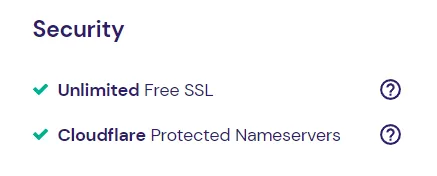
Hostinger offers a free SSL certificate with every plan you choose. This certificate applies 256-bit encryption which is the standard for defense against illegitimate users.
Free website migration:
If already have a WordPress website hosted elsewhere and you decided to migrate to Hostinger, Hostinger has a free website migration feature. All you need to do is submit a migration request and they will begin the process immediately.
Their migration process is quick: Hostinger says an automatic WordPress migration usually takes under two hours, while cPanel sites built on other CMSs can take 20+ hours. Migration is free for all sites on your plan (one request per site), and your website remains active during the move.
Security
Security is a very important part of any web hosting plan. You do not want your users to feel insecure when entering your website and you do not want to risk the chance of hacking, fortunately, security is a great strength that a Hostinger has.
The servers within the data centers are under constant surveillance and equipped with crucial security aspects
All plans within Hostinger are offered with a free SSL certificate that is just a few clicks away and extremely easy to set up. Let’s not forget that SSL certificates slightly affect SEO.
On top of these protection features, Hostinger also has DDoS protection and two-factor authentication to add an extra layer of safety so that even if your password has been infiltrated whoever is trying to hack your site would still require to do another step of verification that will mostly be dependent on only you.
Customer Support
Hostinger offers 24/7/365 customer support through live chat and email. These days the chat starts with Hostinger’s AI assistant (formerly called Kodee, now Hostinger Agent), and a human Customer Success Specialist can join when you need more help. You can even continue the conversation on WhatsApp.
Also, their customer support is available in many languages, so there is usually no language barrier.
However, if you prefer phone support, this might be a problem, as Hostinger doesn’t have a customer service phone number.
How to Start With Hostinger?
Starting with Hostinger is extremely easy and if you keep reading this section we will give you the tiny details.
1. Choose a plan
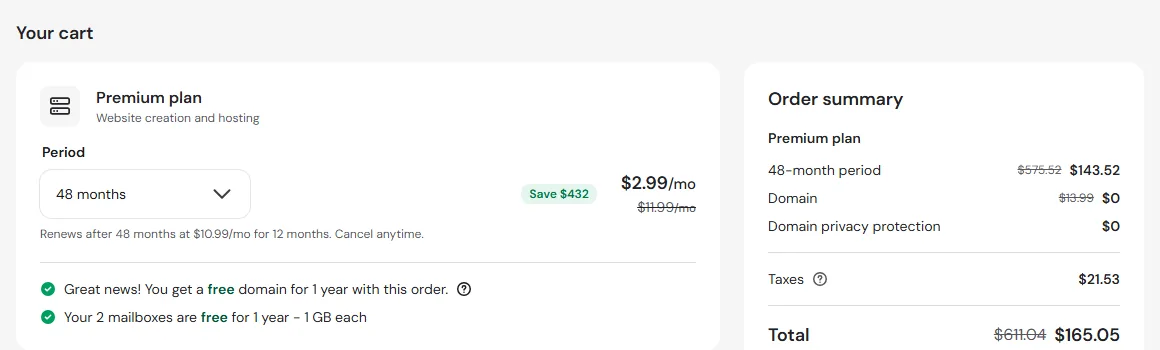
Go to Hostinger.com and choose the plan that most works for you. Click on Add to Cart to choose your plan period from one month to 48 months or 4 years.
2. Choose the plan period:
In this step, you would need to specify the period you want your plan to last before it expires. From one month up to 48 months.
When choosing the period, bear attention to the price differences between the plans. The longer the period you choose, the cheaper price will be.
3. Create your account:
The third step you are required to do is create an account on Hostinger. Scroll down and choose either to enter your email address and verify it later or log in with either Google or Facebook.

4. Select payment method:
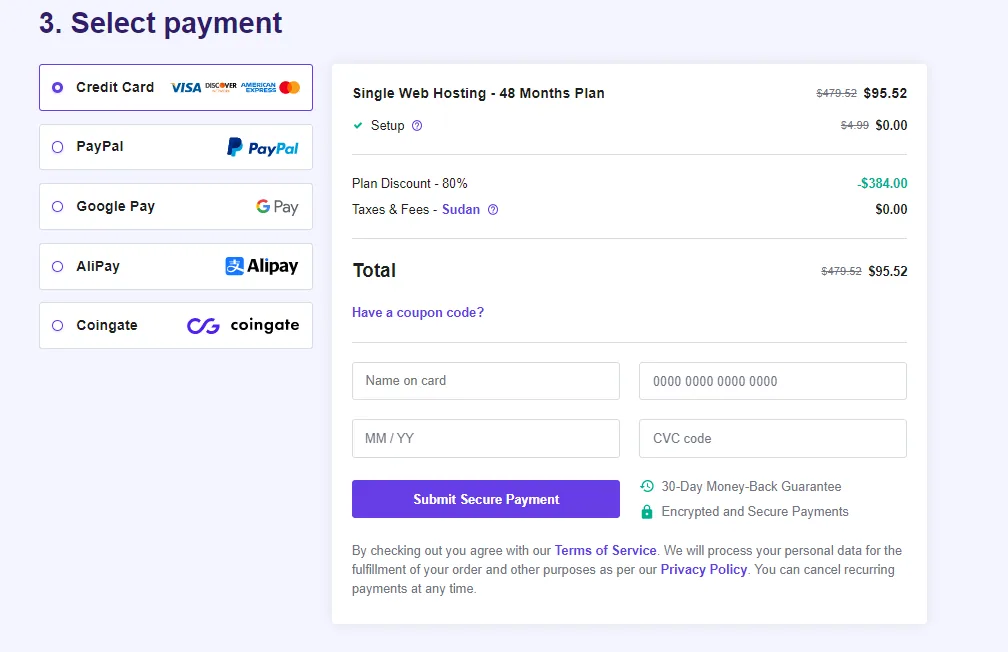
In this section, you need to pick a payment method and then enter the details of the payment. After submitting the payment click on Submit Secure Payment and that’s it.
On the global (USD) store, Hostinger accepts credit, debit, and prepaid cards (Visa, Mastercard, Amex, Discover, and more), PayPal, Google Pay, and cryptocurrency. The options vary a little by country.
Conclusion
Hostinger is a reliable and affordable web hosting provider that offers a wide range of hosting services to meet the needs of different types of websites. The company’s user-friendly interface and budget-friendly prices make it a great choice for beginners and experienced users alike.
The company’s performance and uptime are also quite good which makes it a good choice for hosting a website and the customer support is also helpful and responsive.
Overall, Hostinger is a great option for those who are looking for an affordable, reliable, and user-friendly web host. It is a good balance of cost and quality. Just plan for the renewal price, which is several times the intro rate.
Read also:
DreamHost Review.
Bluehost Review.
Cloudways Review.
Hosting.com (formerly A2 Hosting) Review.