
This free bandwidth calculator estimates how much monthly data transfer and peak speed you need for a website, file downloads or video streaming. No sign-up, and the results update as you type.
How to use the bandwidth calculator
Pick the tab that matches what you serve: Website, Downloads or Video streaming. Each tab has its own fields, and there’s no button to press. Everything runs in your browser, so nothing you type is sent anywhere.
Website tab
- Average page size (KB, MB or GB): the full weight of a typical page, images and scripts included. Not sure? Measure a few of your pages with our free Page Size Checker.
- Monthly page views: take this from your analytics. If you only know visitors, multiply them by pages per visit.
- Served by a CDN (optional): the share of traffic, in percent, that a CDN delivers instead of your server. That part is taken off your total.
- Peak-hour multiplier: how much busier your busiest hour is than an average hour. 3 is a sensible starting point for most sites.
- Safety margin: extra headroom in percent for growth and spikes. The default is 20%.
Downloads tab
Enter the Average file size, your Downloads per month, how many Downloads at the same time (peak) you expect, and the Target speed per download in Mbps. Add a safety margin and you’re done. This is the tab to use for software, PDFs, podcasts or anything people save to their device.
Video streaming tab
Choose a Video quality from 480p SD (1.5 Mbps) up to 2160p 4K (20 Mbps). Then fill in Average viewers at once, Streaming hours per day and Peak viewers at once. The calculator multiplies the bitrate by your viewers and hours to get the data you’d push out every day.
How to read your results
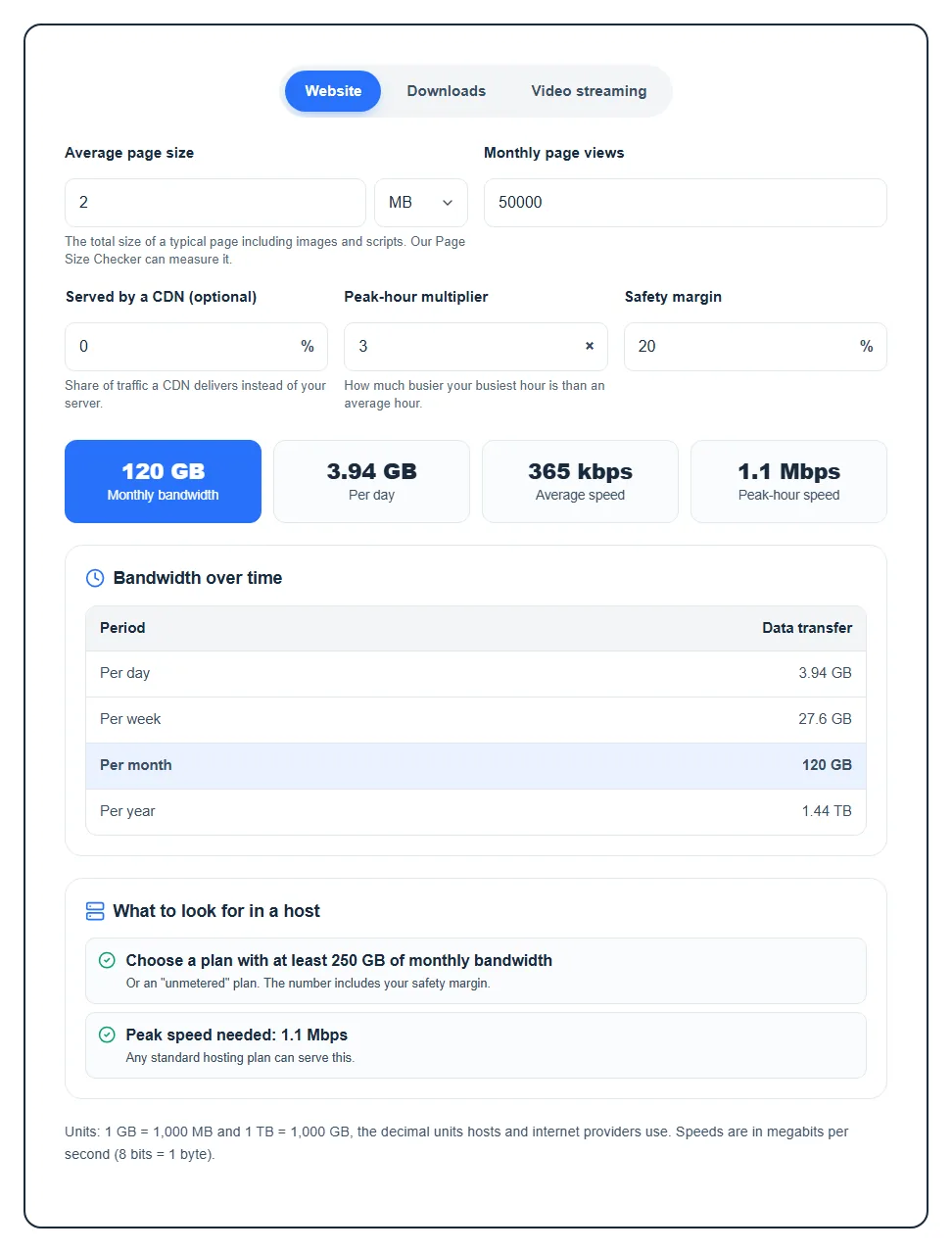
- Monthly bandwidth: the total data transfer for an average month, safety margin included. This is the number to compare with a hosting plan’s bandwidth allowance.
- Per day: the same total spread over one day. Handy for checking against your host’s daily stats.
- Average speed and Peak-hour speed (Website tab): the steady throughput your server needs, and what it needs during your busiest hour.
- Peak speed needed and Time per download (Downloads tab): the total speed when all your peak downloads run at once, and how long one file takes at your target speed.
- Per viewer per hour (Video tab): how much data one person uses watching for an hour at the quality you picked.
- Bandwidth over time: a small table with your data transfer per day, week, month and year.
The What to look for in a host box turns all that into plain advice. It rounds your monthly total up to a common plan size (say 250 GB or 1 TB) and tells you whether any standard plan can handle your peak speed. If your peak goes over 100 Mbps, it suggests a server with a 1 Gbps port or a CDN in front. Over 1 Gbps, it warns you that a single typical server port won’t cope, so you’ll want a CDN or more than one server.
A quick example
Say your pages weigh 2 MB and you get 50,000 page views a month. With a 20% safety margin, the Website tab shows about 120 GB of monthly bandwidth, roughly 3.94 GB a day, and a peak-hour speed of around 1.1 Mbps with a 3× multiplier. The advice box points you to a plan with at least 250 GB a month, and any standard hosting plan can serve that speed.
What to do with the number
- Choosing a plan: pick one with at least the suggested allowance. “Unmetered” plans skip the cap, but read the fair-use terms first. Our guide to the benefits of unlimited bandwidth explains the catch.
- The number looks too high: shrink your pages before you upgrade. Compressing images usually saves the most, and putting a CDN in front takes a big share off your server. Try a few values in the CDN field to see the difference.
- You serve more than one kind of traffic: run each tab separately and add the monthly totals together.
- Video at any real scale: streaming from your own hosting plan gets expensive fast. A video CDN or platform is usually the cheaper path, and the calculator reminds you of that.
Want the full method behind these numbers? Read how much hosting bandwidth your website needs.
FAQ
How do you calculate website bandwidth?
Multiply your average page size by your monthly page views, then add a safety margin. If a CDN serves part of your traffic, take that share off first. That’s exactly what the Website tab does for you.
How much bandwidth does a small website need?
Usually far less than people expect. A blog with light pages and a few thousand visits a month often uses only a few GB. Heavy images, big downloads and video are what push the number up, so enter your real page size rather than guessing.
Is bandwidth the same as data transfer?
Not quite, though hosts use the words interchangeably. Data transfer is the amount of data sent in a month (GB or TB), while bandwidth strictly means speed (Mbps). This calculator shows both: the monthly total and the speed you need. Our guide on what bandwidth is in web hosting goes deeper.
What happens if my site goes over its bandwidth limit?
It depends on your host. Some suspend the site until the next month, some slow it down, and some charge for the extra data. Check your plan’s terms and leave a safety margin so a busy month doesn’t catch you out.
How accurate is a bandwidth calculator?
It’s a solid estimate, not a measurement. Browser caching, bots and repeat visitors all change real usage. Use the result to pick a plan, then compare it with the bandwidth stats in your hosting panel after a month or two.