When you visit a website and a “Not secure” label shows up next to the address, most people leave right away. Chrome has put that label on every plain HTTP page since 2018, and other browsers do something similar.
That label appears because the website doesn’t use an SSL/TLS certificate. So:
How can a website be protected?
SSL/TLS is a protocol that encrypts data in transit between the server and the user. This means that the data sent from the server to a user remains private and unreadable.
When a website has SSL/TLS protection, the information you send travels encrypted. That means any sensitive data entered on the site cannot be read or stolen in transit by someone with malicious intent (it doesn’t protect against a site that’s malicious itself, though).
That being said, what exactly are SSL and TLS?
What is an SSL/TLS?
An SSL/TLS is a protocol that allows for encrypted communication through the internet. It’s used to secure data transmissions between devices.
The SSL/TLS protocol is responsible for encrypting data sent over the internet and establishing an authenticated, confidential and private connection.
This means that any information sent during this process is indecipherable to unauthorized people and also secured from eavesdropping.
What is SSL?
SSL or Secure Sockets Layer is the original protocol for creating a secure path between two devices over the internet or an internal network. The certificate is a separate thing: it’s the file a website uses to prove its identity when that secure path is set up.
SSL was once the most widely used encryption protocol on the web. It turns the information shared over the connection into scrambled data that only the two ends can read.
So even if a third party intercepts the traffic, they can’t make sense of it. Today, though, SSL itself is retired: every version has known weaknesses, and browsers no longer support it.
What is TLS?
SSL was created by Netscape in 1995 (SSL 2.0, followed by SSL 3.0 in 1996) to secure connections and protect privacy. TLS, short for Transport Layer Security, was published by the Internet Engineering Task Force “IETF” in 1999 as the successor to SSL 3.0, which it evolved from. SSL 2.0 was formally banned in 2011 and SSL 3.0 in 2015.
The protocol got a new name to show it was now an open IETF standard rather than a Netscape product. TLS has had four versions since: TLS 1.0 (1999), 1.1 (2006), 1.2 (2008) and 1.3 (2018). TLS 1.0 and 1.1 were deprecated in 2021, so today’s websites use TLS 1.2 and TLS 1.3. People still say “SSL” out of habit, and that’s why you’ll see both names used for the same thing.
Key Takeaway:
SSL/TLS is simply used to create an encrypted link between the user’s web browser and the web server.
TLS is the modern, more secure successor to SSL. The name was changed when the Internet Engineering Task Force took over the protocol from Netscape, and only TLS is used today.
How Does SSL/TLS work and What is its Importance?
To keep your data private, SSL/TLS encrypts the information that travels between your web browser and the website’s server, meaning that whoever tries to intercept your data will be unable to read it.
SSL instigates a verification process also known as a handshake between the two devices that are connecting to guarantee that both parties are really who they profess to be.
Moreover, SSL/TLS protects data integrity: every piece of data carries a cryptographic check, so the receiver can tell if anything was tampered with before reaching its intended addressee.
There have been several versions of SSL, each one providing more security than the last, until SSL 3.0 was replaced by TLS in 1999.
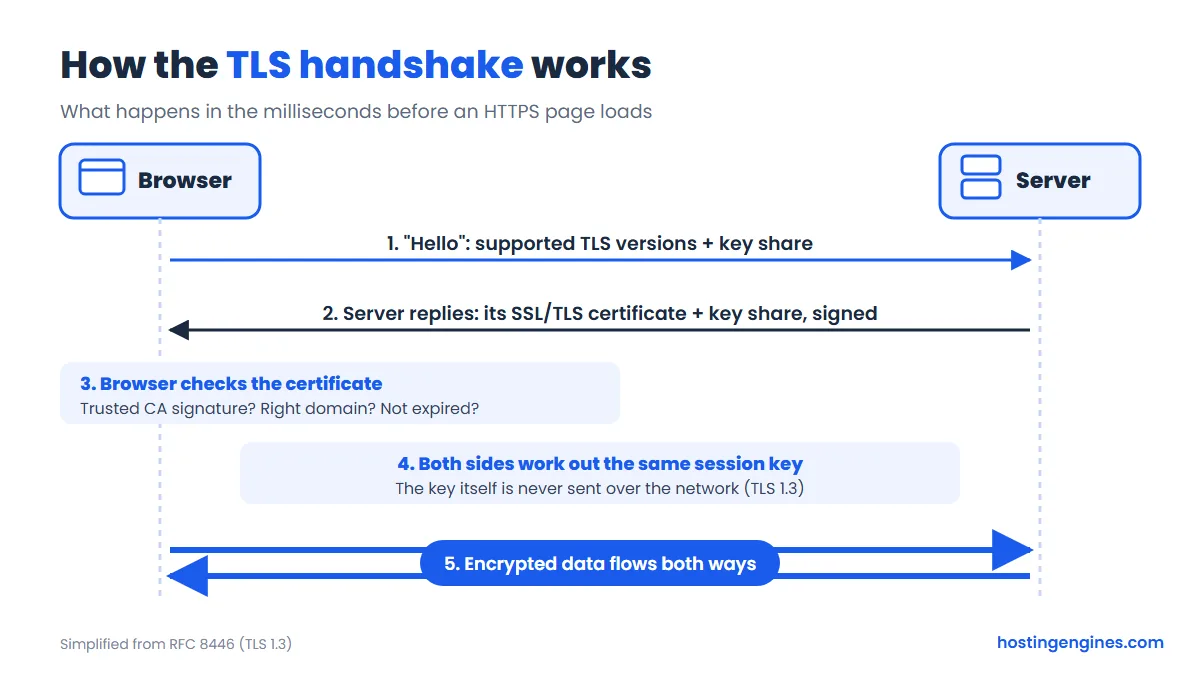
Here’s the handshake in a nutshell, before we get into the details below.
Initially, data on the web was broadcast in clear text meaning that anyone could intercept the data and read it, so if you wanted to buy something online and you were to enter your credit card data, this data would travel through the web without being encrypted.
SSL was created to solve this issue by encrypting all your data so even if it were to be intercepted it would be unreadable and would only be detectable by the website you entered the data into.
Furthermore, SSL/TLS can stop certain kinds of cyber attacks, such as man-in-the-middle attacks, by verifying the web server’s identity, so an attacker can’t quietly pretend to be the site you meant to visit.
Key takeaway:
When your browser connects to a website that has an SSL/TLS certificate, it asks the server to identify itself.
The server sends a copy of its certificate, and the browser checks whether it trusts it (valid signature from a known certificate authority, right domain name, not expired). Then both sides agree on a session key, and from that point all data between the two endpoints is encrypted.
This is how the SSL/TLS works and it is important to guarantee safety to the users of a website.
For an organization or institute to secure its website to protect itself and its consumer’s private information it requires an SSL/TLS certificate.
HTTP and SSL certificate
We have already figured out what is SSL/TLS but how is it equipped or added to a website? Now, let’s see what are SSL certificate and HTTP means and what are the relation between them.
What is an SSL certificate?
SSL/TLS can only be procured by websites that have an SSL/TLS certificate. An SSL/TLS certificate is like an identification permit or a pass that guarantees that someone is genuine.
The most important part of an SSL certificate is the key pair. The public key is inside the certificate and makes verification possible: the visitor’s device uses it to check the server and then agree on a session encryption key with the website.
On the other hand, the website keeps a private key that is never shared. The server uses it to prove it owns the certificate, by signing part of the handshake (or, in older setups, by decrypting what was encrypted with the public key).
The public key and private keys utilized for SSL/TLS certificates are fundamentally lengthy strings of characters meant for encrypting and decrypting data.
Anything encrypted with the public key can only be decrypted with the matching private key, and a signature made with the private key can be checked by anyone holding the public key. Certificate authorities, also known as CAs, are in charge of issuing SSL/TLS certificates.
HTTP and HTTPS:
You have probably seen the word HTTP and HTTPS on your URL when you search for something but what exactly is HTTP and what is HTTPS?
Hypertext transfer protocol known as HTTP is an application protocol that is used to transfer data, information, images, and videos it is the main course of communication between web browsers and servers.
HTTP is unprotected and is vulnerable to attacks because all of the information transferred from the web browser to the server or between any other points is transmitted in normal readable text.
This provides attackers with the means to check delicate data, such as credit card numbers or personal information.
To prevent this issue HTTPS was created where the “S” here stands for secure: HTTP runs inside an SSL/TLS connection, so all the data sent is encrypted.
Key takeaway:
An SSL/TLS certificate is like an identification permit that is issued by certificate Authorities CA to businesses that request security on their websites, it is what converts HTTP to HTTPS where S means secure.
Divisions of SSL/TLS certificates:
Once an organization decides that it wants an SSL/TLS certificate it must decide on exactly what type it requires as there are SSL/TLS certificates that can:
- Apply to only one website such as the single domain SSL/TLS certificate (where a domain represents the name of the website, for example, www.hostingengines.com)
- Apply to only one domain however it will also include its first-level sub-domains such as www.hostingengines.com and services.hostingengines.com and is known as a wildcard SSL/TLS certificate.
- Apply to more than one domain or several domains and is a multi-domain SSL/TLS certificate it can handle multiple domains that have no relation to each other.
In addition to SSL/TLS having different types of certificates it also has different authentication levels with each one requiring a different identity verification thoroughness level the levels are:
- Domain Authentication: Domain authentication (domain validation, DV) is the basic level and the cheapest of all of them, often free. You just prove that you control the website or domain, usually in minutes.
- Organization Authentication: Organization Authentication (OV) is the second level and a bit more expensive. The certificate authority checks that the organization legally exists and controls the domain. The encryption is the same as DV; what you get is verified company details inside the certificate.
- Extended Authentication: Extended authentication (EV) is the most expensive one, requiring complete identity verification of the business before the SSL/TLS certificate can be issued. Browsers stopped showing the green company-name bar for EV in 2019, so visitors rarely notice the difference.
Key takeaway:
There are three types of SSL/TLS certificates single domain for one domain, wildcard for one domain and its subdomains, and multi-domain for multiple different domains.
Additionally, there are three levels of validation: domain validation, the cheapest (often free) and fine for most small and personal websites; organization validation, which also checks the company; and extended validation, which has the strictest identity checks. All three encrypt your traffic equally well.
Now we have figured out what an SSL/TLS certificate is but what exactly does it contain?
An SSL/TLS certificate contains:
- The website or domain name that the certificate was assigned for and the name of the business or entity it was assigned to.
- Which certificate authority or CA authorized it and that CA’s digital signature?
- All the involved domains and sub-domains.
- The presented date of the certificate and the expiration date of the certificate
- Finally the public key, the private key is never shared and is kept unknown.
How can businesses obtain SSL/TLS certificates for their websites?
SSL/TLS certificates can only be issued from a Certificate Authority, so the only way for your website’s certificate to be legit is by obtaining it from a CA.
A CA is an external institution and a trustworthy third entity that creates and distributes SSL/TLS certificates, the certificate that is issued by the CA will also be signed digitally with their private key allowing consumers to identify it.
CAs may charge fees for certificates or provide them for free, such as the free Let’s Encrypt SSL certificate that most web hosts install automatically.
Keep in mind that certificates don’t last long anymore. Since 2026, a public certificate can be valid for at most 200 days, and that limit drops to 100 days in 2027 and 47 days in 2029. Let’s Encrypt certificates last 90 days. In practice, that means automatic renewal is a must, and it’s worth checking your expiry date now and then with a tool like our free SSL checker.
Once a certificate has been created it must be installed and instigated on the website, once the SSL/TLS certificate is installed the website will run or load over HTTPS instead of HTTP thereby ensuring that all the data is encoded and safe.
Key takeaway:
Certificates can be obtained from certificate authorities which are trustworthy third parties having their private key that is kept secret.
SSL/TLS Certificate: The Conclusion
Transport Layer Security TLS, still widely called Secure sockets Layer SSL, is how a business keeps its visitors’ data private, by encrypting everything that passes between the website and the visitor into unreadable text.
This guarantees its safety and the consumer’s data safety which is done by obtaining an SSL/TLS certificate from a certificate authority CA.
TLS matters because it protects your visitors and makes them comfortable using your website. It’s also a small plus for search, as we explain in does an SSL certificate boost your ranking.
Read also: What is CDN? and What is Bandwidth?
TLS/SSL FAQs
Should I use TLS or SSL?
You don’t really have a choice anymore, and that’s a good thing: all SSL versions are deprecated and modern browsers won’t connect with them. Every “SSL certificate” you buy or get for free today is used with TLS. On your server, enable TLS 1.2 and TLS 1.3 and turn off anything older. Most hosts already do this for you.
What is the purpose of TLS?
It is an important security protocol that ensures the privacy and integrity of data in transit and lets you confirm who you’re talking to. TLS is used by web browsers, email clients, messaging apps and many other applications to communicate securely over the Internet.