In SEO and website management, sitemaps play a crucial role, yet many website owners overlook their importance. If you’ve ever wondered, “What is a sitemap, and why does my website need one?”, you’re in the right place. To check how a page will look in search results, run it through our meta tags analyzer.
This guide will explain:
✅ What a sitemap is (and the different types)
✅ Why sitemaps are essential for your website
✅ How to create, submit, and optimize a sitemap for search engines
✅ Common sitemap mistakes to avoid
By the end, you’ll understand how sitemaps help search engines crawl and index your site more efficiently, leading to better rankings and organic traffic.
Key Takeaways:
🔹 XML sitemaps help search engines; HTML sitemaps help users.
🔹 Submit your sitemap to Google Search Console & Bing Webmaster Tools.
🔹 Regularly update and optimize your sitemap for maximum SEO benefits.
Read: What Is Web Hosting?
What Is a Sitemap?
A sitemap is a file that lists all the important pages, videos, and files on your website, helping search engines like Google, Bing, and Yahoo discover, crawl, and index your content.
Think of it as a roadmap for search engine bots. Without one, they might miss critical pages or struggle to understand your site’s structure.
Read: What Is CDN?
Types of Sitemaps
There are two main types of sitemaps:
- XML Sitemaps: designed for search engines and written in XML format.
- Lists URLs and when each page was last updated (optional tags like priority also exist, but Google ignores them).
- Helps search engines index pages faster.
- HTML Sitemaps: designed for human visitors.
- Acts as a clickable directory of your website’s pages.
- Improves user experience (UX) and navigation.
Some websites also use image sitemaps, video sitemaps, or news sitemaps to help search engines better understand multimedia content.
Why Are Sitemaps Important?
1. Better Crawling & Indexing by Search Engines:
Search engines like Google use crawler bots to scan and index websites. A sitemap ensures:
- New or updated pages are discovered quickly.
- Deep or orphaned pages (those with few internal links) aren’t missed.
- Large websites (10,000+ pages) are indexed efficiently.
2. Improved SEO Rankings:
A well-structured sitemap helps search engines:
- Understand your site hierarchy.
- Spot which pages are new or recently updated (through the
<lastmod>date). - Reduce crawl budget waste (so bots focus on key pages).
3. Enhanced User Experience (UX):
An HTML sitemap helps visitors:
- Find content easily.
- Navigate complex websites.
- Improve time-on-site and reduce bounce rates.
4. Faster Indexing of New Content:
When you publish a new blog post or product page, an updated sitemap with an accurate <lastmod> date tells Google there’s something new to crawl. Keep in mind that a sitemap is a hint, not a guarantee: Google decides when (and whether) to crawl each URL. Google also retired its old sitemap “ping” URL in 2023, so the way to tell it about your sitemap now is Google Search Console or your robots.txt file. Bing and a few other engines also support IndexNow, which lets your site notify them the moment a URL changes.
How to Create a Sitemap?
Option 1: Automatically Generate a Sitemap
Most CMS platforms (WordPress, Shopify, Wix) create sitemaps automatically:
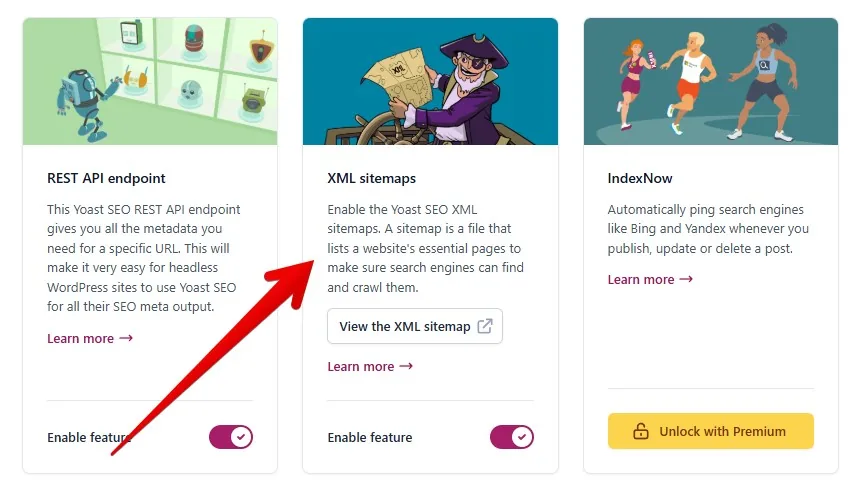
- WordPress: Since version 5.5, WordPress creates a basic sitemap on its own at
/wp-sitemap.xml. SEO plugins like Yoast SEO or Rank Math replace it with their own, more flexible XML sitemaps. - Shopify: Automatically creates
/sitemap.xml. - Wix/Squarespace: Built-in sitemap functionality.
Option 2: Manually Create a Sitemap:
For custom websites, you can:
- Use sitemap generators like Screaming Frog and XML-Sitemaps.com.
- Code an XML sitemap manually (for developers).
Example of an XML Sitemap Structure:
<?xml version="1.0" encoding="UTF-8"?>
<urlset xmlns="http://www.sitemaps.org/schemas/sitemap/0.9">
   <url>
      <loc>https://example.com/</loc>
      <lastmod>2024-05-01</lastmod>
      <changefreq>weekly</changefreq>
      <priority>1.0</priority>
   </url>
   <url>
      <loc>https://example.com/blog/</loc>
      <lastmod>2024-04-28</lastmod>
      <changefreq>daily</changefreq>
      <priority>0.8</priority>
   </url>
</urlset>
(Key tags: <loc> = URL, <lastmod> = last significant update. <changefreq> and <priority> are part of the sitemap protocol, but Google says it ignores both, so don’t spend time tuning them.)
How to Submit a Sitemap to Google and Other Search Engines?
Once your sitemap is ready, submit it to:
1. Google Search Console:
Go to Google Search Console > Sitemaps.
Enter your sitemap URL (e.g., https://yourwebsite.com/sitemap.xml).
Click Submit.
2. Bing Webmaster Tools:
Log in to Bing Webmaster Tools.
Navigate to Sitemaps > Submit.
3. Robots.txt File:
Add this line to your robots.txt file to guide crawlers:
Sitemap: https://yourwebsite.com/sitemap.xmlRead: What is the Pay as You Go “PAYG” Pricing Model in Web Hosting?
Best Practices for Optimizing Your Sitemap
To maximize SEO benefits, follow these tips:
✔ Keep It Updated: refresh your sitemap when adding new content, and only change <lastmod> when a page really changes.
✔ Exclude Unimportant Pages: no-index pages (like admin pages) shouldn’t be in the sitemap.
✔ Split Large Sitemaps: one sitemap can hold up to 50,000 URLs or 50MB (uncompressed), so bigger sites should use a sitemap index file.
✔ Use Proper Formatting: validate your XML sitemap with tools like XML-Sitemaps Validator.
✔ Focus on Key Pages: list your canonical, high-value pages (homepage, product pages, main posts). Google ignores <priority>, so strong internal links matter more.
Read: What is Uptime?
Common Sitemap Mistakes to Avoid
❌ Including Broken or Redirected URLs: only list live, crawlable pages.
❌ Not Updating After Major Changes: if you redesign your site, update the sitemap.
❌ Blocking Sitemap in Robots.txt: make sure search engines can access it.
❌ Ignoring Image/Video Sitemaps: they help multimedia content rank in Google Images/Video search.
Conclusion: Sitemaps are a Must For Your Website Success
A sitemap is more than just a technical SEO requirement, it’s a powerful tool that helps search engines find, crawl, and rank your content efficiently.
By implementing a well-structured sitemap, you’ll improve indexation, rankings, and user experience, leading to more organic traffic and better website performance.
Next Steps:
- Check if your website has a sitemap (
yoursite.com/sitemap.xml). - Submit it to Google & Bing if you haven’t already.
- Optimize it by removing low-value, redirected or no-index pages.