A website is often the cornerstone of a business, brand, or personal project. It serves as the face of your online presence, a hub for communication, and a platform for transactions. But what happens when something goes wrong?
A hacked website, a server crash, or even a simple human error can lead to catastrophic data loss. This is where automatic backups come into play. They are an essential part of maintaining a secure, functional, and reliable website.
In this blog post, we’ll dive deep into why automatic backups are critical, how they work, and why every website owner should prioritize them.
Read: Essential Security Features to Consider When Choosing a Web Host
What Are Automatic Backups?
Automatic backups are a system or process that regularly and automatically saves copies of your website’s files, databases, and configurations without requiring manual intervention.
Unlike manual backups, where you have to remember to create and store copies of your data, automatic backups are scheduled to run at specific intervals (e.g., daily, weekly, or in real-time) to ensure your data is always protected.
Think of automatic backups as a safety net for your website. If something goes wrong, you can quickly restore your website to its previous state using the most recent backup.
This process is seamless, efficient, and often requires just a few clicks, making it an indispensable tool for website owners, developers, and businesses alike.
Automatic backups include all the critical components of your website, such as:
- Files: HTML, CSS, JavaScript, images, and other media.
- Databases: User data, product information, blog posts, and other dynamic content.
- Configurations: Settings for your content management system (CMS), plugins, themes, and server configurations.
By automating this process, you eliminate the risk of forgetting to back up your data, ensuring that your website is always protected against potential disasters.
Why Automatic Backups Are Essential for Websites?
1. The Fragility of Digital Data
Let’s start with a hard truth: digital data is fragile. Websites are built on a complex interplay of files, databases, and configurations. A single misstep (a faulty plugin update, a coding error, or a malicious attack) can bring your entire site crashing down.
Without a backup, recovering from such an event can be time-consuming, expensive, and sometimes impossible.
Consider this scenario: You’ve spent months building a beautiful e-commerce website. It’s generating revenue, attracting customers, and growing steadily. One day, you decide to update a plugin to improve functionality. But something goes wrong. The update conflicts with your theme, and suddenly your site is inaccessible. Panic sets in.
Without a recent backup, you’re faced with the daunting task of manually restoring your site. Or worse, starting from scratch.
Automatic backups act as a safety net, ensuring that no matter what happens, you can restore your website to its previous state with minimal downtime and stress.
2. The Threat of Cyberattacks
Cyberattacks are on the rise, and websites are prime targets. Hackers can exploit vulnerabilities in your site’s code, steal sensitive data, or even hold your website hostage through ransomware attacks.
Back in 2020, Cybersecurity Ventures predicted that cybercrime damages would reach $10.5 trillion a year by 2025. Whatever the exact figure, the trend is clear: for website owners, the risk of losing critical data keeps growing.
Automatic backups provide a powerful defense against cyberattacks. If your site is compromised, you can quickly restore it to a pre-attack state, minimizing the damage and getting back online faster.
Without backups, recovering from an attack could mean losing weeks or months of work, or even your entire website.
3. Human Error: We All Make Mistakes
No matter how experienced you are, mistakes happen. Whether it’s accidentally deleting a critical file, making a faulty code change, or overwriting important data, human error is one of the most common causes of website issues. Even the most skilled developers and website administrators are not immune.
Automatic backups act as a fail-safe against human error. They ensure that even if you make a mistake, you can easily revert to a previous version of your site. This peace of mind is invaluable, especially when you’re managing a complex website with multiple contributors.
4. Server Failures and Hosting Issues
Your website’s hosting provider plays a crucial role in its performance and reliability. However, even the best hosting providers are not immune to server failures, hardware malfunctions, or data center outages. When these issues occur, your website’s data could be at risk.
Automatic backups stored offsite (i.e., not on the same server as your website) provide an additional layer of protection. If your hosting provider experiences a catastrophic failure, you can restore your website from a backup and avoid prolonged downtime.
5. Compliance and Legal Requirements
For many businesses, maintaining backups is not just a best practice. It can also be a legal requirement. Industries such as healthcare, finance, and e-commerce are often subject to strict data protection regulations.
For example, Article 32 of the European Union’s General Data Protection Regulation (GDPR) asks businesses to be able to “restore the availability and access to personal data in a timely manner” after an incident. It doesn’t name backups outright, but in practice a tested backup is the simplest way to meet that rule.
Automatic backups help ensure compliance with these regulations by providing a reliable way to recover data in the event of a breach or loss. They also demonstrate to customers and regulators that you take data security seriously.
The Cost of Downtime
Downtime is expensive. For an e-commerce website, even a few minutes of downtime can result in lost sales, damaged reputation, and frustrated customers. A widely quoted 2014 Gartner estimate put the average cost of IT downtime at $5,600 per minute. That number is old and is an average across big companies, but it shows how fast lost minutes add up.
Automatic backups significantly reduce downtime by enabling quick and efficient recovery. Instead of spending hours or days trying to fix a problem, you can restore your site from a backup and get back to business as usual.
How Automatic Backups Work
Now that we’ve covered the importance of automatic backups, let’s take a closer look at how they work. Automatic backups are typically performed by a backup plugin, service, or hosting provider. Here’s a breakdown of the process:
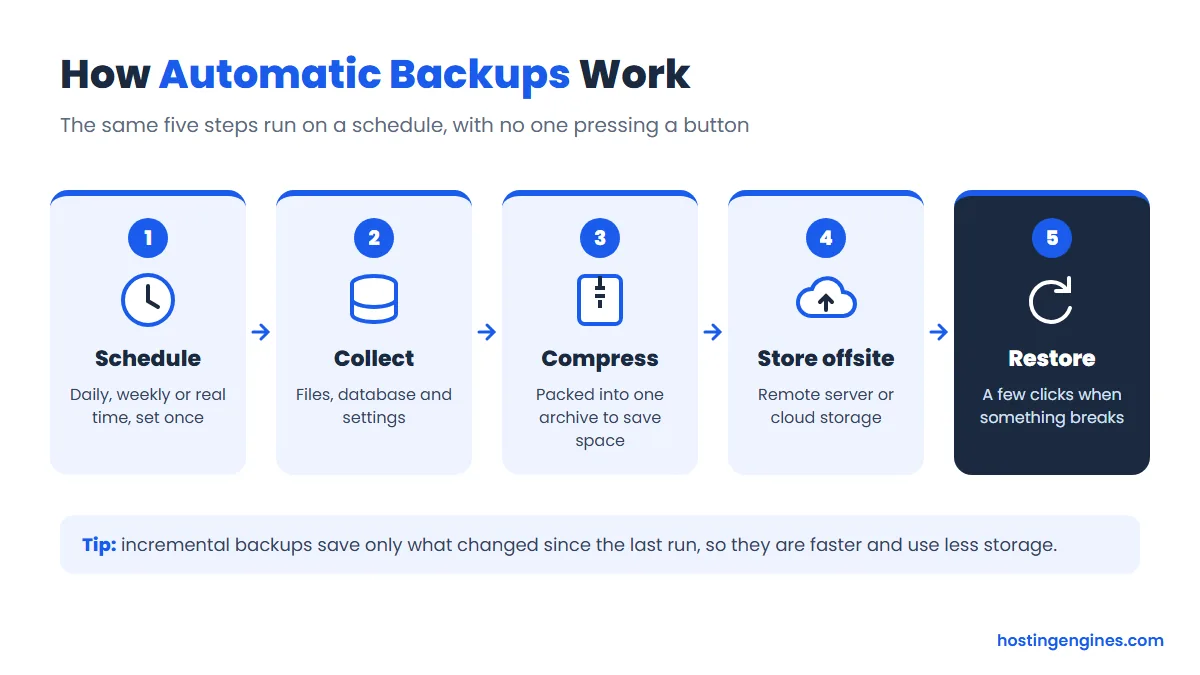
- Scheduling: You set a backup schedule (e.g., daily, weekly, or real-time) based on your website’s needs.
- Data Collection: The backup tool collects all your website’s files, databases, and configurations.
- Compression: The data is compressed into a single backup file to save storage space.
- Storage: The backup file is stored in a secure location, either on a remote server, cloud storage, or an external drive.
- Restoration: If needed, you can restore your website from the backup file with just a few clicks.
Many backup solutions also offer incremental backups, which only save changes made since the last backup. This reduces storage requirements and speeds up the backup process.
Choosing the Right Backup Solution
Not all backup solutions are created equal. When choosing a backup tool or service, consider the following factors:
- Frequency: How often are backups performed? Daily or weekly backups are a good starting point, but high-traffic or frequently updated sites may require more frequent backups.
- Storage Location: Where are backups stored? Offsite storage is ideal for added security.
- Ease of Use: How easy is it to set up and manage backups? Look for a user-friendly interface and clear instructions.
- Restoration Process: How quickly and easily can you restore your site? A good backup solution should make restoration simple and fast.
- Scalability: Can the solution grow with your website? Ensure it can handle increased traffic and data as your site expands.
- Cost: What is the pricing structure? Some backup solutions are free, while others charge a monthly or annual fee. Consider your budget and the value of your data when making a decision.
Many web hosts include automated backups in their plans, for example Hostinger and Cloudways. Check how often they run and how long they are kept, because that differs from plan to plan.
On WordPress, popular backup plugins include UpdraftPlus and Jetpack VaultPress Backup, and you can use them alongside your host’s own backups for extra safety.
Read: 10 Essential Features of a Good Web Host
Best Practices for Automatic Backups
To get the most out of your automatic backups, follow these best practices:
- Test Your Backups Regularly: Don’t wait for a crisis to discover that your backups are corrupted or incomplete. Regularly test your backups by restoring them to a test environment.
- Store Backups Offsite: Keep backups in a secure, remote location to protect against server failures and physical disasters.
- Use Multiple Backup Methods: Combine automatic backups with manual backups for added redundancy.
- Monitor Backup Logs: Check backup logs to ensure the process is running smoothly and address any errors promptly.
- Set Retention Policies: Decide how long to keep backups and delete old ones to free up storage space.
Conclusion: Don’t Wait Until It’s Too Late
Automatic backups are your first line of defense against data loss, cyberattacks, and unforeseen disasters. They are a technical necessity and a strategic investment in the longevity and success of your website.
Beyond the practical advantages, automatic backups offer psychological benefits. Knowing that your website is backed up gives you peace of mind and allows you to focus on growing your business or pursuing your passion. It eliminates the fear of losing everything and empowers you to take risks, experiment, and innovate.
If you haven’t already, take the time to set up automatic backups for your website today. The small effort and cost involved are insignificant compared to the potential consequences of losing your digital assets.
Read: Benefits of Using CDN with Your Website Hosting Service