If you’re stuck between Hostinger and SiteGround, you’re probably looking at two cheap starter plans and wondering which one will still feel like a good deal two years from now. That’s the right question to ask. Both companies lead with a low monthly price, both are popular with first-time WordPress users, and both quietly charge a lot more once the first term ends.
We went through both official pricing pages, plan cards, FAQs and refund terms in 2026 and built this Hostinger vs SiteGround comparison from what they actually say today. You’ll find the prices, the limits that matter, and a clear pick for each kind of buyer. If you’d rather go deep on one host first, our full Hostinger review and SiteGround review cover each one on its own.
The quick answer
Pick Hostinger if price is the deciding factor. Its entry plan hosts 3 websites, the intro price is locked in for a full 48-month term, and the renewal rate is still lower than SiteGround’s. For a blog, a portfolio or a small business site, it’s very hard to beat on cost.
Hostinger coupon: Enter HOSTINGENGINES10 at checkout for an extra 10% off any 12, 24 or 48-month plan. It’s our readers’ code: open Hostinger through our link above first, then add the code in the cart.
Pick SiteGround if your site earns money and you want daily backups on every plan, staging from the middle plan up, and a support team you can phone. You pay for that, and you pay for it mostly from year two onward.
If you’re still unsure, here’s the short version: a beginner with one site goes Hostinger, a growing business that changes its site often goes SiteGround GrowBig.
Prices: what you pay to start and at renewal
This is where the two hosts differ the most, so it’s worth slowing down. All prices below are in US dollars and exclude VAT. We use the US store for Hostinger.
| Plan | Intro price | Renews at | Intro term |
|---|---|---|---|
| Hostinger Premium | $2.99/mo ($2.49/mo during the Black Friday sale) | $10.99/mo | 48 months, paid upfront |
| Hostinger Unlimited | $3.49/mo during the Black Friday sale | $16.99/mo | 48 months, paid upfront |
| SiteGround StartUp | $2.99/mo | $17.99/mo | 12 months, prepaid |
| SiteGround GrowBig | $4.99/mo | $29.99/mo | 12 months, prepaid |
| SiteGround GoGeek | $7.99/mo | $44.99/mo | 12 months, prepaid |
At first glance Hostinger Premium and SiteGround StartUp look like the same price. They aren’t, and the reason is the term. Hostinger’s intro rate covers the whole 48-month term you pay for upfront. SiteGround’s intro rate covers the first 12 months, and then StartUp bills at $17.99 a month.
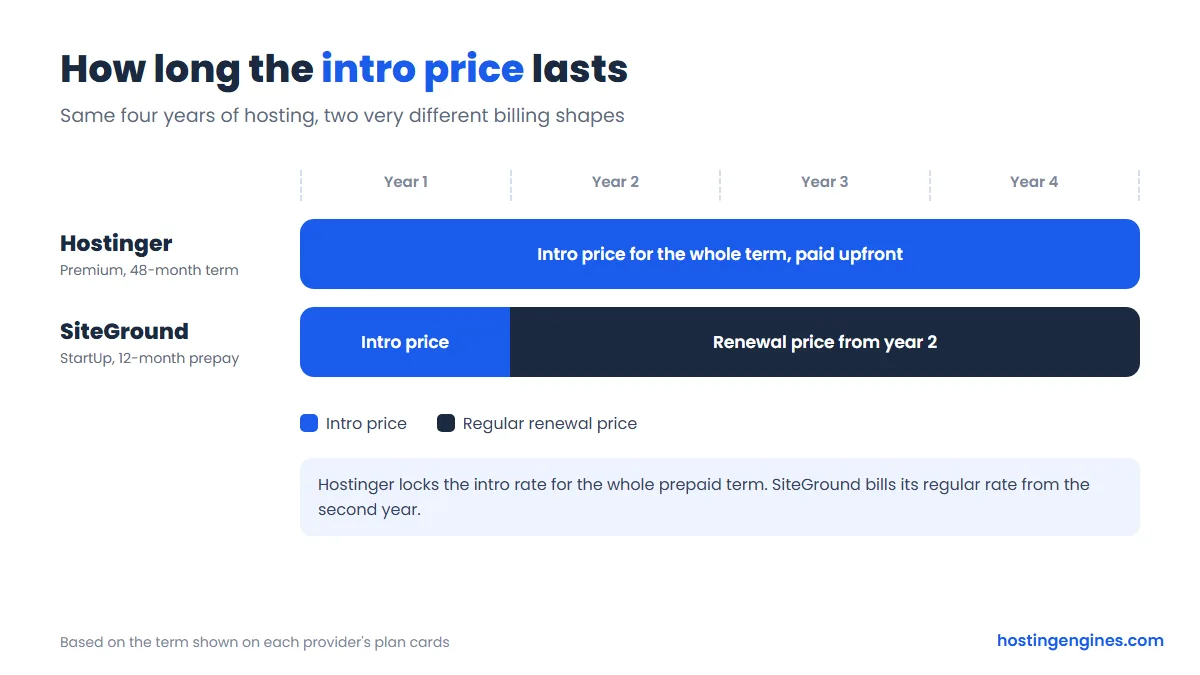
Run the numbers over four years and the gap is hard to ignore. Hostinger Premium at $2.99 a month for 48 months comes to about $144 in total. SiteGround StartUp on 12-month prepays comes to roughly $684 over the same four years: about $36 for year one, then three years at the renewal rate. Step up to GrowBig and four years cost around $1,140. SiteGround may quote different prices on other term lengths at checkout, so check the cart, but on the 12-month prices shown on its plan cards the difference is several hundred dollars.
The flip side is commitment. Hostinger’s best price asks you to prepay four years. That’s fine if you know the site will be around, and less fine if it’s a side project you might drop in six months. The 30-day money-back window helps at the start, but not in month ten.
Hostinger’s plans right now
Hostinger is running a Black Friday sale as we write this. The cards below show the sale prices, which are temporary: Premium at $2.49 a month instead of the $2.99 we quote, and Unlimited at $3.49. The renewal rates ($10.99 and $16.99) don’t change with the sale. If the sale has ended by the time you read this, expect the higher intro price.
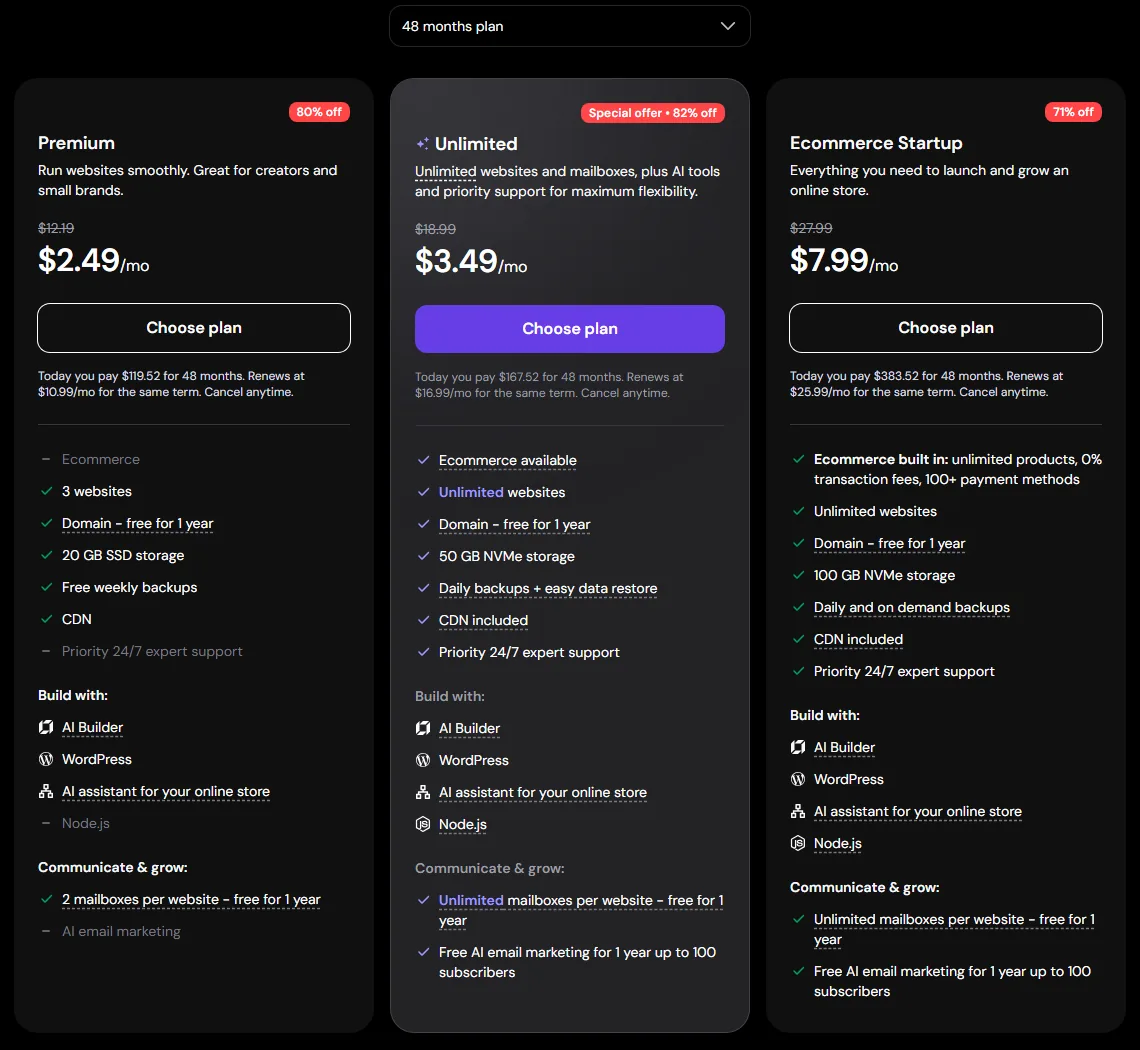
Premium gives you 3 websites, 20 GB of SSD storage, free weekly backups, a CDN, a free domain for the first year and 2 mailboxes per website (free for the first year). Unlimited lifts the site limit, moves you to 50 GB of NVMe storage, switches backups to daily with easy restore, and adds priority 24/7 support. The Ecommerce Startup tier on the right is aimed at online stores.
SiteGround’s plans right now
SiteGround’s shared plans are StartUp, GrowBig and GoGeek. The big number on each card is the first-year price, and the renewal sits in small print under the button. That small print is the number to budget for.
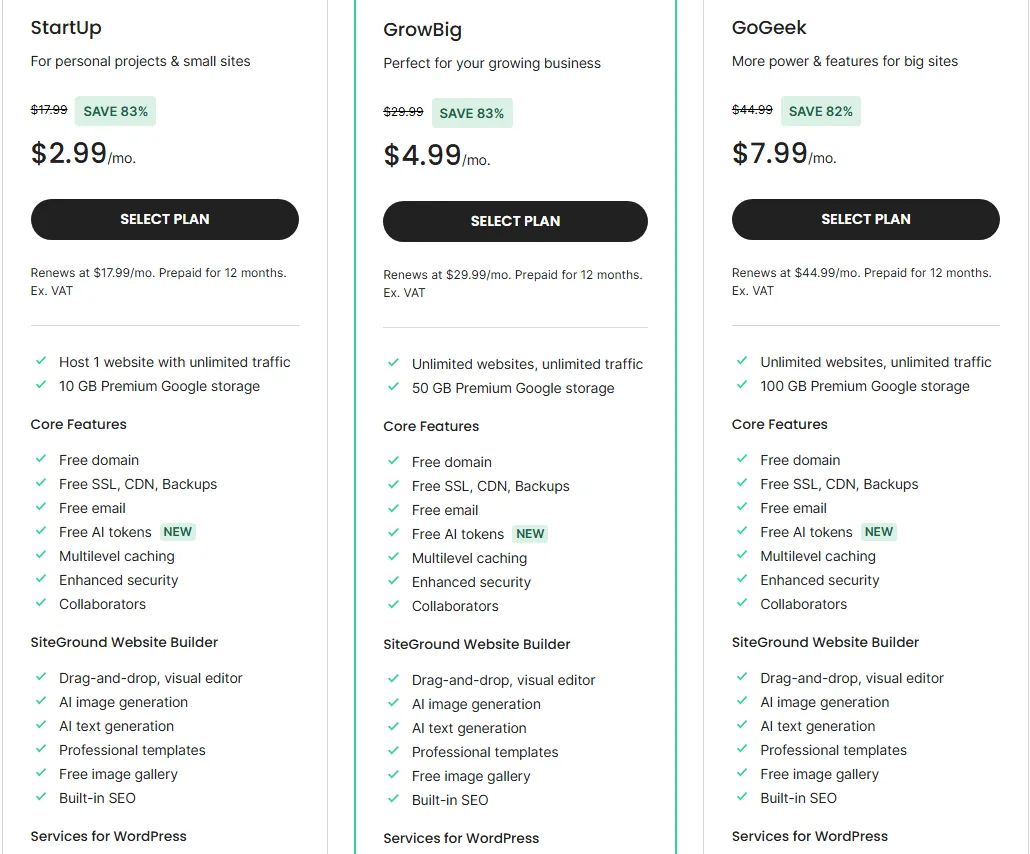
What you actually get on each plan
Hostinger is more generous with sites and storage per dollar. SiteGround is more generous with the tools that keep a busy site safe while you change it. That’s the trade in one sentence.
| Host | Plan | What it includes or adds |
|---|---|---|
| Hostinger | Premium | 3 websites, 20 GB SSD, weekly backups, CDN, free domain for the first year |
| Hostinger | Unlimited (step up) | Unlimited websites, 50 GB NVMe, daily backups, priority support, Node.js |
| Hostinger | Ecommerce Startup (step up) | 100 GB NVMe, on-demand backups, store tools built in |
| SiteGround | StartUp | 1 website, 10 GB, daily backups, CDN, free email, free domain |
| SiteGround | GrowBig (step up) | Unlimited websites, 50 GB, staging, on-demand backups, faster PHP |
| SiteGround | GoGeek (step up) | 100 GB, staging with Git, private DNS, white-label, priority support |
Shared hosting plans, from entry level to the top of each range. Based on each provider’s plan cards.
The entry plans show it best. Hostinger Premium hosts 3 sites with 20 GB. SiteGround StartUp hosts one site with 10 GB, but it includes daily backups (Premium’s are weekly) and unlimited email accounts on your domain. SiteGround also gives a rough traffic guide: about 10,000 monthly visits for StartUp, 100,000 for GrowBig and 400,000 or more for GoGeek. Hostinger advertises unlimited bandwidth instead, subject to its fair usage policy.
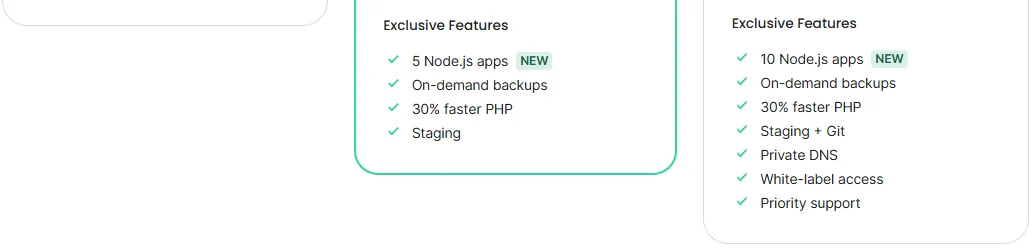
The middle plans are where SiteGround starts to justify its price. GrowBig adds staging, on-demand backups and what SiteGround calls 30% faster PHP. GoGeek adds Git on staging, private DNS, white-label access and priority support.
Here’s how the most-compared plans line up.
| Feature | Hostinger | SiteGround |
|---|---|---|
| Websites on the entry plan | 3 (Premium) | 1 (StartUp) |
| Storage | 20 GB SSD on Premium, 50 GB NVMe on Unlimited | 10 GB on StartUp, 50 GB on GrowBig, 100 GB on GoGeek |
| Backups | Weekly on Premium, daily on Unlimited | Daily on every plan, on-demand from GrowBig |
| CDN | Included on all three plans shown | Included on every plan |
| 2 mailboxes per site on Premium, unlimited on Unlimited (free for the first year) | Unlimited accounts on your domain | |
| Free domain | First year | First year |
| Staging | Advertised for WordPress, plans not listed on the cards | GrowBig and GoGeek |
| Free migration | Yes, unlimited sites | Yes, listed on every plan |
| Money-back window | 30 days | 30 days |
Speed and performance
Here is how each company builds its servers, because that tells you what to expect.
Hostinger runs its shared hosting on LiteSpeed servers, with NVMe storage on Unlimited and up, a built-in CDN and object caching. SiteGround runs on Google Cloud, with its own CDN (it says 170 or more edge locations), NGINX direct delivery, full-page caching and Memcached, plus the faster PHP setup on GrowBig and GoGeek. Both stacks are modern, and both are more than enough for a typical WordPress site with a caching plugin.
Honestly, for a small site the difference you’ll feel comes down to two things: where the server sits relative to your visitors, and whether your theme is bloated. Both hosts let you pick a data center at signup. SiteGround lists locations in North America, Europe, Asia and Australia. Hostinger says its locations vary by plan.
If speed really matters to you, test it yourself. It’s cheaper and more reliable than trusting anyone’s chart, ours included.
- Copy the same site: Same theme, plugins and content on both hosts. Use a temporary URL.
- Turn on caching: Use each host’s own cache and CDN, the way you would in real life.
- Test the same pages: Same speed tool, same location, same time of day, for several days.
- Keep one, cancel one: Compare the medians, not the best run. Cancel the loser in time. Hosting Engines testing checklist
A fair side by side test takes a few evenings, not a lab All four steps fit inside a 30-day money-back window
Security and backups
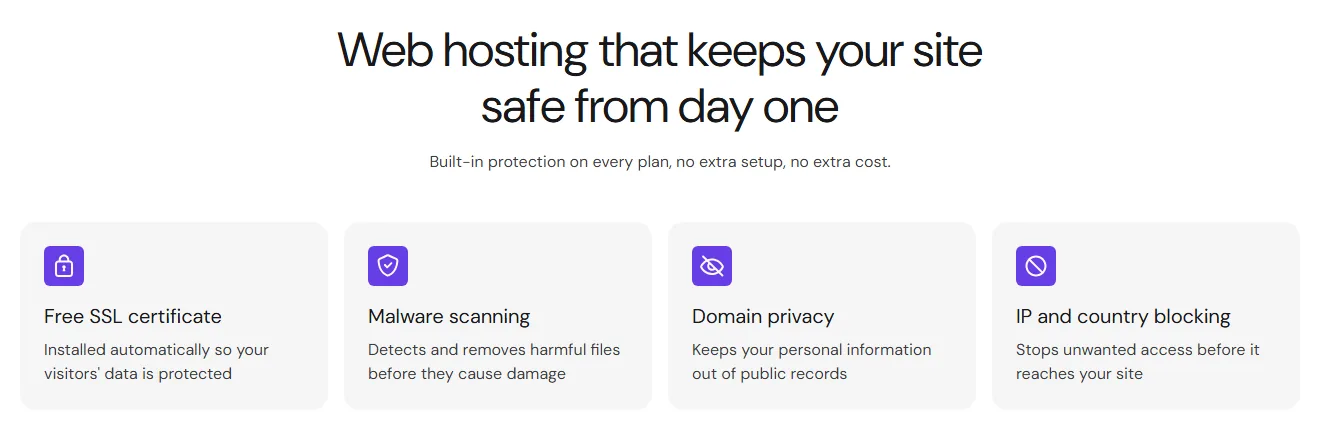
Both hosts cover the basics on every plan. Hostinger lists a free SSL certificate, malware scanning, domain privacy and IP and country blocking on all its web hosting plans.
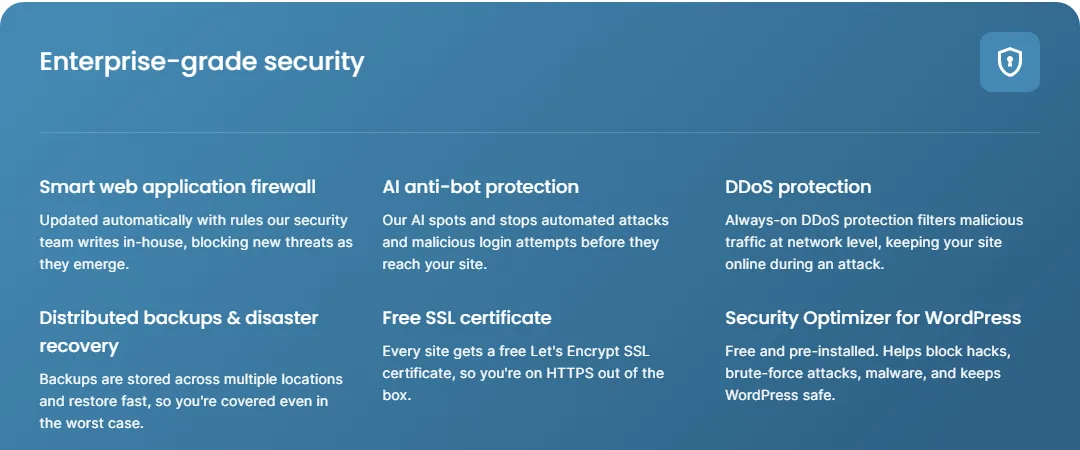
SiteGround lists a web application firewall with rules its own team writes, AI anti-bot protection, DDoS protection, Let’s Encrypt SSL and its Security Optimizer plugin for WordPress. Its backups are stored in more than one location, and the FAQ says you get up to 30 days of daily restore points.
Backups are the real difference. On Hostinger Premium you get weekly backups, so if something breaks on a Friday you might be restoring to last weekend. SiteGround takes a backup every day, even on StartUp. If you post every day or run a shop, that matters more than any firewall feature. On Hostinger you can fix it by moving to Unlimited or by running your own backup plugin to cloud storage.
Support: chat, tickets and phone
Both hosts promise 24/7 help, but the way you reach a person is different.
| Channel | Hostinger | SiteGround |
|---|---|---|
| Live chat, around the clock | Yes | Yes |
| Support tickets | Not listed | Yes |
| Phone line | No | Yes |
| Priority support | Unlimited plan and up | GoGeek plan |
| AI helper in the dashboard | Yes | Yes |
The ways each host lists for getting help on shared plans Based on each provider’s hosting page and FAQ
Hostinger’s support runs through live chat, in many languages, around the clock. There’s no phone line. On Unlimited and above you get priority support, which should mean a shorter wait. Hostinger also has an AI agent in the dashboard that handles common fixes and hands you over to a human when needed.
SiteGround offers live chat, tickets and phone, all 24/7, plus an AI assistant inside Site Tools for quick questions. GoGeek adds priority support.
For most beginner problems, chat is fine. A DNS record, a broken plugin or an email client that won’t connect can all be sorted in a chat window. Where phone support earns its keep is the bad day: your shop is down, customers are emailing you, and you want to explain the problem out loud to one person. If that scenario worries you, SiteGround has the edge.
Ease of use and WordPress tools
Hostinger uses hPanel, its own control panel, and SiteGround uses Site Tools, also its own. Neither uses cPanel. Both are clean, both put WordPress installs one click away, and both give developers SSH and WP-CLI. Hostinger lists Git in hPanel, while SiteGround adds Git to staging on GoGeek.
Moving an existing site is free on both. Hostinger says it migrates unlimited websites for free with no downtime; you request it from hPanel after buying a plan. SiteGround lists free site migrations on every plan, and it has a free migrator plugin for WordPress if you’d rather do it yourself.
The one WordPress tool worth checking before you buy is staging, a private copy of your site where you can test plugin and theme updates. SiteGround puts it on GrowBig and GoGeek, clearly marked on the cards. Hostinger advertises a one-click staging tool for WordPress but doesn’t say on its plan cards which plans include it, so ask in chat before you pay if you depend on it.
Renewal and refund traps to plan for
None of these are scams. They’re just the details that make people feel tricked a year later.
The first is the renewal price, which we covered above. SiteGround’s renewal is roughly six times the StartUp intro price, and Hostinger’s Premium renewal is a little under four times its $2.99 rate. Put the renewal date in your calendar either way.
The second is the domain. Both hosts give you a free domain for the first year, and then it renews at the normal rate. Hostinger’s refund policy says domains you get free with a deal are not refundable, and neither are domain renewals or transfers. Ask SiteGround about its domain terms at checkout too.
The third is extras. Both checkouts can offer add-ons. Read every step and untick what you don’t need. You can always add a feature later.
- Renewal price: The price after the first term is the one you pay for years. Read it before the cart.
- Backups: How often are they taken, and can you restore one file or only the whole site?
- Support: Chat, tickets or phone. Find out if a person answers, not only a bot.
- Staging: A copy of your site to test plugin and theme updates before visitors see them.
- Refund window: Check what is refundable. Domain fees often are not, even inside the guarantee. Source: provider pricing and policy pages
Each one matters more than the discount on the front page
Who should pick which host
Pick Hostinger if…
You’re starting your first site, you might add a second or third later, and the monthly bill matters. Premium covers that for less over four years than a single year of SiteGround StartUp at its renewal rate. You’re comfortable with chat-only support and you’ll either live with weekly backups or upgrade to Unlimited when the site starts earning.
Pick SiteGround if…
Your site already makes money, you update it often, and you’d rather pay more than lose a day of orders. GrowBig is the plan most people should look at: unlimited sites, daily and on-demand backups, staging and phone support. Budget for $29.99 a month after the first year and you won’t be surprised.
Skip both if…
You’ve outgrown shared hosting. If your site is slow at peak times on a decent plan, or you’re hitting resource limits, a bigger shared plan won’t fix it for long. At that point a VPS or cloud plan is the honest next step, from either company or someone else.
| Buyer | What they look like | Lean toward |
|---|---|---|
| Beginner, tight budget | One site, small traffic, no team. Watches the monthly bill, at the start and at renewal. Does not need staging or server-level tools. | Hostinger |
| Growing site, needs help fast | More traffic, more changes, less downtime. Wants staging to test updates before they go live. Will pay more at renewal for faster help and extra tools. | SiteGround |
Pick the buyer that sounds like you, then check the renewal. Based on plan features on each provider’s pricing page.
Our verdict
For most people reading this, Hostinger is the better value. You get more sites, more storage and a much lower four-year cost, and the plan features are solid for a blog or small business site. Its weak spots are weekly backups on Premium and no phone line.
SiteGround is the better host for a site that can’t afford to be down. Daily backups everywhere, staging on GrowBig, and three ways to reach support make it easier to run a busy site safely. You just pay a lot more for that peace of mind once year one is over.
Not sure Hostinger is the right cheap option either? Our Hostinger vs Bluehost comparison puts it against another big budget name.
Hostinger vs SiteGround FAQ
Is Hostinger cheaper than SiteGround?
Yes, by a wide margin once you include renewals. Hostinger Premium renews at $10.99 a month against $17.99 for SiteGround StartUp, and Hostinger’s intro price lasts 48 months instead of 12. Over four years that’s roughly $144 against $684 on the entry plans.
Is SiteGround faster than Hostinger?
It depends on the site. Both use modern stacks with built-in caching and a CDN. Your theme, plugins and server location will make a bigger difference for a small site, so test both during the 30-day refund window if speed is your main concern.
Does Hostinger have phone support?
No. Hostinger offers 24/7 live chat with no phone line. SiteGround offers 24/7 chat, tickets and phone.
Which host is better for WordPress?
Both run WordPress well, so it depends on how you work. SiteGround suits you better if you test updates on a staging copy, since GrowBig and GoGeek include it. Hostinger suits you better if you want several WordPress sites on one cheap plan.
Can I move from Hostinger to SiteGround later?
Yes. SiteGround lists free site migrations on every plan and offers a free WordPress migrator plugin. Take a full backup before you move, and remember the domain renewal is a separate bill.
Can I get a refund if I change my mind?
Yes, both hosts offer a 30-day money-back guarantee on hosting. At Hostinger, free domains from a deal, domain renewals and transfers aren’t refundable, so expect those to stay on the bill.