
This free redirect generator writes 301 and 302 redirect code for .htaccess (Apache and LiteSpeed), Nginx, PHP, IIS, HTML and JavaScript. Pick what you want to redirect, fill in the URLs, and copy the code. It all runs in your browser, no sign-up needed.
How to create a redirect
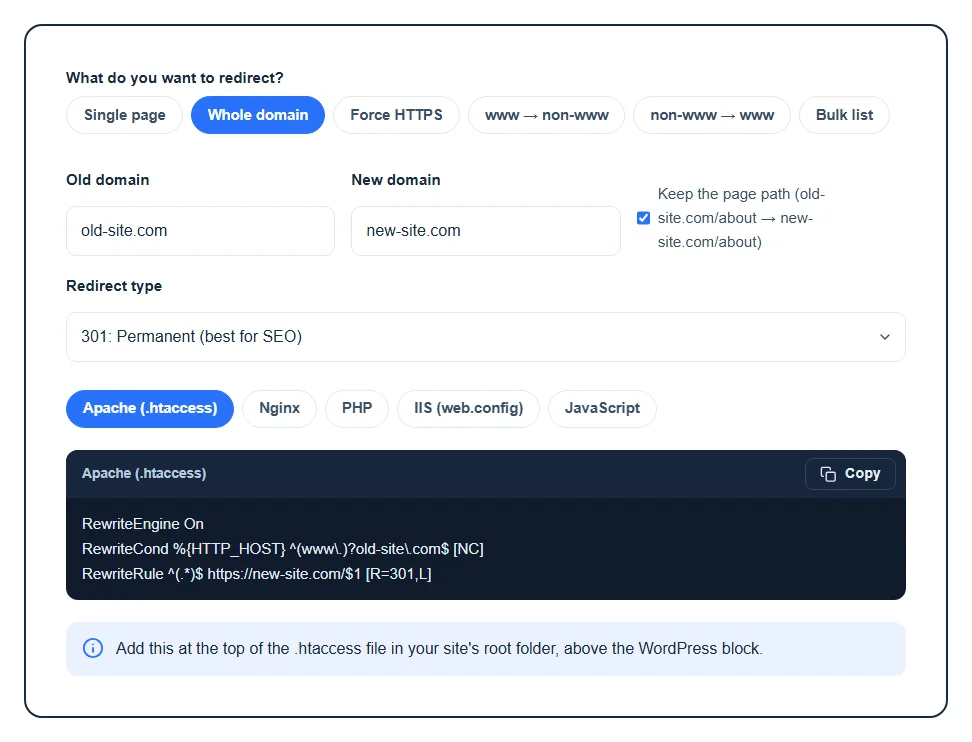
- Choose what you want to redirect: Single page, Whole domain, Force HTTPS, www → non-www, non-www → www or a Bulk list.
- Fill in the fields that appear. For a single page that’s the Old URL or path (like
/old-page/) and the New URL. - Pick the Redirect type. Leave it on 301 unless the move is temporary.
- Click your server type above the code (Apache, Nginx, PHP, IIS, HTML meta or JavaScript), then press Copy. A short note under the code tells you exactly where to paste it.
The code updates as you type, so there’s no button to press. The tool also remembers which server you picked last time.
Which redirect do you need?
- Single page: you renamed or deleted a page and want visitors and Google to land on the new one. The old path can be a full URL or just a path, and it can include a query string like
?id=12. Trailing slashes are handled, so/old-pageand/old-page/both redirect. - Whole domain: you moved to a new domain. With Keep the page path ticked,
old-site.com/aboutgoes tonew-site.com/about. Untick it to send everything to the new home page. The www version of the old domain is covered too. - Force HTTPS: sends every
http://request tohttps://. Install your SSL certificate first, or visitors will hit a warning. - www → non-www or non-www → www: picks one version of your domain so you don’t have two copies of the same site.
- Bulk list: one redirect per line, the old path, a space, then the new URL. Lines starting with
#are skipped, so you can leave notes. Handy after a site restructure or a migration.
301, 302, 307 or 308?
| Code | Meaning | Use it when |
|---|---|---|
| 301 | Moved permanently | The page or site has moved for good. This is the one you want almost every time. |
| 302 | Found (temporary) | The move is short-term, like a sale page or maintenance, and the old URL will come back. |
| 307 | Temporary, keeps the method | Like 302, but a form POST stays a POST. Mostly for apps and APIs. |
| 308 | Permanent, keeps the method | Like 301 for apps and APIs that must keep the request method. |
If you choose a temporary type for a move that’s really permanent, the tool warns you. Search engines pass rankings to the new URL much more reliably with a 301.
Where to put the code
- Apache (.htaccess): most shared hosting, cPanel and LiteSpeed servers. Open the .htaccess file in your site’s root folder and paste the rules at the top, above the
# BEGIN WordPressblock. Single redirects useRedirectMatch, so a rule for one page can’t accidentally catch the pages under it. - Nginx: page rules go inside your site’s
server { }block. Domain, HTTPS and www rules come as their own server block. Runnginx -tto test, then reload Nginx. - PHP: paste at the very top of the PHP file, before any output. Useful when you can’t edit the server config.
- IIS (web.config): add the rule inside
<rewrite><rules>. It needs the URL Rewrite module. IIS can’t send a 308, so the tool uses a 301 there and tells you. - HTML meta and JavaScript: last resorts for hosts where you can only edit the page. They aren’t real 301s, and search engines treat them as a weaker signal. That’s why they only appear for the redirect types where they make sense.
Behind Cloudflare or another proxy? The Force HTTPS rule for Apache includes a commented line that uses the X-Forwarded-Proto header instead. Swap it in if the normal rule causes a redirect loop.
Mistakes the tool catches for you
- A new URL that points back to the old page, which would loop forever.
- The same old and new domain.
- Bulk lines with a missing URL, and old paths listed twice (only the first one is kept).
- Special characters like
$, spaces and quotes, which are escaped for each server so the rule doesn’t break.
Always back up your .htaccess before editing it. One typo there can take the whole site down with a 500 error. Once the rule is live, test it with our redirect checker to see every hop and the status code. Moving to a new host at the same time? Our guide to migrating a WordPress site step by step covers the rest, and the SSL checker confirms your certificate works before you force HTTPS.
FAQ
How do I create a 301 redirect?
Enter the old path and the new URL in the generator above, keep the type on 301, and copy the code for your server. On most shared hosting that means pasting it at the top of your .htaccess file. WordPress users can also use a redirect plugin, but a server rule is faster because WordPress never has to load.
How do I redirect an entire domain to a new domain?
Choose Whole domain, enter the old and new domain, and keep “Keep the page path” ticked so every old page lands on its match. The rule has to run on the server the old domain points to, so keep that hosting (or a redirect service) active after the move.
Do 301 redirects hurt SEO?
No. A 301 is the proper way to tell search engines a page has moved, and Google passes the old page’s ranking signals to the new one. What hurts is long redirect chains, loops, and sending lots of old pages to the home page instead of their closest match.
How long should I keep a redirect in place?
At least a year, and ideally for good. Old links on other sites, bookmarks and search results keep sending people to the old URL long after the move.
Why isn’t my redirect working?
The most common causes are a browser that cached an old redirect (test in a private window), rules placed below the WordPress block in .htaccess, a server that isn’t Apache or LiteSpeed, or a CDN serving a cached copy. Our HTTP headers checker shows what the server actually sends back.
Is my data sent anywhere?
No. The code is built in your browser as you type, so the URLs you enter never reach our server.