Hostinger vs Bluehost is one of the most common match-ups people search before buying their first hosting plan, and it’s easy to see why. Both are big, both are recommended on WordPress.org, and both advertise a starting price of a few dollars a month. Look closer, though, and they make money in different ways: one locks your low price in for longer, the other charges less once the discount runs out.
We put this comparison together from both companies’ own plan pages, pricing tables, refund terms and help articles, all checked in October 2026. We haven’t run our own speed or uptime tests on these two, so you won’t find made-up benchmark numbers here. If you want the deeper story on either host, read our full Hostinger review and Bluehost review.
Quick Verdict
Short answer: pick Hostinger if you want the lowest total cost and you’re happy to prepay for four years. Its entry plan costs about the same upfront as Bluehost’s but covers an extra year, and its middle plan adds daily backups. Pick Bluehost if you need a lot of sites on a cheap plan, want phone support, or care more about the monthly rate after the intro term, because Bluehost’s renewals are a little lower.
| Hostinger | Bluehost | |
|---|---|---|
| Entry plan | Premium | Starter |
| Starting price | From $2.99/month (48-month term) | From $3.99/month (36-month term) |
| Entry plan renews at | $10.99/month | $9.99/month (36-month renewal) |
| Websites on entry plan | 3 | 10 |
| Backups | Weekly on Premium, daily from Unlimited up | Weekly on all three plans |
| Control panel | hPanel (its own) | Bluehost portal, with cPanel inside |
| Phone support | No | Business plan and up |
| Money-back | 30 days | 30 days |
| Best for | Lowest long-term cost, beginners | Many small sites, phone help |
The Two Hosts in a Nutshell
Hostinger started in Kaunas, Lithuania, in 2004 and now says more than 5 million website owners use it. It built its own control panel, hPanel, and it leans hard on low prepaid prices, AI tools and a clean, simple dashboard.
Bluehost was founded in Utah in 2003 and is part of Newfold Digital, the same group behind HostGator. It’s been tied to WordPress for a long time and says it has worked closely with WordPress since 2005. Its shared plans are built around WordPress, with a lot of sites allowed even on the cheapest tier.
Hostinger vs Bluehost Pricing: Intro and Renewal
Both hosts sell three main shared plans, and they line up fairly neatly by tier. The intro prices are for each host’s longest term, paid upfront: 48 months at Hostinger and 36 months at Bluehost. Prices checked October 2026, in US dollars, before tax.
| Tier | Hostinger plan | Intro price | Renews at | Bluehost plan | Intro price | Renews at |
|---|---|---|---|---|---|---|
| Entry | Premium | $2.99/mo (48 mo) | $10.99/mo | Starter | $3.99/mo (36 mo) | $9.99/mo |
| Middle | Unlimited | $3.99/mo (48 mo) | $16.99/mo | Business | $6.99/mo (36 mo) | $13.99/mo |
| Top shared | Cloud Startup | $7.99/mo (48 mo) | $25.99/mo | eCommerce Essentials | $14.99/mo (36 mo) | $21.99/mo |
Here’s the part most comparisons skip. Hostinger Premium costs $143.52 for 48 months. Bluehost Starter costs $143.64 for 36 months. So you hand over almost exactly the same amount on day one, but Hostinger’s money covers a fourth year. If you’d stay with Bluehost for that fourth year, you’d renew, and a 12-month Starter renewal is $11.99 a month.
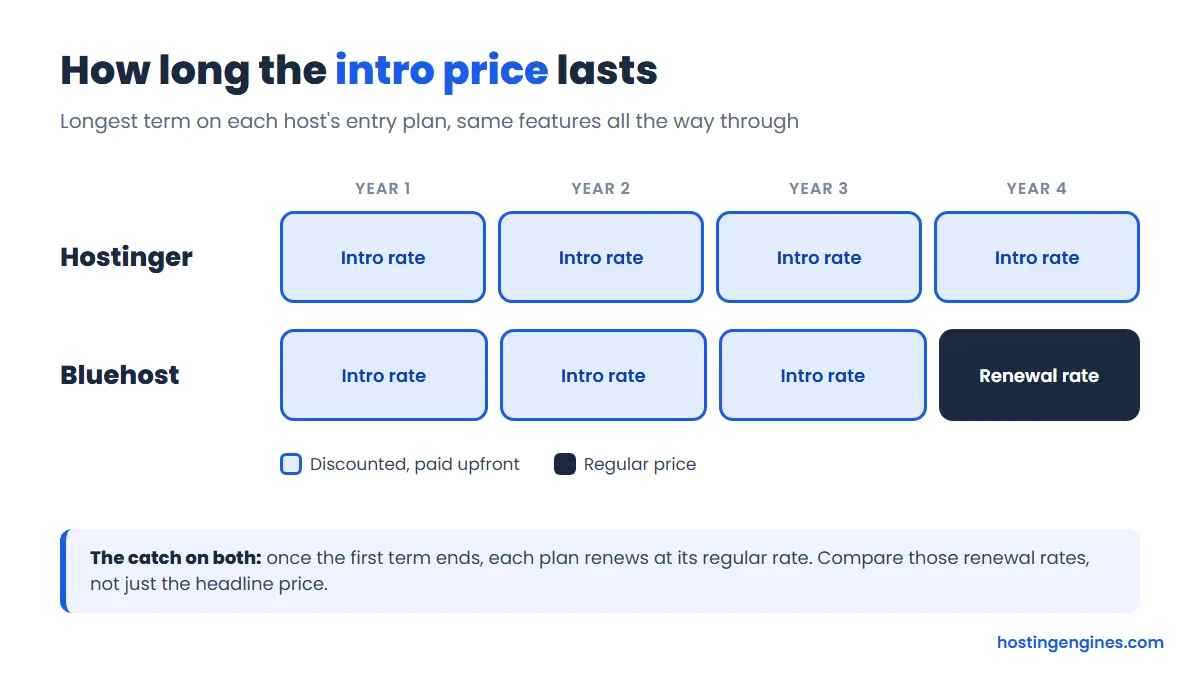
The other side of the coin: once the discount ends, Bluehost is the cheaper one to keep. Its Starter renews at $9.99 a month on a 36-month renewal against Hostinger Premium’s $10.99, and the gap is wider on the middle and top tiers. Bluehost also prices renewals by term. Starter is $9.99 on a 36-month renewal, $11.99 on 12 months and $15.99 month to month, so a long renewal saves real money there.
Our take: for most new sites, the first four years matter more than year five, and Hostinger wins those years clearly. If you already know you’ll stay put for a decade, Bluehost’s lower renewals start to even things out. Either way, plan for the renewal price, not the banner price. Our guide to the hidden costs of website hosting covers this and the add-ons that sneak onto invoices.
Temporary offer: Hostinger is running its Black Friday sale right now, which drops Premium to $2.49 a month ($119.52 for 48 months) and Unlimited to $3.49 a month ($167.52 for 48 months). Renewal prices stay the same. The sale won’t last, so check the live price before you buy; the regular prices above are what the comparison is based on.
What Each Plan Includes
Price only tells half the story. Here’s how the plans compare on the things you’ll actually notice, tier against tier.
| Feature | Hostinger Premium | Bluehost Starter | Hostinger Unlimited | Bluehost Business |
|---|---|---|---|---|
| Websites | 3 | 10 | Unlimited | 50 |
| Storage | 20 GB SSD | 10 GB NVMe | 50 GB NVMe | 50 GB NVMe |
| Free domain (first year) | Yes | Yes | Yes | Yes |
| 2 mailboxes per site, free for 1 year | Pro Email free trial | Unlimited mailboxes per site, free for 1 year | Pro Email free trial | |
| Backups | Weekly | Weekly | Daily, with easy restore | Weekly |
| Free SSL | Yes | Yes (Let’s Encrypt) | Yes | Yes (Let’s Encrypt) |
| CDN | Yes | Yes | Yes | Yes |
| Malware scanning | Yes | Yes | Yes | Yes |
| Domain privacy | Yes | Not listed | Yes | Free for the first year |
| Priority or phone support | No | No phone | Priority 24/7 support | Phone support included |
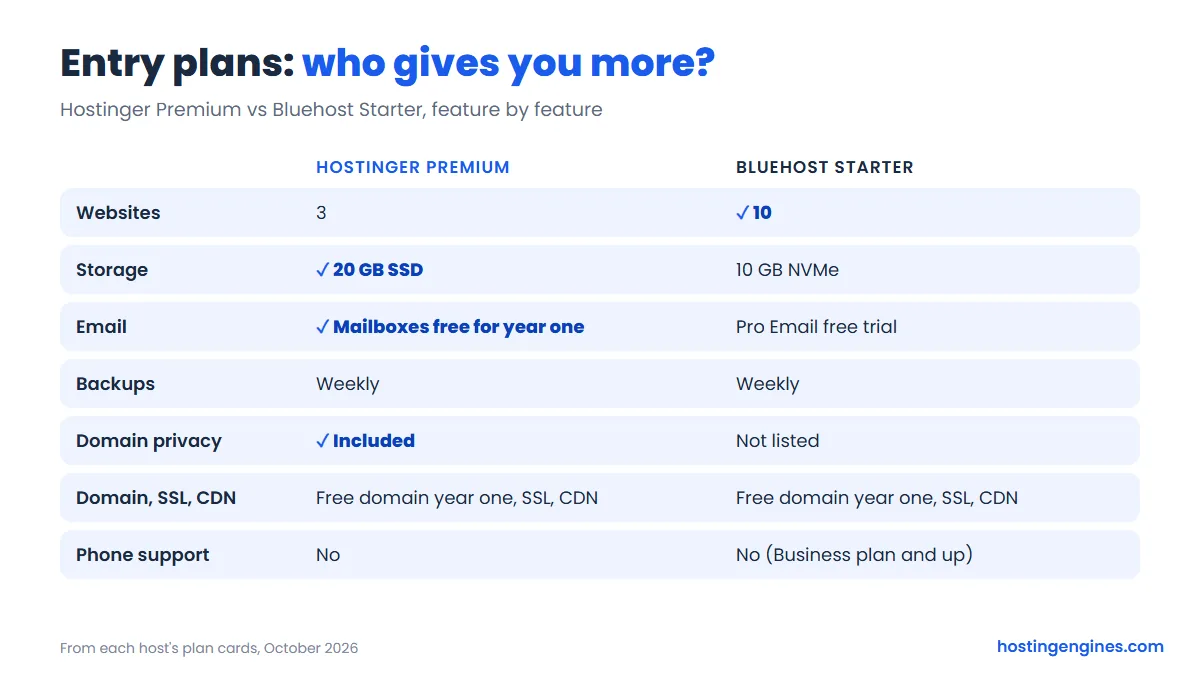
A few things jump out. Bluehost is far more generous with site counts: ten sites on Starter is a lot for an entry plan, while Hostinger Premium stops at three. Hostinger gives more storage on its entry plan, though it’s regular SSD there and NVMe from Unlimited up.
Backups are where Hostinger pulls ahead in the middle tier. Unlimited backs your site up every day, and Hostinger keeps daily backups for 7 days. Every Bluehost shared plan lists weekly backups, so if you want daily copies there, you’re looking at an add-on or a backup plugin. That matters more than people think the first time an update breaks a site.
Email is better at Hostinger, at least for year one. You get real mailboxes included (they renew at $0.59 per mailbox a month after the free year), while Bluehost’s cards list only a free trial of its Pro Email service.
Hostinger Plans
Hostinger’s three web hosting plans are Premium, Unlimited and Cloud Startup. All are paid upfront for the whole term, and the free domain applies to yearly or longer plans. The screenshot below was taken during the Black Friday sale, so the first two prices are lower than the regular ones in our table.
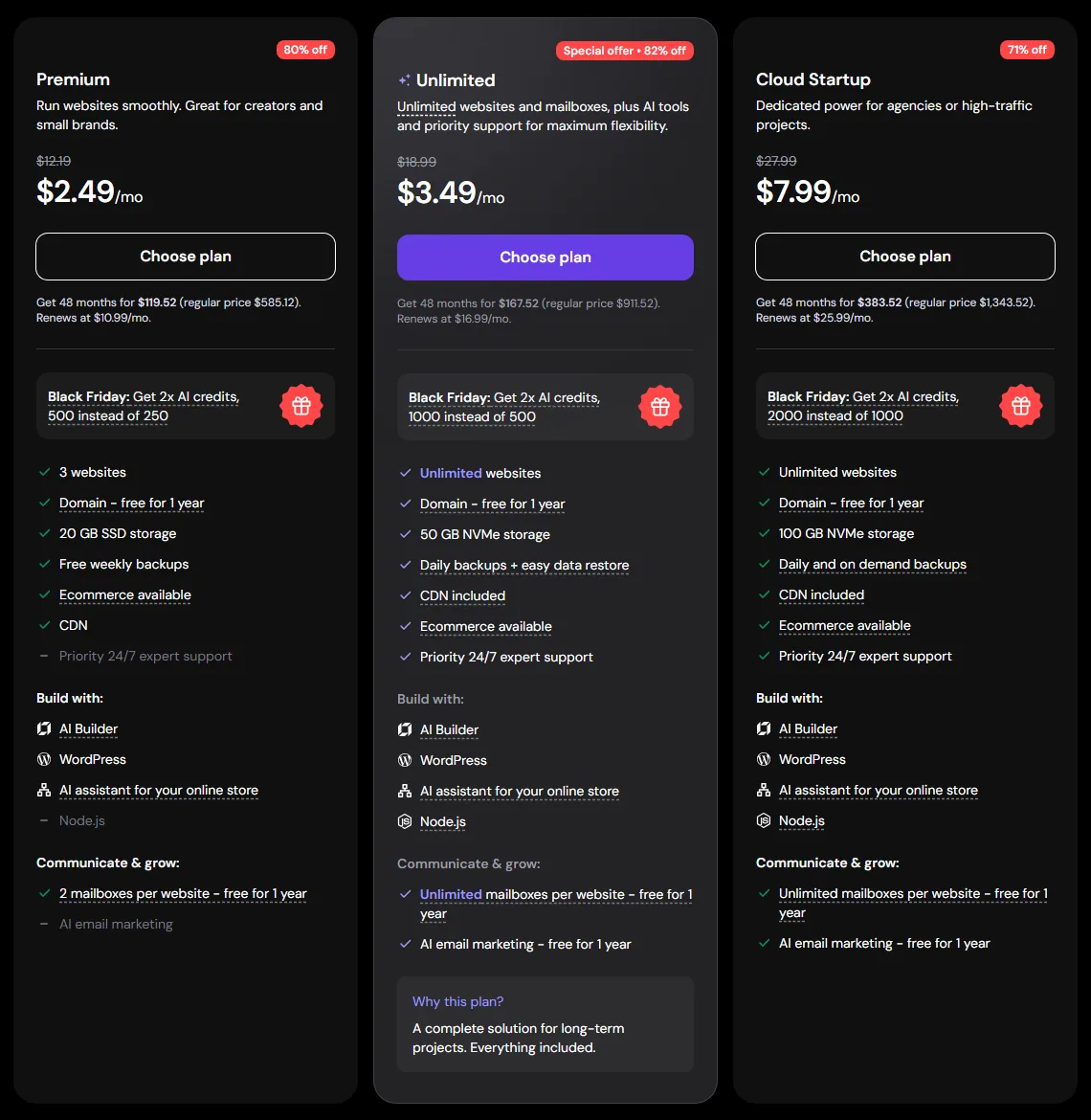
- Premium is the one for a first blog or a small business site. Three sites is plenty to start, but the weekly backups are the reason we’d stretch to the next plan if your site makes money.
- Unlimited is our pick for most people. It adds unlimited sites, NVMe storage, daily backups and priority support for about a dollar more a month on the intro term.
- Cloud Startup adds 100 GB of NVMe storage and daily plus on-demand backups. It suits busy sites and agencies that have outgrown regular shared hosting.
Bluehost Plans
Bluehost’s shared lineup is Starter, Business and eCommerce Essentials, plus an Enterprise & Custom tier with no public price. The intro prices you see are for a 36-month term.
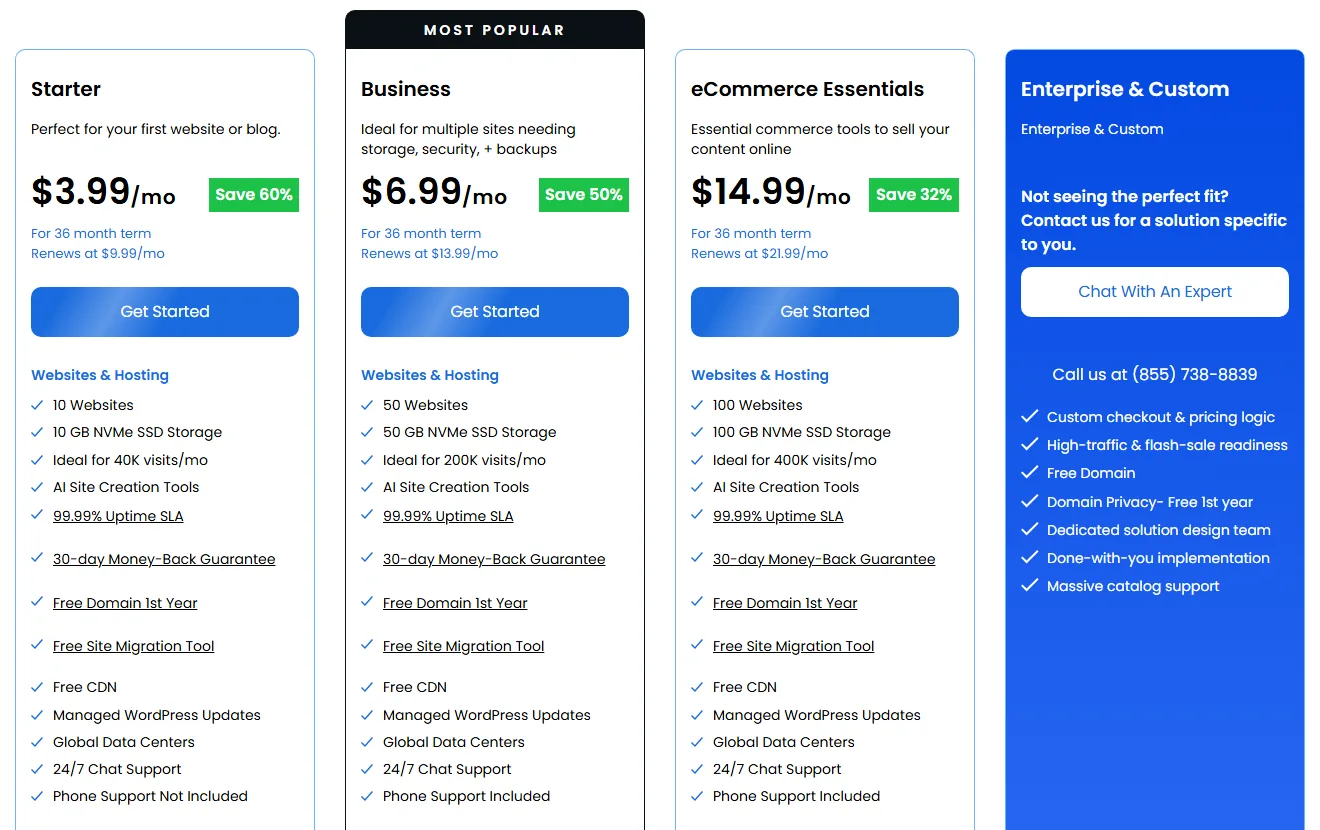
- Starter fits up to 10 sites with 10 GB of NVMe storage, and Bluehost says it’s sized for about 40,000 visits a month. Chat support only.
- Business raises that to 50 sites, 50 GB and about 200,000 visits a month, and adds phone support, a web application firewall, DDoS protection and free domain privacy for the first year.
- eCommerce Essentials is built for WooCommerce stores, with payment processing, subscriptions, memberships and paid course tools on top of 100 sites and 100 GB.
Every Bluehost plan also lists static and object caching, SSH and WP-CLI, managed WordPress updates and a WordPress staging site, which is handy for testing changes before they go live.
Performance Features and Data Centers
We can’t tell you which host is faster from our own tests, because we haven’t run them on these plans. What we can compare is what each one puts under your site, and on paper they’re closer than the marketing suggests.
- Hostinger runs its web hosting on LiteSpeed servers, with NVMe storage from Unlimited up, a built-in CDN and object caching. It backs this with a 99.9% uptime guarantee in its hosting agreement.
- Bluehost uses NVMe storage on every shared plan, with a free CDN, static content caching and object caching. Its plan cards promise a 99.99% uptime SLA.
One thing to know about those uptime numbers: a guarantee is a promise of a small credit if things go wrong, not a measure of how often they do. Hostinger’s agreement, for example, offers a credit of 5% of that month’s hosting fee if it misses 99.9%, and you have to ask for it.
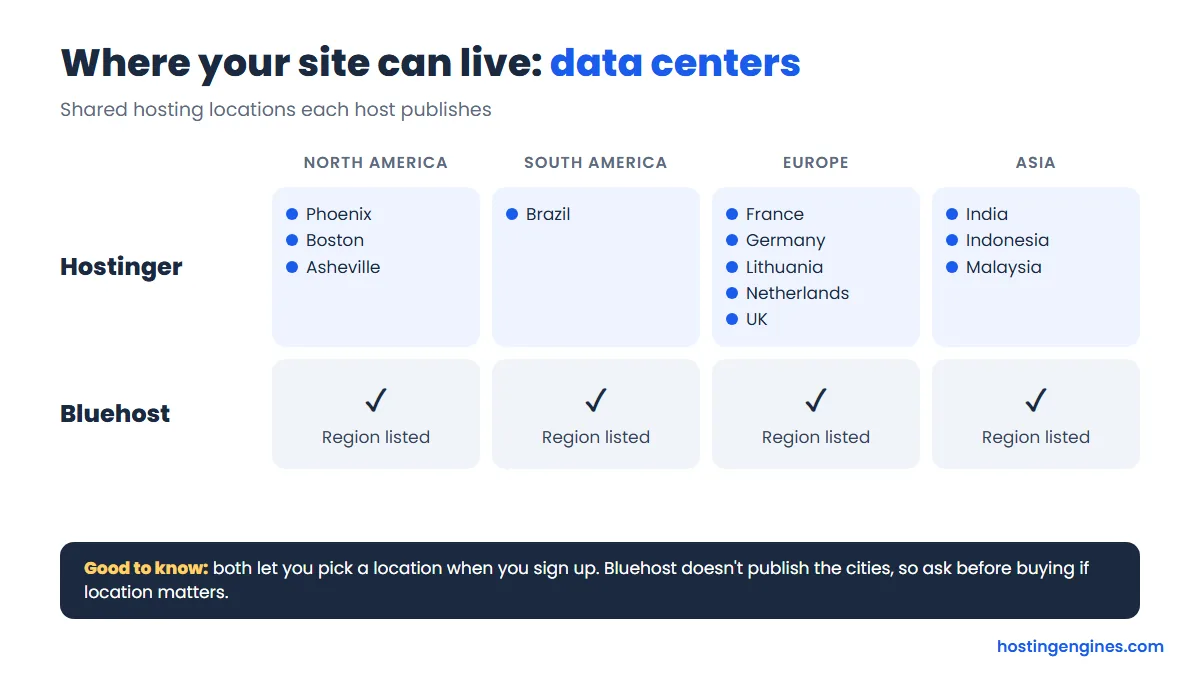
Data centers are a clearer difference. Hostinger publishes its list: France, Germany, Lithuania, the Netherlands and the UK in Europe, India, Indonesia and Malaysia in Asia, three US locations (Phoenix, Boston and Asheville) and Brazil. You pick one at setup and can move a web or cloud plan later from hPanel. Bluehost says it has data centers across North America, South America, Europe and Asia and lets you choose at checkout, but it doesn’t publish a city-by-city list. If your readers are mostly in Europe or Asia, Hostinger makes it easier to know exactly where your site will live.
Ease of Use: Hostinger’s Dashboard (hPanel) vs the Bluehost Portal
Both hosts are friendly to beginners, just in different ways.
Hostinger’s control panel, long known as hPanel and now simply called the Hostinger dashboard, is its own design, and its web hosting plans don’t use cPanel. It puts your sites, domains, email, backups and billing in one tidy dashboard, with a big button for each common job. There’s also an AI assistant that can set up WordPress, connect a domain or fix common issues by chat. If you’ve never managed hosting before, hPanel is probably the easier of the two to find your way around.
Bluehost gives you its own account portal for WordPress sites, domains and billing, and cPanel is still there under your hosting plan for files, databases and email settings. That’s a plus if you’ve used cPanel at another host and like knowing where everything is. The downside is that you’re sometimes switching between two interfaces to get a job done.
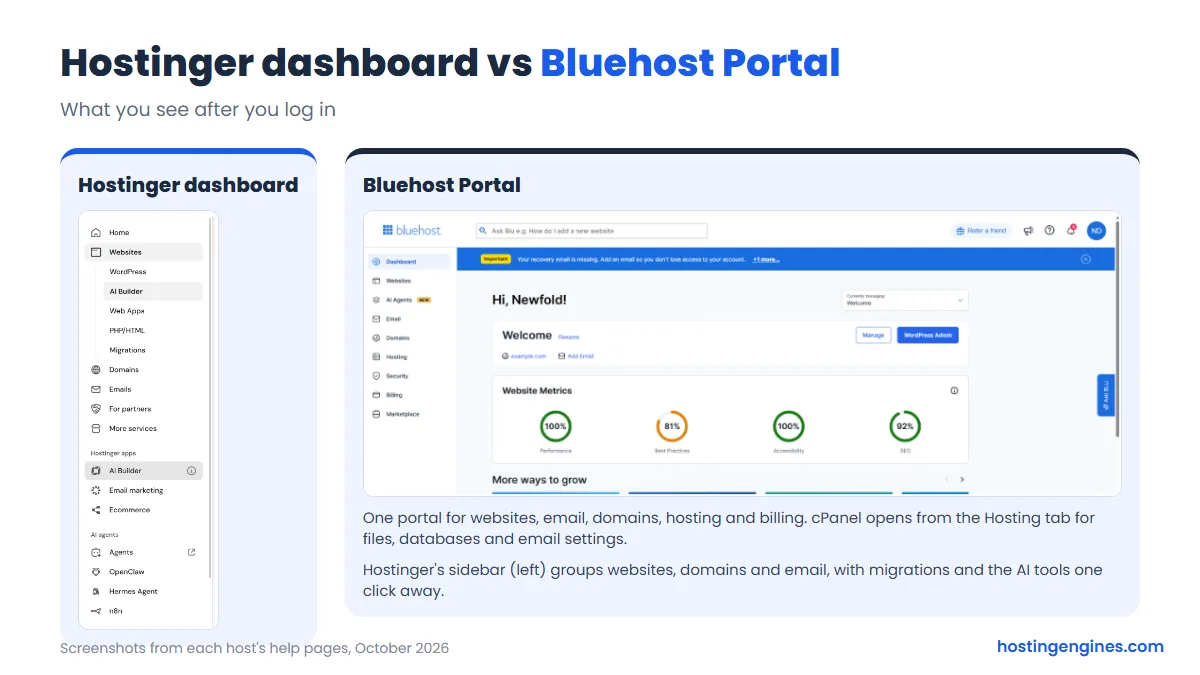
Both offer one-click WordPress and an AI site builder, so getting a basic site up is quick at either one.
Customer Support
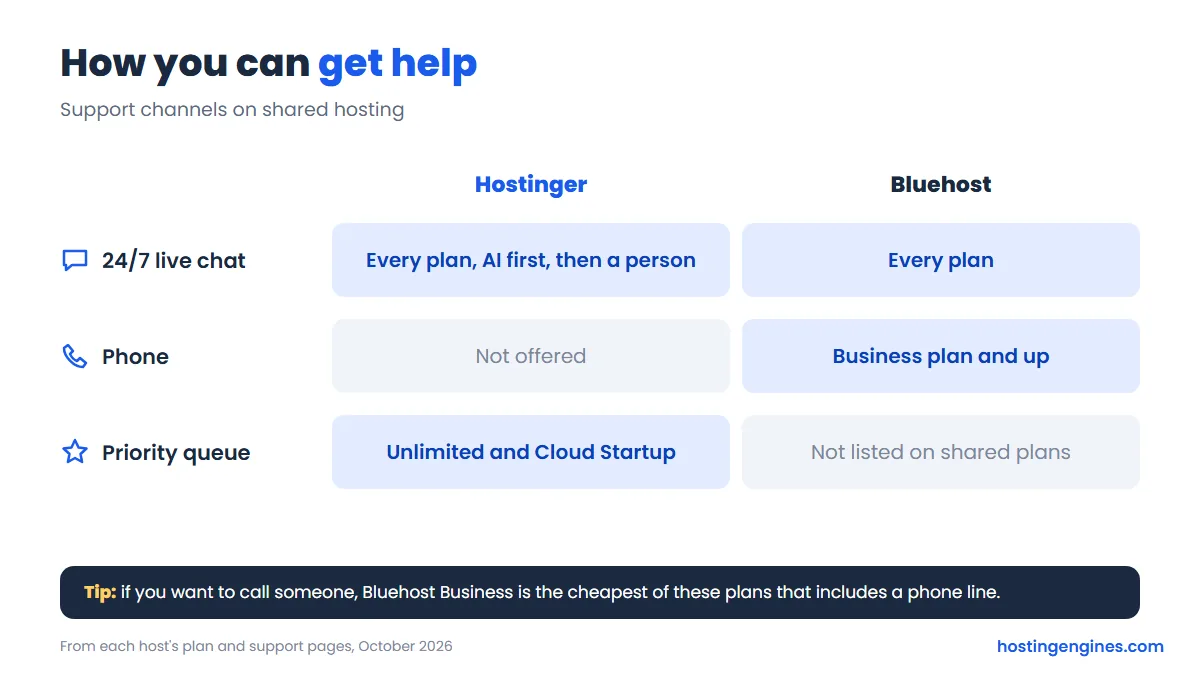
Hostinger offers 24/7 live chat and email. The chat starts with its AI assistant, and a human specialist steps in when you need one. There’s no phone line, and priority support comes with Unlimited and Cloud Startup, not Premium. Support is available in many languages, which helps if English isn’t your first one.
Bluehost has 24/7 chat on every shared plan and adds phone support from the Business plan up. If talking to a person on the phone matters to you, that’s a real point in Bluehost’s favor, though note Starter doesn’t include it.
Refund Policy
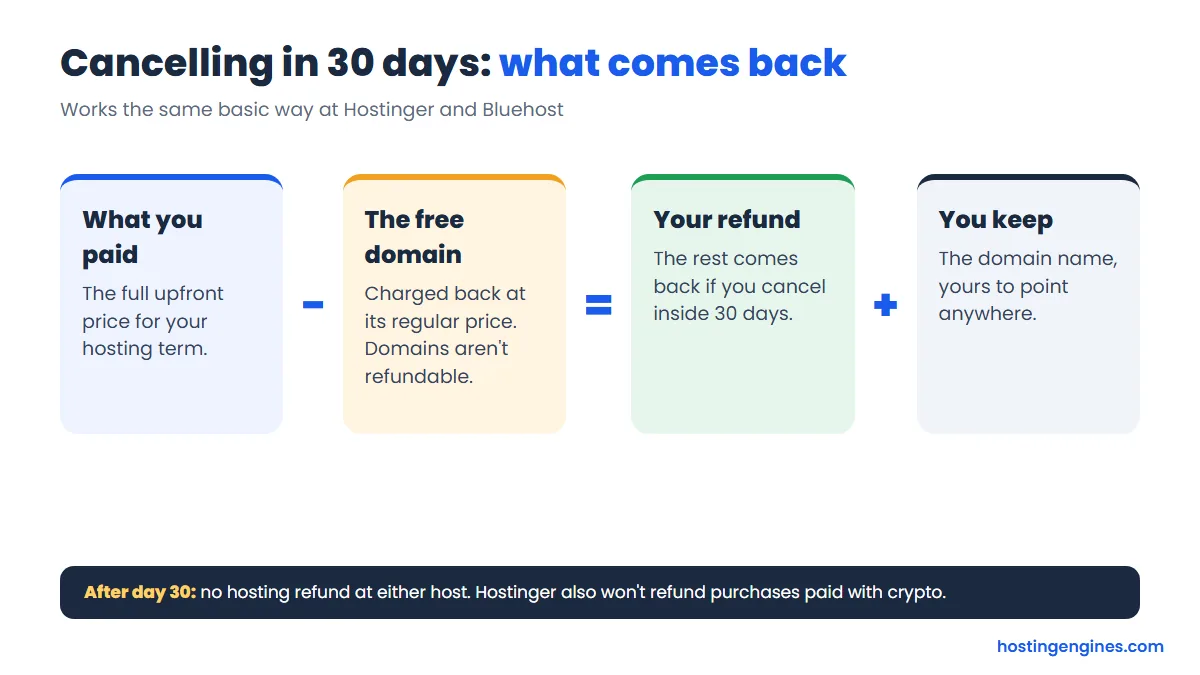
Both have a 30-day money-back guarantee on shared hosting, and both handle the free domain the same basic way: you keep the domain, but its cost comes out of your refund.
- Hostinger refunds hosting cancelled within 30 days. Free domains from a hosting deal are non-refundable, so the refund is your payment minus the domain’s price, and you keep using the domain. Purchases made with crypto aren’t refundable.
- Bluehost gives a full refund of hosting fees within 30 days. If your plan came with a free domain, it deducts a domain fee at the regular cost of that domain, which it puts at typically $15 to $20. No refunds after 30 days.
Migration
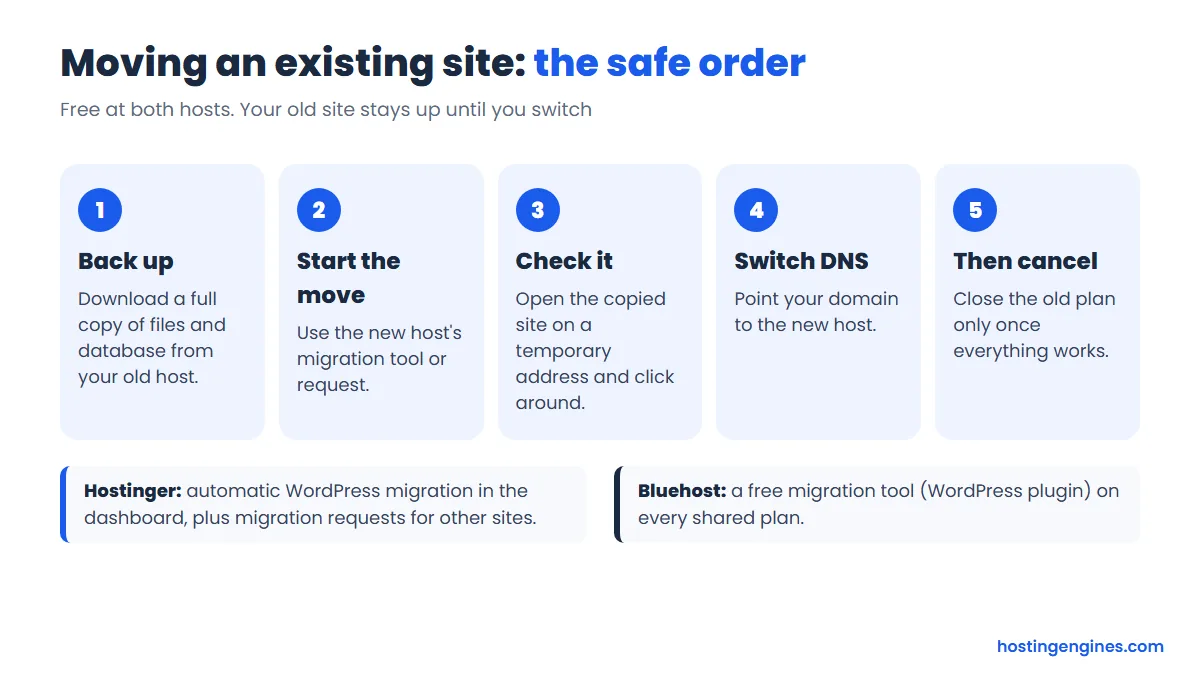
Moving an existing site is free at both. Hostinger has an automatic WordPress migration in hPanel, and you can also send a migration request for other sites. Bluehost lists a free site migration tool on every shared plan, a WordPress plugin that copies your site over to your new account. Either way, keep your old hosting live until you’ve checked the moved site works.
Who Should Pick Which?
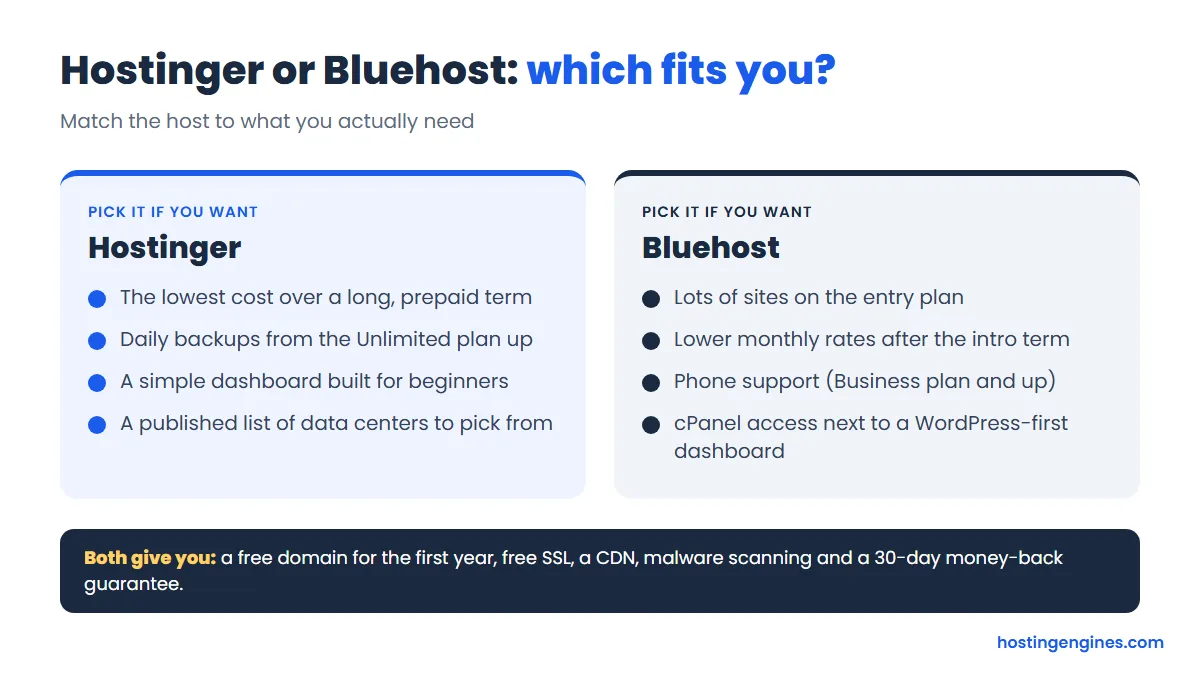
Go with Hostinger if you’re starting one to three sites on a budget, you’re fine paying for four years upfront, and you want the simplest dashboard. Step up to Unlimited if your site matters to you, because daily backups are worth the small extra cost. It’s also the better pick if you want your site hosted in a specific European or Asian country.
Go with Bluehost if you run lots of small sites, like a handful of hobby projects or client brochure sites, since ten sites on the entry plan is hard to beat. It also makes sense if you want phone support, already know cPanel, or plan to stay many years and care about the renewal rate more than the intro deal.
Still shopping around? Our list of the best cheap web hosting plans compares both of these with other budget hosts.
FAQ
Is Hostinger better than Bluehost?
For most beginners on a budget, yes. Hostinger costs less over the first four years, includes email mailboxes and has daily backups on its middle plan. Bluehost is the better fit if you need many sites on a cheap plan, phone support or lower renewal rates.
Which is cheaper, Hostinger or Bluehost?
Hostinger is cheaper upfront and over its intro term: Premium is from $2.99 a month on 48 months versus $3.99 a month on 36 months for Bluehost Starter. After the intro term, Bluehost is cheaper to renew, at $9.99 a month on a 36-month renewal versus $10.99 for Hostinger Premium.
Do Hostinger and Bluehost both give a free domain?
Yes, both include a free domain for the first year on all three shared plans. After that it renews at the normal domain price, and if you cancel for a refund, each host deducts the domain’s cost and lets you keep it.
Does Hostinger use cPanel like Bluehost?
No, Hostinger uses its own control panel, the Hostinger dashboard (formerly hPanel). Bluehost has its own account portal too, but cPanel is still available inside your hosting plan.
Can I move my site from Bluehost to Hostinger for free?
Yes, Hostinger migrates websites for free, including an automatic tool for WordPress sites. Bluehost also offers a free WordPress migration tool if you’re moving the other way.
Which has better support?
It depends on how you like to get help. Both offer 24/7 chat, but only Bluehost has phone support, and only from the Business plan up. Hostinger’s chat starts with an AI assistant and hands you to a person when needed, in many languages.