
Shared hosting is fine until it isn’t. One day your site slows down at lunchtime, your host emails you about “resource usage”, or you want to run something shared plans simply won’t allow. That’s usually the moment people start looking for the best VPS hosting, and it’s also the moment the choice gets confusing: some VPS plans come with a team that runs the server for you, others hand you a blank Linux box and a root password.
This guide sorts that out. We picked 11 VPS providers, checked each one’s official pricing page, terms and FAQ, and wrote down what you actually get on the cheapest plan, what it costs after the intro deal, and who should look after the server. We didn’t run our own speed or uptime tests, so you won’t find made-up benchmark scores here. Prices checked October 2026. Some links are affiliate links, which means we may earn a commission at no extra cost to you.
New to the idea? Our plain-English guide to what VPS hosting is covers the basics in a few minutes.
Best VPS Hosting: Quick Picks
If you only have a minute, here’s where we’d start.
| Best for | Provider | Starts at | |
|---|---|---|---|
| Best value overall | {go:hostinger | Hostinger VPS} | $6.49/mo (24-month term), 4 GB RAM |
| Managed VPS with a simple panel | {go:scalahosting | ScalaHosting} | $22.46/mo (12-month term), fully managed |
| Developers who want many locations | {go:vultr | Vultr} | $5/mo for 1 GB, billed by the hour |
| Developer-friendly docs and tools | {go:digitalocean | DigitalOcean Droplets} | $4/mo, billed by the second |
| Managed cPanel VPS for a business | {go:inmotion | InMotion Hosting} | $43.49/mo (24-month term) |
| Premium support you can call | {go:liquidweb | Liquid Web} | $11/mo self-managed, managed tiers extra |
| Managed or unmanaged, month to month | {go:hostwinds | Hostwinds} | $4.99/mo unmanaged, $10.99/mo managed |
| Cheap monthly VPS you can grow in slices | {go:interserver | InterServer} | $3/mo per slice |
| Most RAM and CPU for the money | {ext:https://contabo.com/en/vps/ | Contabo} | $5.28/mo before VAT (24-month term) |
| Europe-first cloud servers | {ext:https://www.hetzner.com/cloud/ | Hetzner Cloud} | €6.49/mo before VAT, hourly |
| Plain unmanaged VPS from a big network | {go:linode | Akamai (Linode)} | $5/mo, billed by the hour |
The short version: pick Hostinger if you’re comfortable running your own server and want the most for your money, ScalaHosting or InMotion if you’d rather someone else handled the server, and Vultr or DigitalOcean if you’re a developer who wants hourly billing and an API.
Managed vs Unmanaged VPS: Decide This First
Every provider below falls somewhere on one line. At one end, an unmanaged (also called self-managed) VPS: the host keeps the hardware and network running, and everything from the operating system up is your job. At the other end, a managed VPS: the host patches the OS, keeps the control panel working, takes backups and helps when the server misbehaves.
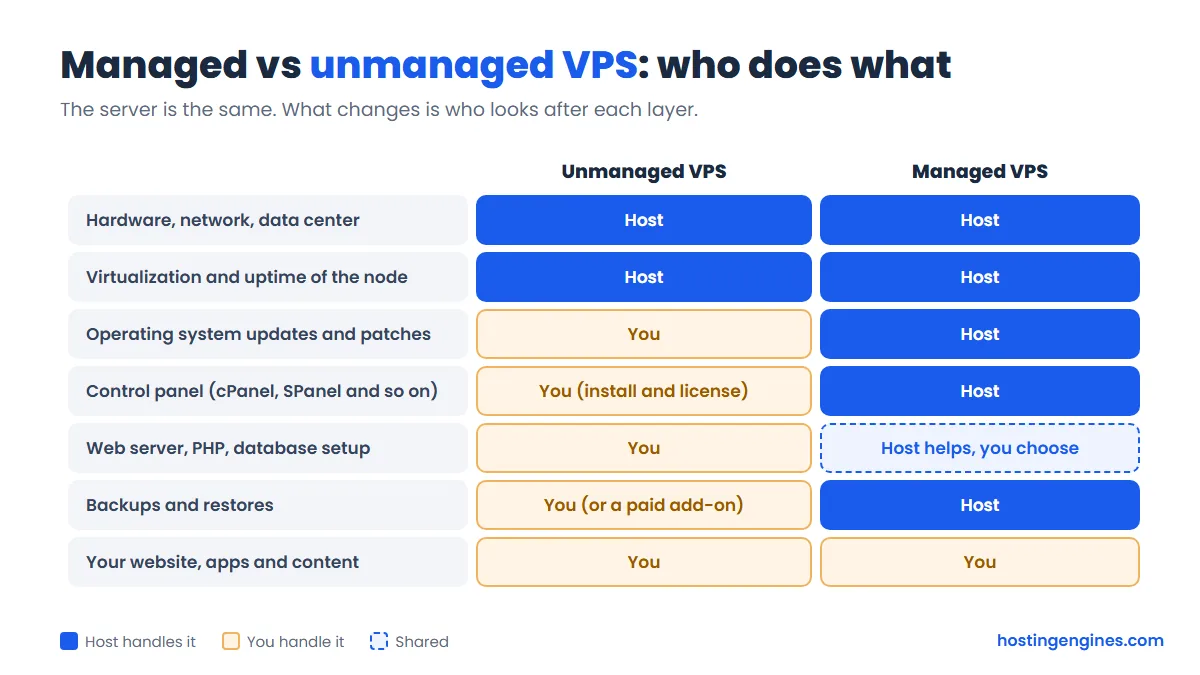
Unmanaged is much cheaper, often a third of the price or less for the same resources. But “cheap” assumes your time is free. If a failed update at 2 a.m. would leave you stuck, the managed premium is money well spent. We go deeper on this in managed vs unmanaged hosting.
How We Picked These VPS Hosts
We started with providers our readers ask about most and the ones that keep showing up in VPS shortlists, then kept the ones that sell real virtual servers (not shared hosting with a VPS label). For each, we checked the official VPS page on the same day for:
- The cheapest plan’s vCPU, RAM, storage and bandwidth
- The intro price, the billing term it needs, and the renewal price where the provider shows it
- Whether the plan is managed, unmanaged or both
- Which control panel you get, and whether it costs extra
- How many data center locations you can choose
- Refund rules and how billing works (prepaid term, monthly, hourly)
The order reflects value for the typical reader moving up from shared hosting, not a speed test. Where a provider’s fine print changes the picture (an IPv6-only cheap plan, a refund window measured in hours), we say so.
The Best VPS Hosting Providers in Detail
1. Hostinger VPS: Best Value Overall
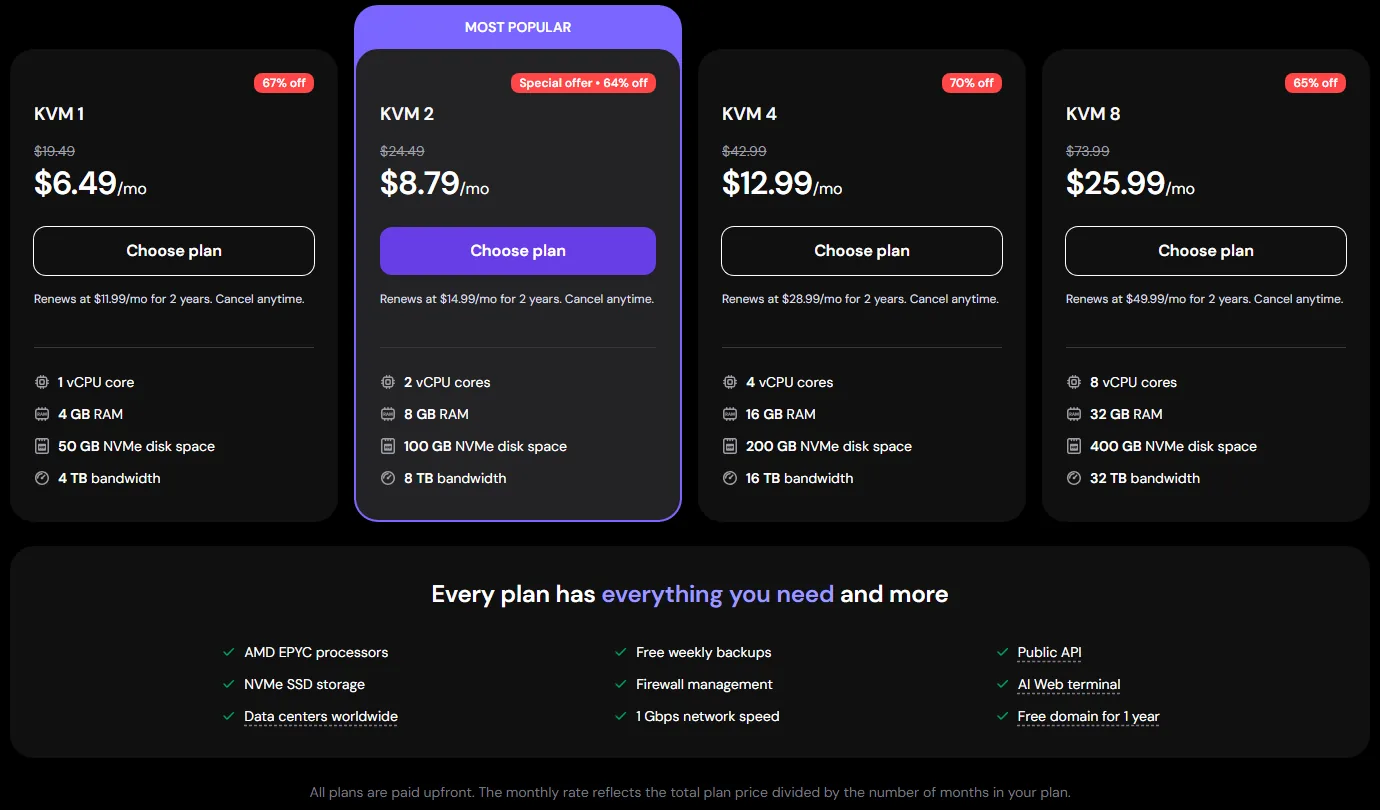
Hostinger gives you more RAM for the money than almost anyone else on this list. The entry KVM 1 plan comes with 1 vCPU, 4 GB RAM, 50 GB NVMe storage and 4 TB of bandwidth for $6.49/month when you pay for 24 months upfront, and it renews at $11.99/month. Most rivals give you 1 GB of RAM at that price.
It’s a self-managed VPS, but a friendly one. The dashboard lets you install an OS with a control panel in one click (cPanel, CloudPanel, Coolify and others are on the template list; cPanel needs its own license), and Hostinger’s built-in AI assistant can read logs and suggest fixes from the browser terminal. You also get free weekly backups, a managed firewall, DDoS filtering and a choice of 10 data centers across 4 continents.
The refund rule is worth knowing: VPS plans have a 30-day money-back window, but only if you haven’t refunded another Hostinger VPS in the last 180 days.
| Cheapest plan | KVM 1: 1 vCPU, 4 GB RAM, 50 GB NVMe, 4 TB bandwidth |
| Price | From $6.49/mo (24-month term), renews at $11.99/mo |
| Managed? | Self-managed, with an AI assistant and one-click templates |
| Control panel | Optional one-click templates (cPanel license extra) |
| Locations | 10 data centers |
| Refunds | 30 days (one VPS refund per 180 days) |
Pros
- 4 GB RAM and NVMe storage on the cheapest plan
- Free weekly backups and a free domain for a year on 12-month or longer plans
- Beginner-friendly dashboard for a self-managed server
Cons
- The best price needs a 24-month prepayment
- Renewal is close to double the intro rate
- Nobody will run the server for you
Who it suits: people leaving shared hosting who are happy to learn a little Linux, small agencies, and anyone self-hosting apps like n8n or Docker stacks. Read our full Hostinger review for the rest of its lineup.
2. ScalaHosting: Best Managed VPS With SPanel
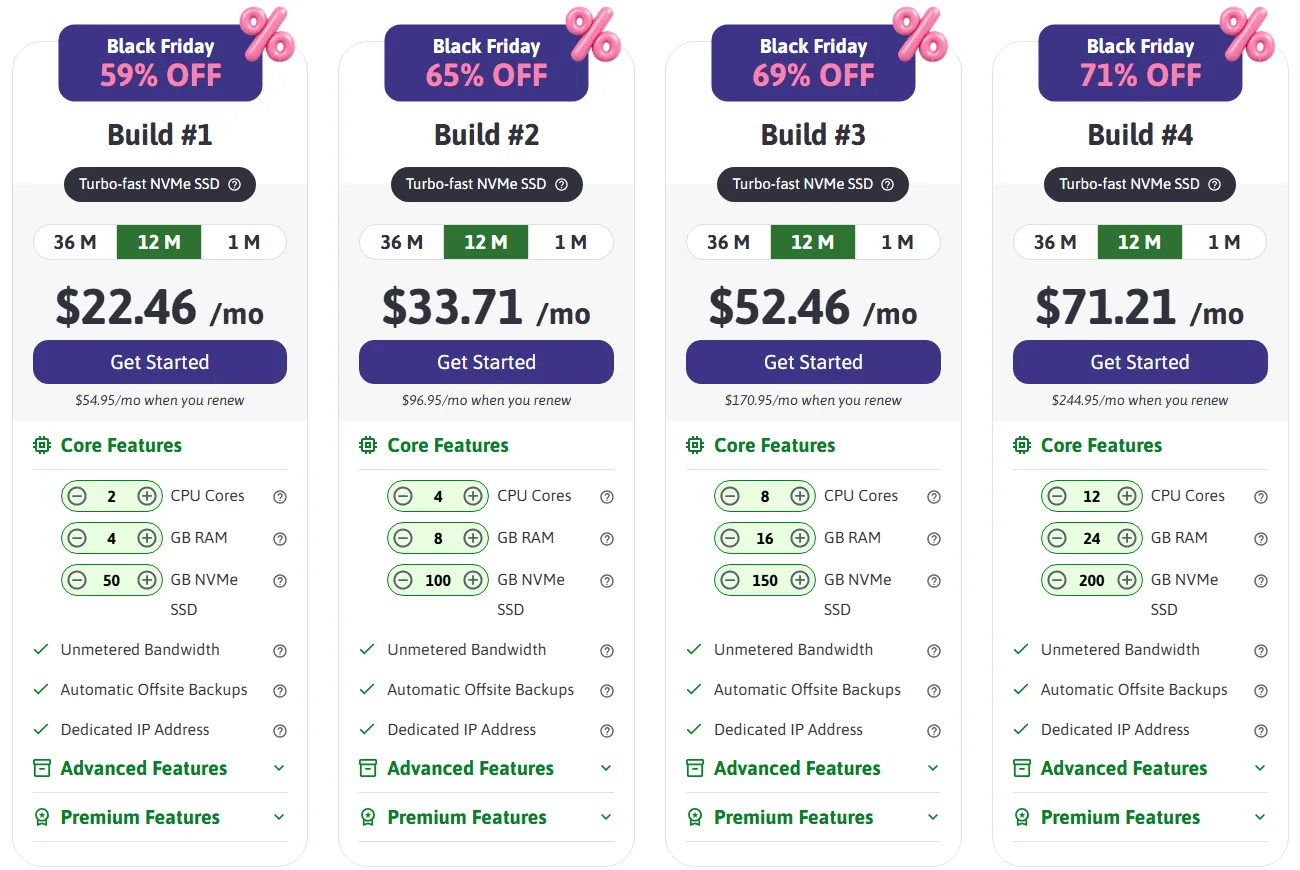
ScalaHosting is the pick if you want a fully managed VPS without paying for cPanel. Its own control panel, SPanel, comes free with every managed plan and does the everyday jobs cPanel does: email, databases, SSL, a WordPress manager and backups.
Build #1 gives you 2 CPU cores, 4 GB RAM, 50 GB NVMe storage and unmetered bandwidth, plus automatic offsite backups and a dedicated IP. During the current sale it’s $22.46/month on a 12-month term (oddly cheaper than the 36-month term at $29.95/month), and it renews at $54.95/month. Month to month, you pay $54.95 from day one. You can also drag the CPU, RAM and storage sliders to build a custom size.
ScalaHosting runs its own data centers in Dallas, New York, Seattle and Sofia, and lists more regions through partner clouds. Its “anytime” money-back guarantee gives new clients a full refund within 30 days and a prorated refund for unused time after that.
| Cheapest plan | Build #1: 2 CPU cores, 4 GB RAM, 50 GB NVMe, unmetered bandwidth |
| Price | From $22.46/mo (12-month term), renews at $54.95/mo |
| Managed? | Fully managed |
| Control panel | SPanel included (cPanel available) |
| Locations | 4 own data centers, more through partner clouds |
| Refunds | Full refund in 30 days, prorated after |
Pros
- Fully managed with a free control panel, which keeps the total bill down
- Free migration, daily offsite backups and a dedicated IP included
- Prorated refunds even after the first month
Cons
- The renewal jump is big (more than double on a 12-month sale price)
- More expensive than self-managed options for the same resources
- Only four data centers are ScalaHosting’s own
Who it suits: small businesses, WordPress and WooCommerce sites, and anyone who wants VPS power without touching the command line. Our ScalaHosting review covers SPanel in more detail.
3. Vultr: Best for Developers Who Want Many Locations
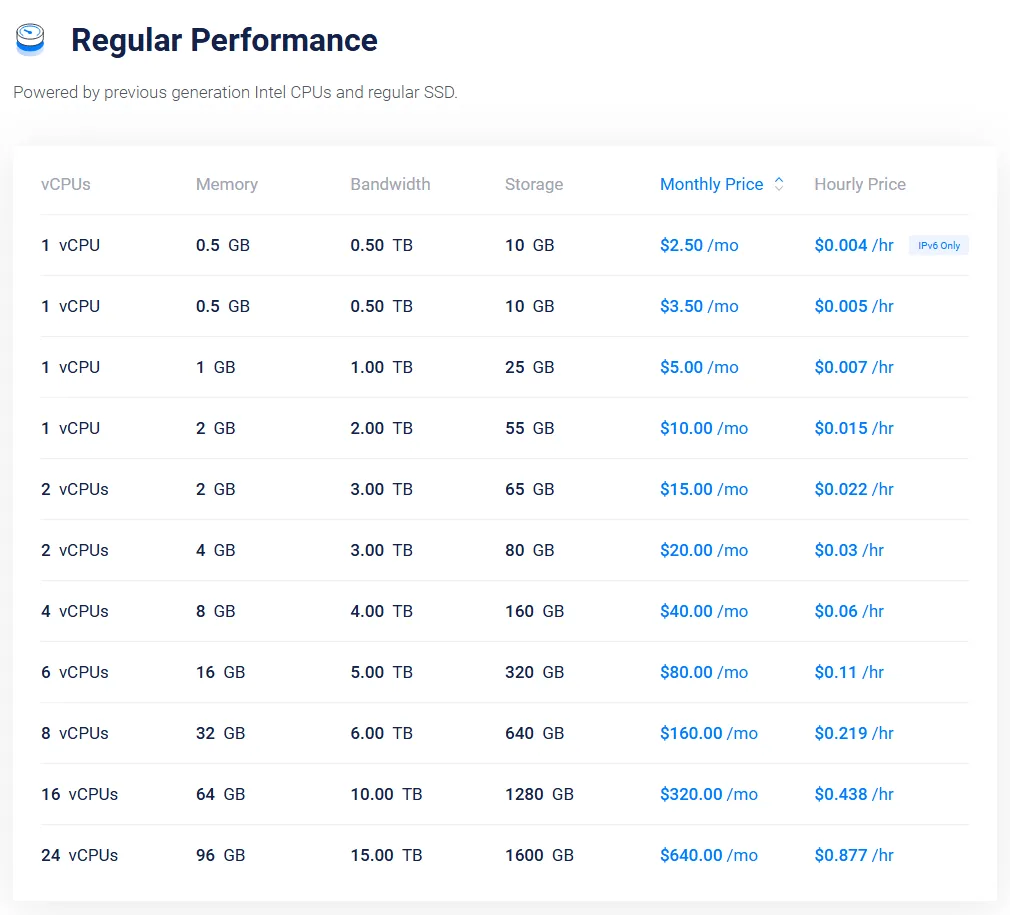
Vultr is a pure cloud VPS provider: you sign up, pick one of 33 regions, choose a size and your server is up within minutes. You pay by the hour, and the monthly price works as a cap, so a test server that lives for an afternoon costs cents.
The headline $2.50/month plan is real but limited. It’s IPv6-only, and Vultr’s own plan list shows it (and the $3.50 IPv4 version) in only a couple of locations. The plan most people will actually use is $5/month for 1 vCPU, 1 GB RAM, 25 GB SSD and 1 TB of bandwidth, available in 31 regions. For newer AMD or Intel CPUs and NVMe storage, High Performance plans start at $6/month.
Everything is unmanaged. Automatic backups add 20% to the server price and extra DDoS protection is $10/month per server.
| Cheapest practical plan | 1 vCPU, 1 GB RAM, 25 GB SSD, 1 TB bandwidth |
| Price | $5/mo, billed hourly (from $2.50/mo for an IPv6-only plan in a few locations) |
| Managed? | Unmanaged |
| Control panel | None included (one-click Marketplace apps) |
| Locations | 33 regions |
| Refunds | Pay-as-you-go, delete the server to stop billing |
Pros
- 33 regions, including Tel Aviv, Johannesburg, Santiago and Mumbai
- Hourly billing and a full API, perfect for test servers
- Many server types, from tiny instances to dedicated CPUs and GPUs
Cons
- The cheapest plans are IPv6-only or scarce
- Backups and stronger DDoS protection cost extra
- You’re on your own with the OS and software
Who it suits: developers, people who need a server close to an unusual market, and anyone who spins servers up and down. See our Vultr review for more.
4. DigitalOcean Droplets: Most Developer-Friendly
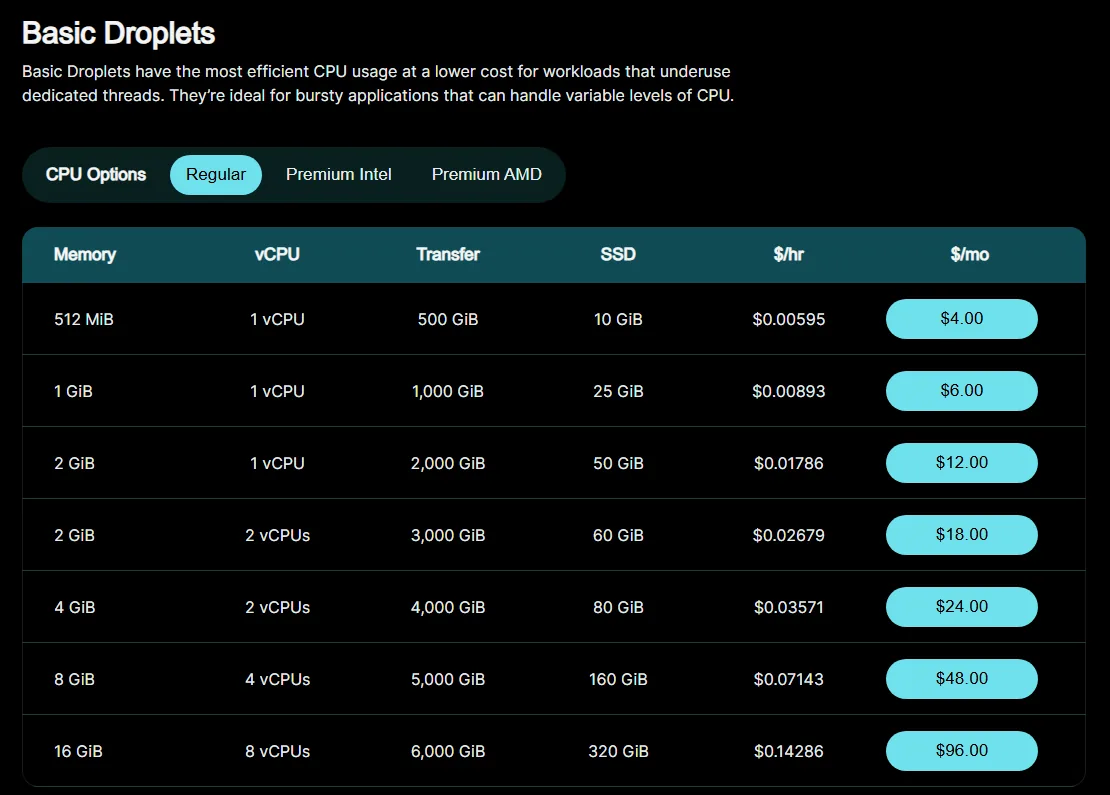
DigitalOcean calls its virtual servers Droplets, and it’s the provider many developers learn on, thanks to a clean dashboard and a huge library of free tutorials. Since January 1, 2026, Droplets are billed by the second (with a 60-second minimum), capped at the monthly price.
The smallest Basic Droplet costs $4/month for 1 vCPU, 512 MiB RAM, 10 GiB SSD and 500 GiB of transfer. That’s fine for a tiny bot or a static site, but for WordPress the $6 plan (1 GiB RAM, 25 GiB SSD, 1,000 GiB transfer) or the $12 plan (2 GiB) is a more realistic start. Weekly backups add 20% and daily backups 30% of the Droplet price.
DigitalOcean lists 16 data centers across 13 regions in North America, Europe, India, Singapore and Australia.
| Cheapest plan | 1 vCPU, 512 MiB RAM, 10 GiB SSD, 500 GiB transfer |
| Price | $4/mo, billed per second up to the monthly cap |
| Managed? | Unmanaged |
| Control panel | None included (1-Click Marketplace apps) |
| Locations | 16 data centers in 13 regions |
| Refunds | Pay-as-you-go, delete the Droplet to stop billing |
Pros
- Excellent documentation and tutorials
- Per-second billing with simple, flat monthly caps
- Easy upgrades to managed databases, Kubernetes and storage later
Cons
- Little RAM for the price compared with Hostinger or Contabo
- Backups cost extra
- You handle all the server admin yourself
Who it suits: developers and startups who want a polished platform they can script. Our DigitalOcean review goes through the extras.
5. InMotion Hosting: Best Managed cPanel VPS for Business
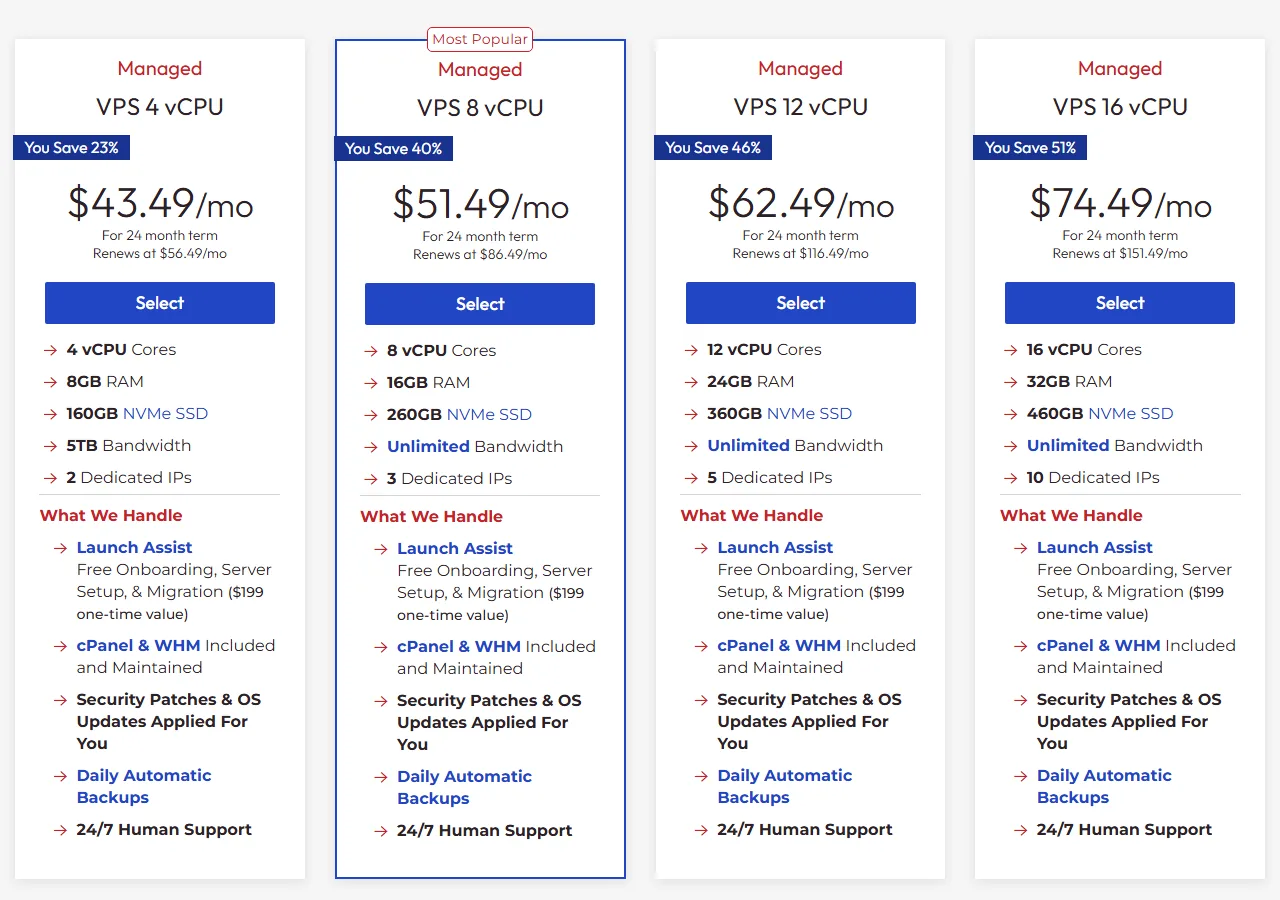
InMotion Hosting is for the business owner who wants cPanel, phone support and someone else doing the server work. Its managed VPS plans include cPanel and WHM, OS updates and security patches, daily automatic backups and free setup and migration (InMotion calls this Launch Assist).
The entry managed plan is generous on paper: 4 vCPU, 8 GB RAM, 160 GB NVMe storage, 5 TB bandwidth and 2 dedicated IPs for $43.49/month on a 24-month term, renewing at $56.49/month. If you’d rather run it yourself, the same hardware sold as a self-managed VPS starts at $13.99/month (24 months) and renews at $26.99/month.
The refund window is one of the longest around: 90 days on terms of 6 months or longer, 30 days on monthly billing. InMotion owns its hardware in Los Angeles, Ashburn and Amsterdam.
| Cheapest managed plan | VPS 4 vCPU: 4 vCPU, 8 GB RAM, 160 GB NVMe, 5 TB bandwidth |
| Price | From $43.49/mo (24-month term), renews at $56.49/mo |
| Managed? | Managed (self-managed plans also sold) |
| Control panel | cPanel and WHM included on managed plans |
| Locations | 3 data centers (Los Angeles, Ashburn, Amsterdam) |
| Refunds | 90 days on 6-month or longer terms, 30 days monthly |
Pros
- cPanel license included, which alone is worth a lot
- Big starting resources and 24/7 phone, chat and ticket support
- 90-day money-back guarantee on longer terms
Cons
- High entry price if you only need a small server
- Only three locations
- The best price needs a 24-month commitment
Who it suits: businesses and agencies hosting several client sites under cPanel. More in our InMotion Hosting review.
6. Liquid Web: Premium Fully Managed VPS
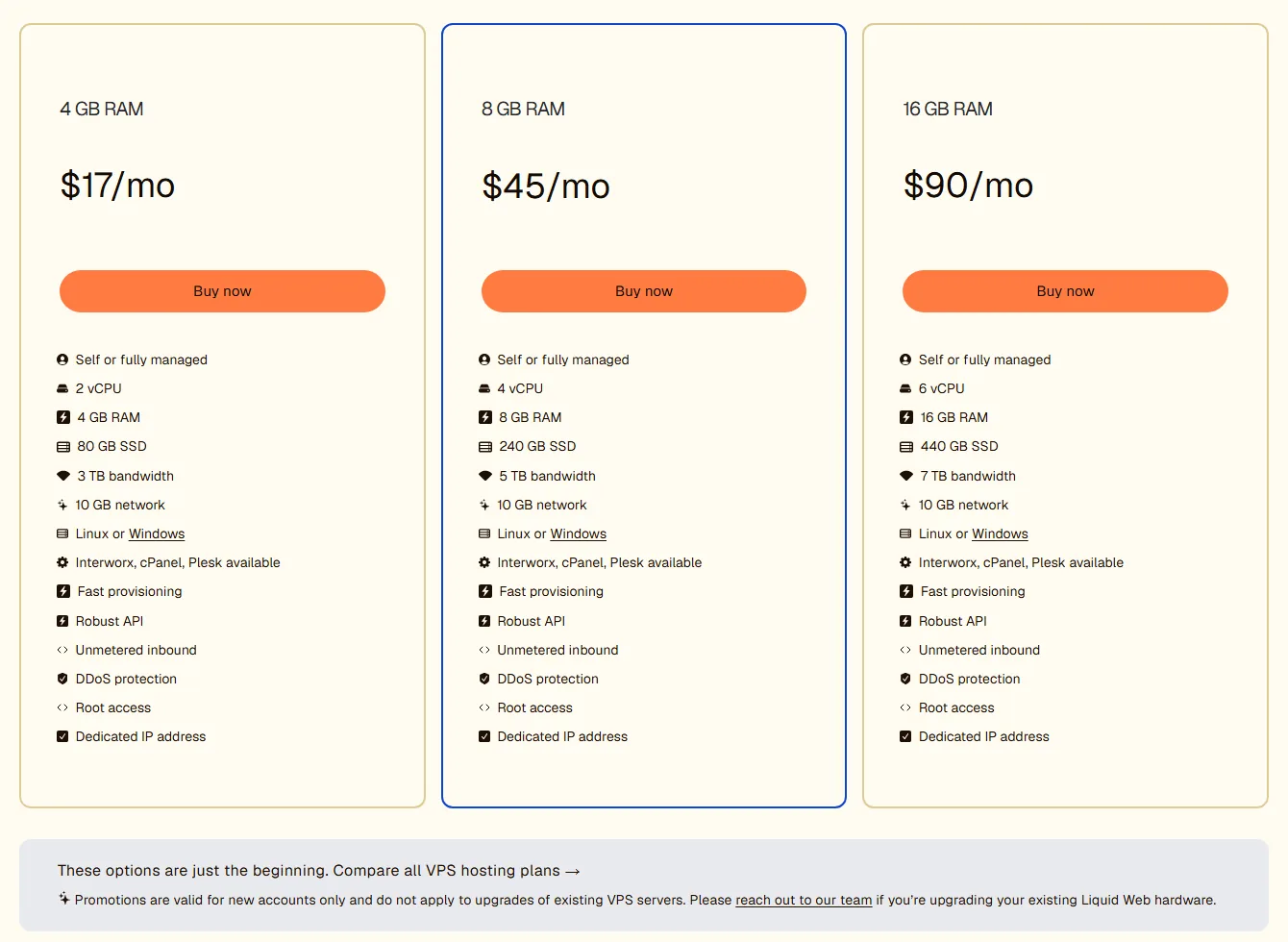
Liquid Web has built its name on support, and its VPS lets you choose exactly how much of it you want. In the configurator the base server is self-managed, “core managed” adds $21/month, and “fully managed” adds $39/month.
The smallest server is 1 vCPU, 2 GB RAM, 60 GB SSD and 2 TB of bandwidth for $11/month self-managed, so a fully managed version of it comes to about $50/month before a control panel. cPanel adds $31/month, Plesk $26 and Liquid Web’s own InterWorx $11. You can deploy in Michigan, Arizona, Amsterdam or London, and billing is monthly with hourly prices shown for each size.
One thing to read before you buy: Liquid Web’s Terms of Service say fees are non-refundable, and we found no money-back guarantee for VPS.
| Cheapest plan | 1 vCPU, 2 GB RAM, 60 GB SSD, 2 TB bandwidth |
| Price | $11/mo self-managed; core managed +$21/mo, fully managed +$39/mo |
| Managed? | Your choice of three levels |
| Control panel | Optional: InterWorx, Plesk or cPanel (extra cost) |
| Locations | 4 (Michigan, Arizona, Amsterdam, London) |
| Refunds | No money-back guarantee in the Terms of Service |
Pros
- Pick self, core or fully managed on the same server
- Linux or Windows, with three control panel options
- Strong reputation for hands-on support
Cons
- Fully managed with cPanel gets expensive fast
- SSD rather than NVMe on the standard plans
- No refund window
Who it suits: businesses that value a support team more than the lowest price, and teams that need Windows VPS too.
7. Hostwinds: Managed or Unmanaged, Month to Month
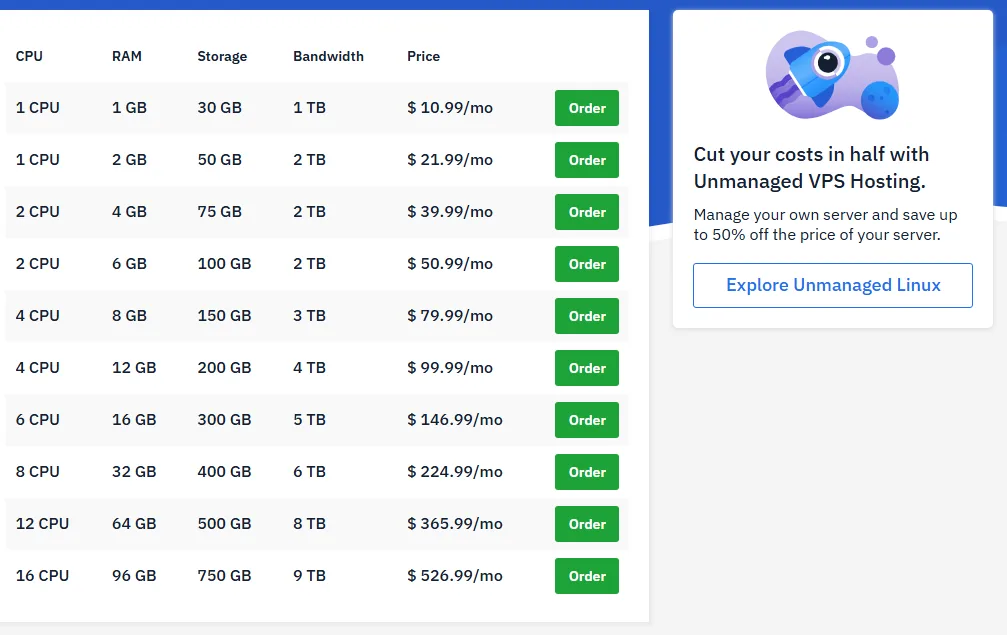
Hostwinds sells the same VPS sizes two ways. Unmanaged Linux VPS starts at $4.99/month for 1 CPU, 1 GB RAM, 30 GB storage and 1 TB of bandwidth. The managed version of that same server is $10.99/month and adds Hostwinds’ support for problems on the server. You can switch an unmanaged server to managed later from the Cloud Portal.
Prices are month to month, with no long prepay needed to unlock them. If you want true hourly billing, Hostwinds also sells cloud servers billed by the hour. Data centers are in Seattle, Dallas and Amsterdam.
The catch is the refund rule: you must cancel and ask for a refund within 72 hours of paying, and hourly-billed products aren’t refundable at all.
| Cheapest plan | 1 CPU, 1 GB RAM, 30 GB, 1 TB bandwidth |
| Price | $4.99/mo unmanaged, $10.99/mo managed (monthly) |
| Managed? | Both |
| Control panel | Optional cPanel template (paid license) |
| Locations | 3 (Seattle, Dallas, Amsterdam) |
| Refunds | Within 72 hours of payment, prorated |
Pros
- Honest monthly pricing, no big renewal jump
- Choose managed or unmanaged on the same hardware
- Nightly backups you can schedule, plus snapshots
Cons
- Only 1 GB RAM on the entry plans
- 72-hour refund window is very short
- Three locations
Who it suits: people who want to start small, pay monthly and keep the option of support. Our Hostwinds review explains the managed vs unmanaged split.
8. InterServer: Cheapest Monthly VPS You Can Grow
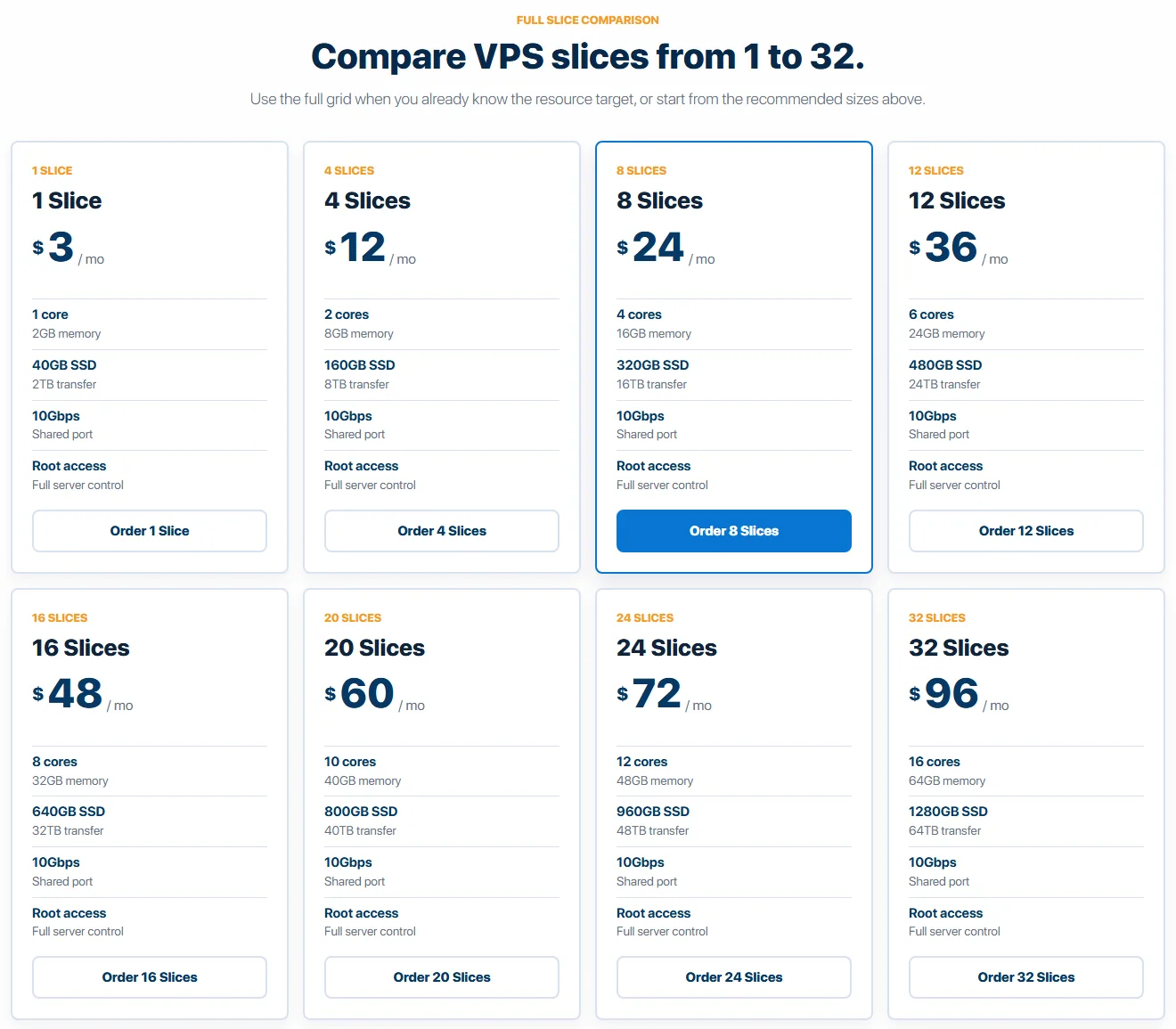
InterServer sells its VPS in “slices”. One slice costs $3/month and gives you 1 core, 2 GB RAM, 40 GB SSD and 2 TB of transfer. Need more? Add slices, up to 32. Eight slices ($24/month) get you 4 cores and 16 GB RAM, and at that size managed support is included.
Billing is month to month with no prepay discount, so the price you see is the price you keep. Servers run in the New York City area, Dallas or Los Angeles. InterServer is upfront that there’s no trial or money-back guarantee on VPS, but you can cancel any time.
| Cheapest plan | 1 slice: 1 core, 2 GB RAM, 40 GB SSD, 2 TB transfer |
| Price | $3/mo per slice, monthly |
| Managed? | Self-managed; managed support from 8 slices |
| Control panel | Optional, chosen when you order |
| Locations | 3 (NYC, Dallas, Los Angeles) |
| Refunds | No money-back on VPS; cancel any time |
Pros
- Very low monthly price with no contract
- Scale in small, predictable steps
- Managed support included at 8 slices and up
Cons
- US-only locations
- No refunds on VPS
- Small plans are self-managed
Who it suits: budget-minded users in the US who want a cheap server they can grow without changing hosts. See our InterServer review.
9. Contabo: Most Resources for the Money
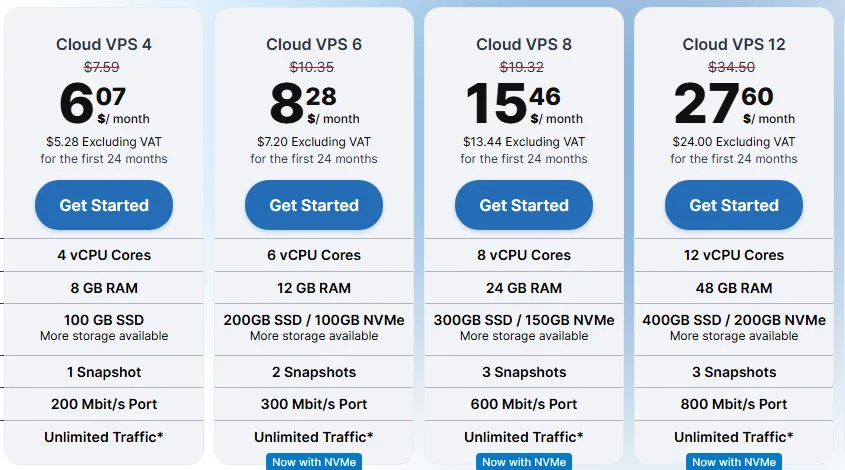
Contabo is famous for one thing: a lot of server for very little money. Cloud VPS 4 gives you 4 vCPU cores, 8 GB RAM, 100 GB SSD and unlimited traffic (under a fair use policy) for $5.28/month before VAT on a 24-month term. Paying month to month costs about 25% more (the 24-month term saves 20%), and in our check of the order page there was no setup fee on any term.
The trade-offs are real, and they explain the price. The smallest plan has a 200 Mbit/s port, uses regular SSD (NVMe starts on bigger plans) and runs on what Contabo calls proven hardware. The price on the plan card is labelled “for the first 24 months” without the later rate next to it. Hosting in the EU is included, while other regions such as the UK add a small monthly fee. cPanel, Plesk and automatic backups are paid add-ons, and the server is unmanaged.
Contabo lists 9 regions and 11 locations, including Germany, the UK, three US regions, Singapore, Japan, India and Australia.
| Cheapest plan | Cloud VPS 4: 4 vCPU, 8 GB RAM, 100 GB SSD, unlimited traffic (fair use) |
| Price | $5.28/mo before VAT (24-month term); monthly about 25% more |
| Managed? | Unmanaged |
| Control panel | Optional cPanel or Plesk (extra cost) |
| Locations | 9 regions, 11 locations |
| Refunds | No money-back guarantee advertised on the VPS page |
Pros
- More cores and RAM per dollar than anyone else here
- Unlimited traffic and free DDoS protection
- Many regions, including Asia and Australia
Cons
- Slower port and regular SSD on the entry plan
- Region surcharges and paid backups add up
- Unmanaged, and the long-term rate isn’t shown on the plan card
Who it suits: hobbyists, developers and side projects that need lots of RAM (game servers, self-hosted apps, staging) and don’t mind doing their own admin.
10. Hetzner Cloud: Best Europe-First Cloud VPS
Hetzner is a German provider with its own data center parks in Falkenstein, Nuremberg and Helsinki, plus cloud locations in Ashburn, Hillsboro and Singapore. It’s a favourite with European developers because it’s simple, GDPR-friendly and includes a lot of traffic: 20 TB a month on EU servers.
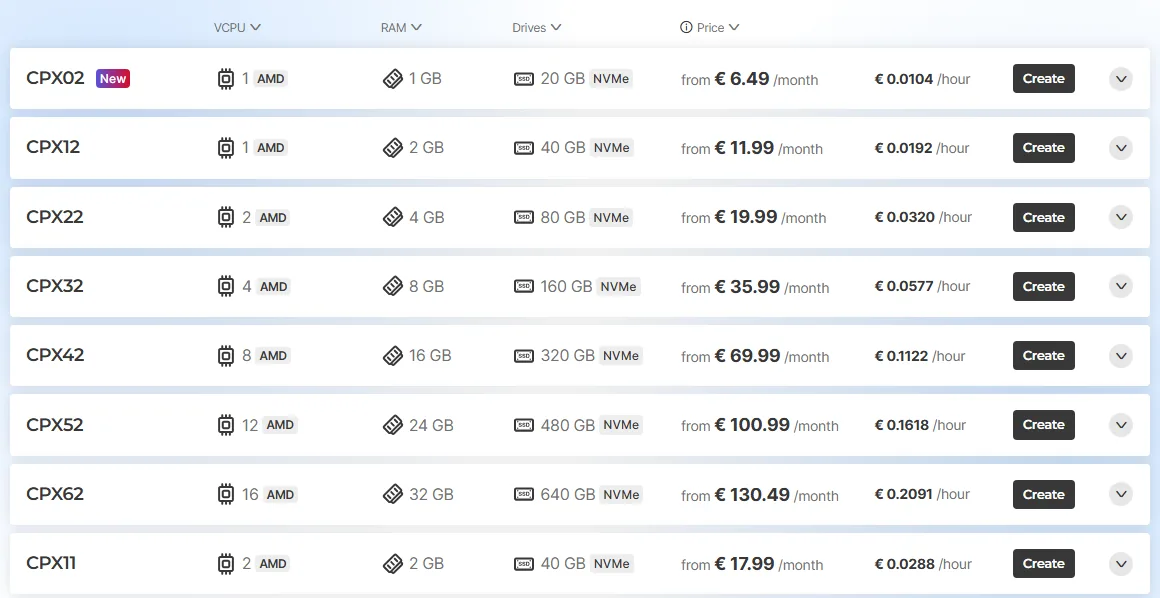
Prices are in euros and exclude VAT. When we checked, the cheapest plans you could actually order were the Regular Performance ones, from €6.49/month for CPX02 (1 AMD vCPU, 1 GB RAM, 20 GB NVMe). The famously cheap Cost-Optimized line, which starts at €5.99/month for 2 vCPU and 4 GB RAM, was marked “not available” across the board. Servers are billed by the hour, and prices include an IPv4 address.
Hetzner is unmanaged, with 24/7 support by email and a 99.9% uptime SLA.
| Cheapest orderable plan | CPX02: 1 AMD vCPU, 1 GB RAM, 20 GB NVMe, 20 TB traffic in the EU |
| Price | From €6.49/mo before VAT, billed hourly |
| Managed? | Unmanaged |
| Control panel | None included (one-click apps such as Docker and WordPress) |
| Locations | 6 (Germany x2, Finland, US x2, Singapore) |
| Refunds | Pay-as-you-go, delete the server to stop billing |
Pros
- Very generous included traffic in Europe
- Clean console, API and free firewalls
- Strong choice for GDPR-sensitive projects
Cons
- The cheapest plans were out of stock when we checked
- Prices in euros plus VAT
- Few locations outside Europe, and only 0.5 TB of included traffic on the small Singapore plans
Who it suits: developers and businesses whose visitors are mainly in Europe.
11. Akamai Cloud (Linode): Plain Unmanaged VPS
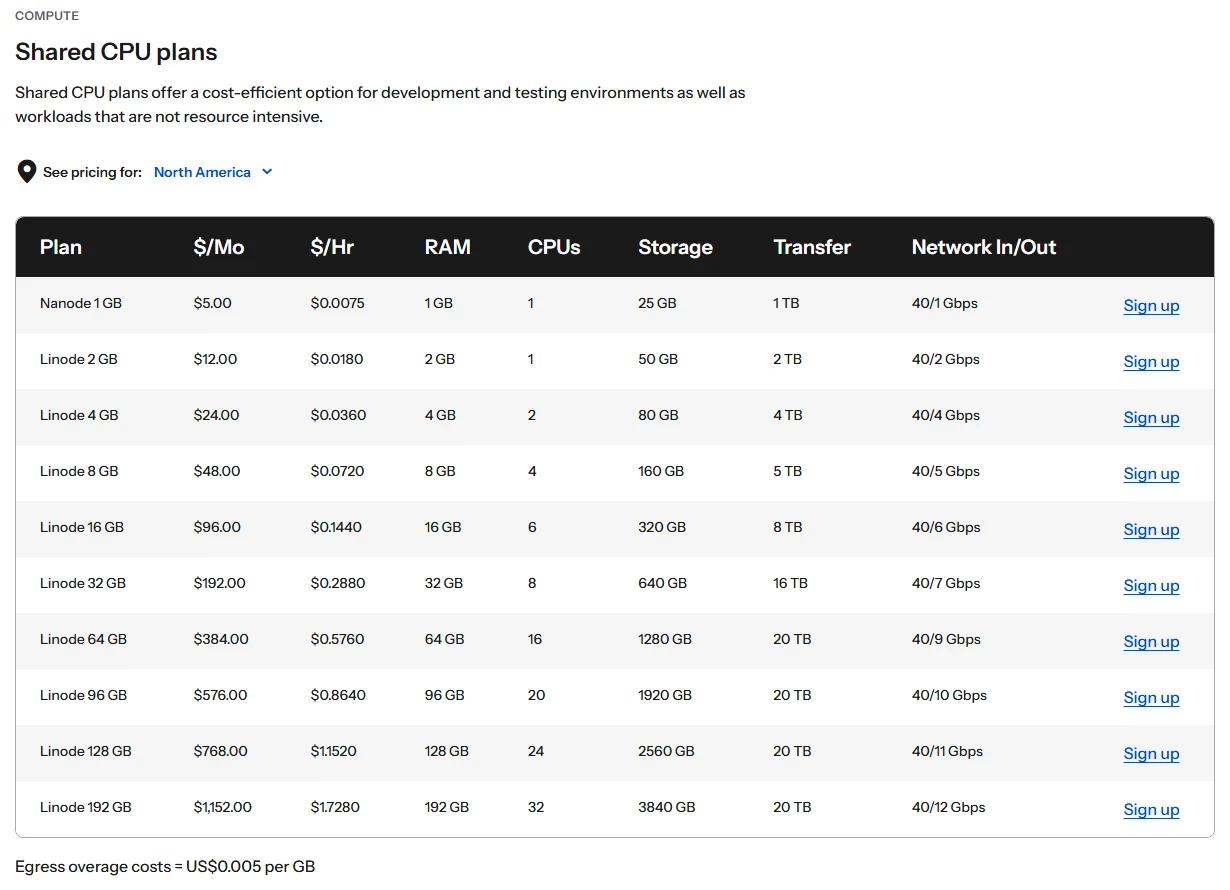
Linode is now part of Akamai and sold as Akamai Cloud, but the product is the same simple VPS developers have used for years. The Nanode 1 GB costs $5/month for 1 CPU, 1 GB RAM, 25 GB storage and 1 TB of transfer, and the 2 GB plan is $12/month. Usage is billed by the hour, rounded up.
Akamai’s public region list shows more than 30 core compute regions where you can launch servers. Servers are unmanaged, but you can add Akamai’s Managed Service for $100 per server per month, which is better value for a few important servers than for a single small one.
| Cheapest plan | Nanode 1 GB: 1 CPU, 1 GB RAM, 25 GB, 1 TB transfer |
| Price | $5/mo, billed hourly |
| Managed? | Unmanaged (Managed Service add-on $100/mo per server) |
| Control panel | None included (Marketplace apps) |
| Locations | 30+ core regions |
| Refunds | Pay-as-you-go, delete the server to stop billing |
Pros
- Predictable, simple pricing
- Large global network behind it
- Easy to grow into dedicated CPU and high-memory plans
Cons
- Same small RAM as other $5 cloud plans
- Managed help is expensive for one small server
- No control panel included
Who it suits: developers who want a no-frills VPS from a big, stable company. Our Linode review has the details.
VPS Hosting Comparison Table
Here’s every provider side by side. “Renews at” is only filled in where the provider shows a different renewal price; pay-as-you-go clouds charge the same rate every month.
| Provider | Cheapest plan | Starts at | Renews at | Managed | Locations |
|---|---|---|---|---|---|
| Hostinger | 1 vCPU, 4 GB, 50 GB NVMe | $6.49/mo (24 mo) | $11.99/mo | Self-managed | 10 |
| ScalaHosting | 2 cores, 4 GB, 50 GB NVMe | $22.46/mo (12 mo) | $54.95/mo | Fully managed | 4 own + partners |
| Vultr | 1 vCPU, 1 GB, 25 GB | $5/mo (hourly) | Same | Unmanaged | 33 |
| DigitalOcean | 1 vCPU, 512 MiB, 10 GiB | $4/mo (per second) | Same | Unmanaged | 16 |
| InMotion | 4 vCPU, 8 GB, 160 GB NVMe | $43.49/mo (24 mo) | $56.49/mo | Managed | 3 |
| Liquid Web | 1 vCPU, 2 GB, 60 GB | $11/mo self-managed | Same | Self, core or full | 4 |
| Hostwinds | 1 CPU, 1 GB, 30 GB | $4.99/mo (monthly) | Same | Both | 3 |
| InterServer | 1 core, 2 GB, 40 GB | $3/mo (monthly) | Same | Self (managed at 8 slices) | 3 |
| Contabo | 4 vCPU, 8 GB, 100 GB SSD | $5.28/mo + VAT (24 mo) | Not shown | Unmanaged | 11 |
| Hetzner | 1 vCPU, 1 GB, 20 GB NVMe | €6.49/mo + VAT (hourly) | Same | Unmanaged | 6 |
| Akamai (Linode) | 1 CPU, 1 GB, 25 GB | $5/mo (hourly) | Same | Unmanaged | 30+ |
Notice how the cheapest headline prices are not the cheapest servers. Hostinger’s $6.49 buys 4 GB RAM; a $5 cloud plan buys 1 GB. On the other hand, the cloud providers never hit you with a renewal jump.
How to Choose a VPS Host
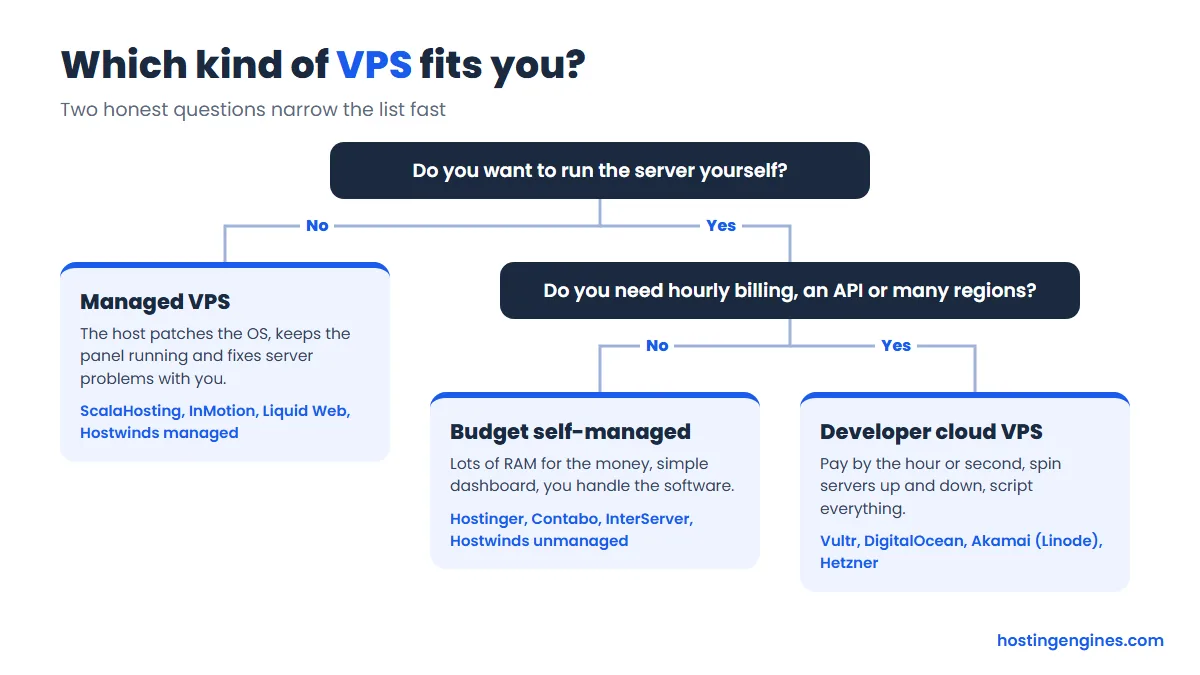
Start with the two questions in the chart above, then check these:
- RAM first. For WordPress, 2 GB is a comfortable minimum and 4 GB gives you room for caching and a few sites. CPU matters less than people think for small sites.
- Total cost over the time you’ll stay. Add the renewal price, the control panel license (cPanel can cost more than the server), backups and any region fees.
- Location. Put the server near most of your visitors. US-only hosts like InterServer are a poor fit for an audience in Asia.
- Billing style. Long prepaid terms get the lowest price on Hostinger, ScalaHosting, InMotion and Contabo. Hourly or monthly billing (Vultr, DigitalOcean, Akamai, Hetzner, Hostwinds, InterServer) keeps you flexible.
- Refund rules. They range from 90 days at InMotion to 72 hours at Hostwinds and none at Liquid Web or InterServer VPS.
- Your skills. If “SSH”, “firewall rules” and “apt upgrade” don’t mean much yet, either budget for managed hosting or pick a self-managed host with a friendly dashboard.
Still unsure whether you need a VPS at all? Our comparison of shared hosting vs VPS hosting walks through the signs.
FAQ
What is the best VPS hosting for beginners?
Hostinger is the best VPS for most beginners who are willing to learn, because its dashboard, one-click templates and AI assistant make a self-managed server much less scary. If you don’t want to manage anything, choose a managed VPS like ScalaHosting or InMotion instead.
Is a VPS better than shared hosting?
A VPS is better once your site needs guaranteed resources, root access or software shared hosting won’t run. For a small blog with modest traffic, shared hosting is cheaper and needs no server work, so there’s no rush to move.
How much RAM do I need on a VPS?
Most WordPress sites run well on 2 to 4 GB of RAM. A single small site can live on 1 GB with careful tuning, while WooCommerce stores, several sites under cPanel or self-hosted apps usually want 4 GB or more.
What’s the cheapest VPS hosting worth using?
InterServer’s $3 slice (2 GB RAM, monthly) and Contabo’s Cloud VPS 4 (8 GB RAM, from $5.28 before VAT on a 24-month term) give the most for the least money. Vultr’s $2.50 plan is cheaper on paper, but it’s IPv6-only and only offered in a few locations.
Do I need a control panel on a VPS?
You don’t need one, but most website owners are happier with one. ScalaHosting includes SPanel and InMotion’s managed plans include cPanel; on most other hosts a panel is a paid add-on or a free open-source option you install yourself.
Can I switch from unmanaged to managed later?
Yes, with some hosts. Hostwinds lets you upgrade an unmanaged VPS to managed from its Cloud Portal, and Akamai sells a Managed Service add-on per server.
Our Verdict
For most people moving up from shared hosting, Hostinger VPS is the best value: 4 GB RAM, NVMe storage and free backups for a few dollars a month, as long as you’re fine with a 24-month prepay and handling the server yourself. If you’d rather never log in over SSH, ScalaHosting gives you a fully managed VPS with a free control panel, and InMotion is the safer bet for a business that wants cPanel and a 90-day refund window. Developers should start with Vultr or DigitalOcean for hourly billing and a good API. And if you just want the biggest server you can get for the money, Contabo is hard to beat, as long as you accept its trade-offs.