
Pay as you go hosting sounds simple: use a server, pay for the hours you used. In practice every provider has its own rules about minimums, caps, stopped servers and extras, and those rules decide whether you save money or get a surprise invoice.
We checked the official pricing and billing pages of eight providers that really bill by the hour or minute. Below you get the verified prices, how each bill works, what costs extra, and who each provider suits.
Quick answer
The best pay as you go hosting for most people is Cloudways, because it bills hourly but manages the server for you. Developers get better value from DigitalOcean, Vultr or Akamai Cloud, which start at a few dollars a month with no contract. Always delete servers you stop using.
Key takeaways
- Real pay as you go means hourly or per-minute billing, no contract, and billing stops when you delete the server.
- Most providers cap the hourly charge at one monthly price, so a full month never costs more than the plan price.
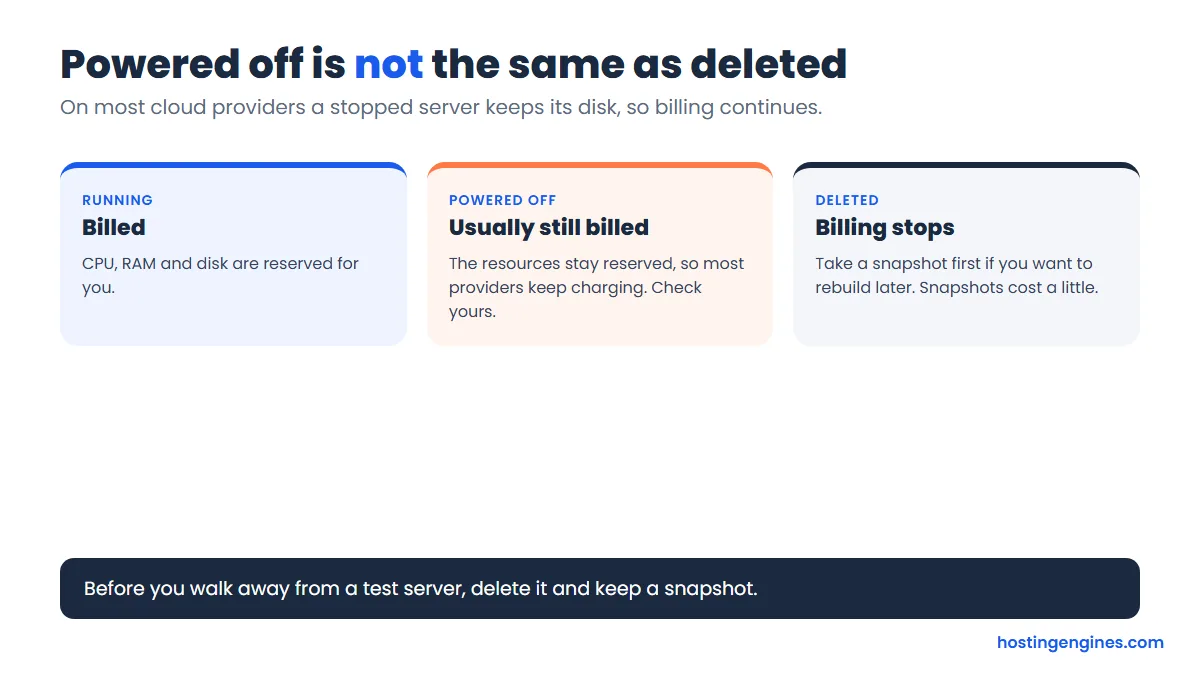
- A powered-off server is usually still billed. Delete it, and keep a snapshot if you want to rebuild.
- Backups, bandwidth overage, snapshots and extra IP addresses are where the surprise costs hide.
- Popular shared hosts such as Hostinger and Hosting.com sell fixed terms, not hourly billing.
Our top picks at a glance
All prices are in US dollars unless marked, taken from each provider’s own pricing page. “From” prices are for the smallest plan, so your real server will cost more.
| Provider | From (monthly / hourly) | Billing unit | Managed? | Best for |
|---|---|---|---|---|
| Cloudways | $11 / $0.0164 | Hourly usage, billed after | Yes | Site owners who want no server work |
| DigitalOcean | $4 / $0.00595 | Per second (60 s minimum) | No | Developers and small apps |
| Vultr | $2.50 IPv6 only, $3.50 with IPv4 / $0.005 | Hourly | No | Lowest entry price, many locations |
| Akamai Cloud (Linode) | $5 / $0.0075 | Hourly, capped monthly | No ($100 add-on) | Balanced price and bandwidth |
| Hetzner Cloud | About EUR 6.49 with IPv4 | Hourly, capped monthly | No | European hosting, strong value |
| Kamatera | From $4 (page) | By the minute | Optional | Custom CPU, RAM and disk mixes |
| UpCloud | EUR 3 / capped 28 days | Starting hour | No | Big free trial credit |
| Hostwinds Cloud | $0.006931 per hour | Hourly | Managed VPS also sold | Hostwinds customers wanting cloud |
What is pay as you go hosting?
Pay as you go hosting bills you for the resources and time you actually use, usually by the hour, instead of a fixed prepaid term. You create a server, run it, delete it, and the bill stops. There is normally no contract and no setup fee.
It is common on cloud and VPS platforms. It is almost never offered on ordinary shared hosting. If you want the pricing model explained from the ground up, see our guide to the pay as you go pricing model in web hosting.
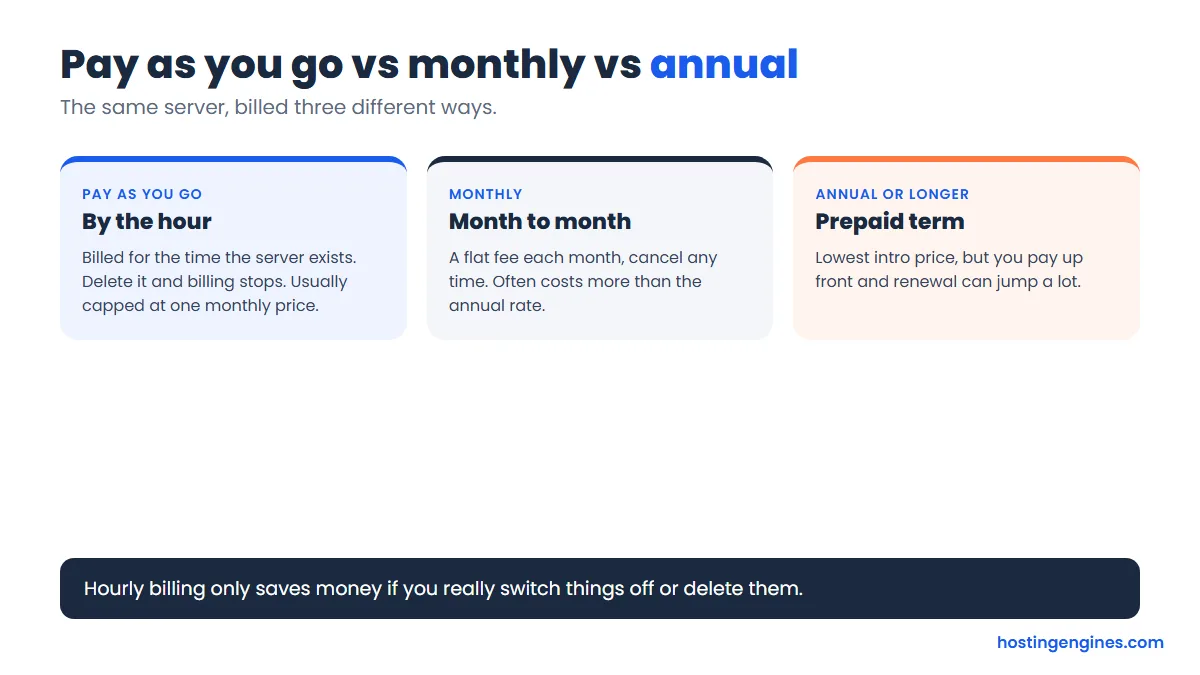
Pay as you go vs monthly vs annual billing
Pay as you go charges by the hour and can stop any time. Monthly billing is a flat fee you can cancel monthly. Annual billing is a prepaid term with the lowest intro price but a bigger renewal jump. For testing and spiky traffic, pay as you go wins. For one stable site, a long term is cheaper.
| Pay as you go | Monthly | Annual or longer | |
|---|---|---|---|
| You pay for | Hours the server exists | A flat month | A prepaid term |
| Commitment | None | Month to month | 1 to 4 years |
| Cheapest when | Short or changing workloads | You want flexibility | One site runs all year |
| Main risk | Forgotten servers and extras | Higher monthly price | Renewal price jump |
Our comparison of monthly vs annual web hosting subscriptions goes deeper on the long term side.
How does hourly billing work?
Providers meter the time your server exists, multiply it by an hourly rate, and cap the total at the monthly price. DigitalOcean, for example, bills per second with a 60 second minimum, and bundled plans stop charging at the monthly price after 672 hours (28 days).
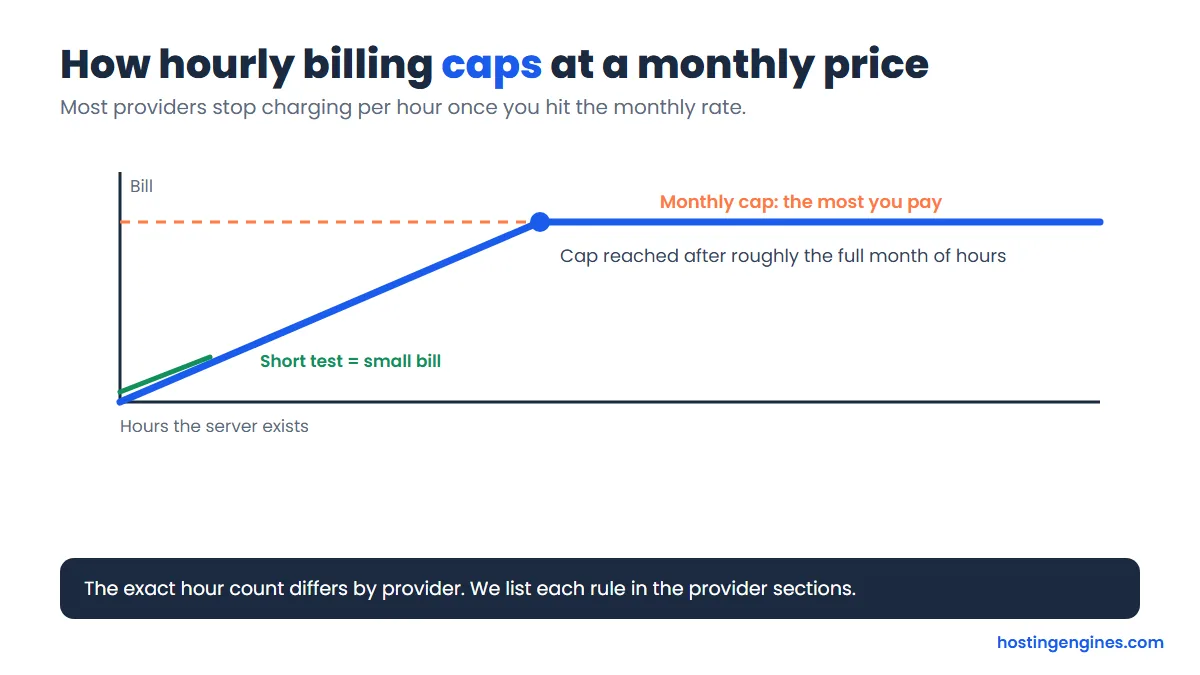
That makes testing cheap. A three day test on DigitalOcean’s smallest plan is 72 hours at $0.00595, about $0.43 before backups and extras.
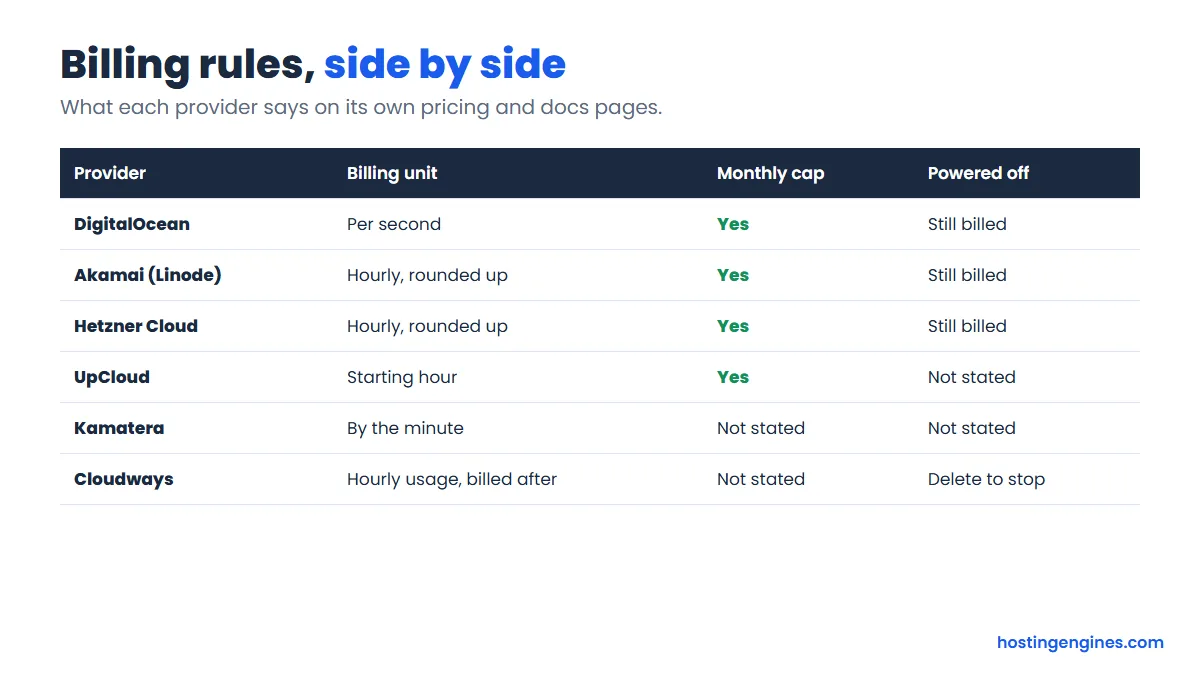
Invoices usually arrive after the fact. Cloudways and Akamai invoice on the 1st for the previous period, and DigitalOcean is postpaid too. Akamai also bills mid-month if your balance hits a $50 threshold.
How we picked these providers
A provider made the list only if it bills by the hour or minute, has no contract, and shows prices publicly. We then opened each official pricing page and recorded the plan price, billing rules, backups, bandwidth and trial. Where a page hid an answer behind a collapsed FAQ or would not load, we mark it as not stated.
- Billing rules: real hourly or per-minute billing, with a clear monthly cap.
- Entry price: what the smallest usable plan costs.
- Extras: backups, snapshots, bandwidth overage and IP addresses.
- Effort: managed or do-it-yourself.
- Our experience: we link our own reviews and pricing guides where we have them.
The 8 best pay as you go hosting providers
1. Cloudways: best managed pay as you go hosting
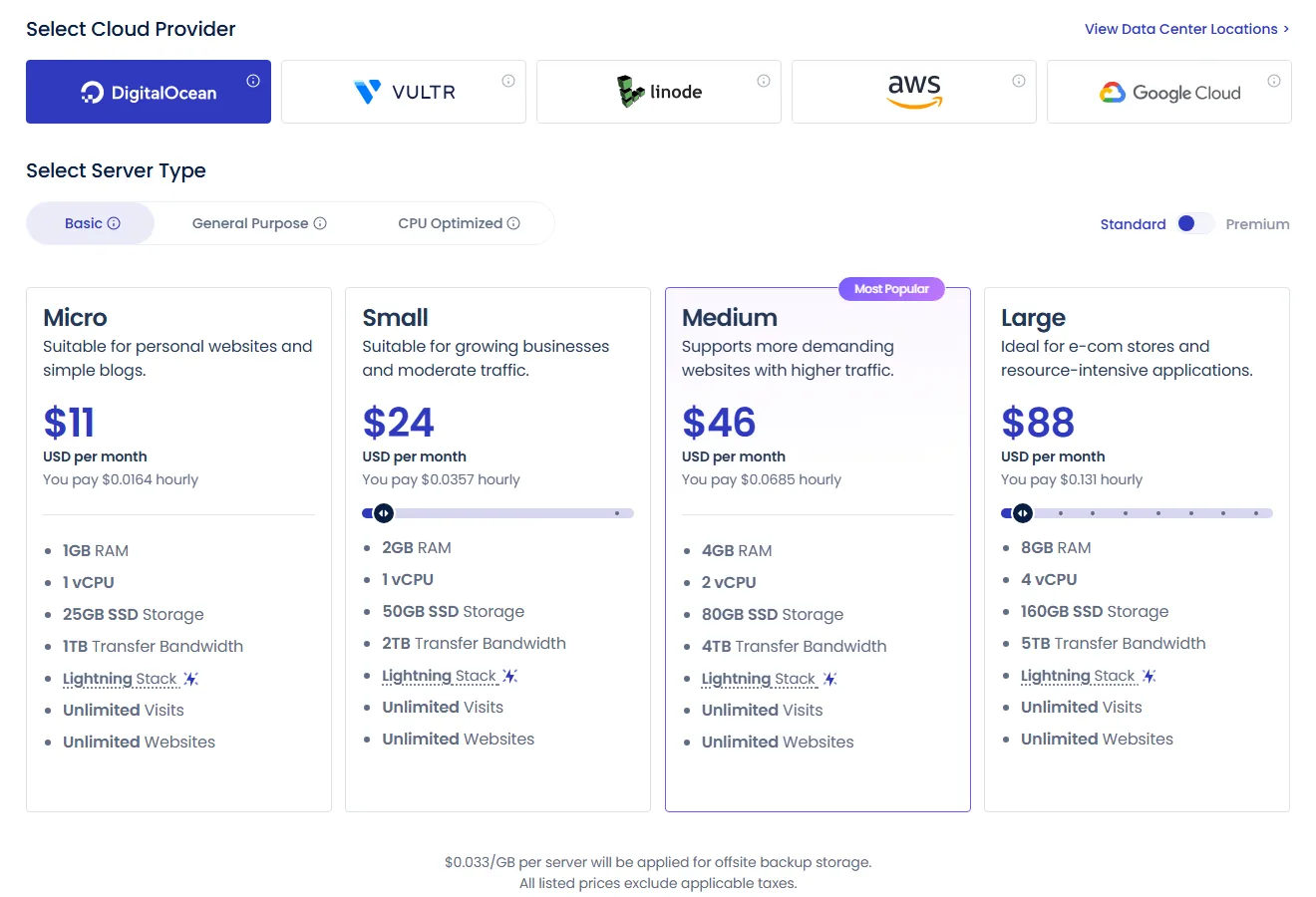
Cloudways puts a managed hosting layer on top of DigitalOcean, Vultr, Linode, AWS and Google Cloud. The Micro plan is $11 a month ($0.0164 an hour) with 1 vCPU, 1 GB of RAM, 25 GB of SSD and 1 TB of transfer. Usage is tracked hourly, and the invoice for the previous month arrives on the 1st. There is no lock-in, and you can upgrade or downgrade any time.
- Trial: 5 days, no credit card.
- Backups: backup storage is mandatory and billed at $0.033 per GB.
- Bandwidth: your site keeps running if you pass the allowance. Extra usage is billed at the provider’s rate: $0.02 per GB on DigitalOcean and Linode, $0.01 per GB on Vultr in North America and Western Europe.
- SSL: free Let’s Encrypt SSL built in. Billing stops when you delete a server.
Our Cloudways pricing guide breaks down each plan, and the Cloudways review covers speed and support. Try Cloudways.
2. DigitalOcean: best for developers and small apps
DigitalOcean’s smallest Basic Droplet is $4 a month ($0.00595 an hour) with 1 vCPU, 512 MiB of RAM, 10 GiB of SSD and 500 GiB of transfer. The 1 GiB plan is $6 a month and the 2 GiB plan is $12.
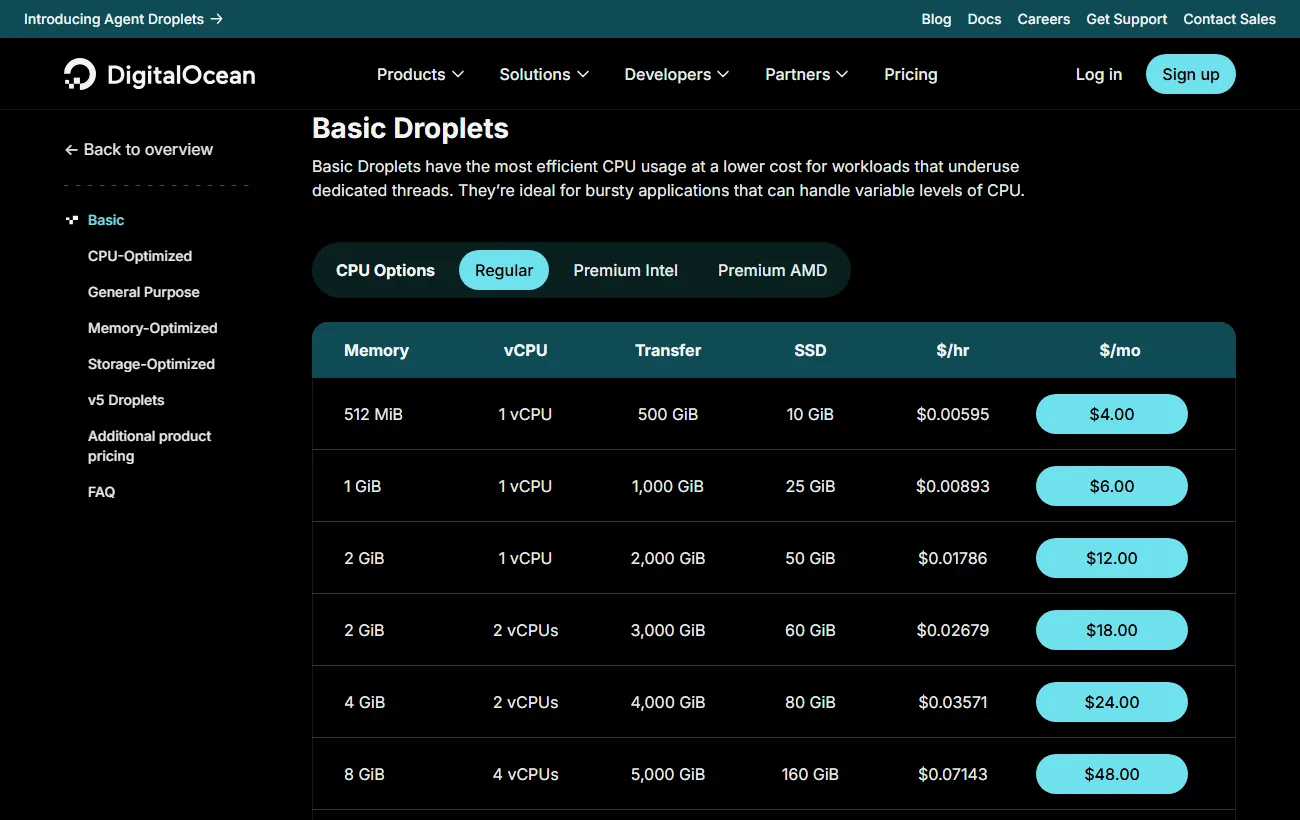
- Billing: per second with a 60 second minimum (or $0.01, whichever is higher), capped at the monthly price after 672 hours. Postpaid.
- Extras: backups cost 20% of the Droplet price weekly or 30% daily. Snapshots are $0.06 per GB a month. Overage is $0.01 per GiB of outbound traffic.
- Powered off: a stopped bundled Droplet is still billed. Destroy it to stop billing.
- Managed? No. You handle updates and security.
See our DigitalOcean pricing guide and DigitalOcean review. Check Droplet pricing.
3. Vultr: lowest entry price and many locations
Vultr’s Cloud Compute starts at $2.50 a month ($0.004 an hour) for an IPv6-only server, $3.50 ($0.005 an hour) with IPv4 (both 1 vCPU, 0.5 GB of RAM, 10 GB of storage and 0.5 TB of bandwidth), and $5 a month ($0.007 an hour) for 1 vCPU, 1 GB of RAM, 25 GB of storage and 1 TB of bandwidth.
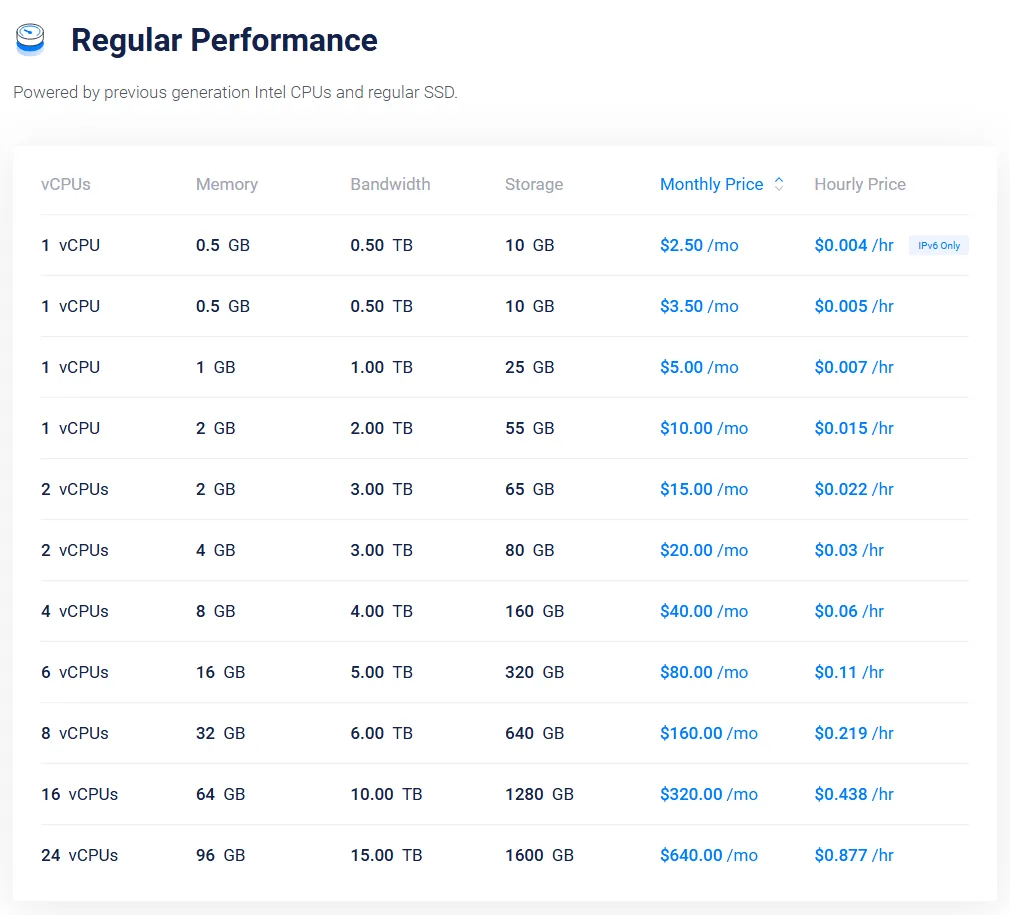
- Billing: hourly. Vultr’s pricing page says its newer VX1 plans are billed on actual hours and are not capped at 672 hours, so check the cap on the plan you pick.
- Extras (reported): backups at 20% of the plan price, snapshots at $0.05 per GB and $0.01 per GB overage. We read these from search summaries of Vultr’s docs, because the FAQ answers were collapsed in the page we rendered, so verify them in the console.
- Managed? No.
Our Vultr pricing guide and Vultr review have the plan detail. See Vultr plans.
4. Akamai Cloud (Linode): balanced price and bandwidth
Akamai Cloud, formerly Linode, starts with the 1 GB Nanode at $5 a month ($0.0075 an hour): 1 vCPU, 25 GB of storage and 1 TB of transfer. Billing is hourly, rounded up, and capped at the monthly price.
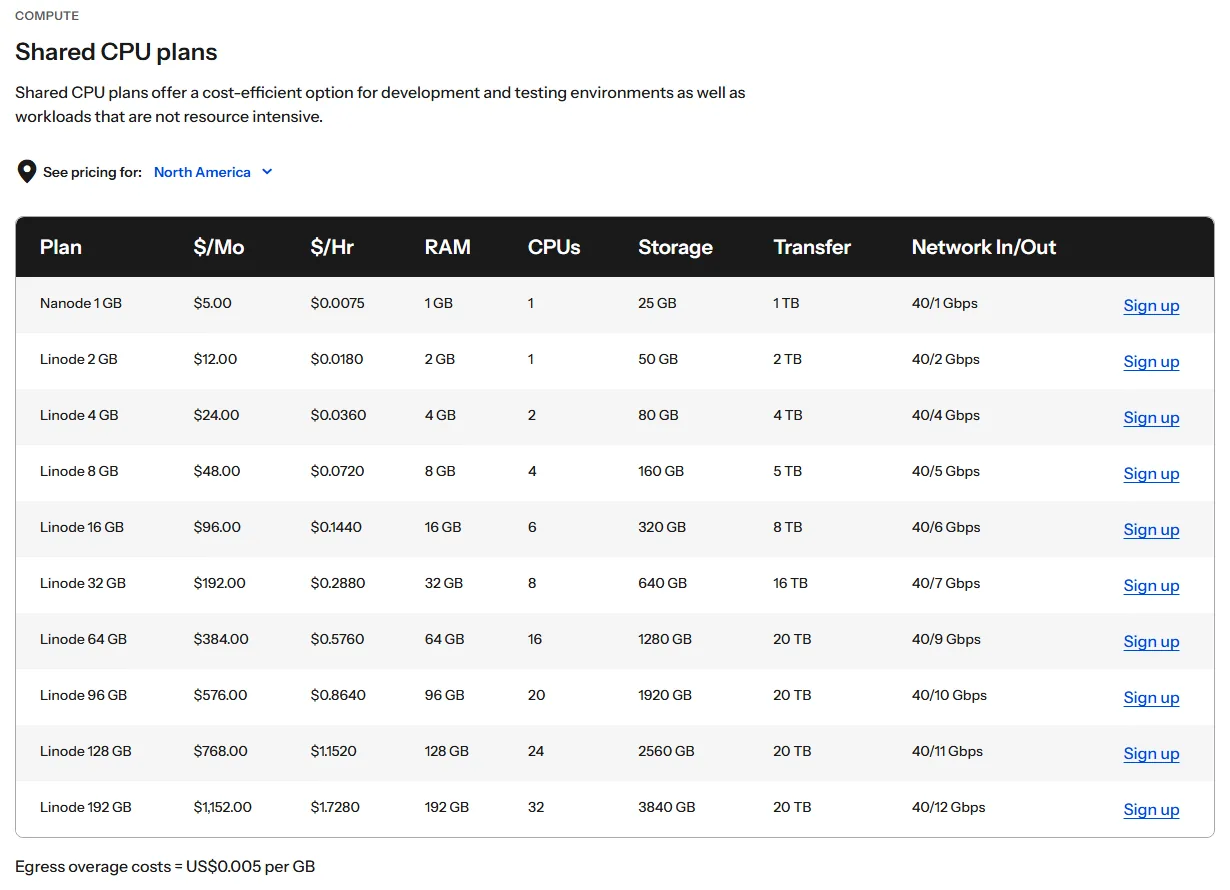
- Invoices: on the 1st, plus a mid-month invoice if charges reach $50. You can prepay and keep a balance.
- Powered off: still billed until removed.
- Extras: backups start at $2 a month for the smallest plan. its pricing page lists egress overage at $0.005 per GB. Akamai says extra IPv4 addresses are billed hourly with no monthly cap, and we did not find the price. A Managed Service add-on is $100 per instance a month.
Read the Akamai Cloud (Linode) pricing guide and Akamai Cloud review. View Akamai Cloud pricing.
5. Hetzner Cloud: strong value in Europe
Hetzner’s docs list the entry CX23 server at EUR 5.49 a month (EUR 0.0088 an hour) excluding IPv4, which is the EUR 5.99 “starting from” price its cloud page shows with IPv4. That Cost-Optimized line was marked currently not available when we checked, so the next line, Regular Performance, is the realistic start at about EUR 6.49 a month including IPv4. Billing is hourly and rounded up, capped at the monthly price, and a server is billed whether it is on or off.
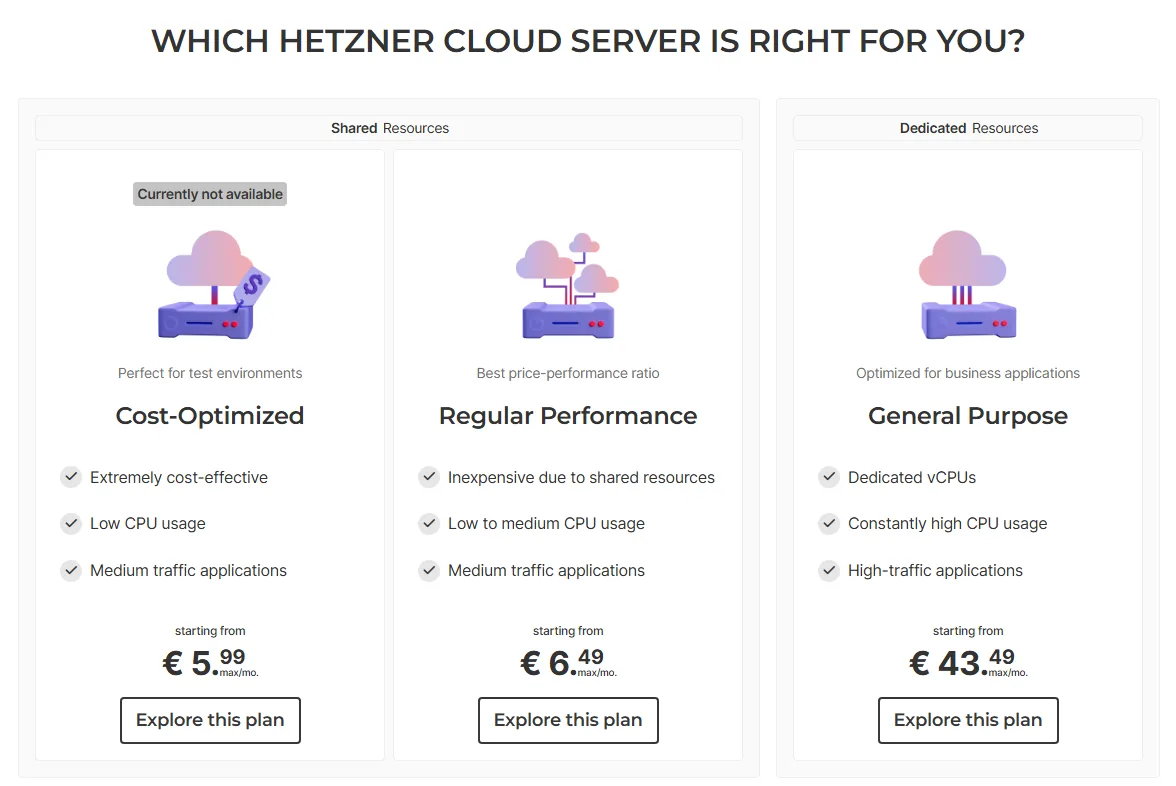
- Extras: backups are 20% of the server price. A primary IPv4 address is EUR 0.50 a month, and IPv6 is free.
- Gaps: we could not read the plan specs, snapshot rate or traffic overage price from Hetzner’s current pages, so confirm them before you order.
Check Hetzner Cloud pricing. We have no Hetzner review yet.
6. Kamatera: custom builds billed by the minute
Kamatera lets you pick CPU, RAM and disk separately. Its pricing page says servers start at $4 a month, and hourly servers are billed by the minute with no long-term contract.
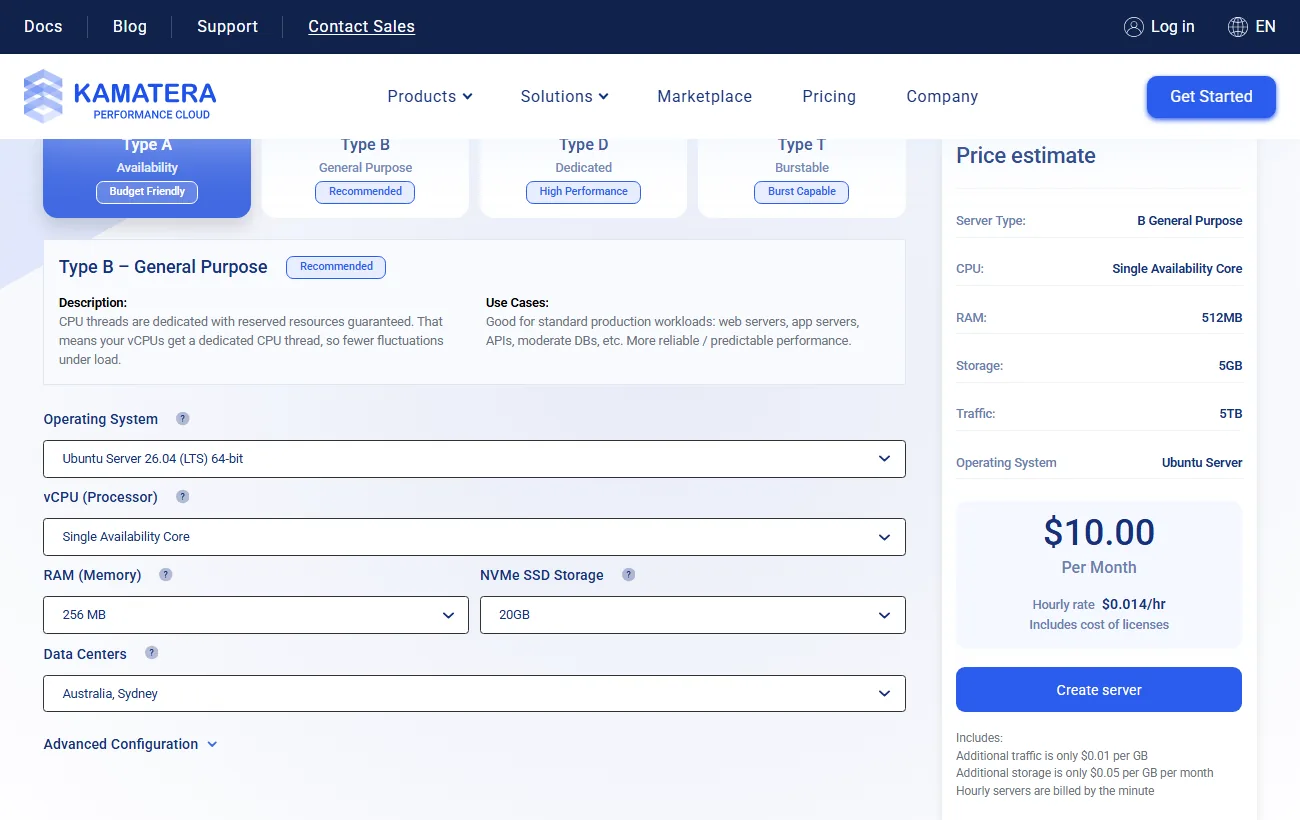
- Extras: additional traffic is $0.01 per GB and additional storage $0.05 per GB a month.
- Control panels: cPanel and Plesk are paid add-ons.
- Gaps: we could not confirm backup, snapshot or stopped-server billing.
Open the Kamatera configurator.
7. UpCloud: big trial credit
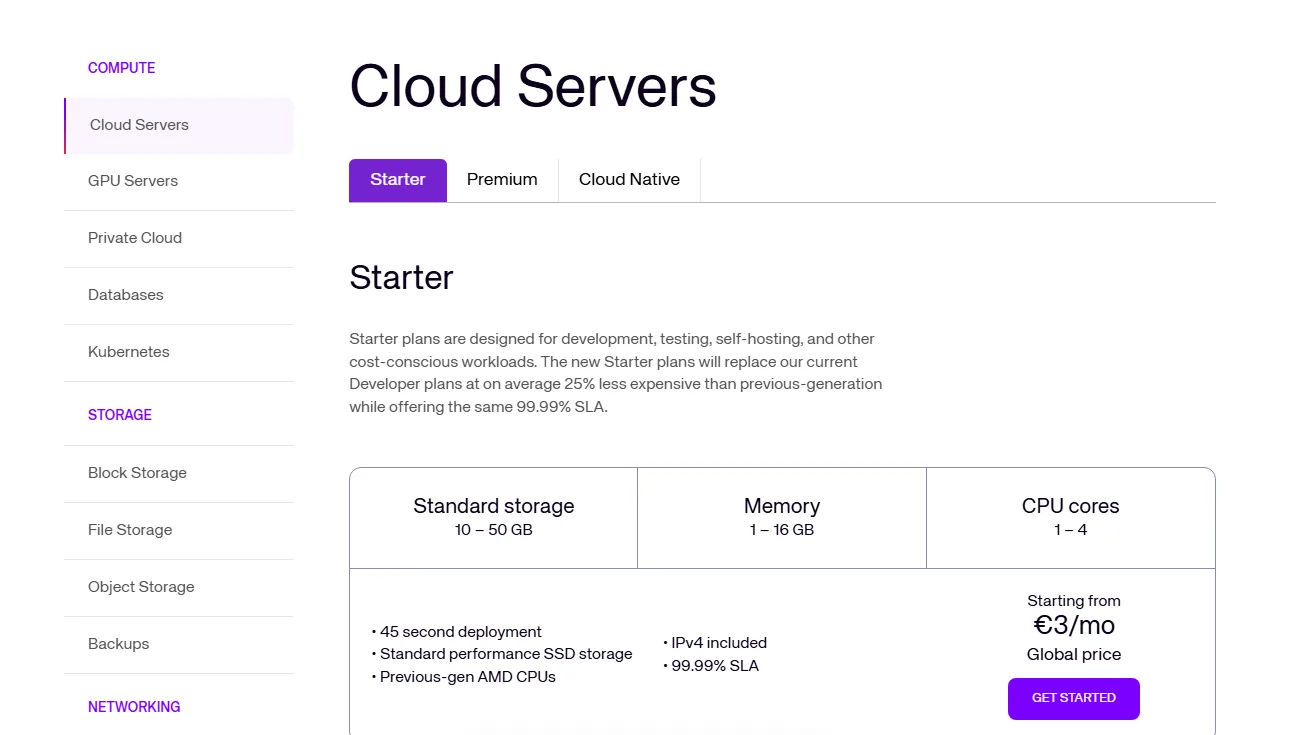
UpCloud’s Starter plan is EUR 3 a month (USD 3.5 on its global page) for 1 vCPU, 1 GB of RAM and 10 GB of storage, with an IPv4 address included and zero-cost egress. It bills by the starting hour and caps the Starter at 28 days.
- Trial: $500 in credits for the first 30 days.
- Heads up: UpCloud says plan prices change shortly after our check, so confirm today’s number.
8. Hostwinds Cloud: hourly cloud from a shared host
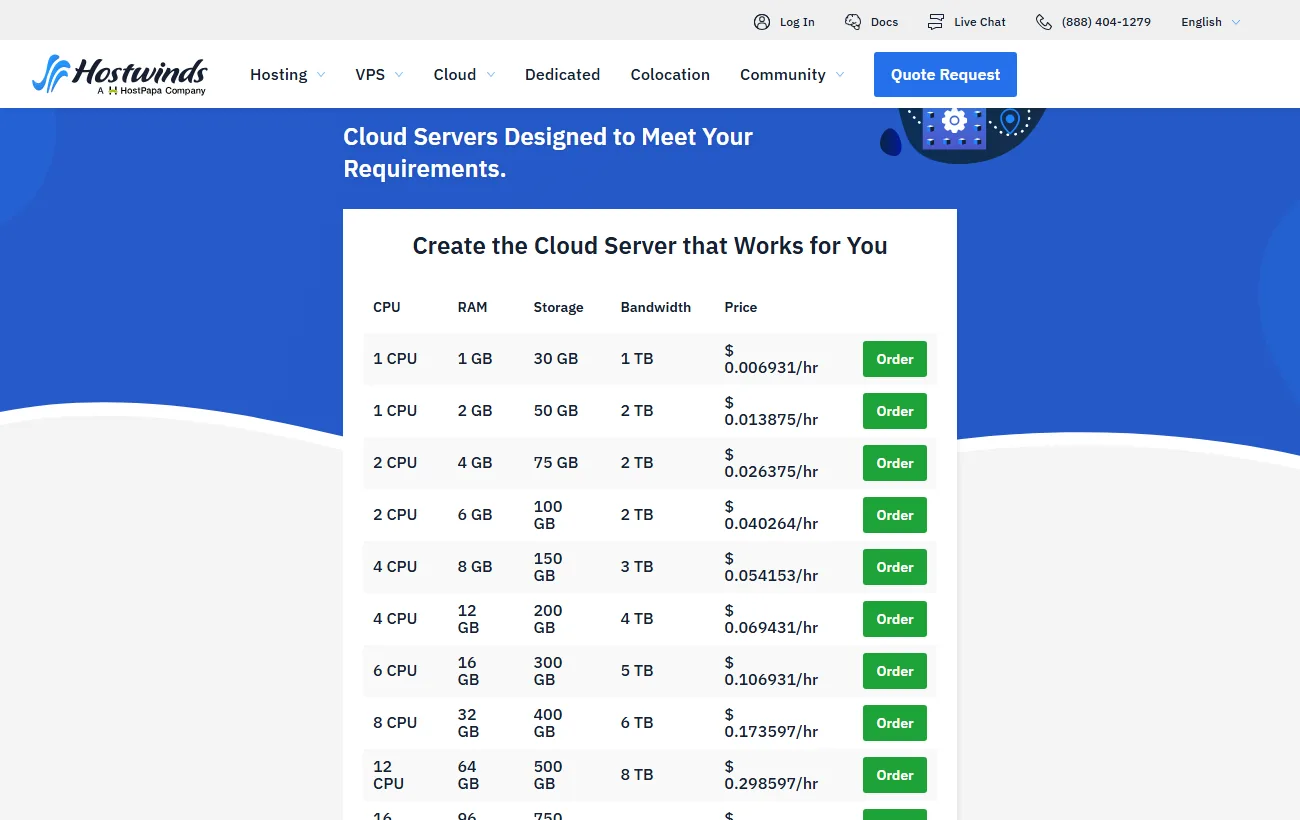
Hostwinds sells hourly cloud servers alongside shared and VPS hosting. The smallest cloud server (1 CPU, 1 GB of RAM, 30 GB of storage, 1 TB of bandwidth) is $0.006931 an hour. The larger 2 CPU and 4 GB server is $0.026375 an hour.
- Also available: managed Linux VPS from $10.99 a month on a monthly basis.
- Gaps: we did not find the monthly cap, backup price or overage rate on its cloud page.
See our Hostwinds review for the shared and VPS side. View Hostwinds cloud servers.
What are the hidden costs?
The server price is only part of the bill. Backups, bandwidth overage, snapshots and extra IP addresses add up, and a forgotten test server keeps billing until you delete it. Add them up before comparing two cheap plans.
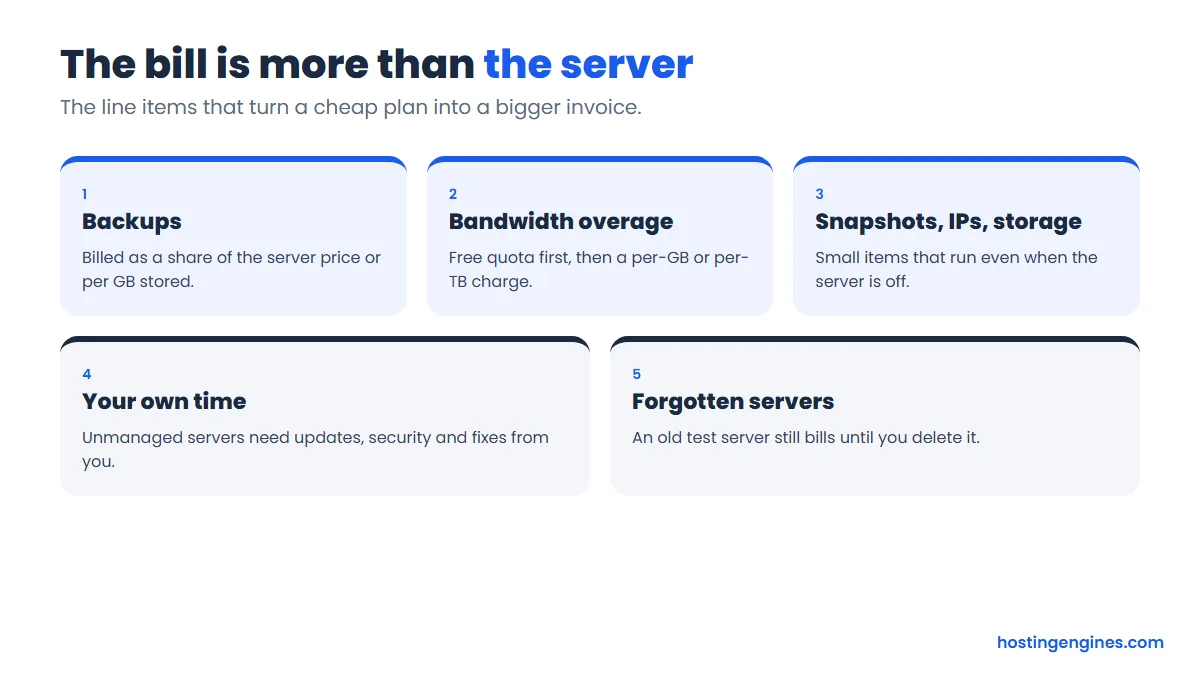
- Backups: 20% of the plan price at DigitalOcean (weekly), Vultr and Hetzner, and $0.033 per GB at Cloudways.
- Bandwidth overage: $0.01 per GiB at DigitalOcean, and up to $0.12 per GB on AWS through Cloudways.
- IP addresses: Hetzner charges EUR 0.50 a month for a primary IPv4, and Akamai bills extra IPv4 hourly with no cap.
- Your time: unmanaged servers need patching and monitoring, which is the case for choosing Cloudways despite the higher price.
Our guide to the hidden costs of website hosting covers fees outside pay as you go too.
Which popular hosts are not pay as you go?
Most shared hosts are not pay as you go. Hostinger and Hosting.com sell fixed terms with a 30 day money-back guarantee, and we found no hourly option on their plan pages. OVHcloud lists its VPS plans monthly. A refund window is not the same as hourly billing.
If you only want a low monthly price and no hourly meter, a long shared plan is usually cheaper. If you want room to grow later, compare it against the best cloud hosting services and the best VPS hosting providers.
Which provider should you choose?
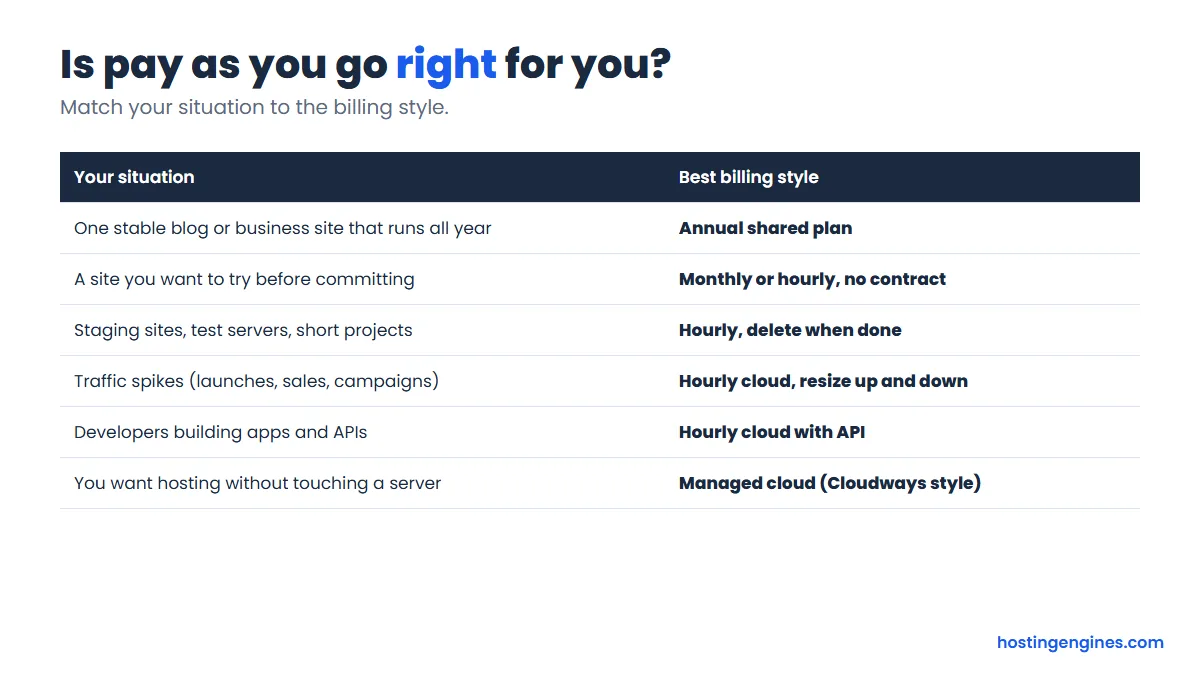
Choose Cloudways if you want hosting without server work, DigitalOcean, Vultr or Akamai if you are comfortable on a command line, Hetzner for European value, and UpCloud if you want a large free credit to test. If you need to compare the big three, read DigitalOcean vs Vultr vs Linode.
FAQ
Is pay as you go hosting cheaper?
Only for short or changing workloads. A server you run all month costs the monthly cap, which is similar to a flat monthly plan. A long shared plan with an intro discount is often cheaper still. The saving comes from deleting what you do not use.
Do I pay if my server is turned off?
Usually yes. DigitalOcean, Akamai and Hetzner all say a powered-off server is still billed because its resources stay reserved. Delete the server to stop the charge, and take a snapshot first if you want to rebuild later.
Is there a minimum charge or deposit?
Billing minimums are small. DigitalOcean’s is 60 seconds or $0.01. Akamai allows prepaying a balance. We did not find a required deposit on the official pages we read, but check your signup flow.
Which pay as you go host is best for WordPress?
Cloudways is the easiest because it manages the stack and includes free SSL. On DigitalOcean, Vultr or Akamai you install and maintain WordPress yourself, which suits developers more than beginners.
What happens if I go over my bandwidth?
Cloud providers keep your server online and bill the extra. DigitalOcean charges $0.01 per GiB of outbound traffic over your pool. At Cloudways the rate follows the underlying provider, from $0.01 per GB up to $0.12 per GB on AWS.
Can I get pay as you go hosting with a free trial?
Yes. Cloudways gives 5 days with no card, and UpCloud gives $500 in credit for 30 days. DigitalOcean’s docs mention a signup credit but we could not confirm the amount.
Bottom line
Pay as you go is worth it when your workload is short, changing or unpredictable. For a steady site, a long plan can be cheaper. Whatever you pick, delete test servers, and read the backup and bandwidth lines before you compare prices.
Next step: if you want managed hosting that bills hourly, start with our Cloudways pricing breakdown.