
This free page size checker measures the total weight of any web page: the HTML plus every script, stylesheet, image and font it loads, with a breakdown and a list of the heaviest files. No sign-up needed.
How to check a page’s size
- Enter the page address, like
example.comor a full link to a blog post. - Click Measure. The tool loads the page, follows redirects, finds every file the HTML points to, and asks each one for its size at the same time.
- Read the verdict, then scroll to Heaviest files to see what to trim first.
Test more than your home page. A single blog post with a few big screenshots can easily outweigh the rest of the site.
How to read the results
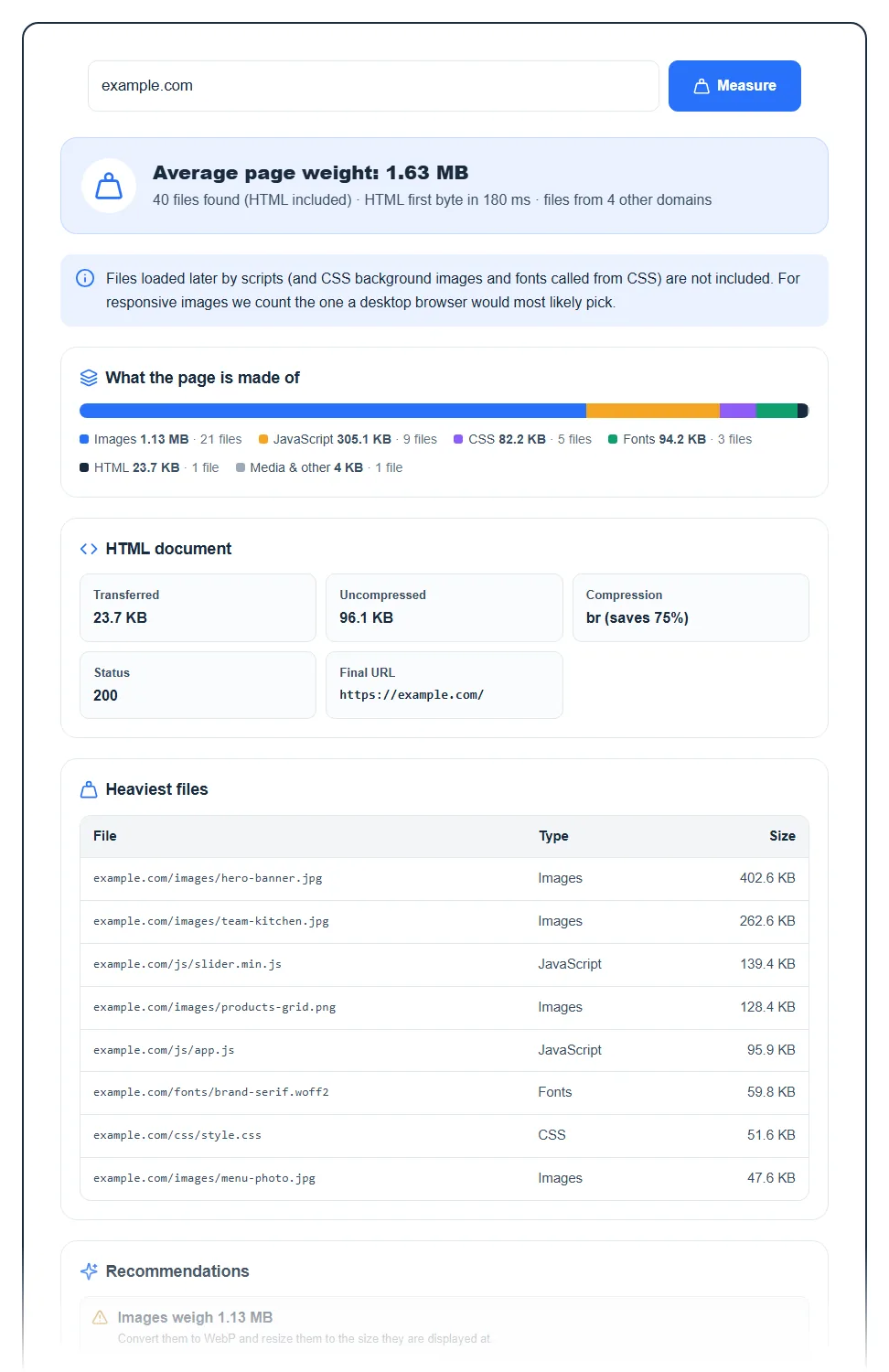
The verdict
The top line gives the total weight and a label:
| Label | Total page weight |
|---|---|
| Lightweight page | under 1 MB |
| Average page weight | 1 MB to 2.5 MB |
| Heavy page | 2.5 MB to 5 MB |
| Very heavy page | 5 MB or more |
Under it you’ll see the number of requests (the HTML plus each file found), how long the server took to send the first byte of HTML in milliseconds, and how many other domains the page pulls files from. A slow first byte points at the server or hosting, not at page weight. Lots of other domains usually means ads, trackers, fonts or embeds.
What the page is made of
A colored bar splits the weight into Images, JavaScript, CSS, Fonts, HTML and Media & other, with the size and file count for each. On most sites images win by a mile. If JavaScript is the biggest slice, look at plugins, page builders and third-party widgets.
HTML document
- Transferred: bytes that actually crossed the network, after compression.
- Uncompressed: the real size of the HTML once it’s unpacked.
- Compression: gzip, br (Brotli) or another method, with the percentage saved. “Not compressed” is worth fixing right away.
- Status and Final URL: the HTTP code and the address the tool ended up on after redirects.
Heaviest files and recommendations
Heaviest files lists the ten biggest files with their type and size. This is your shortlist. The Recommendations box then flags the usual suspects: no gzip or Brotli on the HTML, images over 1 MB in total, JavaScript over about 500 KB, or more than 80 requests. If none of those apply, it says no major weight problems were found.
What the number does not include
The checker reads the files listed in the HTML: scripts, stylesheets, preloaded fonts, icons, images (including lazy-loaded ones in data-src), video posters and media sources. It doesn’t run JavaScript, so anything a script loads later, plus CSS background images and fonts pulled in by stylesheets, isn’t counted. It measures up to 80 files per page.
Sizes come from each file’s server headers. When a server doesn’t report a size, the tool tells you how many files it skipped, so the real total is a bit higher. Treat the result as a solid estimate of the first load, not an exact browser waterfall.
How to make a heavy page lighter
- Shrink images first. Convert them to WebP and resize them to the width they’re actually shown at. A 4000 pixel photo in an 800 pixel column is pure waste.
- Turn on compression. Most hosts let you enable gzip or Brotli in the control panel, or a caching plugin does it for you.
- Cut scripts. Remove plugins you don’t use, drop sliders and chat widgets you can live without, and defer the rest.
- Limit fonts. Two families with a couple of weights is plenty.
- Use a CDN. It won’t make files smaller, but it serves them from closer to your visitors. Here’s how a CDN works.
If the page is light but still slow, the bottleneck is probably your server. Read how web hosting affects speed, or see how we got a 100% PageSpeed score on this site.
FAQ
What is a good web page size?
Under 1 MB is a good target for most pages, and lighter is better on mobile. Image-heavy pages like galleries will be bigger, which is fine as long as each image is compressed and sized properly.
Does page size affect SEO?
Not directly, but it affects speed, and speed affects user experience and Core Web Vitals, which Google does look at. A heavy page also burns more of your visitors’ mobile data and your hosting bandwidth.
Why is my result different from my browser’s developer tools?
Because the browser runs scripts and loads extra files the HTML doesn’t list, like CSS background images or ads. Your browser may also pick a smaller image from srcset. The checker measures what the HTML asks for up front.
What’s the difference between transferred and uncompressed size?
Transferred is what travels over the network after gzip or Brotli. Uncompressed is the size after the browser unpacks it. A big gap between the two means compression is doing its job.
Is there a limit on how many pages I can check?
Yes, 10 checks every 10 minutes per visitor, since each check fetches dozens of files. It’s free and needs no account. While you’re at it, run the same page through the meta tags analyzer.