SiteGround has a reputation that most hosts would love: quick WordPress sites, support people who actually fix things, and a polished dashboard. It also has a reputation for one thing people complain about every year, the renewal bill. This SiteGround review looks at both sides, so you know what the first year costs, what every year after it costs, and whether the gap is worth paying.
How we put it together: everything here comes from SiteGround’s own plan pages, feature table, checkout and knowledge base, all checked in October 2026. We haven’t run our own speed or uptime benchmarks on SiteGround, so you won’t find made-up test numbers here. When we say “fast,” we’re talking about the setup SiteGround gives you, not a stopwatch.
Quick Verdict
Short answer: SiteGround is one of the nicest shared hosts to use, with good WordPress tools, daily backups, a free CDN and 24/7 help by chat, ticket and phone. The catch is price. The intro rate only covers your first invoice, and the regular rate on renewal is roughly six times higher on the 12-month plans. Go in knowing that number and it can still be a good deal.
| Best for | WordPress and WooCommerce sites, small businesses and agencies that value support and tools over the lowest price |
| Shared plans | StartUp, GrowBig, GoGeek |
| Starting price | From $2.99/month (12-month term), first invoice only |
| Renewal | StartUp renews at $17.99/month, GrowBig at $29.99, GoGeek at $44.99 |
| Money-back | 30 days on shared hosting, 14 days on cloud |
| Free extras | Domain for the first year, SSL, CDN, email, daily backups, site migration |
| Data centers | USA, Europe, Asia and Australia (11 locations at checkout) |
| Support | 24/7 chat, tickets and phone |
| Our take | Great to use, pricey at renewal. Worth it if you’ll actually use the tools and support. |
About SiteGround
SiteGround started in 2004 and runs its operations from Sofia, Bulgaria. It’s privately owned and says it’s trusted by the owners of about 3 million domains. Over the years it has built a lot of its own tooling instead of leaning on stock cPanel, and that’s the first thing you notice when you log in.
The company is also a long-time favorite in the WordPress world, which is part of why its name keeps showing up in “best host” lists. These days it sells shared hosting, cloud hosting, reseller plans, a website builder, email marketing and a set of AI tools, but shared hosting is still where most people start.
Who Is SiteGround For?
- You run a WordPress or WooCommerce site and want staging, auto-updates and caching handled for you.
- You’d rather pay more and get quick, competent support than save a few dollars and wait.
- You build sites for clients and want collaborators, white-label access and Git on one account.
- Your visitors are in North America, Europe, Asia or Australia and you want a server close to them.
It’s a weaker fit if your main goal is the lowest bill over several years, if you need lots of storage on the entry plan, or if you’re hosting one hobby site that will never earn anything. In those cases the renewal price stings more than the features help.
Pros and Cons
Pros
- Free SSL, CDN, email accounts and daily backups on every plan.
- Free site migration, plus a WordPress migrator plugin you can run yourself.
- Built-in caching (SuperCacher) and managed WordPress auto-updates.
- Staging on GrowBig and GoGeek, and Git on GoGeek.
- 24/7 support by chat, ticket and phone, with a priority queue on GoGeek.
- 11 data center locations to choose from at checkout.
- No setup fee, even on the monthly plans.
Cons
- Big renewal jump. The discount applies to the first invoice only, then you pay the regular rate.
- Small storage: 10 GB on StartUp, 50 GB on GrowBig.
- The cheapest intro price needs a 12-month prepayment. There’s no long cheap term like 36 or 48 months.
- StartUp hosts just one website and has no staging or on-demand backups.
- Prices are shown before VAT, so some buyers pay more at checkout.
SiteGround Plans and Prices
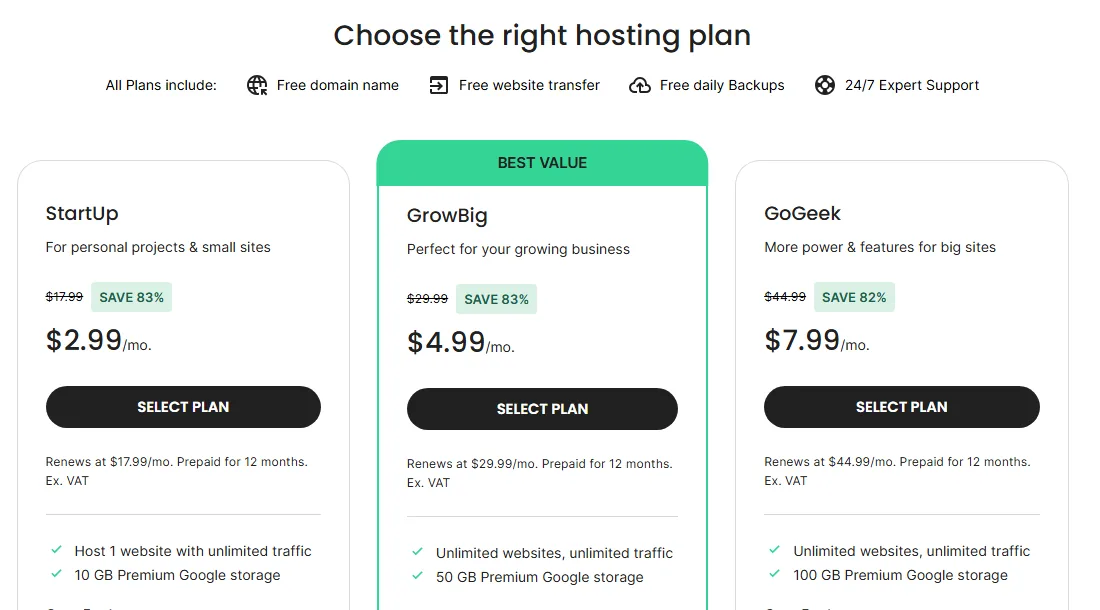
SiteGround sells three shared plans: StartUp, GrowBig and GoGeek. The headline prices are for a 12-month prepaid term, and you can also pick 1 month or 24 months at checkout. Prices checked October 2026, in US dollars, before VAT.
| Plan | 1-month term | 12-month term | 24-month term | Renews at |
|---|---|---|---|---|
| StartUp | $24.99/mo | $2.99/mo | $7.49/mo | $17.99/mo |
| GrowBig | $34.99/mo | $4.99/mo | $12.49/mo | $29.99/mo |
| GoGeek | $49.99/mo | $7.99/mo | $19.99/mo | $44.99/mo |
Notice something odd? The 24-month price per month is higher than the 12-month one. SiteGround puts its deepest discount on the one-year term. The monthly plan has no discount at all, but it also has no setup fee, which some hosts still charge on monthly billing.
What each plan includes
| Feature | StartUp | GrowBig | GoGeek |
|---|---|---|---|
| Websites | 1 | Unlimited | Unlimited |
| Storage | 10 GB | 50 GB | 100 GB |
| Suggested monthly visits | About 10,000 | About 100,000 | About 400,000 |
| Data transfer | Unmetered | Unmetered | Unmetered |
| Server resources | Essential | Premium | Geeky |
| Daily backups | Yes | Yes | Yes |
| On-demand backups | No | Yes | Yes |
| Staging | No | Yes | Yes, with Git |
| “30% faster PHP” | No | Yes | Yes |
| Node.js apps | No | 5 | 10 |
| White-label and private DNS | No | No | Yes |
| Priority support | No | No | Yes |
The visit numbers are SiteGround’s own guide to how much traffic each plan suits, not a hard cap. “Unmetered” data transfer also comes with a condition: SiteGround says it’s fine as long as you stay within the plan’s server resource limits. In practice, storage is the limit most small sites hit first, especially on StartUp, since your email lives in the same 10 GB.
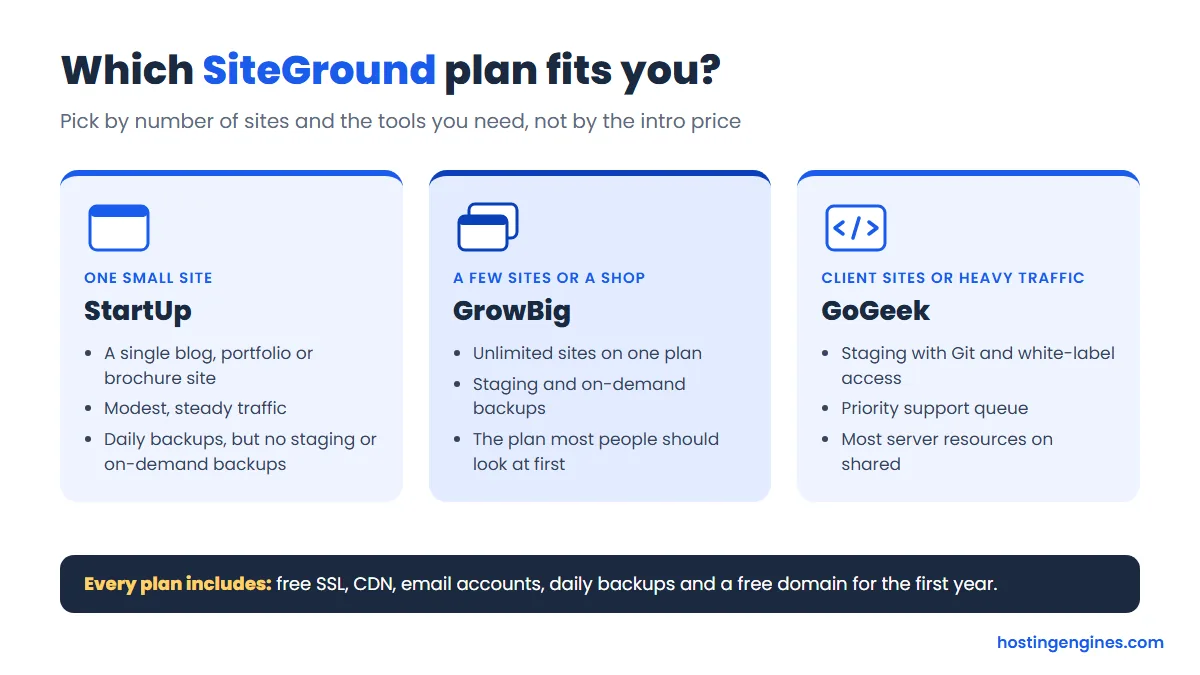
Our pick for most people is GrowBig. Staging alone is worth it the first time a plugin update breaks your layout, and you can host more than one site. StartUp is fine for a single personal site. GoGeek earns its price if you manage client sites or want the priority support queue.
The Renewal Jump: What SiteGround Really Costs
This is the part of any SiteGround review that matters most for your budget. The checkout says it plainly: discounted prices apply to the first invoice only, and regular prices apply to every renewal after that. Your plan also auto-renews for the same period you first bought, unless you change it in the Client Area.
| Plan | First year (12-month term) | Each renewal year | Difference |
|---|---|---|---|
| StartUp | $35.88 | $215.88 | About 6x |
| GrowBig | $59.88 | $359.88 | About 6x |
| GoGeek | $95.88 | $539.88 | About 5.6x |
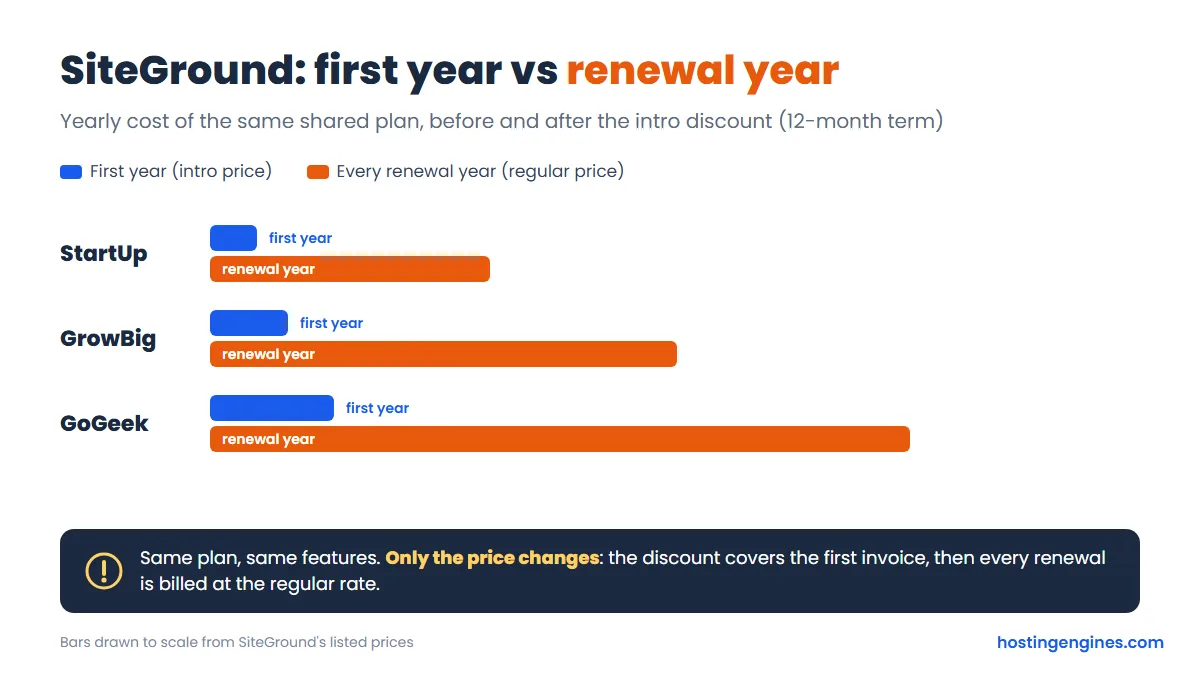
Is that unusual? Almost every shared host prices this way, but SiteGround’s gap is one of the wider ones, and its cheap term is only one year long. Some rivals lock in their intro price for three or four years. If you want the full picture of how this works across the industry, our guide to the hidden costs of website hosting walks through renewals, add-ons and domain fees.
Is the 24-month term worth it?
If you already know you’ll stay two years, yes. Here’s the math over the first 24 months:
| Plan | 12-month term, then one renewal | 24-month term upfront |
|---|---|---|
| StartUp | $251.76 | $179.76 |
| GrowBig | $419.76 | $299.76 |
| GoGeek | $635.76 | $479.76 |
The 24-month term costs more on day one but saves you money over two years, because it pushes the renewal jump back by a year. The 12-month term is only the better deal if you’re not sure you’ll still want the site next year.
Ways to soften the renewal
- Pick the longest term you’re confident about, so the discount lasts as long as possible.
- Put a reminder in your calendar a month before renewal and look at your plan again. If you outgrew StartUp or don’t use GoGeek’s extras, change plans before you’re billed.
- Check the add-on trials at checkout. Site Scanner, Premium Backup and Email Marketing are offered as one-month free trials that bill for a year if you don’t cancel.
- Budget for the domain too. The free domain covers year one only, and SiteGround’s checkout lists a .com at $22.99 a year.
Free Extras on Every Plan
SiteGround doesn’t nickel-and-dime the basics. Every shared plan includes:
- SSL: free Let’s Encrypt certificates, installed and renewed automatically.
- CDN: SiteGround’s own CDN, which it says spreads content across 170+ edge locations.
- Email: free email accounts at your domain, with webmail and spam protection.
- Backups: automatic daily backups, with up to 30 days of restore points.
- Migration: your first site migration is free, done by SiteGround’s team or with its automatic migrator for WordPress.
- Domain: one free .com, .org or .net for the first year.
Compare that with hosts that sell backups or SSL as add-ons, and some of SiteGround’s higher price starts to make sense. Hourly backups are the one thing you’d pay extra for, through the optional Premium Backup service.
Speed and Performance Features
SiteGround’s speed reputation comes from its setup rather than any one trick. Plans run on what it calls “Premium Google storage,” sites get multilevel caching through its SuperCacher, and the free CDN serves your static files from locations near your visitors. GrowBig and GoGeek add what SiteGround markets as “30% faster PHP.”
We didn’t run benchmarks, so we won’t quote load times. What we can say is that the tools a fast WordPress site needs are built in and turned on for you, which isn’t true on every budget host. If speed is your top concern, our list of the best WordPress hosting puts SiteGround next to the other hosts we’d consider.
WordPress Tools
WordPress is clearly where SiteGround puts its effort. You get one-click installs, managed auto-updates for WordPress and plugins (you can schedule or skip a version), WP-CLI and SSH on every plan, and staging on GrowBig and up. There’s also a new AI Agent for WordPress, which lets you manage parts of your site by chatting with it, plus a drag-and-drop Website Builder if you’d rather skip WordPress altogether.
One thing to know: SiteGround uses its own Site Tools dashboard, not cPanel. It’s clean and easy to learn, but if you’ve used cPanel for years, expect a short adjustment period.
Data Centers
You choose a location at checkout. In October 2026 the list had 11 options: four in the USA (Iowa, Virginia, Texas and California), the Netherlands, Paris, Madrid, Frankfurt, London, Singapore and Sydney. That’s a better spread than most shared hosts offer, and it means you can put an Australian or European site close to its readers instead of across an ocean.
Security
Each account is isolated from its neighbors on the server, and SiteGround runs its own anti-hack systems, server monitoring and spam protection. It also patches proactively; on the day we checked, its blog had a post about protecting customers ahead of a critical PHP security release. Daily malware monitoring with alerts for your own site is a separate paid service called Site Scanner.
Customer Support
Support is the other half of SiteGround’s reputation. It’s available 24/7 by live chat, ticket and phone on every plan, and GoGeek tickets and chats go to a priority queue with more experienced agents. The knowledge base and tutorials are large and well kept.
For many site owners, this is what the renewal price really pays for. If you’re the person who’d rather ask an expert than spend an evening on forums, it’s worth more than an extra 40 GB of storage.
Refunds and Cancellation
- Shared hosting: 30-day money-back guarantee from activation.
- Cloud hosting: 14 days.
- Domains: not refundable, and SiteGround says the domain fee “may be due upon cancellation even if waived initially.” So your free domain can cost you something if you ask for a refund.
- Renewals: a full refund if you cancel within 30 days and the new term hasn’t started yet; after that, a partial refund minus the first month.
- Refunds are requested by cancelling the service in your Client Area.
SiteGround Cloud Hosting
If a site outgrows GoGeek, SiteGround’s cloud hosting is the next step. It starts at $100/month for the Jump Start plan (4 CPU cores, 8 GB RAM, 40 GB SSD and 5 TB of data transfer), billed monthly with no setup fee. That’s a big step up in price, and for most small businesses GrowBig or GoGeek will be plenty. If you’re already at that level, it’s worth comparing with a managed cloud host before you commit.
SiteGround Alternatives
If the renewal price is the deal breaker, these are the hosts we’d look at next:
- Hostinger: Premium is $2.99/month on a 48-month term and renews at $10.99, so the cheap rate lasts four years instead of one. Support is chat-based. Read our Hostinger review.
- ChemiCloud: a smaller host with a similar “good support, good tools” feel. Starter is $1.95/month on a 36-month term, with a 45-day money-back window. See our ChemiCloud review.
SiteGround Review: Final Verdict
SiteGround is fast to set up, helpful when something breaks, and full of tools that WordPress users actually use: staging, daily backups, caching, a CDN and auto-updates. It’s also pricey once the first invoice is behind you, with renewals around six times the intro rate on the yearly plans.
Our advice: if you’re serious about a site and plan to keep it, take GrowBig on the 24-month term and treat the regular price as the real price. If that number makes you wince, pick a host whose discount lasts longer. Either way, you’ll know exactly what you’re signing up for.
FAQ
Is SiteGround good?
Yes, especially for WordPress. You get daily backups, free SSL and CDN, staging on GrowBig and up, 11 data center locations and 24/7 support by chat, ticket and phone. The main downside is the high renewal price.
How much does SiteGround cost after the first year?
StartUp renews at $17.99/month, GrowBig at $29.99 and GoGeek at $44.99, before VAT. On a 12-month term that’s $215.88, $359.88 and $539.88 a year, compared with $35.88, $59.88 and $95.88 for the first year.
Does SiteGround charge a setup fee?
No. We saw no setup fee in the checkout on any term, including the monthly plans, which cost $24.99, $34.99 and $49.99 a month with no discount.
Does SiteGround have a money-back guarantee?
Yes, 30 days on shared hosting and 14 days on cloud hosting. Domain fees are not refundable and may be charged even if the domain was free with your plan.
Which SiteGround plan is best?
GrowBig suits most people, since it allows unlimited sites and adds staging and on-demand backups. StartUp is enough for one small personal site, and GoGeek is for agencies or busy sites that need Git, white-label access and priority support.
Does SiteGround use cPanel?
No. SiteGround uses its own Site Tools dashboard, which covers files, email, databases, backups, caching and WordPress tools in one place.