Nexcess sells managed WordPress and WooCommerce hosting, so we expected this review to be simple: open the pricing page, note the plans, done. It wasn’t. When we went back to nexcess.com in 2026, the WordPress pricing page we had used before returned a “page not found” error, and the homepage now talks about bare metal, AI readiness and compliance instead of blogs and stores.
The managed WordPress plans still exist. They are sold on liquidweb.com, under a logo that reads “Liquid Web by Nexcess”. So this Nexcess review covers those plans: what they cost in US dollars, what you get on Pro and Elite, the features that actually set them apart, and the gaps we could not fill. We have not run our own speed or uptime tests, so you won’t find benchmark numbers here. When a claim comes from the company, we say so.
Quick answer
Nexcess (through Liquid Web) is a good fit for a business WordPress site that wants staging, daily backups, a CDN and safer plugin updates without touching a server. Pro WordPress starts at $19 a month for one site. Elite, at $29, is the plan we’d actually buy, because it doubles the backup history and adds human migration and virtual patching. If you run a small hobby blog, you’re paying for things you won’t use.
| Best for | Business WordPress sites that want a managed setup |
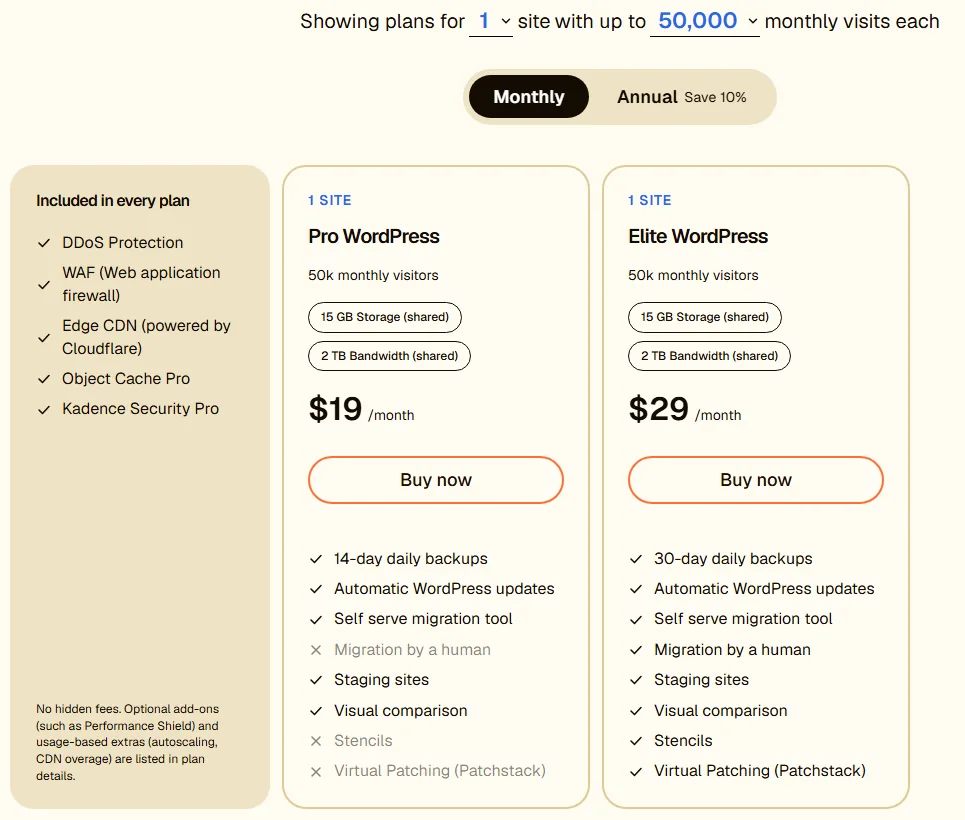
| Entry price | $19 a month billed monthly, or $17.10 a month on annual billing (one site, 50,000 visits) |
| Plans | Pro WordPress and Elite WordPress, from 1 to 25 sites and 50k to 400k monthly visits per site |
| Backups | Daily, kept 14 days on Pro and 30 days on Elite |
| Stand-out extras | Visual Comparison for plugin updates, staging, Stencils and Patchstack on Elite |
| Not shown | Renewal price and a refund period |
| Skip it if | You want the cheapest plan that works, or a published money-back promise |
Where Nexcess WordPress hosting lives now
This part confuses people, so it’s worth a minute. Nexcess.com today is pitched at bigger infrastructure buyers. The homepage headline is about cloud, and the main menu points to managed VPS, managed dedicated servers, bare metal and a section called Sites & Stores.
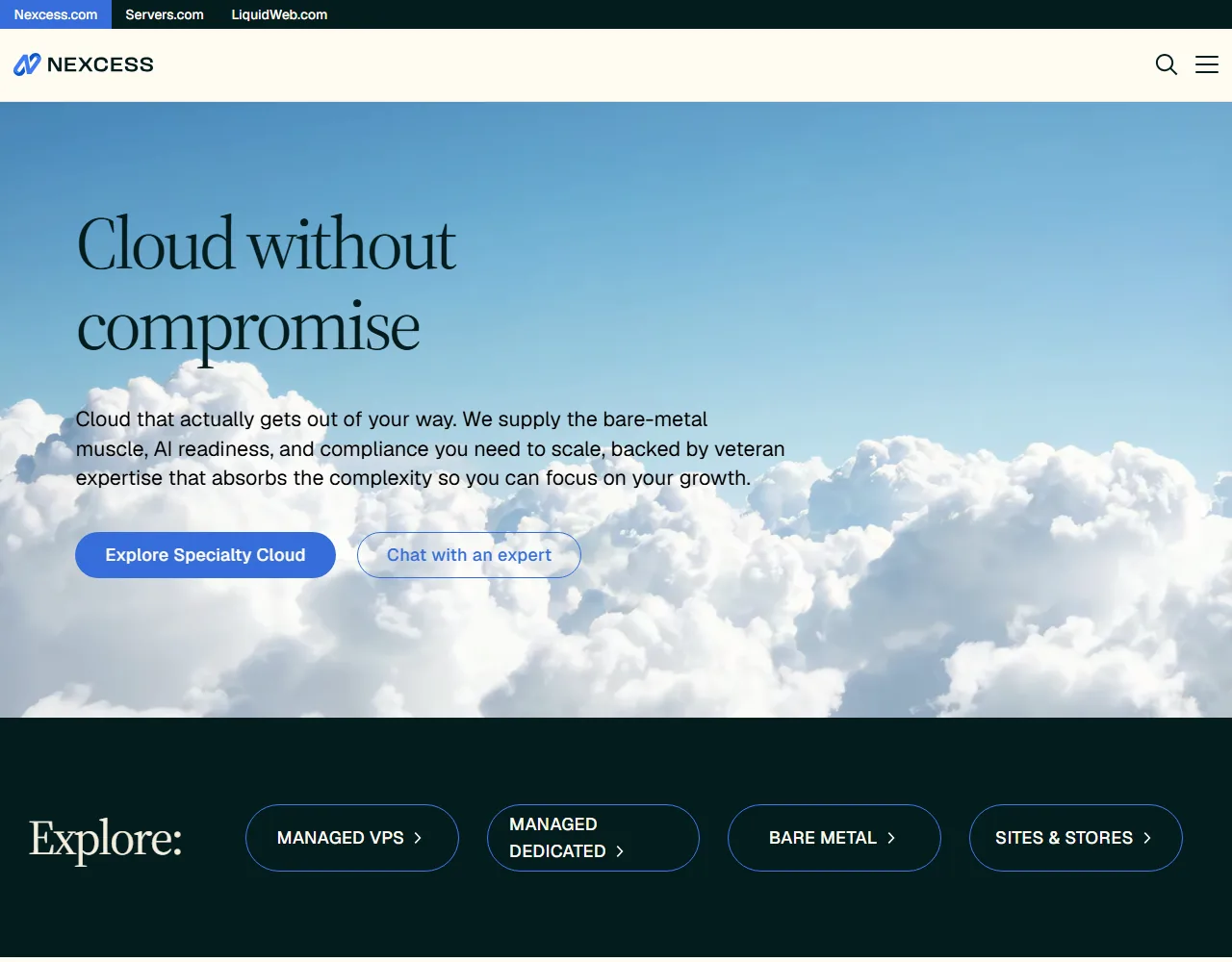
Sites & Stores does list “WordPress Hosting+”, “WooCommerce Hosting+”, Magento and Shopware hosting. But there are no prices there, only a “Chat with an expert” button. If you want a plan you can buy with a card in five minutes, you end up on Liquid Web’s WordPress hosting page.
How do the two fit together? Nexcess’s own site answers it. Its company description says it serves its customers “with our sub-brands LiquidWeb and Servers.com”, and it lists “Liquid Web by Nexcess” as part of the group. The Liquid Web header carries the same “by Nexcess” line under its logo, and the top bar links Nexcess.com, Servers.com and LiquidWeb.com side by side.

In practice, a “Nexcess WordPress plan” and a “Liquid Web WordPress plan” are the same product today. Whichever site you buy from, check that the plan names and prices match what you see below. If you also need a VPS or a dedicated server, our Liquid Web review covers the rest of the range.
Nexcess prices: what you will actually pay
The pricing tool asks two questions: how many sites, and how many visits each site gets per month. It then shows a Pro and an Elite card. Here is the smallest setup, one site with up to 50,000 visits, on monthly billing.
Switch to annual billing and both drop by 10 percent. The page shows the annual price as a monthly figure and doesn’t say whether you pay the whole year up front, so confirm that at checkout.
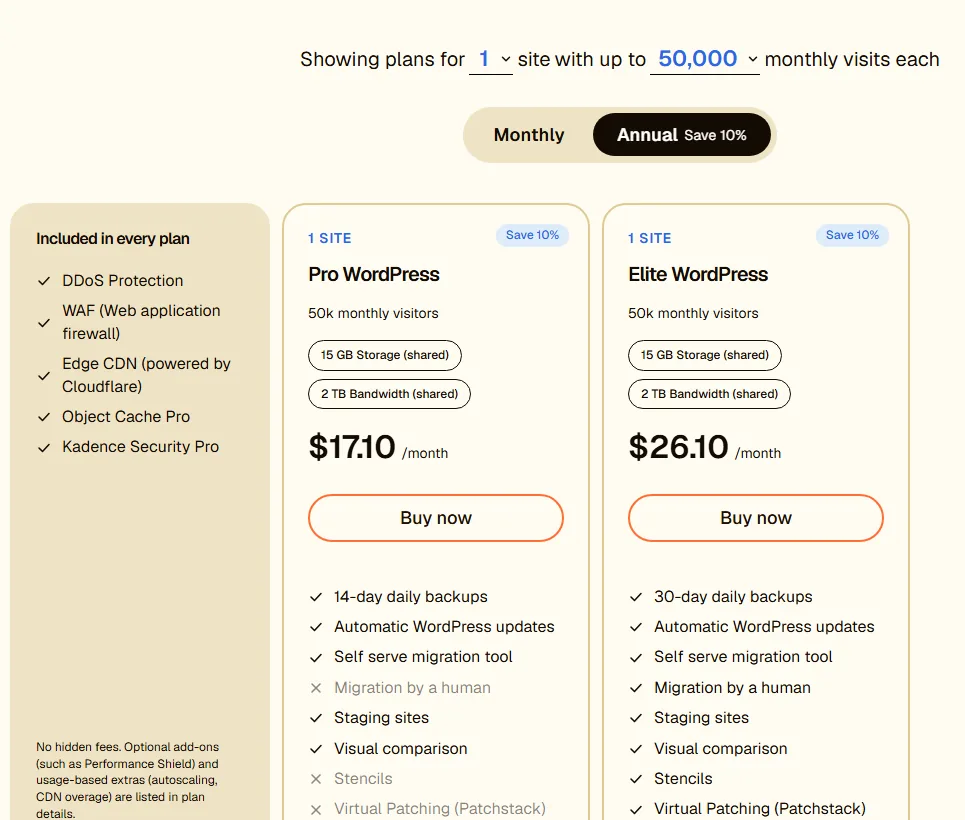
For one site, this is the full price ladder we found in 2026, in US dollars:
| One site, monthly visits | Pro monthly | Pro annual (per month) | Elite monthly | Elite annual (per month) |
|---|---|---|---|---|
| Up to 50,000 | $19 | $17.10 | $29 | $26.10 |
| Up to 150,000 | $39 | $35.10 | $59 | $53.10 |
| Up to 400,000 | $79 | $71.10 | $119 | $107.10 |
Each step up in visits also raises storage and bandwidth. Pro and Elite get the same resources at every size, so the price gap between them is purely about features, not horsepower.
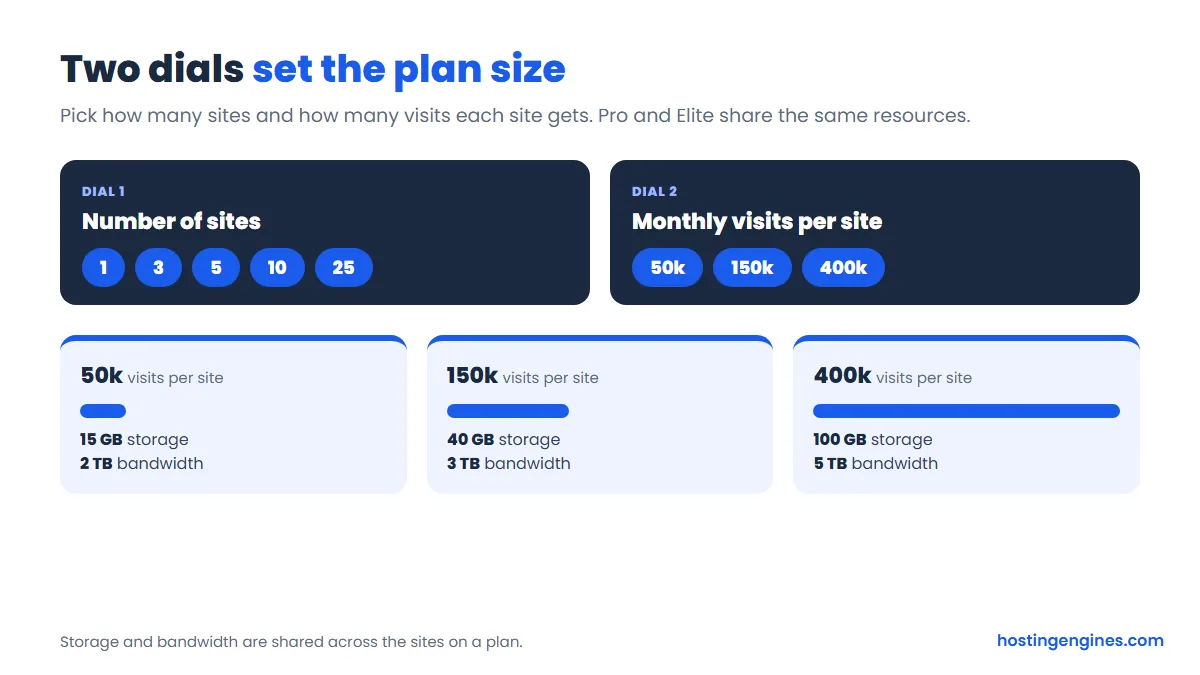
The jump from 50,000 to 150,000 visits roughly doubles the bill, and you get 40 GB of storage and 3 TB of bandwidth instead of 15 GB and 2 TB. Here is what that middle tier looks like on the page.
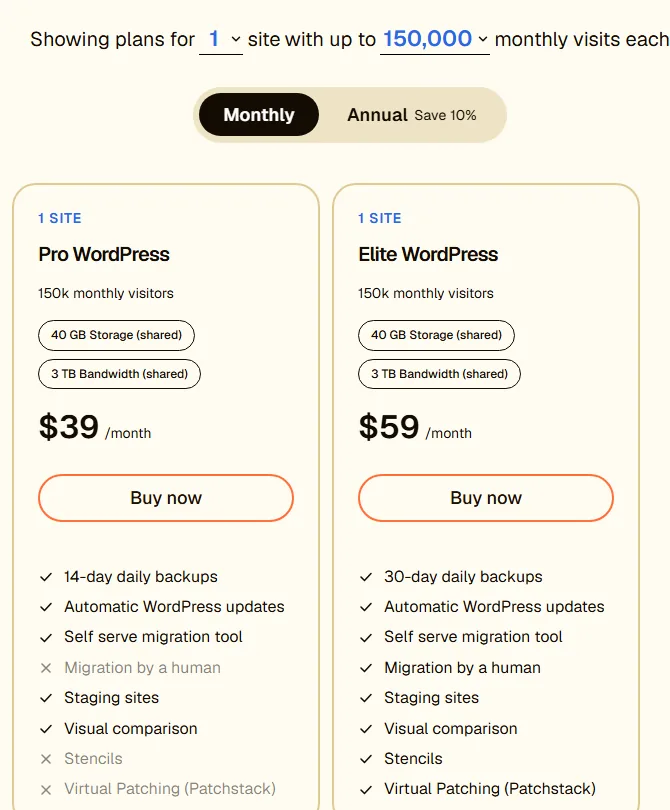
A word on “visits”. Most small business sites are nowhere near 50,000 a month. If your analytics say 8,000, don’t let the bigger tiers scare you. Start at the bottom and move up when the numbers say so. The page says you can switch to a larger plan as you grow.
Hosting several sites on one plan
This is where the pricing gets more interesting for freelancers and small agencies. Pick five sites and the cards show a per-site price under the total.
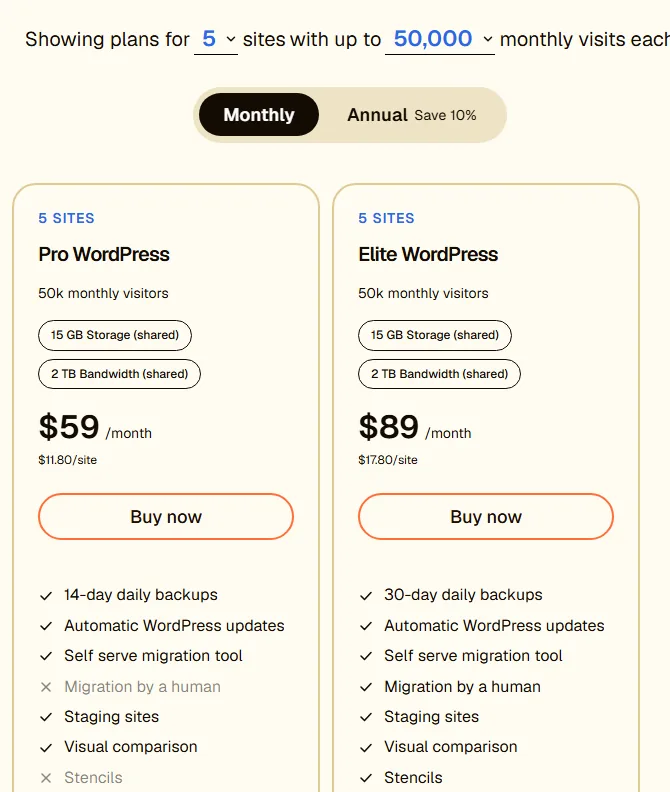
That’s a real saving over five single-site plans ($95 on Pro). The catch sits in the small print on the badges: storage and bandwidth are marked “shared”. On the five-site plan the cards still show 15 GB and 2 TB, so all five sites draw from that same pool. Five small brochure sites will fit easily. Five sites with big image libraries or WooCommerce product photos might not.
The tool goes up to 10 and 25 sites. Ten sites at 50,000 visits each came to $99 a month on Pro and $169 on Elite when we checked. Some of the largest combinations showed odd numbers in our check, so price those directly on the page if you’re planning that big.
Renewal, add-ons and the fine print
Three things are missing from the pricing page, and each one matters for your budget.
First, renewal. Shared hosts usually show a low first-term price and a much higher renewal. This page shows one price and no renewal figure at all. That could mean the price simply stays the same, which is common with managed WordPress plans billed monthly, but we could not confirm it. Look at the order summary before you pay.
Second, extras. A note beside the plans says there are no hidden fees, then mentions optional add-ons such as Performance Shield and usage-based extras for autoscaling and CDN overage. Those are “listed in plan details”, which we could not see without starting an order. If your site gets sudden traffic spikes, ask how those extras are billed.
Third, refunds. Neither the Liquid Web WordPress page nor the Nexcess pages we read state a money-back period. Third-party sites disagree on whether managed WordPress is covered by one. We’d rather say “we don’t know” than repeat a guess, so read the terms at checkout, or ask in chat before you buy.
What every plan includes
Both Pro and Elite come with the same base layer, listed in an “Included in every plan” panel: DDoS protection, a web application firewall, an edge CDN powered by Cloudflare, Object Cache Pro and Kadence Security Pro. Both plans also get automatic WordPress updates, staging sites, a self-serve migration tool and Visual Comparison.
Further down, the page also promises free SSL certificates, continuous malware monitoring and regular PHP updates. One small oddity: the plan panel names Kadence Security Pro, while a section further down names the Solid Security Pro plugin as free with every plan. Either way, you get a premium security plugin without buying it.
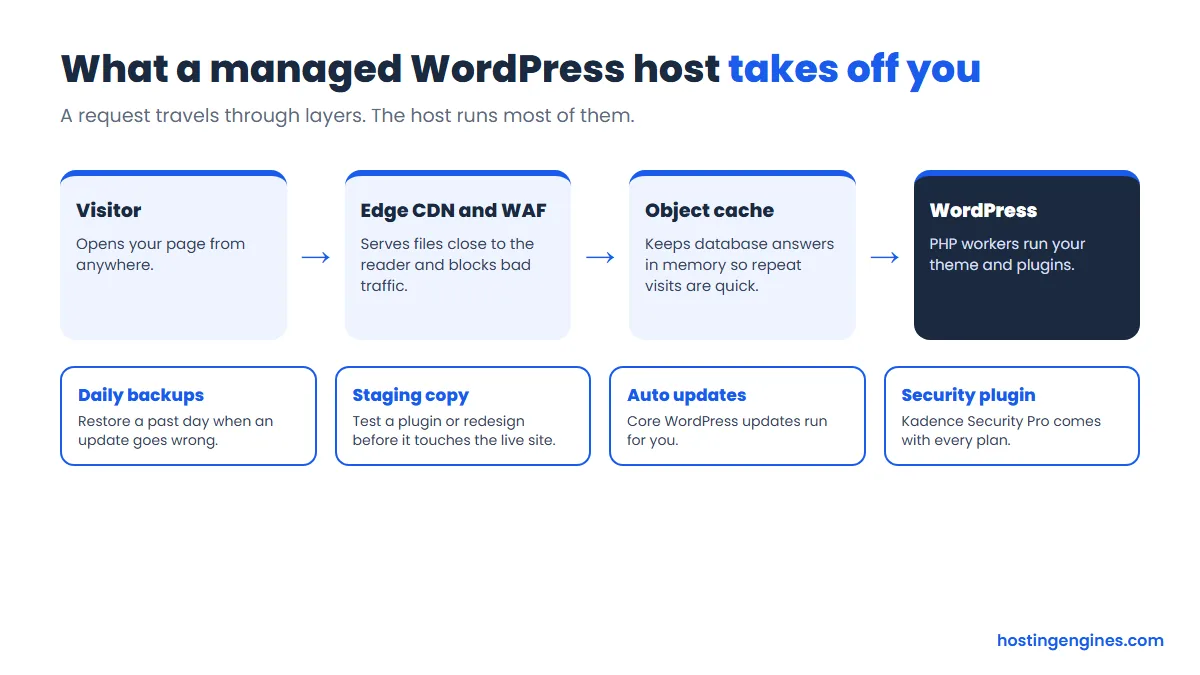
Why does this matter? On a cheap shared plan, you’d set up most of this yourself: a caching plugin, a Cloudflare account, a backup plugin with off-site storage, a security plugin. Here the host owns that list.
Backups, staging and migrations
Both plans take a backup every day. Pro keeps 14 of them and Elite keeps 30. That sounds like a small detail until you need it.
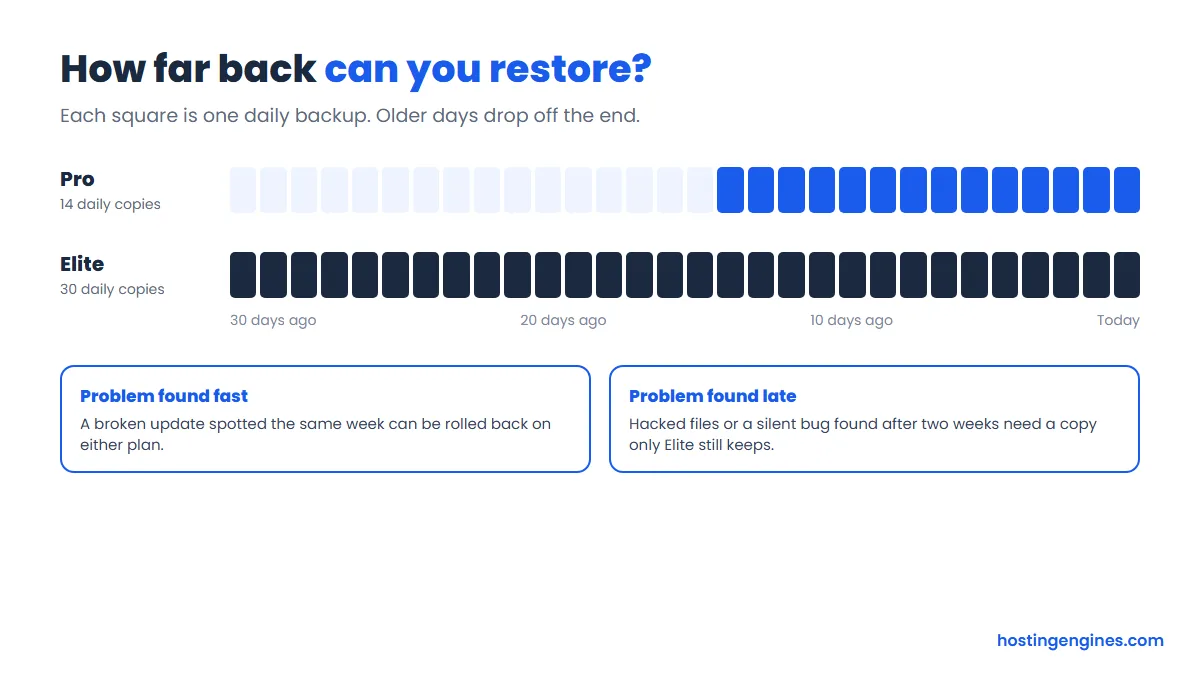
Say a plugin update quietly breaks your contact form, and nobody notices until a customer emails you three weeks later. On Pro, every backup you still have already contains the broken form. On Elite, you can go back to a copy from before the update. The same goes for malware that sits quietly for a while before anyone spots it. For a business site, those extra 16 days are the strongest reason to pay $10 more.
Staging is included on both plans. You get a copy of your site where you can try a new theme, a page builder update or a checkout change before it goes live.
Migration is where the plans split. Pro gives you the self-serve migration tool. Elite adds “Migration by a human”, meaning their team moves the site for you. For a simple blog, the tool is fine. For a WooCommerce store with custom code or a big database, having someone else own the move is worth a lot.
Visual Comparison and Stencils
These two features are what make the Nexcess platform feel different from a generic managed host.
Visual Comparison handles plugin updates. According to Nexcess’s documentation, it applies a plugin update to a staging copy of your site first, takes screenshots of your priority pages, and compares them with the live site. If the pages look the same, the update goes live, either automatically or when you approve it. If something shifts past the allowed limit, the live site keeps the old version and you get a report.
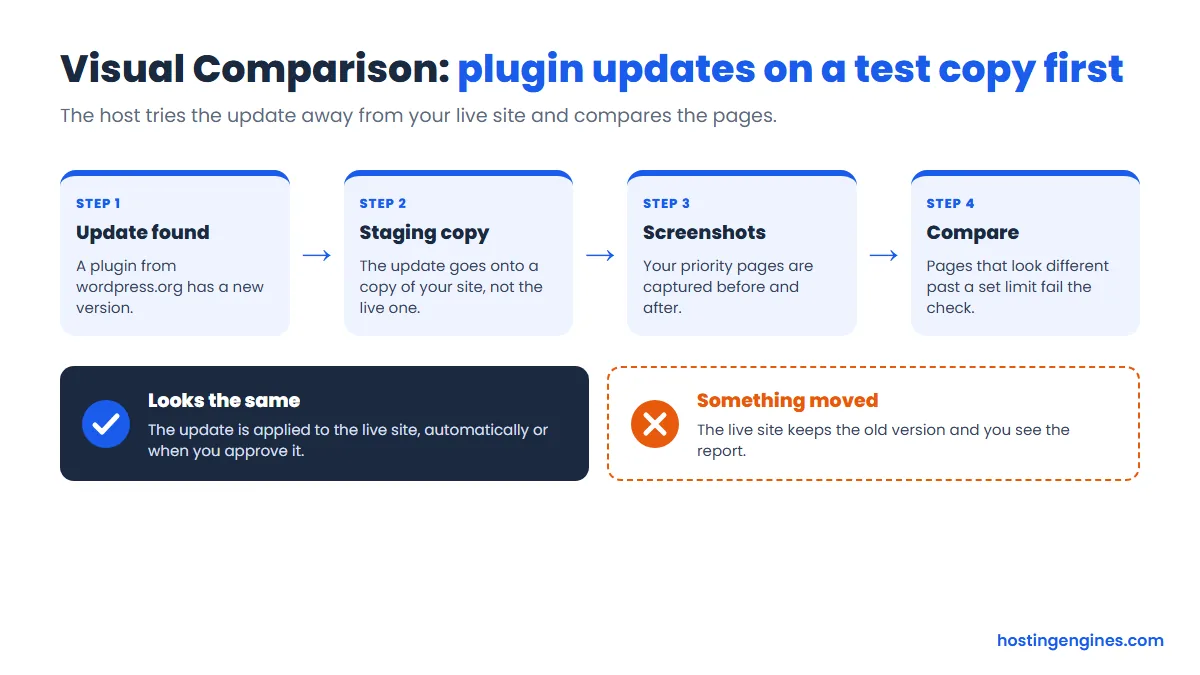
It has limits worth knowing. The docs say it works on plugins from the wordpress.org directory, so paid plugins and themes aren’t covered, and sites over 15 GB are left out. It also only spots visual breakage. A broken payment webhook that looks fine on screen will pass. Still, for the common “plugin update wrecked my layout” problem, it’s a genuinely useful safety net, and it’s on both plans.
Stencils is an Elite feature. Nexcess describes a Stencil as a saved snapshot of a site that you can use to launch new sites on the same plan, and the docs say Stencils don’t count against your disk space. If you build similar sites for clients, with the same theme, plugins and starter pages, that saves the setup routine each time. If you run one site, you’ll never touch it.
Elite also adds virtual patching from Patchstack. When a security hole is found in a plugin, a virtual patch can block attacks on it before the plugin’s author releases a fix. That covers the gap between “vulnerability published” and “you updated”, which is when most WordPress sites get hit.
Speed, uptime and support
We didn’t load-test these plans, so this section is about what the company promises, not what we measured.
On speed, the page lists multi-layered caching, the latest PHP versions, an integrated CDN and image compression. It says plans are configured to WordPress.org’s own performance requirements. On Elite, PHP workers scale up automatically during traffic spikes, which helps a store on a sale day. Object Cache Pro on both plans is a real plus for WooCommerce and membership sites, where many pages can’t be fully cached.
On uptime, the claim is bold: 99.9999 percent. That’s about half a minute of downtime a year. We can’t confirm it, and the page doesn’t explain what you get if it’s missed, so treat it as a target rather than a promise with teeth.
Support is described as 24/7, from people with experience across thousands of WordPress sites. The way in on the WordPress page is “Chat with an expert”. We didn’t see phone or email listed there. Nexcess’s own homepage gives phone numbers, but they appear as company contacts rather than WordPress support lines.
Pro or Elite: which one to pick
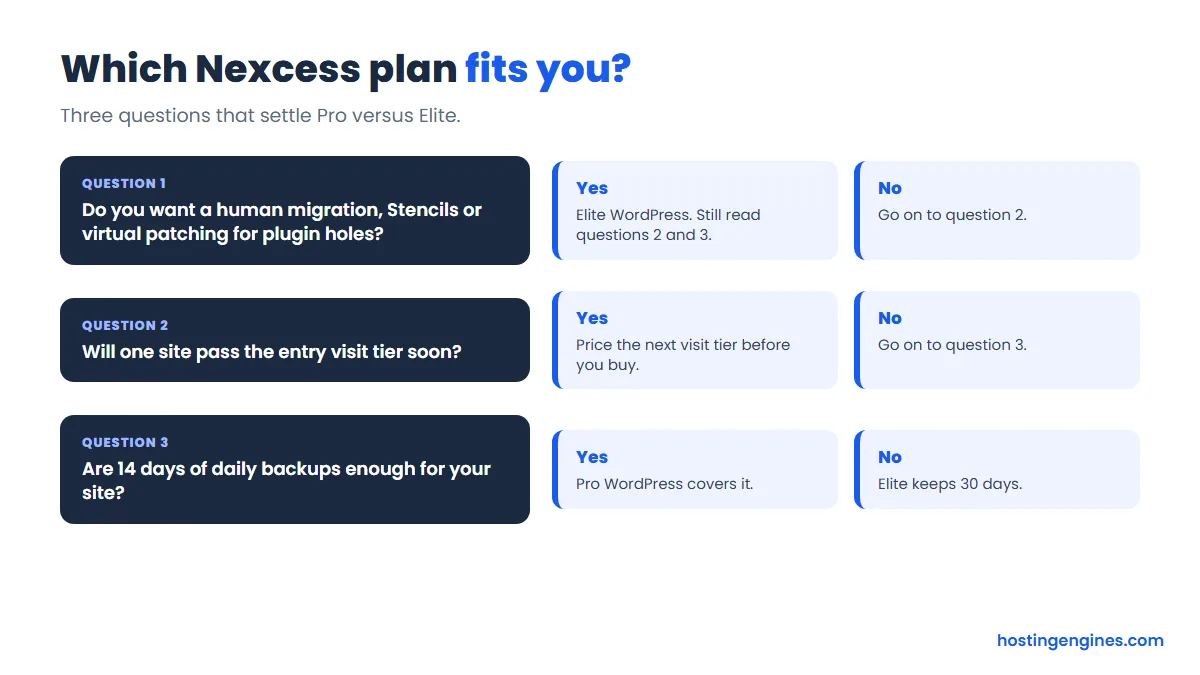
Honestly, for most business sites we’d take Elite. The $10 a month difference at the entry size buys 16 more days of backups, a human migration, Stencils and virtual patching. If any one of those saves you a single bad afternoon a year, it has paid for itself.
Pro still makes sense if you’re careful with updates, you notice problems quickly, and you’re happy to move the site yourself. Run through these three questions:
Who Nexcess suits
Nexcess fits best when downtime or a broken update costs you money. Think of a local service business whose leads come through the website, a WooCommerce shop with steady orders, or a membership site where logged-in pages can’t be cached. The page also says managed WooCommerce uses the same plans and resources, with WooCommerce already installed.
It also suits freelancers who look after a handful of client sites. The multi-site plans bring the per-site cost down, Stencils speed up new builds on Elite, and Visual Comparison takes some of the risk out of routine plugin updates across every site.
Who should skip it
If you run a personal blog with a few hundred visitors a month, a basic shared plan costs a fraction of this and will do the job. Our best cheap web hosting picks are a better fit. You’d be paying for staging and plugin testing you won’t use.
Skip it, too, if you need lots of storage on a small budget. Fifteen GB shared across several sites fills up fast with photos and video. And if a published refund window is a must for you, this offer doesn’t show one, so you’d be buying on trust or after a chat with sales.
Want to compare it with the other big managed hosts first? Our Kinsta review and WP Engine review cover two of the closest rivals, and our best WordPress hosting picks include cheaper options too.
Our verdict
The Nexcess WordPress plans are a solid managed option for business sites, and they’re fairly priced for what you get. Visual Comparison, 30-day backups on Elite and Patchstack virtual patching are practical features, not marketing filler. The pricing is clear on the page, and the multi-site plans are good value if your sites are small.
The weak spots are about paperwork rather than hosting. The brand story is confusing right now, with WordPress plans sold on Liquid Web’s site. Renewal pricing, usage-based extras and refunds aren’t spelled out where you choose a plan. None of that is a deal-breaker, but check all three before you pay. If they check out, Elite at $29 a month is the plan we’d pick for a site that earns money.
Frequently asked questions
How much does Nexcess WordPress hosting cost?
Pro WordPress starts at $19 a month and Elite at $29 a month for one site with up to 50,000 monthly visits, billed monthly. Annual billing takes 10 percent off, which brings them to $17.10 and $26.10 a month. These are the prices we saw in 2026; renewal prices weren’t shown.
Is Nexcess the same as Liquid Web?
They’re part of the same group, and Nexcess describes Liquid Web as one of its sub-brands. Liquid Web’s logo reads “by Nexcess”, and today the managed WordPress plans are sold on liquidweb.com.
Why can’t I find WordPress prices on nexcess.com?
Because nexcess.com now sends WordPress buyers to a “Chat with an expert” button instead of a price list. The old WordPress pricing page returned a “page not found” error when we checked, and the priced plans are on Liquid Web’s WordPress hosting page.
Does Nexcess include backups?
Yes, every plan takes a daily backup. Pro keeps 14 days of them and Elite keeps 30 days.
Can I run WooCommerce on these plans?
Yes. The page says managed WooCommerce hosting uses the same plans and resources, with WooCommerce pre-installed. For a busy store, look at the 150,000 visit tier and the Elite plan’s autoscaling PHP workers.
Is there a money-back guarantee?
We couldn’t confirm one. Neither the Liquid Web WordPress page nor the Nexcess pages we read state a refund period, so check the terms at checkout or ask in chat before you pay.