WP Engine is one of the best-known names in managed WordPress hosting. It doesn’t sell cheap shared hosting with a WordPress logo slapped on. You pay more, and in return WP Engine runs the servers, the updates, the caching and the backups for you. This WP Engine review breaks down what that costs in real money, what the plan limits mean, which add-ons you might end up paying for, and who should skip it.
How we put this together: every price, limit and policy below comes from WP Engine’s own plans page, plan builder, Terms of Service and support docs, checked in October 2026. We didn’t run our own speed or uptime tests on WP Engine, so you won’t find made-up benchmark numbers here.
Quick Verdict
Short answer: WP Engine is a solid choice if your WordPress site makes money and you’d rather pay someone to keep it fast, patched and backed up. Staging, daily backups, a CDN, SSL and 24/7 chat support are all included. It’s expensive for a hobby blog, though, and the useful extras (automatic plugin updates, uptime alerts, a managed firewall) are paid add-ons on the entry plan.
| Best for | Business sites, stores, agencies and anyone who wants WordPress maintenance handled for them |
| Plans | Essential (4 capacity tiers), Business, Enterprise |
| Starting price | From $28/month billed annually ($336/year), or $35 month to month |
| Visits | 25,000 to 400,000 a month on Essential, depending on the tier |
| Storage | 10 GB to 50 GB on Essential |
| Included | Staging and dev environments, daily and on-demand backups, CDN, SSL, SSH, EverCache caching |
| Support | 24/7 chat on Essential; chat and phone on Business |
| Refunds | No money-back guarantee listed in the current terms (see below) |
| Our take | Worth it for sites that earn their keep. Overkill, and overpriced, for a small personal blog. |
About WP Engine
WP Engine is a WordPress-only company. Besides hosting, it owns several tools WordPress developers use every day, including Advanced Custom Fields (ACF), the Local app for building sites on your own computer, the Genesis framework and StudioPress themes. It says more than 1.5 million sites run on its managed hosting platform and that it has over 200,000 hosting customers.
If you’re new to the idea, managed hosting means the host looks after the server side of your site: updates, security patches, caching and backups. Our guide to what managed hosting is explains how it differs from regular shared hosting and when it’s worth paying for.
Who Is WP Engine For?
- Your site brings in sales or leads, so an hour of downtime or a hacked plugin costs you real money.
- You want staging, backups and updates handled without installing five plugins to do it.
- You build sites for clients and want one dashboard, transferable sites and developer tools like SSH and Git.
- You already use ACF, Local or Genesis and like the idea of everything coming from one company.
Who should skip it
- You’re starting a personal blog or a small hobby site. $336 a year is a lot when shared hosts start at a few dollars a month.
- You need email hosting. WP Engine doesn’t host mailboxes, so you’ll pay for Google Workspace, Microsoft 365 or similar on top.
- You want a non-WordPress app, a custom stack or root access. This is WordPress hosting and nothing else.
- You want to try a host risk-free. We couldn’t find a money-back guarantee in WP Engine’s current terms.
Pros and Cons
Pros
- Production, staging and development environments for every site, at no extra cost.
- Automatic daily backups plus on-demand backups, kept offsite with 30 days of restore points.
- WordPress, PHP and MySQL updates managed for you, plus security patching and plugin risk scans.
- Built-in EverCache page caching, a global CDN and free SSL on every plan.
- No throttling or shutdown when you get a traffic spike.
- 24/7 support, with phone support added on Business.
- Ten premium StudioPress themes and Genesis Blocks included.
Cons
- High starting price compared with shared WordPress hosting.
- Visit limits, and you pay for overages if you go over.
- Smart Plugin Manager, uptime monitoring and the managed firewall cost extra on Essential.
- No email hosting.
- The advertised price is marked as first-year pricing for new customers, and no renewal price is shown.
- No refund window in the current terms, and cancelling needs 30 days’ notice.
WP Engine Plans and Prices
WP Engine now sells three plans for its managed hosting platform: Essential, Business and Enterprise. Essential is the one most people will buy. Business starts at $400 a month billed annually and adds isolated resources, phone support, managed migrations and a 99.99% uptime SLA. Enterprise is a custom quote through sales. Prices checked October 2026, in US dollars.
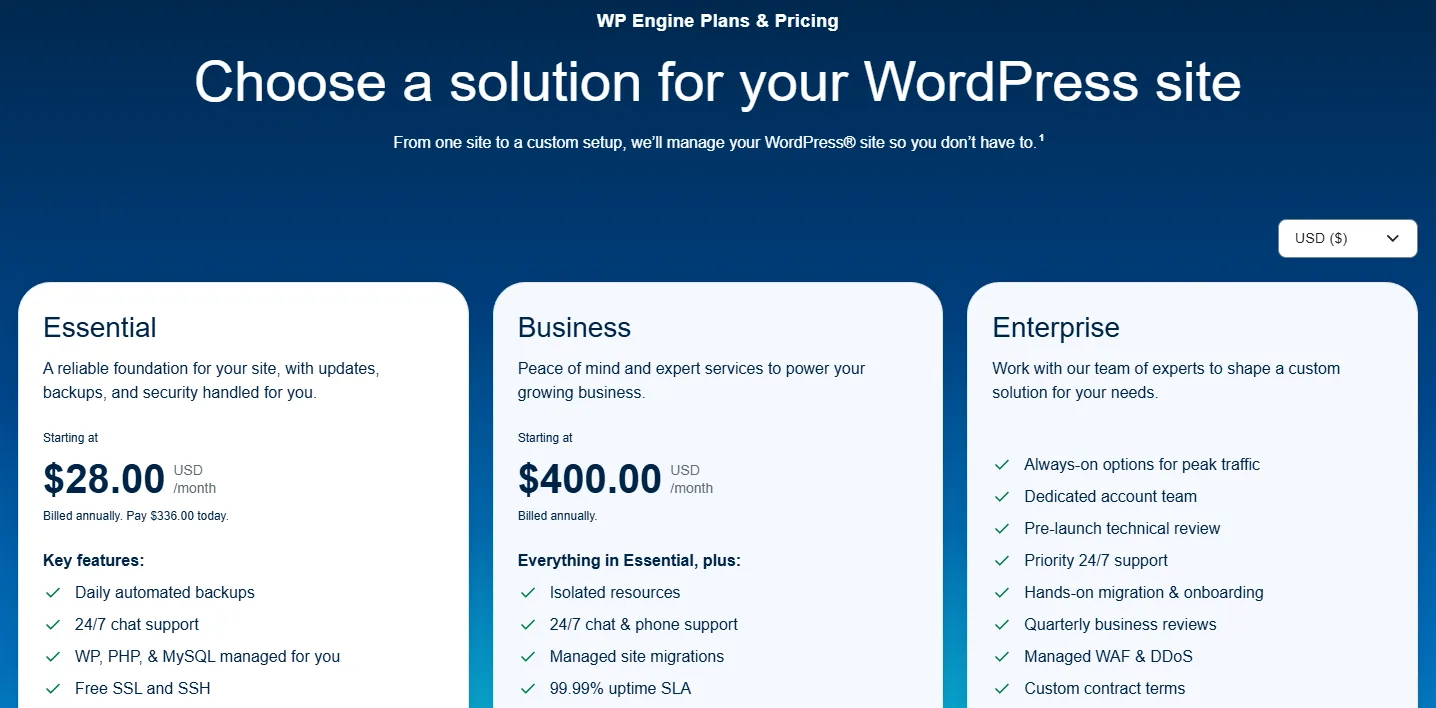
Essential: monthly vs annual
Essential isn’t one plan. When you click “Build your plan,” you pick a capacity tier by how many sites you need, and the price scales with it. Paying yearly saves 20% compared with paying month to month.
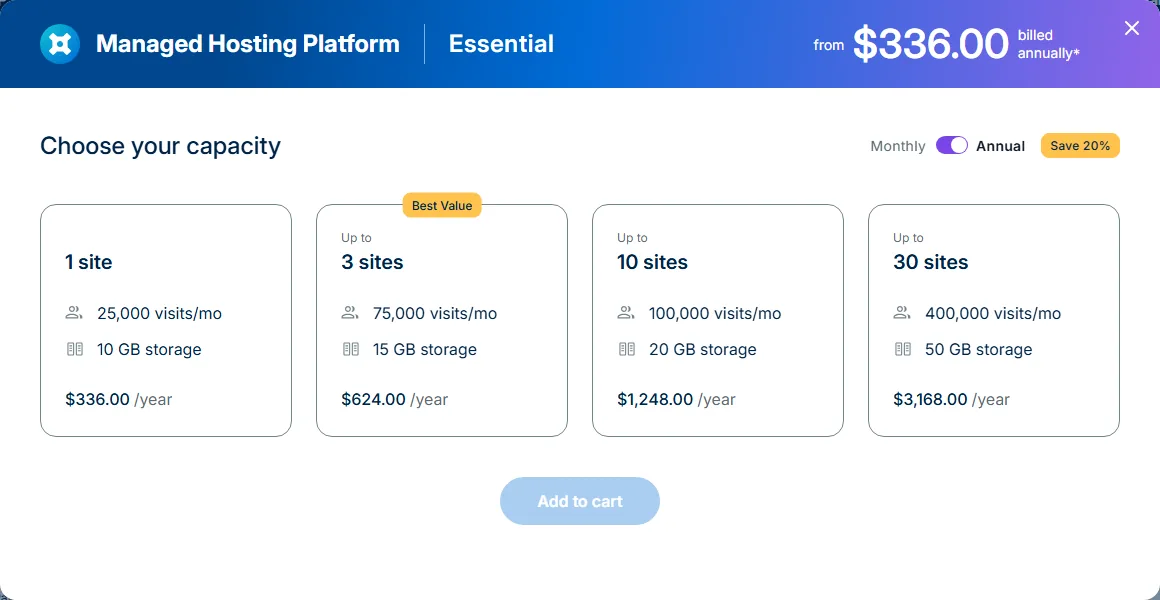
| Essential tier | Visits/month | Storage | Billed monthly | Billed annually |
|---|---|---|---|---|
| 1 site | 25,000 | 10 GB | $35/mo | $336/yr ($28/mo) |
| Up to 3 sites | 75,000 | 15 GB | $65/mo | $624/yr ($52/mo) |
| Up to 10 sites | 100,000 | 20 GB | $130/mo | $1,248/yr ($104/mo) |
| Up to 30 sites | 400,000 | 50 GB | $330/mo | $3,168/yr ($264/mo) |
On the 1-site tier, annual billing saves you $84 a year over paying monthly. On the 30-site tier, the gap grows to $792. If you’re fairly sure you’ll stay a year, annual is the obvious pick. If you’re testing the waters, monthly costs more but keeps you flexible.
Two catches sit in the small print. First, WP Engine labels these prices as first-year pricing for new customers on Essential plans, and says renewal pricing is subject to change. It doesn’t publish a renewal rate on the plans page. Its Terms of Service say renewals are charged at the then-current rate, and that you’ll be told about any increase before the date you can opt out. Second, taxes and overages can be added at checkout.
What every plan includes
| Feature | Essential | Business | Enterprise |
|---|---|---|---|
| Visits/month | 25,000-400,000 | 400,000-800,000 | 800,000+ |
| Storage | 10-50 GB | 50 GB-2 TB | 2 TB+ |
| Bandwidth | 75 GB | 550 GB | 550 GB+ |
| Environment | Shared | Isolated | Isolated |
| Staging and dev environments | Yes | Yes | Yes |
| Automatic and on-demand backups | Yes | Yes | Yes |
| EverCache and global CDN | Yes | Yes | Yes |
| Layer 3 and 4 DDoS protection | Yes | Yes | Yes |
| AI plugin and theme updates | Add-on | 1 license | 1 license |
| Uptime monitoring and alerts | Add-on | 1 license | 1 license |
| Managed WAF and advanced DDoS | Add-on | Add-on | Add-on |
| Git-based CI/CD workflows | No | Yes | Yes |
| 99.99% uptime SLA | No | Yes | Yes |
| Support | 24/7 chat | 24/7 chat and phone | Priority 24/7 |
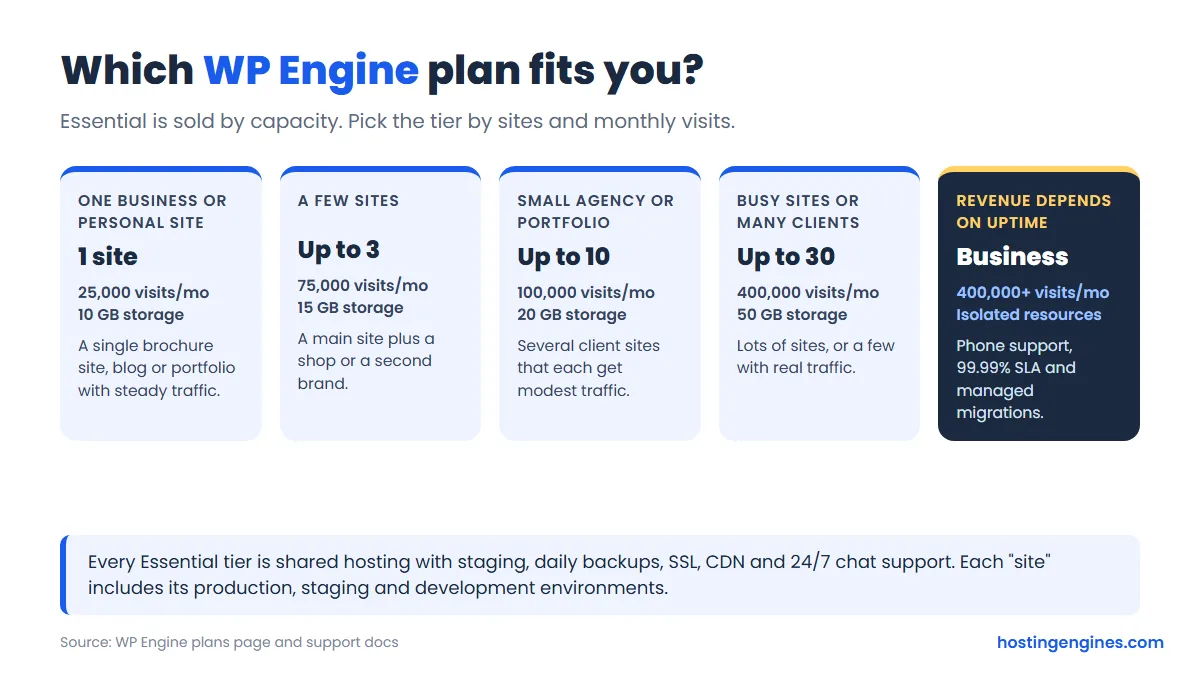
Our take: most single business sites belong on the 1-site tier. If you’d add even one more site later, look at the 3-site tier from the start. An extra site on the 1-site plan costs $240 a year as an add-on, which brings you to $576 a year for two sites, close to the $624 the 3-site tier charges for three sites and three times the visits.
Visit Limits, Storage and Overages
This is where WP Engine works differently from a typical shared host. Your plan isn’t sized by bandwidth or by “unlimited” anything. It’s sized by billable visits per month, and WP Engine says plainly that it never promises unlimited visitors.
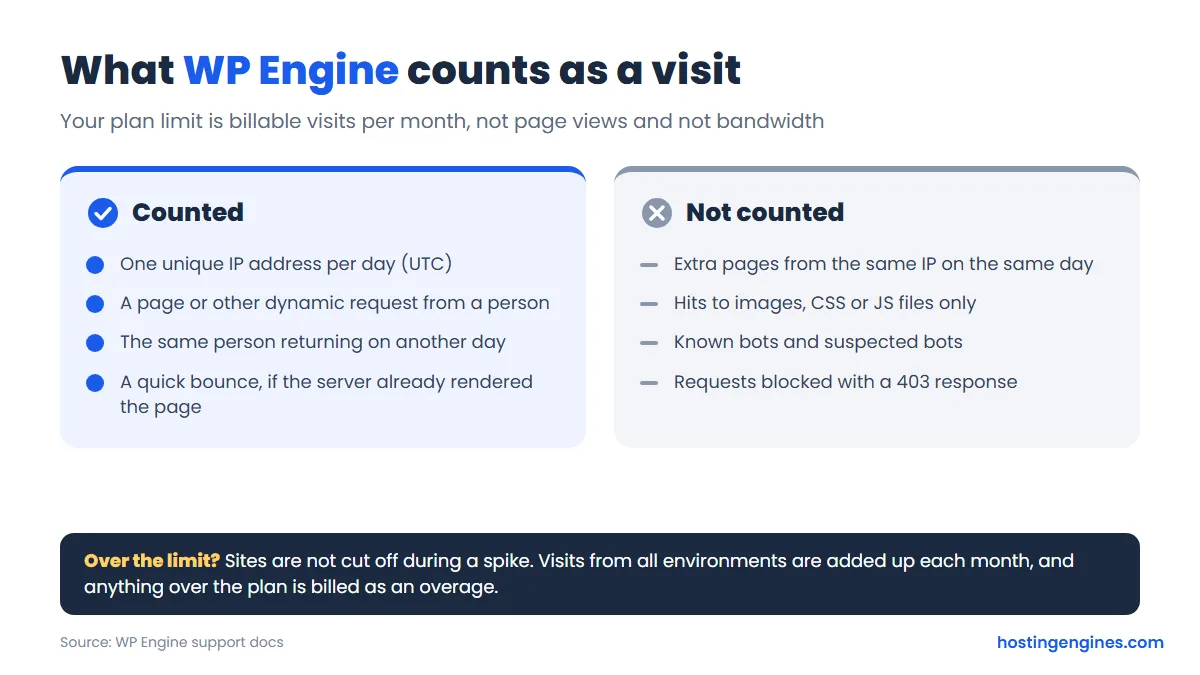
A billable visit is one unique IP address per day. A reader who opens ten pages counts once that day. Requests for images, CSS and JavaScript only don’t count, and neither do known bots. Since September 2025, WP Engine also leaves out suspected bots, which lowers the count for many sites. Visits from all your environments are added together each month.
Expect your WP Engine number to differ from Google Analytics. WP Engine counts from its server logs, so it sees visitors who block analytics scripts. Two people in the same office count once because they share an IP, while one person who visits from work and then from home counts twice. You can check your usage on the Usage page of the User Portal.
What happens if you go over
WP Engine doesn’t slow down or switch off a site for getting a spike. Instead, it bills an overage. Its overage page lists $2 per 1,000 extra monthly visits for its shared plans, though that page still names the older plan lineup (Startup, Professional, Growth, Scale and the Agency plans) rather than the new Essential tiers, so confirm the rate for your tier before you buy. Overages are charged monthly, even if you pay for the plan yearly. You can’t buy extra visits as an add-on; the only way to raise the limit is to move to a bigger plan.
Storage is easier. If you outgrow it, WP Engine sells additional storage from the Products page of the User Portal. On the 1-site tier, 10 GB is fine for most business sites, but a media-heavy site or a store with lots of product images will want more headroom.
Add-Ons and What They Cost
After you pick a capacity tier, the plan builder offers add-ons. Some of these are things other managed hosts include, so it’s worth knowing the numbers before you check out.
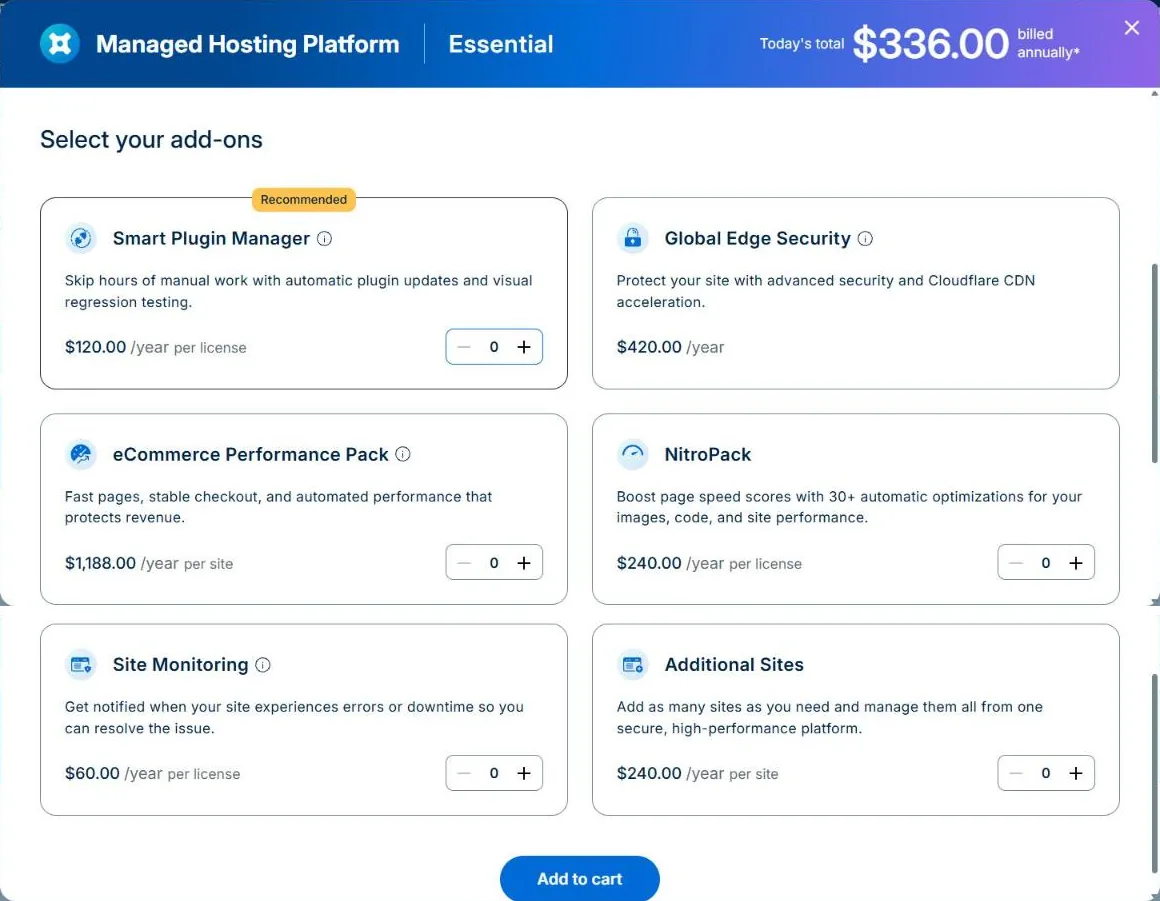
| Add-on | What it does | Monthly | Annual |
|---|---|---|---|
| Smart Plugin Manager | Automatic plugin and theme updates with visual regression testing | $10 per license | $120 per license |
| Global Edge Security | Managed WAF, advanced DDoS protection, bot controls and Cloudflare CDN | $35 | $420 |
| Site Monitoring | Uptime monitoring with alerts when your site goes down | $5 per license | $60 per license |
| NitroPack | Automatic front-end speed optimizations | $20 per license | $240 per license |
| eCommerce Performance Pack | Store speed and checkout tools | $99 per site | $1,188 per site |
| Additional Sites | Add more sites to your plan | $20 per site | $240 per site |
Notice that the annual add-on prices are simply 12 times the monthly ones. The 20% annual discount applies to the hosting plan, not to the add-ons.
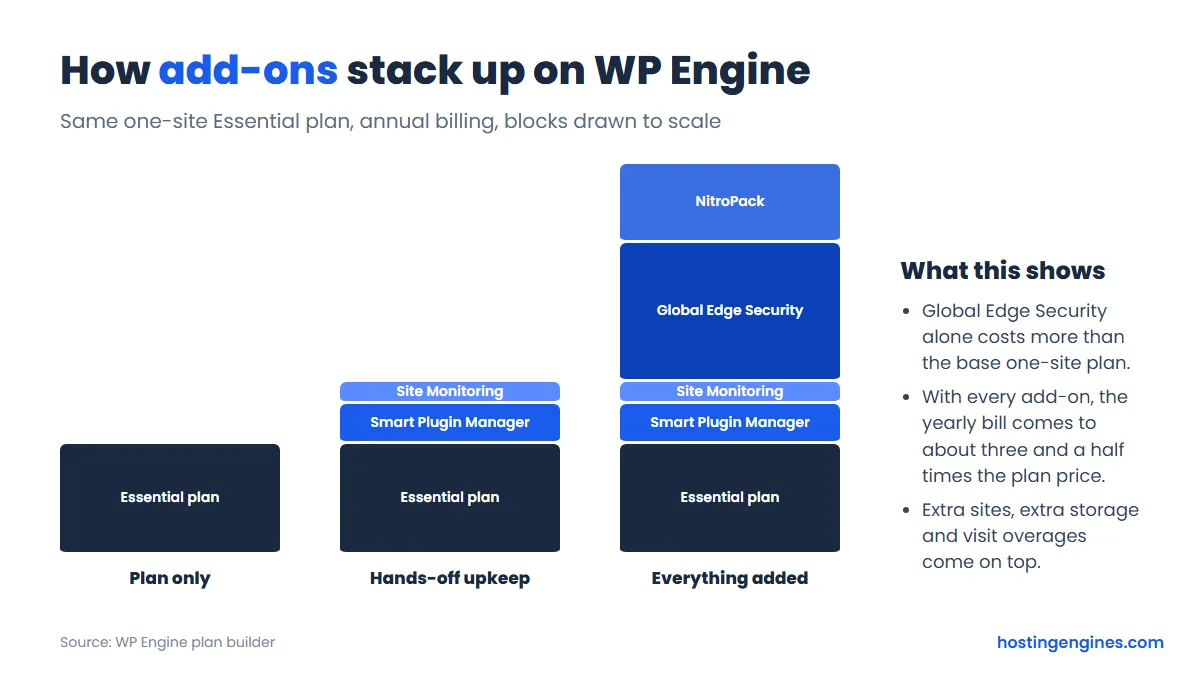
Add Smart Plugin Manager, Site Monitoring, Global Edge Security and NitroPack to the annual 1-site plan and the year comes to $1,176, about three and a half times the $336 base price. You probably don’t need all of them. Here’s how we’d think about each one:
- Smart Plugin Manager: worth it if you run many plugins and hate doing updates. It updates on a schedule, checks the site visually afterwards and rolls back if something looks broken.
- Site Monitoring: cheap, and knowing your site is down before a customer tells you is worth $5 a month. Free outside monitors exist too, though.
- Global Edge Security: the big one. It’s Cloudflare-based edge protection with a managed firewall, Layer 7 attack mitigation and bot filtering. It makes sense for stores and sites that attract attacks. A small brochure site can usually skip it.
- NitroPack: helps if your PageSpeed scores are poor because of heavy themes or images. Try fixing those first.
If you’d like a host where more of this comes in the base price, our guide to the best WordPress hosting compares the options side by side.
The User Portal
You manage everything in WP Engine’s own User Portal, not cPanel. It’s where you add sites, start migrations, create backups, copy environments, point domains, check usage and buy add-ons. The dashboard shows account health (outages, blocked attacks and automatic updates, if you have those add-ons) and your usage over the last 30 days.
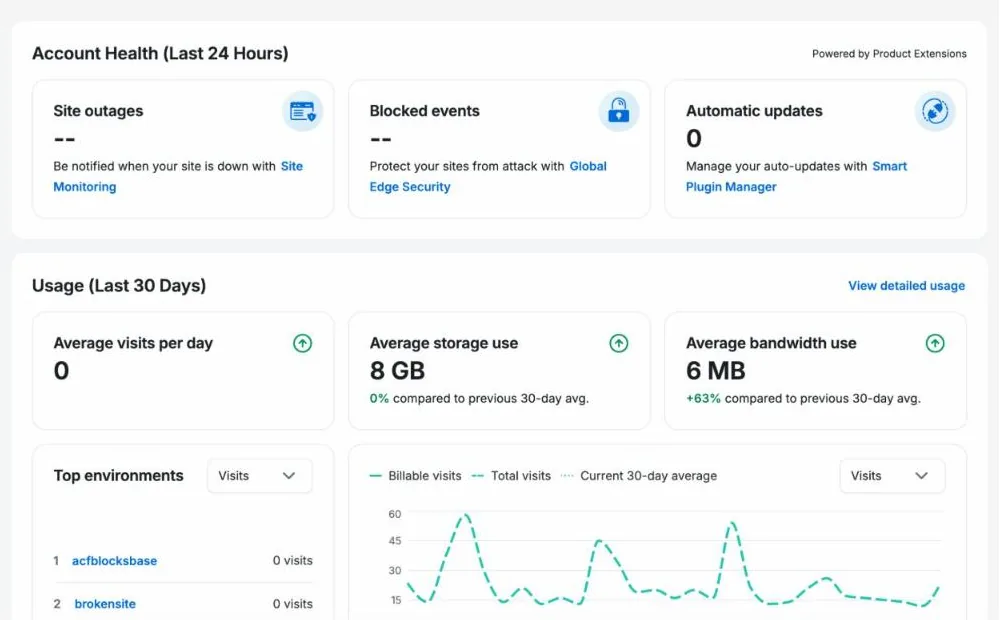
You can rearrange and resize the dashboard widgets, and the Insights menu adds performance data, usage by storage, sites, bandwidth and visits, plus scheduled reports. Agencies get user roles, so a client or freelancer can have access to one site without seeing your billing. It’s a clean, focused panel. If you’re used to cPanel, you’ll miss things like email accounts and a file manager, because WP Engine simply doesn’t do those jobs; you use SFTP or SSH for files.
Staging and Development Environments
Every site on WP Engine comes with three environments: production (the live site), staging and development. This is one of the best reasons to pay for managed hosting. You can test a plugin update or a redesign on a copy of your site, then move it live when it works.
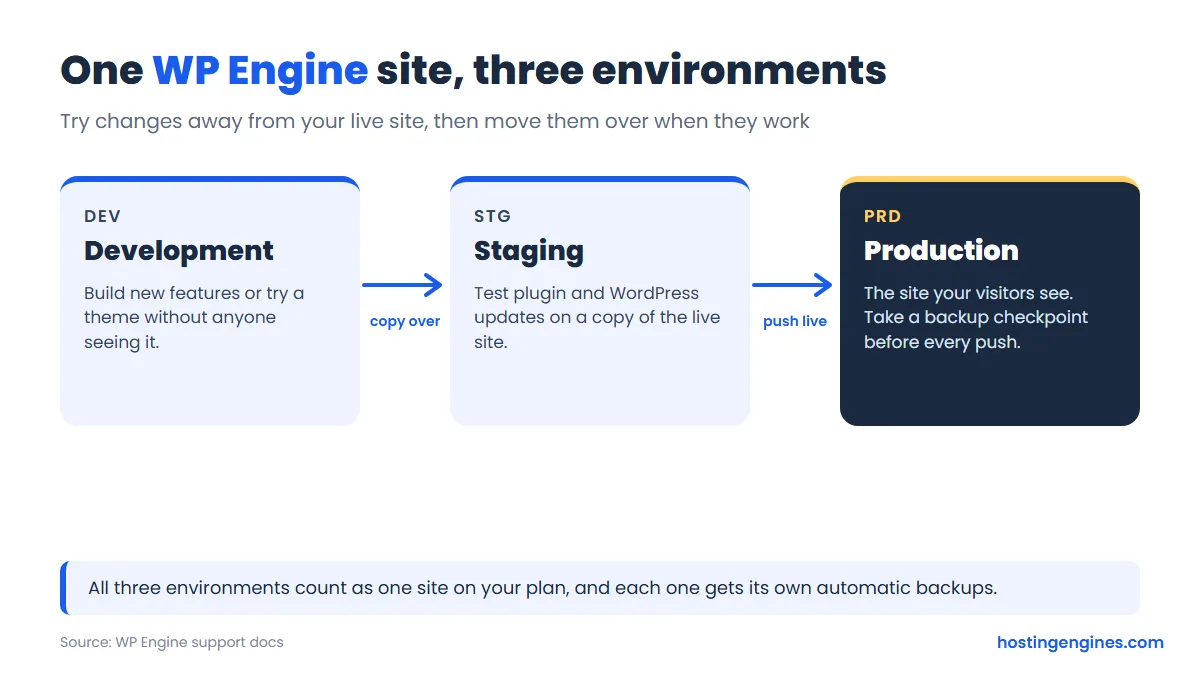
All three environments count as a single site toward your plan limit, which is generous. Developers also get SSH and SFTP, and the free Local app can push a site from your computer to WP Engine. Git-based CI/CD workflows are only on Business and Enterprise, though.
Backups
WP Engine backs up every environment automatically each day, and you can make an on-demand backup checkpoint whenever you like, for example right before a big update. Backups are stored offsite on Amazon S3, encrypted in transit and at rest, and WP Engine keeps 30 days of checkpoints. You can restore a checkpoint to the same environment, restore it to a different environment, or download it as a zip.
That’s better than many shared hosts, where backups are a paid extra or a “best effort” service. We’d still keep your own copy somewhere else now and then, which is good practice with any host.
Performance Features
WP Engine’s speed comes from its own caching layer, EverCache, plus a global CDN that’s included on every plan. Your WordPress, PHP and MySQL versions are managed for you. On Essential, your sites run in a shared environment; Business and Enterprise get isolated resources, which matters when one busy neighbor would otherwise slow you down.
We haven’t benchmarked WP Engine ourselves, so we won’t quote load times. What we can say is that the tools a quick WordPress site needs are set up for you rather than left as a homework list. Front-end tuning (image compression, script minifying) is the part you’d either do yourself or pay for through NitroPack.
Data Centers
Shared Essential plans run on Google Cloud. WP Engine places a new account in the region closest to you at signup, and the data center is set when you create your first site. You can ask support to move it later, but that’s a real server migration that may cause a little downtime and needs DNS changes.
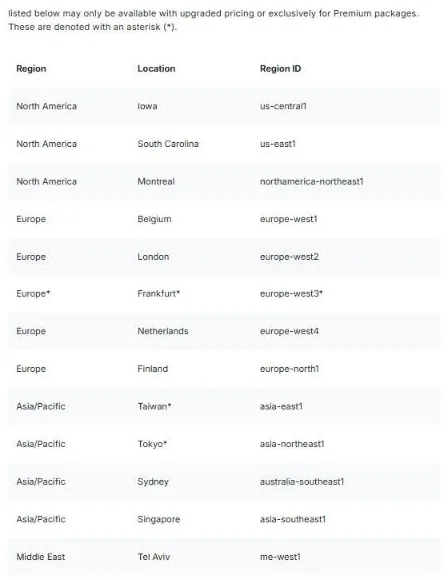
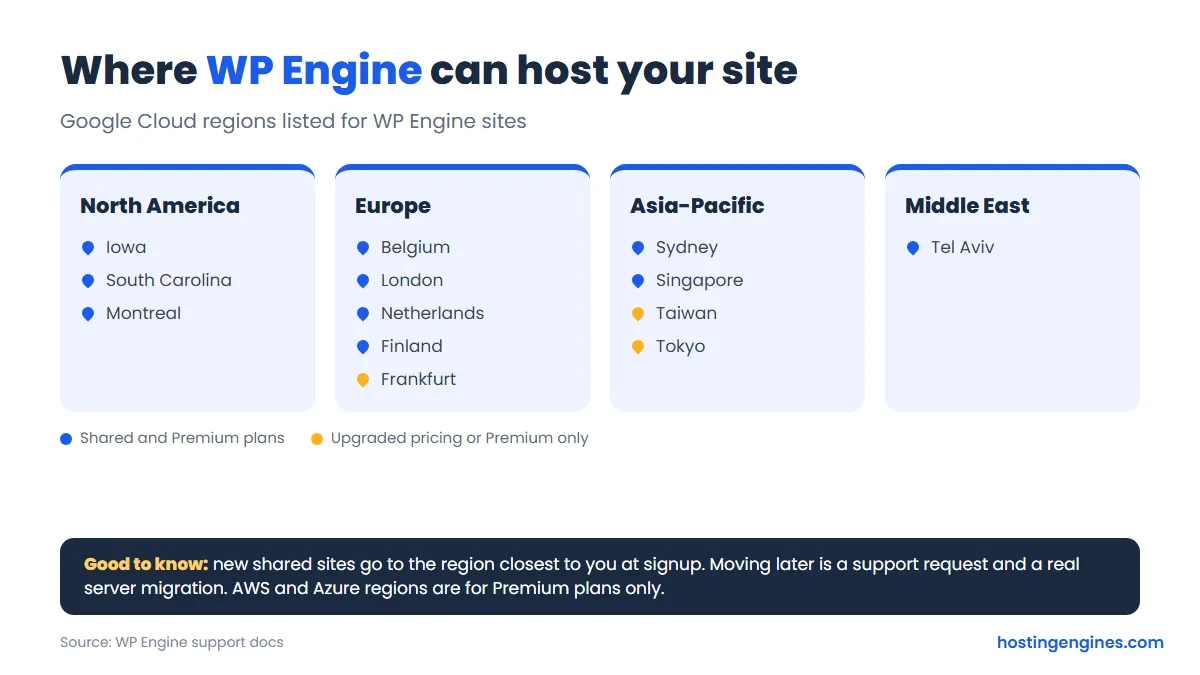
The Google Cloud list has 13 locations: Iowa, South Carolina and Montreal in North America; Belgium, London, Frankfurt, the Netherlands and Finland in Europe; Taiwan, Tokyo, Sydney and Singapore in Asia-Pacific; and Tel Aviv in the Middle East. Frankfurt, Taiwan and Tokyo may need upgraded pricing or a Premium plan. AWS and Microsoft Azure regions also exist, but only for Premium (dedicated) plans. Pick the region nearest most of your visitors, and check local data rules if they apply to you.
Security
The base plans include auto-renewing SSL certificates, SSH access, security patching, plugin risk scans and Layer 3 and 4 DDoS protection. WP Engine also keeps WordPress core and PHP updated. What you don’t get on Essential is a managed web application firewall or Layer 7 attack protection; that’s the Global Edge Security add-on.
For a typical business site, the included security plus good habits (strong passwords, two-factor login, fewer plugins) is a reasonable baseline. A store that takes payments or a site that’s been targeted before is where we’d consider paying for the firewall.
Customer Support
Essential gets 24/7 chat support. Business adds 24/7 phone support plus premium onboarding and priority support, and Enterprise adds a dedicated account team. There’s also a large support center and an AI assistant on the site for quick questions.
Because WP Engine only does WordPress, its staff can usually help with WordPress problems, not just server ones. Still, support won’t rewrite your theme for you. Think of it as help with the platform and WordPress itself, not a free developer.
Migrations
On Essential you move sites yourself with WP Engine’s free Automated Migration plugin, which copies your files, database and settings over. It suits straightforward WordPress sites, and support can help if you get stuck. Business includes managed site migrations, where WP Engine’s team handles the move, tests it in staging and helps with DNS. Moving a big or complicated site on an Essential plan? Budget some time, and test on the staging environment before you point your domain.
Refunds, Renewals and Cancelling
Many reviews still say WP Engine has a 60-day money-back guarantee. We couldn’t confirm that in October 2026. The current Terms of Service say fees are not refundable except where the terms state otherwise, and the plans page, plan builder and billing docs we checked don’t mention a money-back period. The old page some reviews cite for the guarantee no longer loads. If a refund window matters to you, ask sales chat to confirm it in writing before you pay.
- Cancelling: only the account Owner can cancel, using the cancellation form in the User Portal billing page, with 30 days’ notice. After that the plan isn’t renewed, access is removed and your content is deleted, so download your backups first.
- Renewals: charged at the then-current rate. The advertised Essential price is marked as first-year pricing for new customers.
- Downgrades: take effect on your next billing date, and WP Engine asks for 30 days’ notice. Your usage has to fit inside the smaller plan first.
- Switching billing: monthly to annual is self-serve; annual to monthly needs a support ticket.
The WP Engine vs WordPress.org Dispute
If you’ve searched for WP Engine lately, you’ve probably seen this. In September 2024, WordPress co-founder Matt Mullenweg, who also runs Automattic, publicly criticized WP Engine, and WordPress.org then blocked WP Engine’s servers from its plugin and theme updates. WordPress.org also took over the ACF plugin listing and released it as Secure Custom Fields. WP Engine sued Automattic and Mullenweg in a US federal court in California in October 2024.
In December 2024 the court granted WP Engine a preliminary injunction, ordering access to WordPress.org restored, and that order stays in place until the case is decided. As of October 2026 the lawsuit is still going: in September 2026 the judge allowed several of WP Engine’s antitrust claims to move forward, and a jury trial is scheduled for October 2027. For customers, the practical effect today is small: plugin and theme updates work, and WP Engine sites run normally. It’s still worth knowing the background before you commit to a long contract.
WP Engine Alternatives
- Cloudways: managed cloud servers you size yourself, from $11 a month for a 1 GB DigitalOcean server, with no visit limits. You get more control, and more to manage. Our Cloudways vs WP Engine comparison goes through the trade-offs in detail.
- SiteGround: much cheaper to start (GrowBig is $4.99 a month for the first year, then $29.99), with staging, daily backups, email hosting and phone support. It’s shared hosting rather than WordPress-only managed hosting. See our SiteGround review.
WP Engine Review: Final Verdict
WP Engine does what a managed WordPress host should: staging for every site, daily offsite backups, updates and patching handled, caching and a CDN built in, and support around the clock. The price is high, the visit limits need watching, and the most useful extras cost more on the entry plan. The missing refund window is the part we like least.
Our advice: if your WordPress site earns money and your time is worth more than a few hundred dollars a year, the 1-site or 3-site Essential tier on annual billing is a sensible place to start. Add Site Monitoring, decide on Smart Plugin Manager based on how many plugins you run, and leave Global Edge Security for stores and sites that draw attacks. If you’re running a hobby blog, a cheaper host will serve you fine.
FAQ
Is WP Engine worth the money?
It’s worth it for business sites that need staging, daily backups and hands-off maintenance, and less so for small personal blogs. The 1-site plan is $336 a year billed annually, which is far more than shared hosting but buys you managed updates, caching, a CDN and 24/7 support.
How much does WP Engine cost per month?
The Essential plan starts at $28 a month billed annually or $35 billed monthly for one site, 25,000 visits and 10 GB of storage. Larger Essential tiers cost $52, $104 and $264 a month on annual billing, and Business starts at $400 a month.
Does WP Engine have a money-back guarantee?
We couldn’t find one in WP Engine’s current terms in October 2026. The Terms of Service say fees aren’t refundable except as stated there, so ask sales to confirm any refund window in writing before you buy.
What happens if I go over my visit limit on WP Engine?
Your site stays online and you pay an overage instead. WP Engine’s overage page lists $2 per 1,000 extra visits for its shared plans, billed monthly, and the only way to raise the limit is to upgrade your plan.
Does WP Engine include email hosting?
No. WP Engine hosts WordPress sites only, so you’ll need a separate email service such as Google Workspace or Microsoft 365 for addresses at your domain.
Is WP Engine still affected by the WordPress.org dispute?
Not in day-to-day use. A December 2024 court order restored WP Engine’s access to WordPress.org, plugin and theme updates work normally, and the lawsuit itself is still going through the courts with a trial set for 2027.