
Picking the best web hosting for small business isn’t the same as picking hosting for a hobby blog. Your website is where customers find your phone number, book a call or place an order, and your email probably runs through the same account. If the host goes down, loses a backup or doubles the bill at renewal, it’s your business that feels it.
So we looked at hosting the way a small business owner would. We checked nine popular hosts on their official plan pages, terms and FAQs, and wrote down what matters day to day: whether business email is really included, how often backups run, what the uptime promise says, whether you can phone someone, how long the refund window is and what you pay after the first term.
Quick answer: for most small businesses, Hostinger is the best value if you want low prices and a simple dashboard, InMotion Hosting is the safer pick if you want phone support, a 99.99% uptime guarantee and a 90-day refund window, and SiteGround suits owners who want daily backups and a polished, hands-off WordPress setup and can live with high renewals.
Best Web Hosting for Small Business: Quick Picks
| Best for | Host | Plan to pick | Starts at |
|---|---|---|---|
| Best value overall | Hostinger | Premium | $2.99/mo (48-month term) |
| Phone support and room to grow | InMotion Hosting | Power | $5.79/mo (1-year term) |
| Hands-off WordPress with daily backups | SiteGround | GrowBig | $4.99/mo (12-month term) |
| Email and 30 days of backups on every plan | Hosting.com | Pro | Price shown at checkout |
| Budget host with a 45-day refund | ChemiCloud | Pro | $2.95/mo (36-month term) |
| Uptime credits and a path to managed cloud | ScalaHosting | Start | $5.95/mo (36-month term) |
| Many websites on a starter plan | DreamHost | Launch | $2.89/mo first year (12-month term) |
| WordPress beginners who want a 99.99% SLA | Bluehost | Business | $6.99/mo (36-month term) |
| Trying a host before you pay | Namecheap | Stellar Plus | 30 days free, then $2.98/mo (yearly) |
Every price above is an introductory rate for new customers. They all renew higher, often two to six times higher, and we list the renewal for each host below.
The Small Business Essentials, Side by Side
Before the reviews, here’s the stuff that tends to cause trouble later. This is where hosts that look identical on price start to look very different.
| Host | Business email | Automatic backups | Uptime promise | Phone support | Refund window |
|---|---|---|---|---|---|
| Hostinger | Free for the first year | Weekly on Premium, daily on Unlimited | 99.9% | No | 30 days |
| InMotion | Included, unlimited addresses | Paid Backup Manager add-on | 99.99% on Power and Pro | Power and Pro | 90 days |
| SiteGround | Included | Daily | No figure published | Yes, all plans | 30 days |
| Hosting.com | Included, 5 to 40 mailboxes | Daily, kept 30 days | 99.9% (formal SLA on Max) | Yes, all plans | 30 days |
| ChemiCloud | Included, unlimited | Daily, 10 to 30 copies | 99.99% | No | 45 days |
| ScalaHosting | Included | Daily | 99.9% with credits | No | Anytime (prorated after 30 days) |
| DreamHost | Free for 3 months | Daily | 100% with service credits | No | 30 days |
| Bluehost | Trial only | Weekly | 99.99% SLA | Business plan and up | 30 days |
| Namecheap | Included, 30 to unlimited | Twice a week (more on Plus) | 100% | No | 30 days (not after a free trial) |
How We Chose These Hosts
We started with hosts our readers ask about and that we’ve already reviewed in depth, then judged each one on the things a small business actually depends on:
- Business email. Can you create [email protected] addresses without paying for a separate email service, and for how long?
- Backups. How often they run, how many copies are kept, and whether you can restore them yourself without opening a ticket.
- Uptime promise. Is there a written percentage, and what do you get back if the host misses it?
- Support. 24/7 chat is the baseline. We noted which hosts also answer the phone.
- SSL and security. Free SSL is standard now, so we looked at what sits on top of it: malware scanning, firewalls and account isolation.
- Room to grow. Bigger shared plans, cloud or VPS options with the same company, ideally without a painful migration.
- Renewal prices and refunds. What you pay in year two, and how long you have to change your mind.
Every price, limit and policy below comes from each host’s own website, checked on the same day. Where a host’s pages disagree with each other, we say so.
The Best Small Business Hosts in Detail
1. Hostinger: Best Value Overall
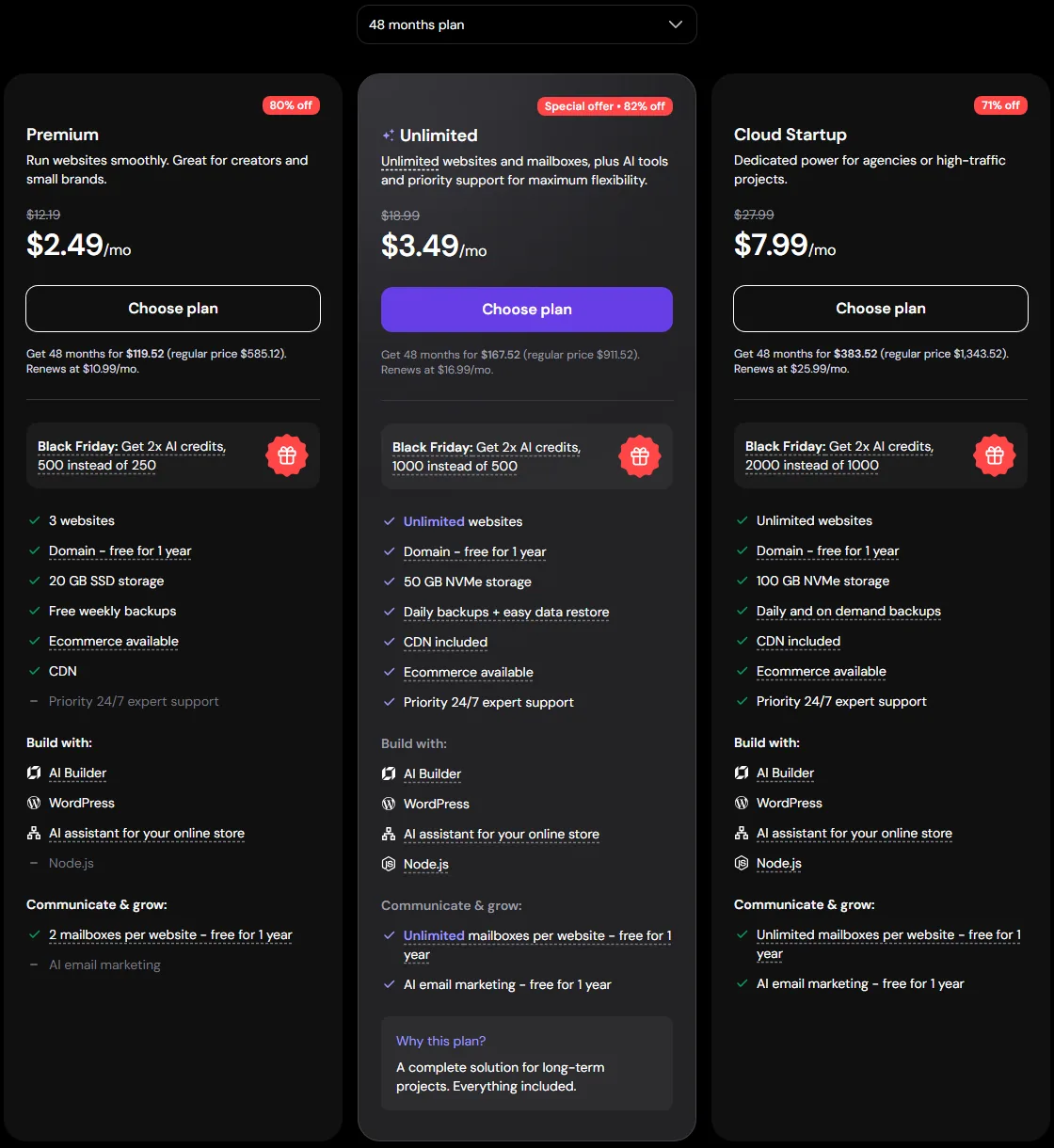
Hostinger is the cheapest way to get a fast, well-equipped business site online, and its dashboard is one of the easiest to use if you’ve never run a website before. The Premium plan normally costs $2.99/month on a 48-month term and renews at $10.99/month. It covers 3 websites, 20 GB of SSD storage, a free domain for the first year, a CDN, free SSL, malware scanning and weekly backups.
The catch for a business is email. Premium gives you 2 mailboxes per website, but they’re free for the first year only. After that each mailbox renews at $0.59/month on a 12-month term. That’s still cheap, but it’s a cost to plan for. If daily backups matter to you (they should for a shop or booking site), step up to Unlimited, which adds unlimited websites and mailboxes for the first year, 50 GB of NVMe storage, daily backups and priority support. It renews at $16.99/month.
Hostinger’s hosting agreement promises 99.9% uptime per month, and if it falls short you can ask for a credit of 5% of that month’s hosting fee. Support is 24/7 by chat, and you get a 30-day money-back guarantee.
Temporary offer: Hostinger’s Black Friday sale is running as we write this. On the 48-month term Premium is $2.49/month ($119.52 upfront) and Unlimited is $3.49/month ($167.52 upfront), with the same renewal prices as above. Sale prices end when the promotion does, so check the current price before you buy.
| Plan to pick | Premium (Unlimited if you need daily backups) |
| Price | From $2.99/mo (48-month term), renews at $10.99/mo |
| Business email | 2 mailboxes per site, free for the first year |
| Backups | Weekly on Premium, daily on Unlimited |
| Uptime promise | 99.9%, 5% credit on request |
| Refund | 30 days |
Pros
- Very low intro price with SSL, CDN, malware scanning and a free domain
- Easy dashboard that suits first-time site owners
- Clear upgrade path to cloud and VPS plans with the same company
Cons
- Email is only free for the first year
- Weekly backups on Premium are thin for a busy business site
- The lowest price needs a 48-month prepayment, and there’s no phone support
Best for: sole traders and small businesses that want a low monthly cost and are happy to manage things through a simple dashboard. Read our full Hostinger review for more detail.
2. InMotion Hosting: Best for Phone Support and Room to Grow
InMotion Hosting builds its shared plans around small businesses, and it shows in the details. Every plan includes a free domain, free SSL, cPanel email accounts with unlimited addresses and free website migration done by its own team. The 90-day money-back guarantee is the longest on this list, which gives you three months to move your site and email over and see how it behaves.
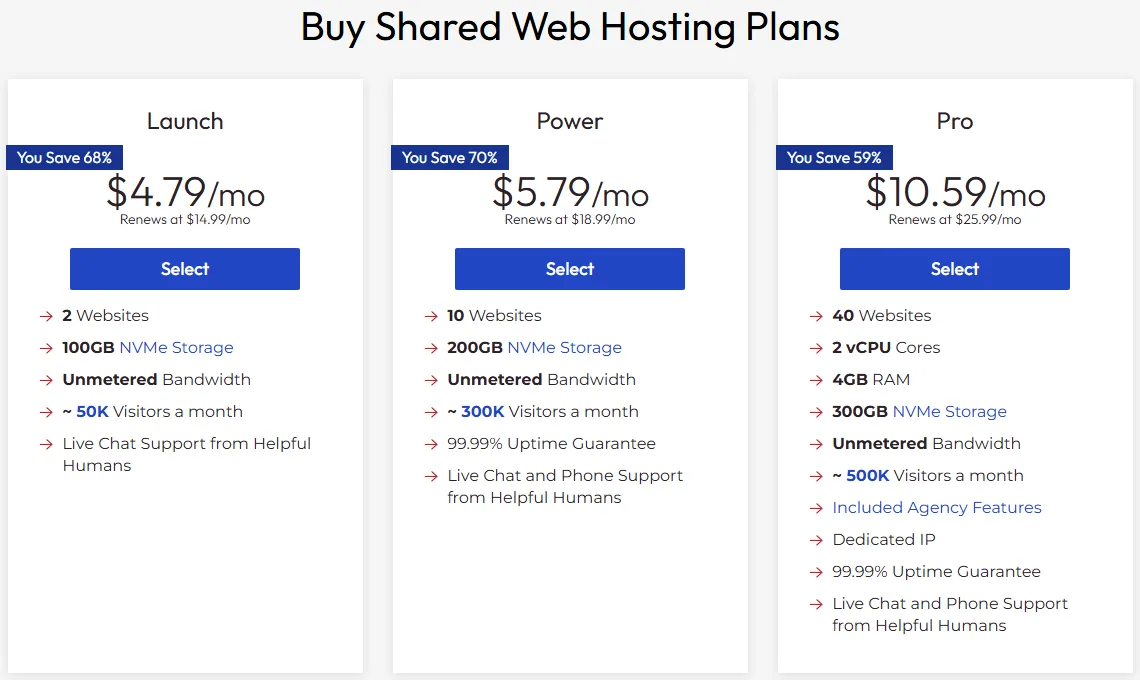
We’d skip the entry Launch plan ($4.79/month, renews at $14.99/month) and pick Power. Power costs $5.79/month on a 1-year term and renews at $18.99/month, and for that you get 10 websites, 200 GB of NVMe storage, a 99.99% uptime guarantee and phone support. Launch only has chat and ticket support and doesn’t list the uptime guarantee on its plan card. Pro ($10.59/month, renews at $25.99/month) adds 2 vCPU cores, 4 GB RAM, a dedicated IP and WHM for agencies.
Two things to know. Automatic backups are a paid add-on (Backup Manager), so budget for it or keep your own backups. And InMotion doesn’t use LiteSpeed; it runs its own NGINX-based UltraStack setup instead. Data centers are in Virginia, California and Amsterdam, and when you outgrow shared hosting, InMotion’s managed VPS plans are the next step with the same support team.
| Plan to pick | Power |
| Price | From $5.79/mo (1-year term), renews at $18.99/mo |
| Business email | Unlimited addresses, 10 GB per inbox on Power |
| Backups | Backup Manager is a paid add-on |
| Uptime promise | 99.99%, credit-backed (Power and Pro) |
| Refund | 90 days |
Pros
- Phone, chat and ticket support around the clock on Power and Pro
- 90-day money-back guarantee
- Email included with generous storage per inbox
Cons
- Automatic backups cost extra
- Launch plan lacks phone support and the uptime guarantee
- Only three data center locations
Best for: established small businesses that want to pick up the phone when something breaks. Our InMotion Hosting review covers its VPS range too.
3. SiteGround: Best for Hands-Off WordPress With Daily Backups
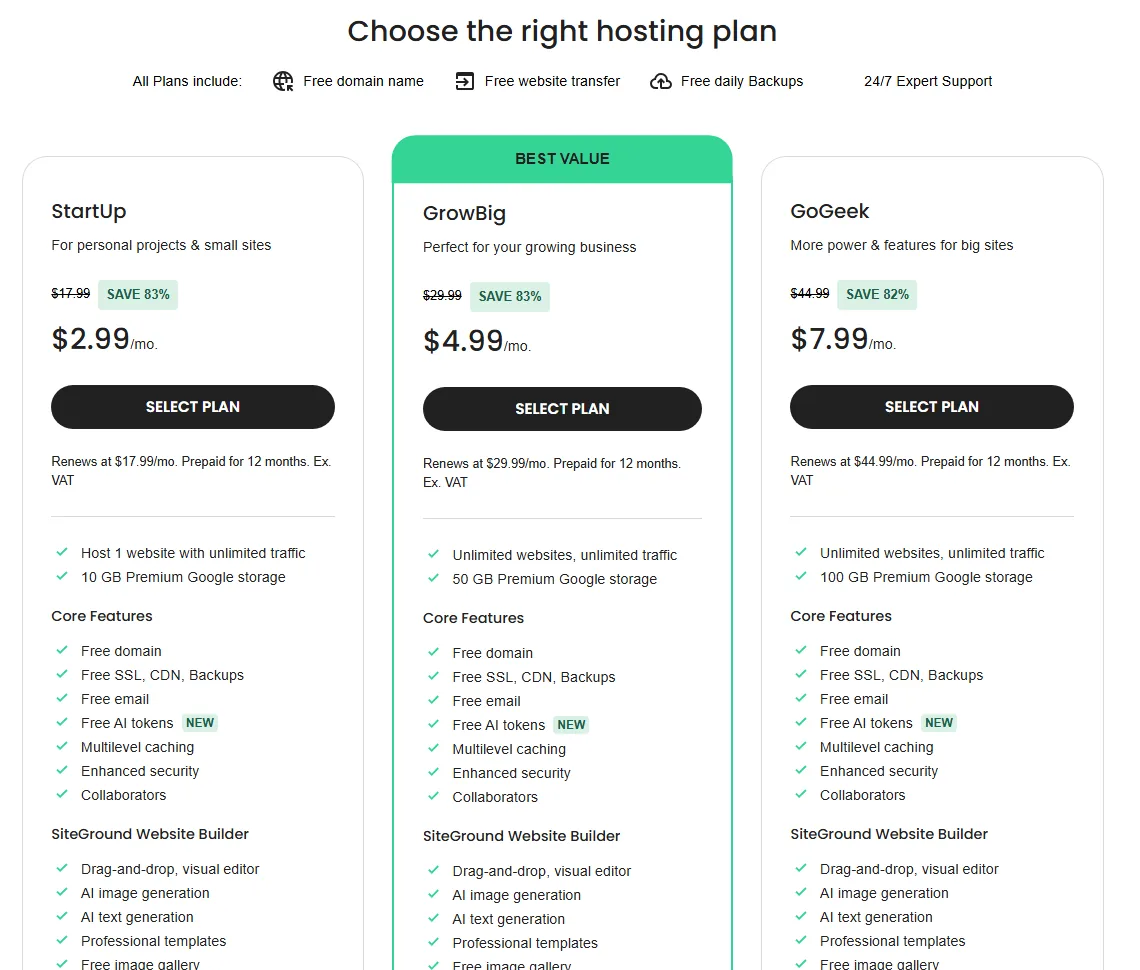
SiteGround is the polished option. Every plan includes a free domain, free email, free SSL and CDN, daily backups, free site migration and 24/7 support by phone, chat and tickets. Its own Site Tools dashboard puts your domain, email, site and backups in one place, and the managed WordPress features (auto-updates, caching, the Speed Optimizer plugin) mean there’s little to fiddle with.
For a business we’d pick GrowBig over StartUp. StartUp ($2.99/month for 12 months, renews at $17.99/month) hosts one website with 10 GB of storage. GrowBig ($4.99/month for 12 months, renews at $29.99/month) gives you unlimited websites, 50 GB, on-demand backups before risky changes, staging and faster PHP. GoGeek ($7.99/month, renews at $44.99/month) adds Git, white-label access and priority support. All prices are before VAT.
The weak spot is cost after year one. GrowBig’s renewal is six times its first-year price, so look at the second-year bill before you commit. We also couldn’t find a published uptime percentage in SiteGround’s terms, so there’s no written figure to hold it to.
| Plan to pick | GrowBig |
| Price | From $4.99/mo (12-month term), renews at $29.99/mo |
| Business email | Free email accounts at your domain |
| Backups | Daily, plus on-demand backups on GrowBig and GoGeek |
| Uptime promise | No percentage published |
| Refund | 30 days |
Pros
- Daily backups, staging and on-demand backups on GrowBig
- Phone support on every plan
- Clean dashboard that handles site, email and domain together
Cons
- Steep renewal prices
- StartUp is limited to one website
- No published uptime percentage
Best for: WordPress businesses that value support and backups over the lowest price. See our SiteGround review for the full picture.
4. Hosting.com: Best for Email and Backups on Every Plan
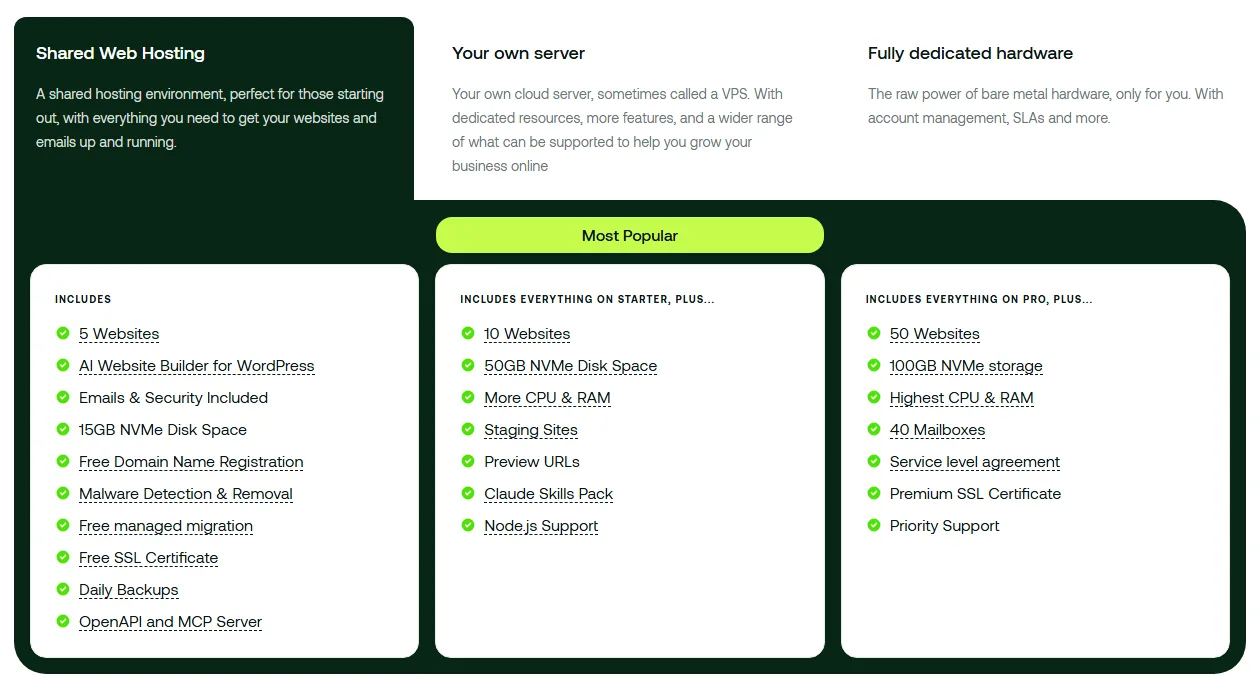
Hosting.com (formerly A2 Hosting) has rebuilt its shared plans around three tiers, Starter, Pro and Max, and the business basics are strong on all of them. Every plan includes email at your own domain with 10 GB per mailbox, daily backups stored off the server with restore to any point in the last 30 days, malware detection and removal, free SSL, a free domain for the first year and free managed migration of your sites, email and domains. Support is 24/7 by chat, ticket and phone, with an AI assistant called Orbi on top.
Pro is the plan we’d pick: 10 websites, 50 GB of NVMe storage, 20 mailboxes, more CPU and RAM than Starter, staging sites and Redis object caching. Starter covers 5 websites, 15 GB and 5 mailboxes. Max goes to 50 websites, 100 GB and 40 mailboxes, and it’s the only shared plan with a formal service level agreement and priority support.
One honest caveat: when we checked, Hosting.com’s plan pages weren’t showing prices at all, only the features, so you’ll see the current intro and renewal price in the cart. Its comparison page says the renewal price is shown before you buy and there’s no contract or early-termination fee. The uptime wording also differs between pages: the main hosting page mentions a 99.9% uptime SLA, while the comparison table lists a 99.95% uptime commitment and a formal SLA only on Max. Shared plans don’t include a CDN, according to the same table.
| Plan to pick | Pro |
| Price | Not shown on the plans page when we checked, see the cart |
| Business email | 5, 20 or 40 mailboxes, 10 GB each |
| Backups | Daily, kept 30 days, self-serve restore |
| Uptime promise | 99.9% (formal SLA on Max) |
| Refund | 30 days |
Pros
- Email and 30 days of daily backups on every plan
- Phone support 24/7 on all plans
- Data centers in the USA, London, Frankfurt, Singapore, Sydney and Mumbai
Cons
- Prices weren’t listed on its plan pages when we checked
- No CDN on shared plans
- Formal SLA only on the top plan
Best for: businesses that rely on email and want solid backups without add-ons. Our Hosting.com review goes deeper.
5. ChemiCloud: Best Budget Host With a 45-Day Refund
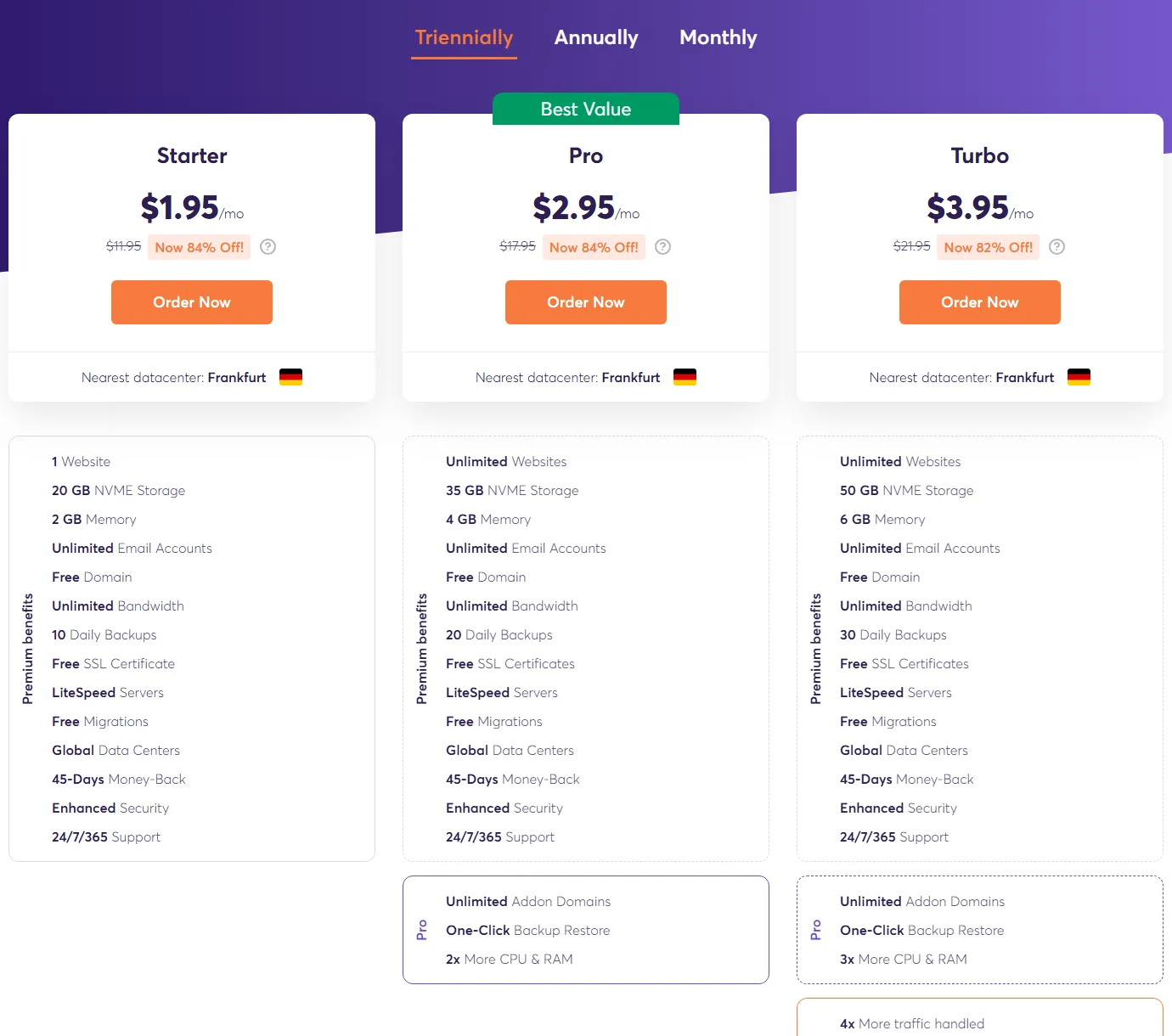
ChemiCloud is a small, independent host that packs a lot into cheap plans. Every shared plan includes unlimited email accounts, a free domain on 36-month plans, daily backups, free SSL, LiteSpeed servers, free migrations and 24/7/365 support, plus a 45-day money-back guarantee and a 99.99% uptime guarantee.
Pro is the sweet spot at $2.95/month on a 36-month term, renewing at its regular $17.95/month. It gives you unlimited websites, 35 GB of NVMe storage, 4 GB of memory, 20 daily backups and one-click backup restore. Starter ($1.95/month, regular $11.95) is limited to one website and 10 daily backups, and Turbo ($3.95/month, regular $21.95) adds more CPU and RAM, Redis caching and advanced malware protection.
ChemiCloud lets you pick from data centers around the world, and its plans page suggests the nearest one (ours showed Frankfurt). Support is by chat and tickets rather than phone.
| Plan to pick | Pro |
| Price | From $2.95/mo (36-month term), renews at $17.95/mo |
| Business email | Unlimited email accounts |
| Backups | Daily, 20 copies on Pro |
| Uptime promise | 99.99% |
| Refund | 45 days |
Pros
- Unlimited email and daily backups even on cheap plans
- 45-day money-back guarantee
- One-click backup restore on Pro and Turbo
Cons
- The best price needs a 36-month term
- Renewal is about six times the intro rate on Pro
- No phone support
Best for: budget-minded businesses that still want daily backups and real email. Read our ChemiCloud review for more.
6. ScalaHosting: Best Uptime Credits and Path to Managed Cloud
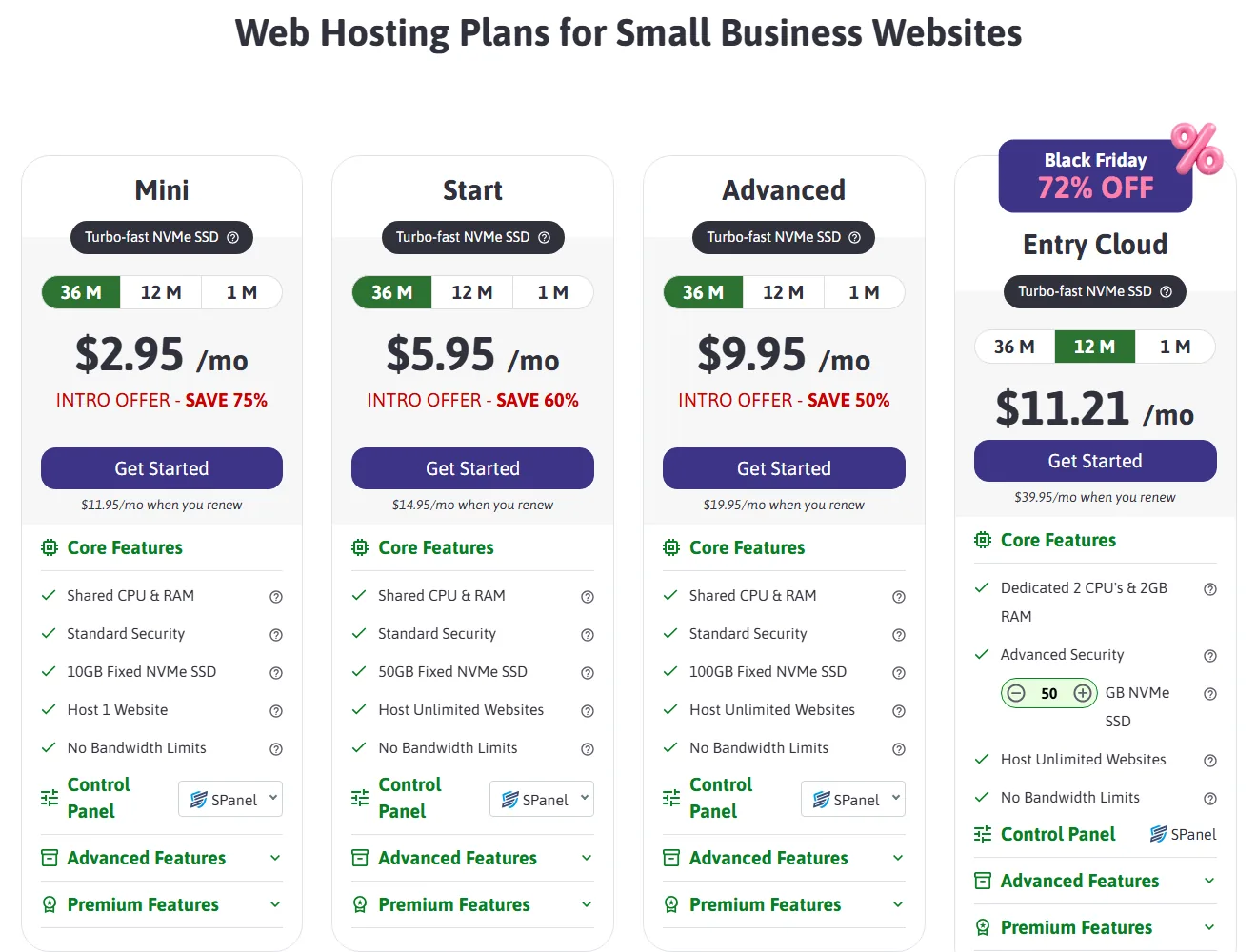
ScalaHosting has a hosting page aimed squarely at small businesses, and two policies stand out. First, its uptime guarantee comes with a clear credit table in the terms of service: 10% back for every 0.1% it drops below 99.9%. Second, its “anytime” money-back guarantee gives new clients a full refund within 30 days and a partial refund for unused time after that.
The plans run on NVMe storage with daily offsite backups, free SSL, free website migration and its own SPanel control panel with a WordPress manager and SShield security monitoring. We’d pick Start at $5.95/month on a 36-month term (renews at $14.95/month) for unlimited websites and 50 GB. Mini ($2.95/month, renews at $11.95/month) hosts one site with 10 GB and includes 10 email accounts. Advanced ($9.95/month, renews at $19.95/month) doubles storage to 100 GB.
The real reason to pick Scala is what comes next. Its Entry Cloud plan gives you dedicated CPU and RAM with the same SPanel dashboard, so a growing business can step up without learning a new control panel. Support is 24/7 by live chat, tickets and email, with no phone line.
| Plan to pick | Start |
| Price | From $5.95/mo (36-month term), renews at $14.95/mo |
| Business email | Included (10 accounts on Mini, more on larger plans) |
| Backups | Daily, offsite |
| Uptime promise | 99.9%, 10% credit per 0.1% below |
| Refund | Full within 30 days, prorated after |
Pros
- Clear uptime credits written into the terms
- Prorated refunds after the first month
- Easy step up to managed cloud with the same panel
Cons
- Mini is limited to one website and 10 GB
- Lowest prices need a 36-month term
- No phone support
Best for: businesses that expect to grow and want to stay with one host from shared to cloud. See our ScalaHosting review for SPanel in detail.
7. DreamHost: Best for Many Websites on a Starter Plan
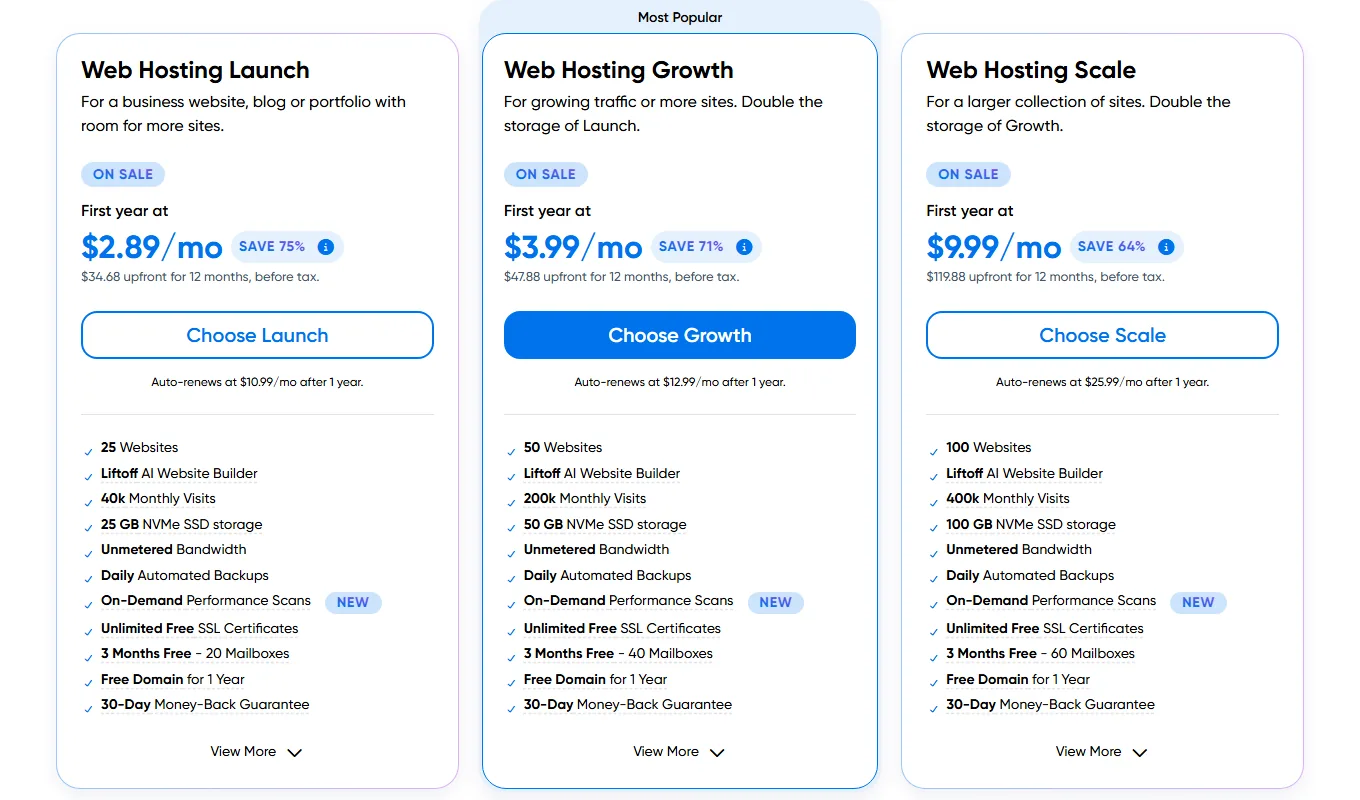
DreamHost is independently owned and its entry plan is generous on site count. Web Hosting Launch costs $2.89/month for the first year ($34.68 upfront on a 12-month term) and renews at $10.99/month. It covers 25 websites, 25 GB of NVMe storage, unmetered bandwidth, daily automated backups, unlimited free SSL and a free domain for a year. Growth ($3.99/month first year, renews at $12.99/month) doubles that to 50 sites and 50 GB.
DreamHost also backs its hosting with a 100% uptime guarantee and service credits, which is the boldest promise here. Email is the weak spot for a business: Launch includes 20 mailboxes, but they’re free for 3 months only, then billed separately. Support is 24/7 by chat and email from its in-house team (chat may start with an AI assistant, and you can ask for a person), and there’s no phone line.
| Plan to pick | Launch |
| Price | $2.89/mo first year (12-month term), renews at $10.99/mo |
| Business email | 20 mailboxes, free for 3 months |
| Backups | Daily, automated |
| Uptime promise | 100%, backed by service credits |
| Refund | 30 days |
Pros
- 25 websites even on the entry plan
- Daily backups included
- 100% uptime guarantee
Cons
- Email is only free for 3 months
- No phone support
- Renewal is close to four times the first-year price
Best for: business owners running several small sites, like a main site plus landing pages. Our DreamHost review has more.
8. Bluehost: Best for WordPress Beginners Who Want a 99.99% SLA
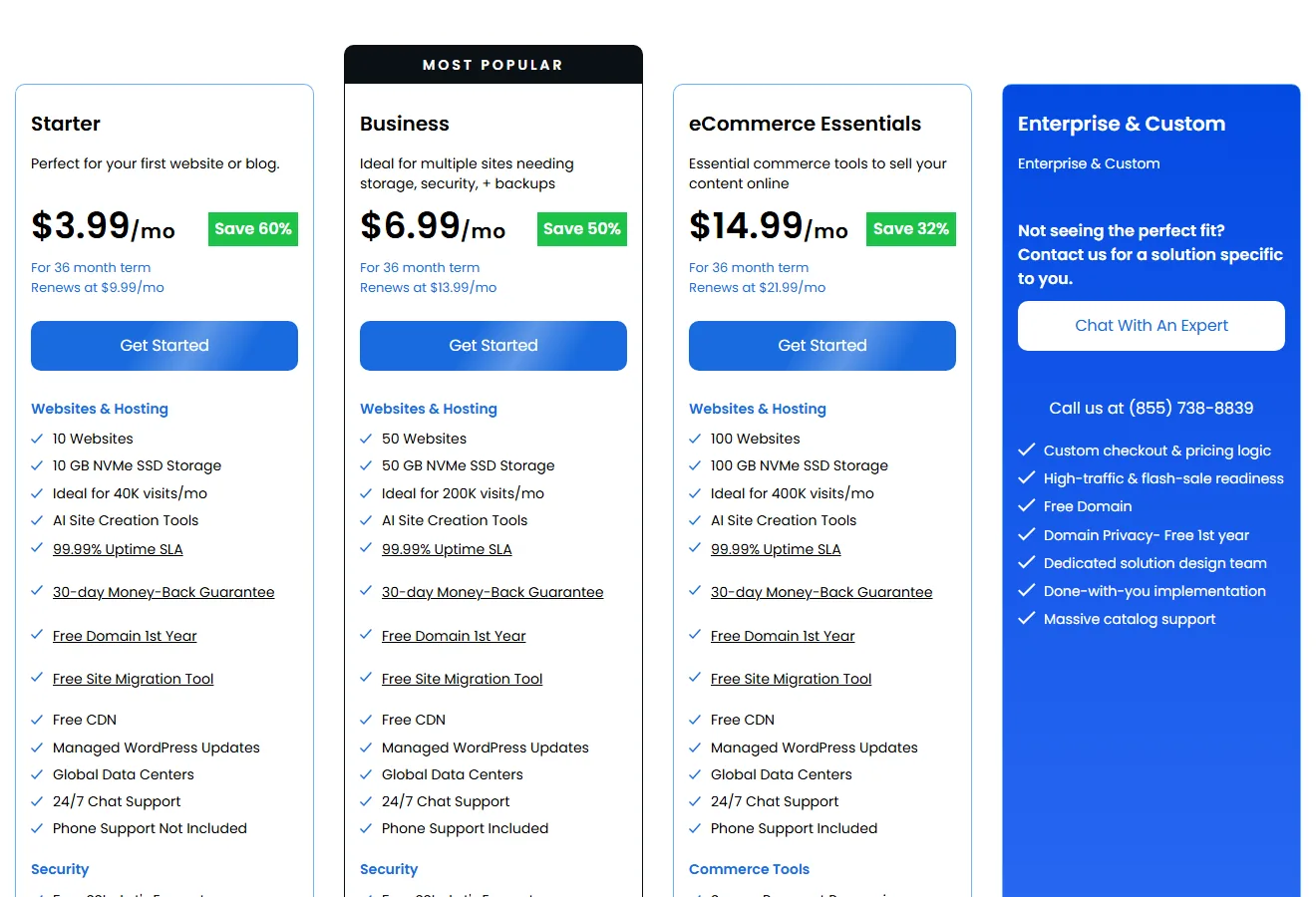
Bluehost has worked with WordPress since 2005 and is recommended by WordPress.org. Every plan lists a 99.99% uptime SLA, managed WordPress updates, a free CDN, free SSL, malware scanning and a free domain for the first year, plus a 30-day money-back guarantee.
For a business, the Business plan is the one to look at: $6.99/month on a 36-month term, renewing at $13.99/month, for 50 websites, 50 GB of NVMe storage, a web application firewall, DDoS protection, free domain privacy for the first year and phone support. Starter ($3.99/month, renews at $9.99/month) is fine for a single simple site, but it has chat support only.
The downsides are email and backups. Bluehost offers its Pro Email only as a free trial, so you’ll pay for mailboxes separately, and backups run weekly rather than daily.
| Plan to pick | Business |
| Price | From $6.99/mo (36-month term), renews at $13.99/mo |
| Business email | Pro Email free trial only |
| Backups | Weekly |
| Uptime promise | 99.99% SLA |
| Refund | 30 days |
Pros
- 99.99% uptime SLA on every plan
- Phone support on Business and above
- Strong WordPress tooling for beginners
Cons
- No included business email
- Weekly backups only
- Best prices need a 36-month term
Best for: WordPress beginners who want phone help and a written uptime SLA, and who already have email elsewhere. Read our Bluehost review for details.
9. Namecheap: Best for Trying a Host Before You Pay
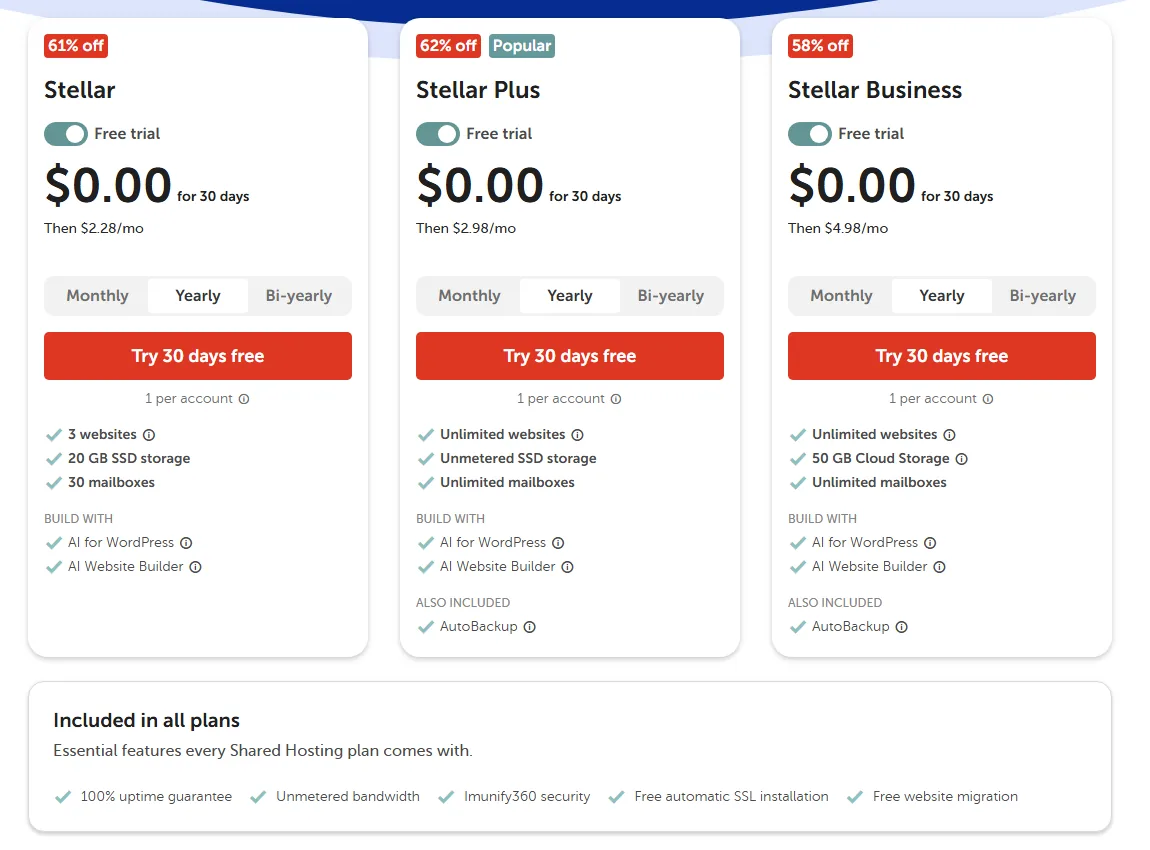
Namecheap lets you try any shared plan free for 30 days (one trial per account), which is handy if you want to set up your site and email before spending anything. After the trial, Stellar Plus costs $2.98/month on yearly billing and renews at $85.44/year. You get unlimited websites, unmetered SSD storage, unlimited mailboxes and AutoBackup on top of the standard twice-weekly backups. Stellar ($2.28/month after the trial, renews at $55.88/year) allows 3 websites and 30 mailboxes, and Stellar Business ($4.98/month, renews at $128.88/year) adds 50 GB of cloud storage.
All plans come with a 100% uptime guarantee, Imunify360 security, free automatic SSL installation, free migration and 24/7 live chat. You can choose a US, EU or Singapore data center. Two catches: the 30-day money-back guarantee only applies if you didn’t start with the free trial, and there’s no phone support.
| Plan to pick | Stellar Plus |
| Price | 30 days free, then $2.98/mo (yearly), renews at $85.44/yr |
| Business email | Unlimited mailboxes (30 on Stellar) |
| Backups | Twice a week, plus AutoBackup on Plus and Business |
| Uptime promise | 100% |
| Refund | 30 days, but not if you started with the free trial |
Pros
- 30-day free trial on every shared plan
- Unlimited mailboxes from Stellar Plus up
- Cheap yearly billing without a multi-year lock-in
Cons
- No refund if you started on the trial
- Live chat only, no phone
- Backups aren’t daily unless you’re on Plus or Business with AutoBackup
Best for: small businesses on a tight budget who want to test before committing. Our Namecheap review covers the trial and renewals in detail.
What Small Businesses Really Need From a Web Host
Most hosting ads talk about speed and storage. For a small business, the things that hurt are usually more boring: an email that stops working, a site you can’t restore after a bad plugin update, or a renewal invoice nobody budgeted for.
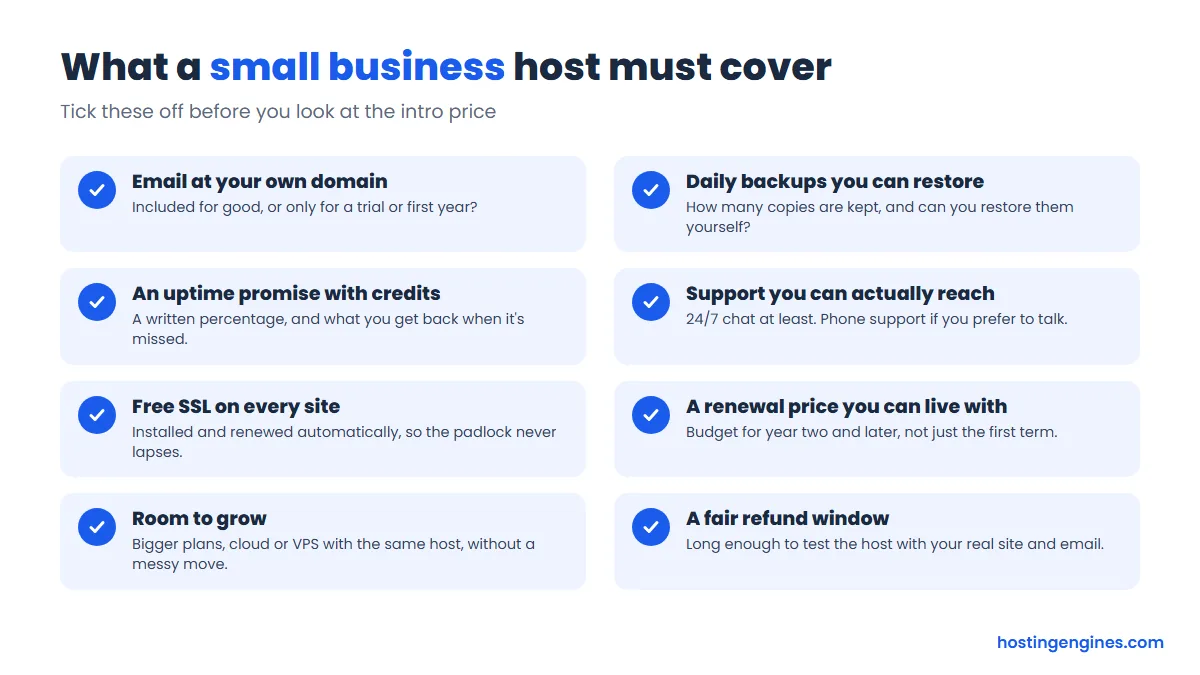
Business email you won’t have to replace
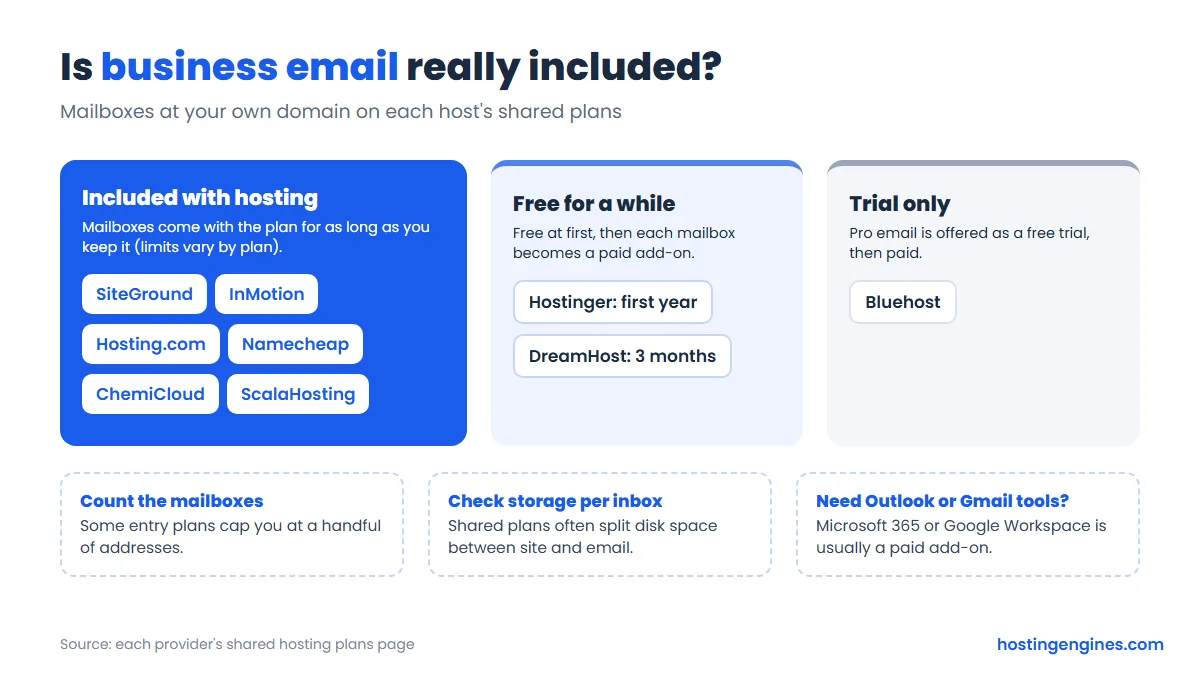
An address like [email protected] looks far more trustworthy than a free webmail account. Six of the nine hosts here include mailboxes for as long as you keep the plan. Hostinger makes them free for the first year, DreamHost for three months, and Bluehost only offers a trial. If you’d rather use Microsoft 365 or Google Workspace, that’s a separate subscription with any host, and you can point your domain at it.
Backups you can restore yourself
Daily backups should be the minimum for a business site, especially one that takes orders or bookings. SiteGround, Hosting.com, ChemiCloud, ScalaHosting and DreamHost include them. Hostinger’s Premium and Bluehost run weekly, Namecheap twice a week, and InMotion charges for its backup tool. Whatever you choose, keep your own copy too. Our guide to automatic backups explains how.
An uptime promise with real credits
Every host goes down sometimes. What matters is whether the promise is written down and what you get when it’s broken. Credits are usually small, a few percent of a monthly fee, so treat an uptime guarantee as a sign of confidence rather than insurance. We explain how these promises work in what an uptime guarantee really means.
Support that matches how you work
If you’re comfortable typing into a chat window, all nine hosts offer 24/7 chat. If you’d rather talk to a person, only InMotion (Power and Pro), SiteGround, Hosting.com and Bluehost (Business and up) list phone support on their shared plans.
Renewal prices and hidden costs
Intro prices are for the first term only. Renewals on this list run from about two to six times the intro rate, and paid extras like email, backups or domain privacy can add up. Our list of hidden costs of website hosting shows what to watch for.
Which plan type fits your business size
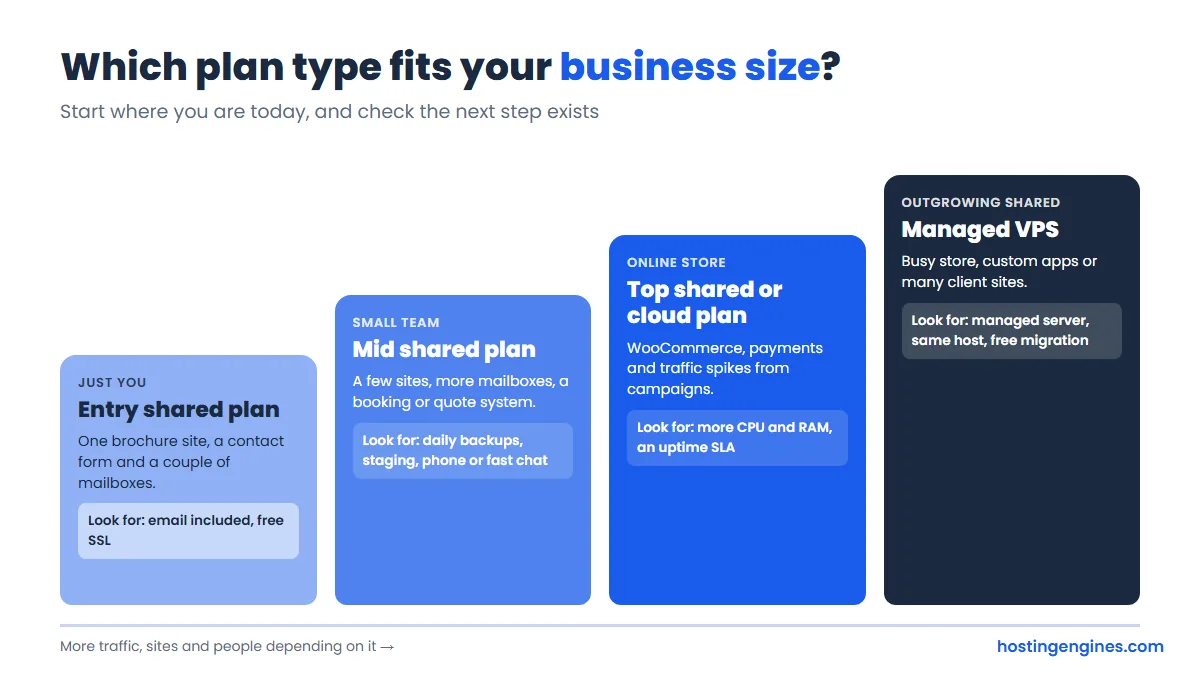
A one-person business with a brochure site and a couple of mailboxes is fine on an entry shared plan. A small team running a few sites and a booking system should go mid-tier for daily backups and staging. An online store or a site that gets campaign traffic spikes needs the top shared tier or a cloud plan, and if you keep hitting resource limits, it’s time to look at managed VPS hosting. Our guide on when to leave shared hosting covers the warning signs.
If you’re still weighing options, our step-by-step guide on how to choose a web hosting provider walks through the decision, and our best web hosting picks cover other types of sites.
FAQ
What is the best web hosting for a small business?
Hostinger is the best value for most small businesses, while InMotion Hosting is the better choice if you want phone support, a 99.99% uptime guarantee and a 90-day refund window. SiteGround is worth the higher renewal if daily backups and a polished WordPress setup matter most.
Do I need business email with my web hosting?
You don’t have to get it from your host, but it’s the cheapest way to have an address at your own domain. SiteGround, InMotion, Hosting.com, Namecheap, ChemiCloud and ScalaHosting include mailboxes with their shared plans, while Hostinger, DreamHost and Bluehost make them free for a limited time or offer a trial.
Is shared hosting good enough for a small business website?
Yes, shared hosting is enough for most small business websites, including small online stores. Move up to a cloud or VPS plan when your site regularly runs into resource limits, slows down at busy times, or you need software shared hosting won’t run.
How much should a small business pay for web hosting?
Expect roughly $2 to $7 a month for the first term on a good shared plan and about $7 to $30 a month once it renews, based on the hosts above. Add any paid extras like email, backups or domain privacy to get the real yearly cost.
Which hosts offer phone support for small businesses?
InMotion (Power and Pro plans), SiteGround, Hosting.com and Bluehost (Business plan and up) offer phone support on shared hosting. Hostinger, ChemiCloud, ScalaHosting, DreamHost and Namecheap support you through chat, tickets or email.
What uptime guarantee should a business host offer?
Look for at least 99.9% in writing, with service credits if the host falls short. InMotion, ChemiCloud and Bluehost promise 99.99%, while DreamHost and Namecheap promise 100%, but the credits are modest everywhere, so backups and support matter just as much.
Our Verdict
There’s no single best web hosting for small business, because a one-person consultancy and a busy online shop need different things. If price is the priority, start with Hostinger and budget for email after the first year. If you want to call someone when your site breaks and like the safety of a 90-day refund, InMotion’s Power plan is the safest all-round choice. SiteGround and Hosting.com are the picks for daily backups and email without add-ons, and ChemiCloud gives you most of that for less if you’re happy with chat support. Whatever you choose, look at the renewal price and the email terms before you pay.