
Liquid Web is not the host you pick because it’s cheap. It’s the host people look at when a site has started to matter: a store that can’t go down on a sale weekend, an agency with a dozen client sites, or a business app that has outgrown shared hosting. In this Liquid Web review we go through every product line on its pricing pages, what the monthly fee actually buys, how renewal and cancellation work, and the gaps you should close before paying.
One thing up front. We did not run our own speed or uptime tests on Liquid Web, so you won’t find benchmark charts here. Everything below comes from Liquid Web’s own pricing, product, policy and contact pages, checked in 2026 in US dollars. Where those pages are silent or contradict each other, we say so plainly.
Some links on this page are affiliate links. If you buy through them we may earn a commission, at no extra cost to you.
The Quick Answer
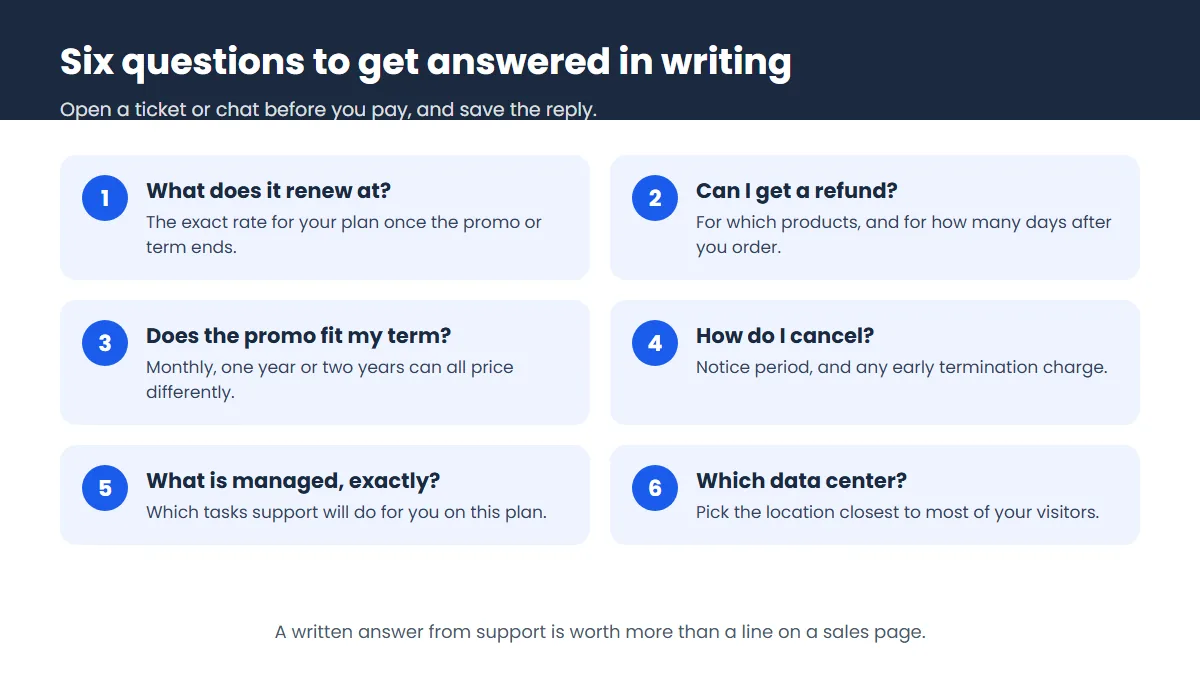
Liquid Web is a good choice if you want a VPS or dedicated server and you’d like experts to keep it patched, monitored and running. It also sells managed WordPress and WooCommerce plans that start at a reasonable $19 a month. It is a poor choice for a single small blog, and its paperwork needs care: the pricing pages don’t show renewal rates, and the refund terms are unclear. Ask Liquid Web for both in writing before you pay.
| Best for | Stores, agencies and businesses that want managed servers |
| Cloud VPS | From $11/month (1 vCPU, 2 GB RAM), also billed hourly |
| VPS | 4 GB RAM from $17/month, self or fully managed |
| Managed WordPress | Pro from $19/month, Elite from $29/month (1 site) |
| Managed dedicated | From $205.70/month on a two-year term |
| Data centers | 9 Liquid Web locations in the US, UK, Netherlands and Australia |
| Support | 24/7 by chat, ticket and phone |
| Refunds | Unclear. Ask Liquid Web for the policy in writing |
| Renewal price | Not shown on the pricing pages |
Who Is Liquid Web?
Liquid Web is a long-running US host based in Michigan. Its pricing page claims “29+ years” in the business, and the site footer now reads “Liquid Web, LLC by Nexcess Corp.” The top bar links three sister brands: Nexcess, Servers.com and LiquidWeb.com. That family tie shows up in practice too. The WordPress and WooCommerce plans fall under what Liquid Web calls Sites & Stores, and the support emails for that line are nexcess.net addresses.
Why does that matter to you? Mostly it doesn’t, day to day. But if you search for help or read older reviews, you’ll see the Nexcess name mixed in with Liquid Web’s, and now you know why. Our Nexcess review looks at the WordPress plans from that side.
VPS and Cloud VPS Pricing
Most people land on Liquid Web for its VPS hosting, and that’s where its pricing page opens. There are three headline cards, sized by RAM.
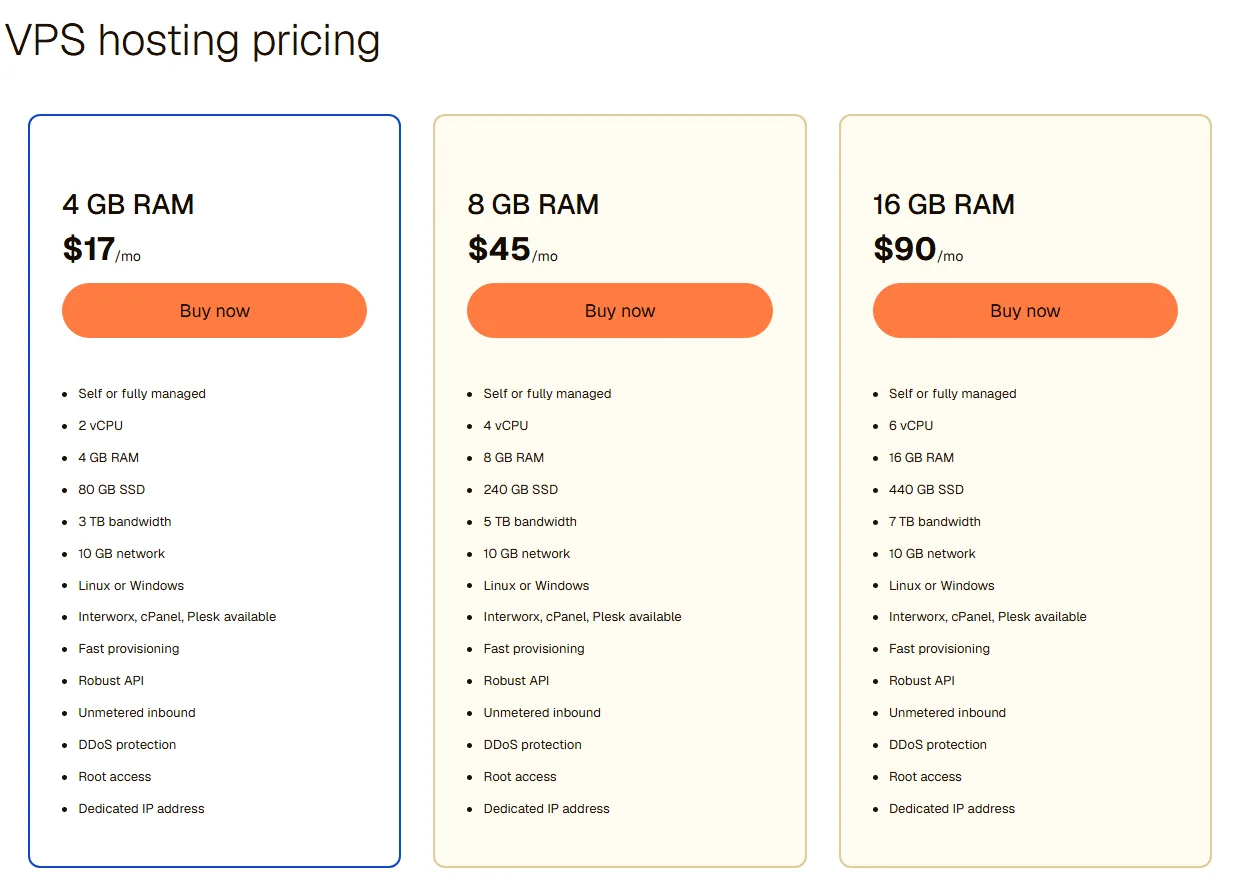
| Plan | Price | vCPU | SSD storage | Bandwidth |
|---|---|---|---|---|
| 4 GB RAM | $17/month | 2 | 80 GB | 3 TB |
| 8 GB RAM | $45/month | 4 | 240 GB | 5 TB |
| 16 GB RAM | $90/month | 6 | 440 GB | 7 TB |
Every card lists the same extras: Linux or Windows, root access, a dedicated IP address, DDoS protection, unmetered inbound traffic, an API and a 10 GB network. Two lines deserve a closer look. “Self or fully managed” sits on every card, but the card doesn’t say whether the fully managed option costs the same. And “Interworx, cPanel, Plesk available” says available, not included. cPanel licenses cost money everywhere, so check the total at checkout before you assume $17 is the final number.
The jump from 4 GB to 8 GB is steep, too. You pay well over twice as much for double the RAM, and the storage triples. If you only need a bit more memory, the Cloud VPS table below has steps in between.
Cloud VPS: the cheaper way in
Cloud VPS starts at $11 a month for 1 vCPU, 2 GB of RAM, 60 GB of storage and 2 TB of bandwidth. It’s also priced by the hour ($0.015 for that smallest size), which is handy for a test server you only need for a weekend. There are three flavors: general purpose, memory optimized (from $17 for 1 vCPU and 4 GB) and CPU optimized (from $22 for 3 vCPU and 2 GB). The general range goes up to 8 vCPU and 32 GB for $179 a month.
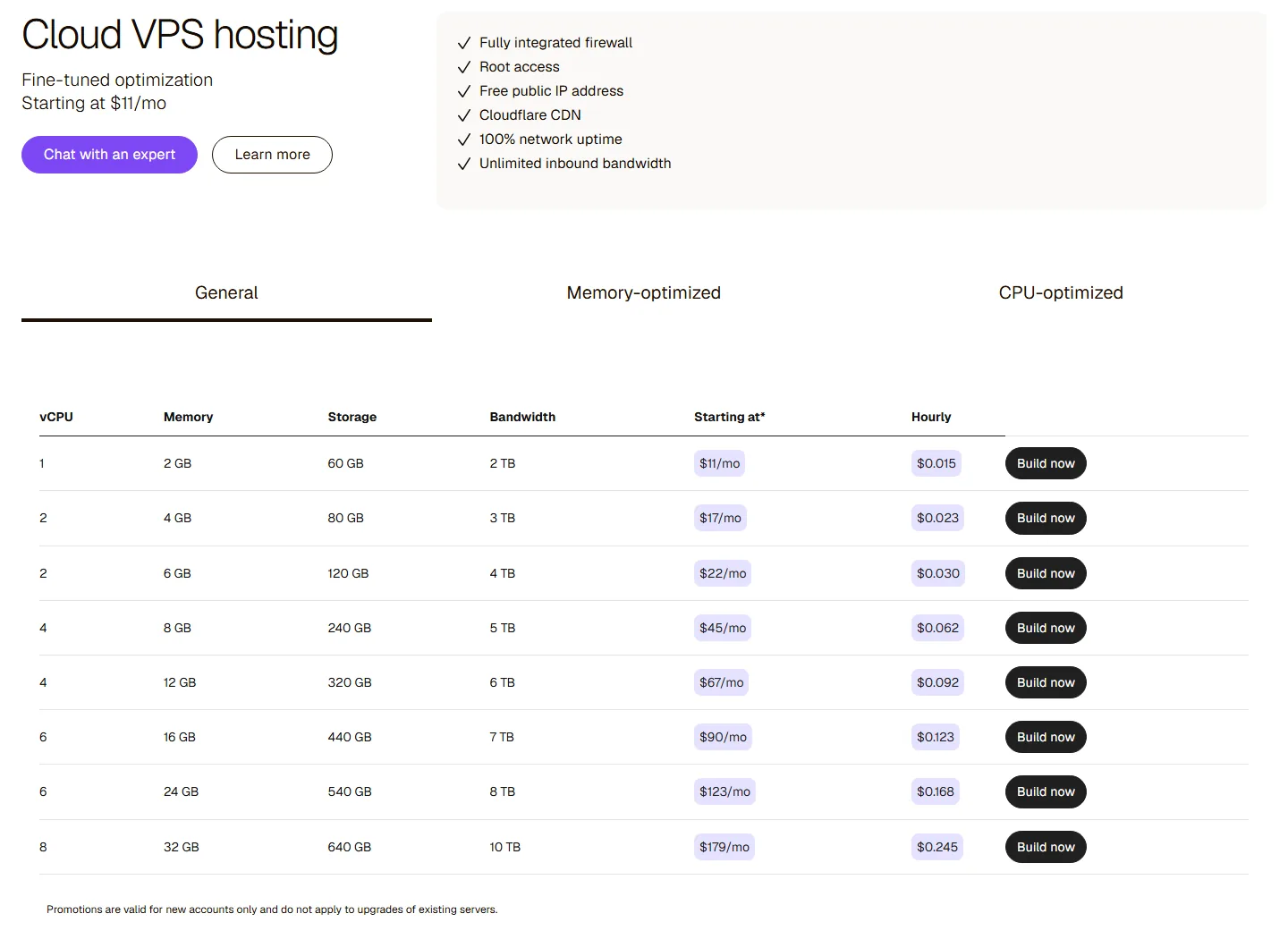
The Cloud VPS section lists a firewall, root access, a free public IP, Cloudflare CDN, unlimited inbound bandwidth and “100% network uptime”. Note the asterisk on “Starting at*” in the table header, and the line under it: promotions are for new accounts only and don’t apply to upgrades. So if you start small and grow, the bigger size may cost you the list price, not a promo one.
Our take: Cloud VPS at $11 is the sensible starting point if you’re curious about Liquid Web and comfortable on a server. If you’ve never run a server, weigh whether you need the managed help on top before you pick the cheapest box.
Dedicated Servers
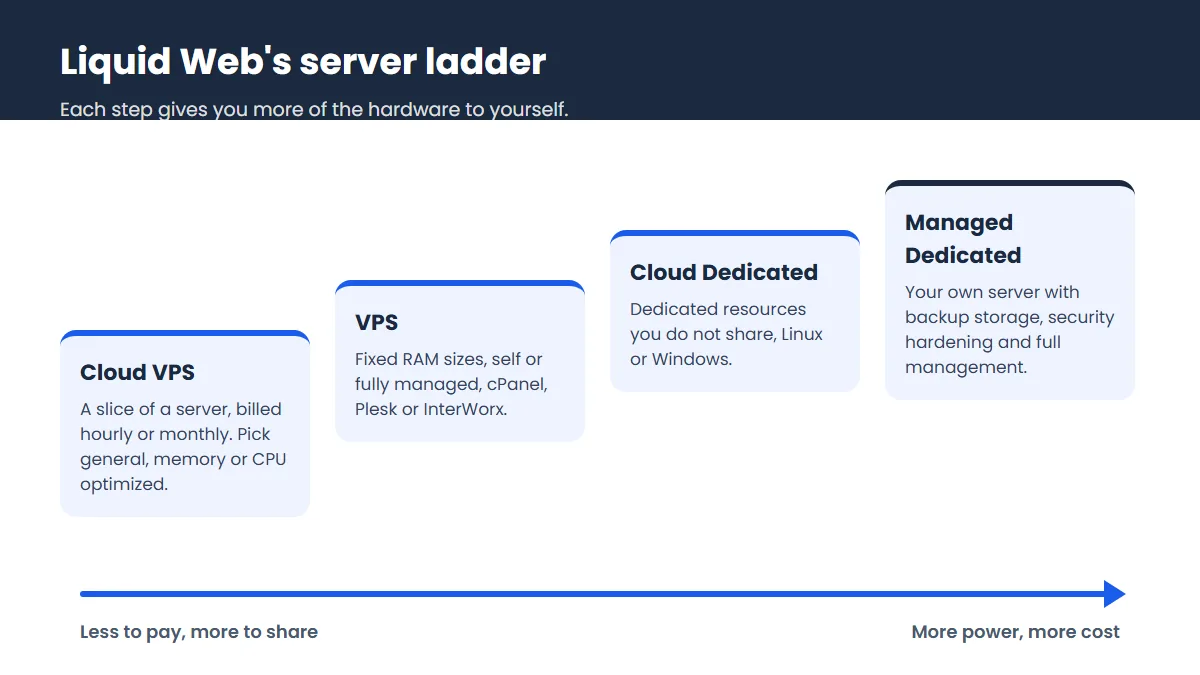
Liquid Web sells two kinds of dedicated server, and the prices are far apart, so it’s worth knowing which one you’re looking at.
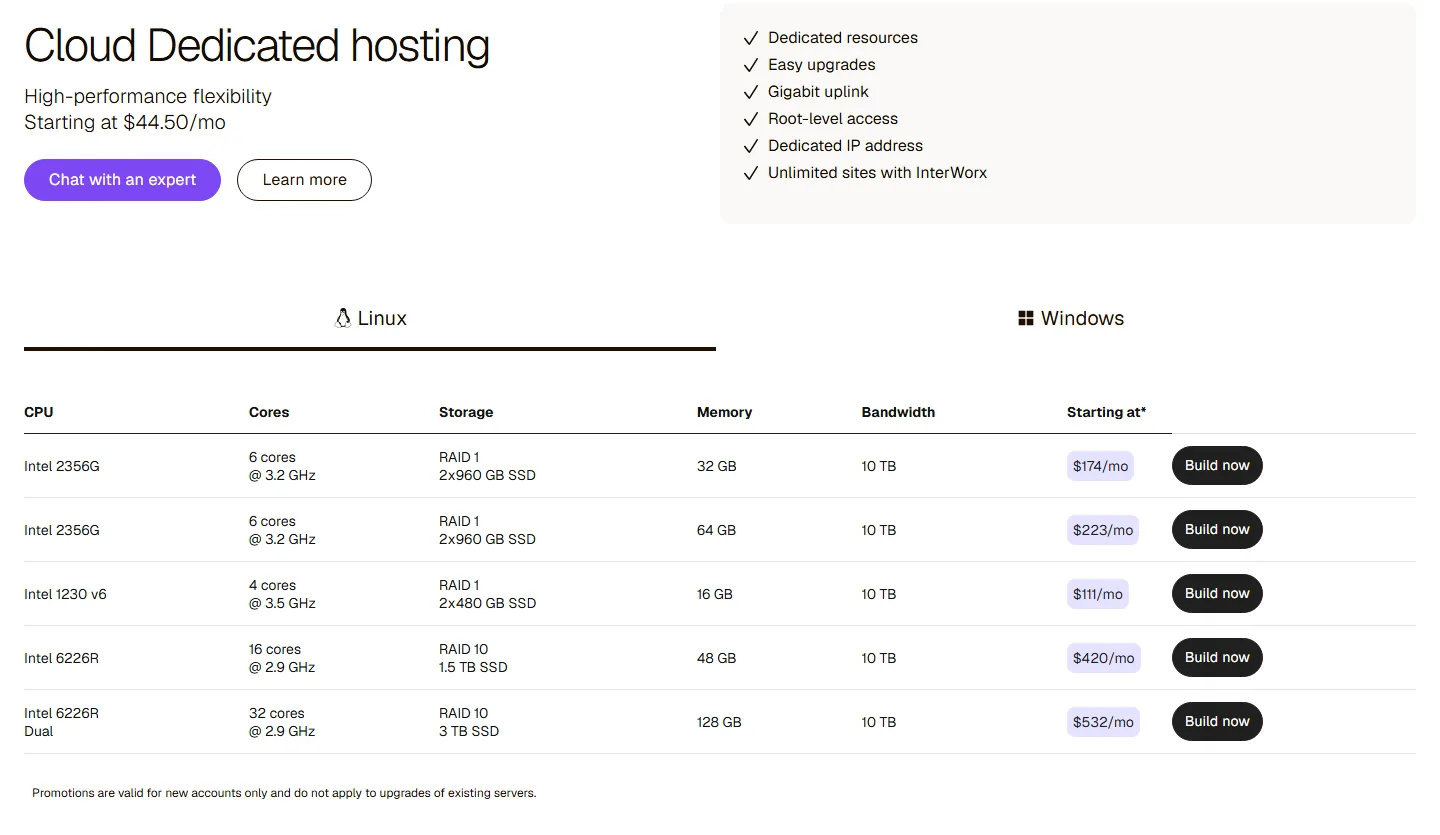
Cloud Dedicated
Cloud Dedicated gives you a whole machine with root access, a dedicated IP, a gigabit uplink and unlimited sites with InterWorx, on Linux or Windows. The headline says “Starting at $44.50/mo” next to an “Up to 50% off 2 mos” badge. The cheapest row in the table, though, is an Intel 1230 v6 with 4 cores, 16 GB of RAM and two 480 GB SSDs in RAID 1 for $111 a month. Bigger boxes run $174, $223, $420 and $532. Our reading is that $44.50 is a two-month promo figure, but the page doesn’t say which server it applies to, so ask.
Fully managed dedicated
The fully managed dedicated line is where Liquid Web earns its reputation. The entry card is an Intel Xeon E-2134 with 4 cores at 3.5 GHz, 16 GB of RAM, a 480 GB SSD, 500 GB of Acronis backup storage, 10 TB of bandwidth and cPanel, for $205.70 a month. That price carries a “Save 15% off 2 years” note, and the plan table lets you switch between a two-year term (15% off), one year (10% off) and monthly. By our math the monthly rate on that entry server works out at roughly $242, so the long term is doing a lot of the work in the headline price.
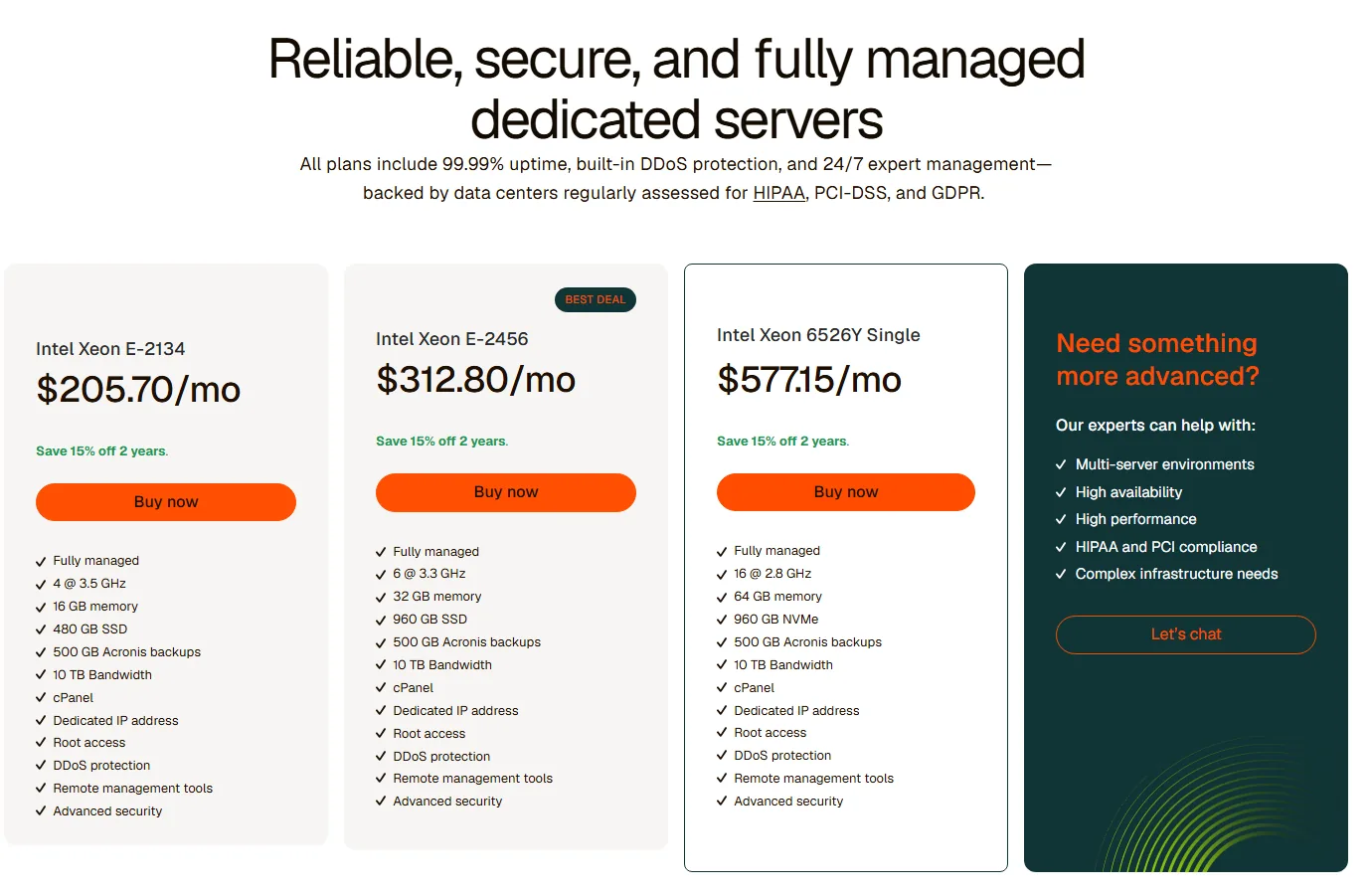
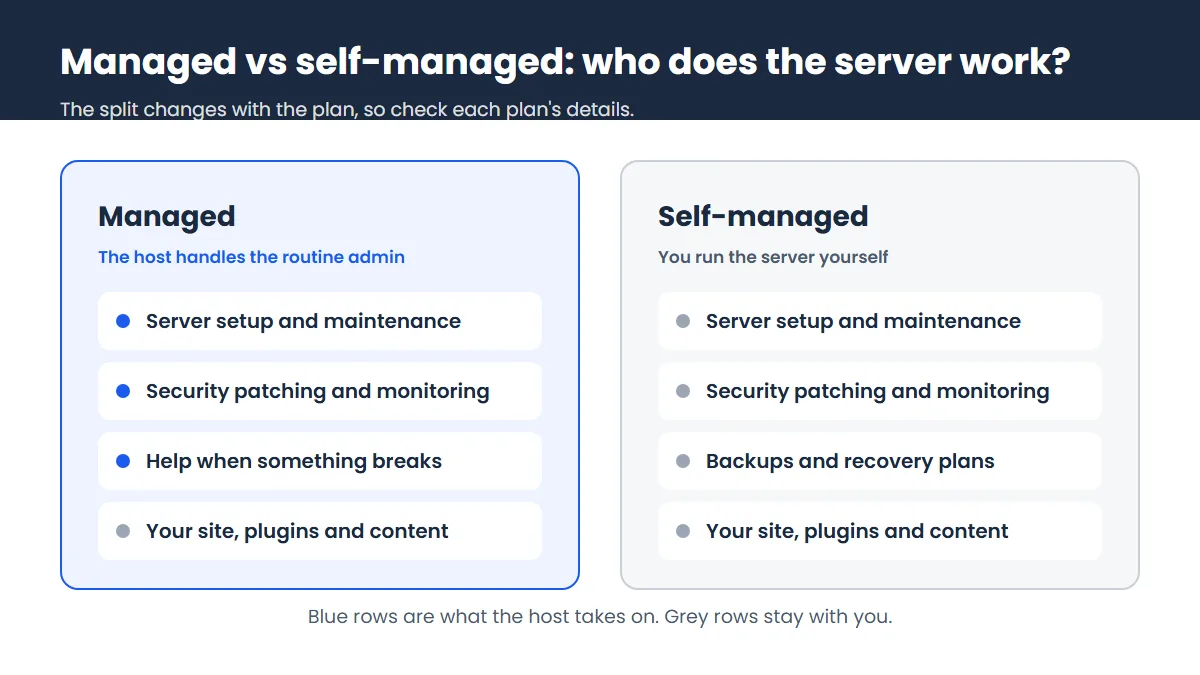
What does “fully managed” add? The dedicated page lists 24/7 monitoring and updates, built-in DDoS protection, ServerSecure hardening, backup-ready storage and a 30-minute hardware replacement promise if a part fails. It also says its data centers are regularly assessed for HIPAA, PCI-DSS and GDPR, which matters if you handle payments or health data. That’s real value for a business with no sysadmin. For a hobby project, it’s money you don’t need to spend. Our managed hosting guide explains where the line usually falls.
Managed WordPress and WooCommerce
If you just want a WordPress site to run well without touching a server, this is the line to look at. You pick the number of sites (1, 3, 5, 10 or 25) and the monthly visits per site (50,000, 150,000 or 400,000), and the page shows two plans: Pro and Elite. For one site at 50,000 visits, Pro is $19 a month and Elite is $29, both with 15 GB of storage and 2 TB of bandwidth. Paying yearly saves 10%.
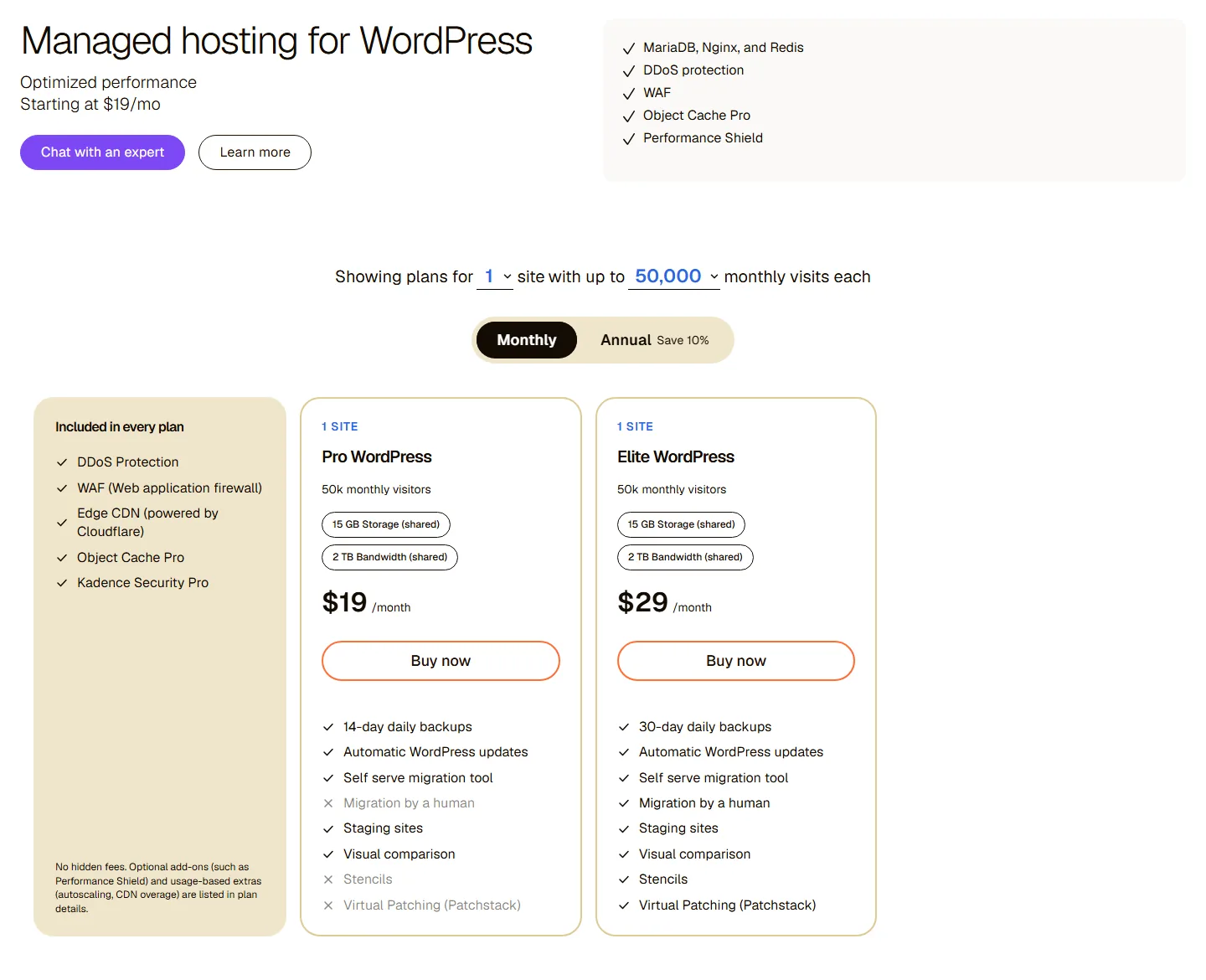
Every plan includes DDoS protection, a web application firewall, a Cloudflare edge CDN, Object Cache Pro and Kadence Security Pro. The stack is MariaDB, Nginx and Redis. So far, so good. The difference between the two tiers is where you should slow down, because the cheaper Pro plan leaves out a few things people often assume are standard.
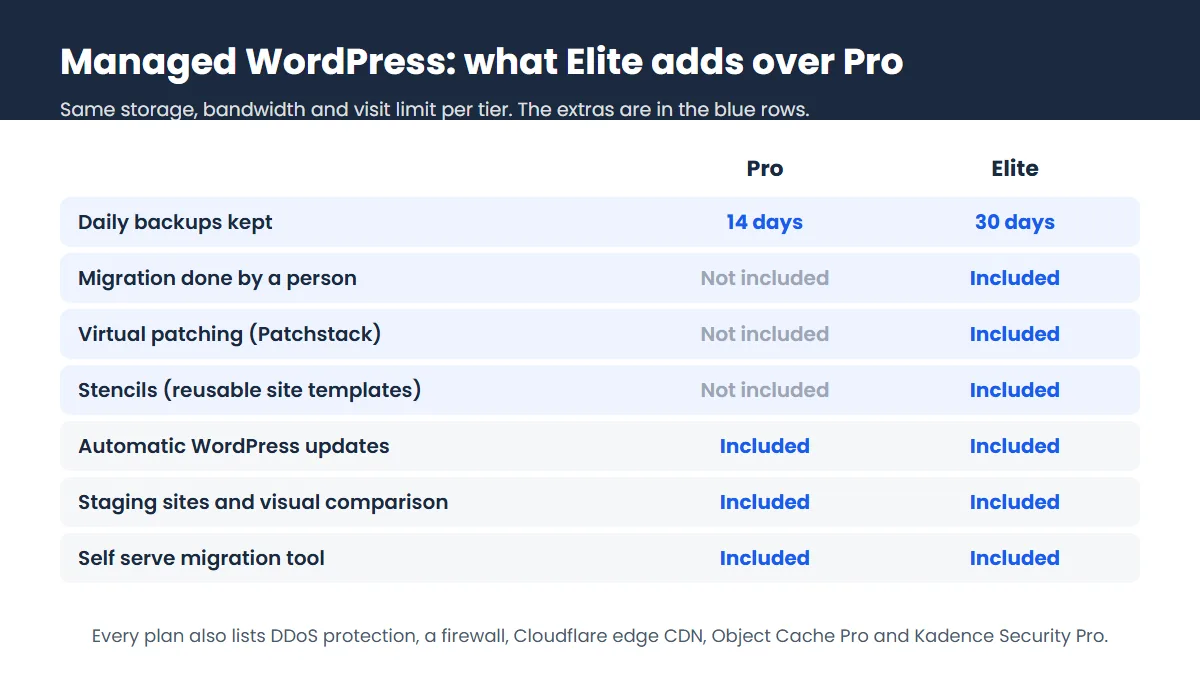
The one we’d watch is migration. On Pro you get the self serve migration tool. On Elite a person does the move for you. If you’re moving a busy store with a custom setup, that alone can be worth the extra $10 a month. Also note the fine print under the plan cards: optional add-ons like Performance Shield and usage-based extras such as autoscaling and CDN overage are charged on top.
The WooCommerce section is less clear. Its headline says “Starting at $9/mo”, and it lists full-page caching, no traffic limits and PHP workers. But the plan cards we saw in that section, for one site at 50,000 visits, showed the same $19 and $29 as WordPress. We couldn’t match the $9 to a plan, so ask sales which setup that price buys. If you’re comparing managed WordPress hosts, our WP Engine review covers a close rival with similar features.
There’s also a Magento line, from $32.64 a month for 50 GB and up to 11 sites. It’s a niche product, so we’ll leave it there.
Performance and Uptime
We can’t give you our own speed numbers, and we’d be wary of any review that does so without showing its test setup. What we can do is read the promises carefully, and they don’t line up. The VPS and dedicated pages say 99.99% uptime guaranteed. A banner in the WordPress section says 99.999%. The Cloud VPS section says 100% network uptime. Those are three different numbers, and “network uptime” is not the same as your server staying up.
The Terms of Service point to a separate service level agreement, and that document, not the marketing banner, decides what you get back if things go wrong. If uptime is the reason you’re paying more, ask which SLA applies to your plan and what credit it pays.
On hardware, the details are decent. VPS plans use SSD storage, the top managed dedicated card uses NVMe, and the dedicated server tables list RAID 1 or RAID 10 storage, so a single failed drive doesn’t take your site with it.
Data Center Locations
Liquid Web runs nine data centers of its own. Five are in the US: Lansing and Southfield in Michigan, Phoenix, San Jose and Ashburn in Virginia. Three are in Europe: Amsterdam, London and West Sussex. One is in Sydney. The same page lists more locations from sibling brand Servers.com, but those belong to a different service.
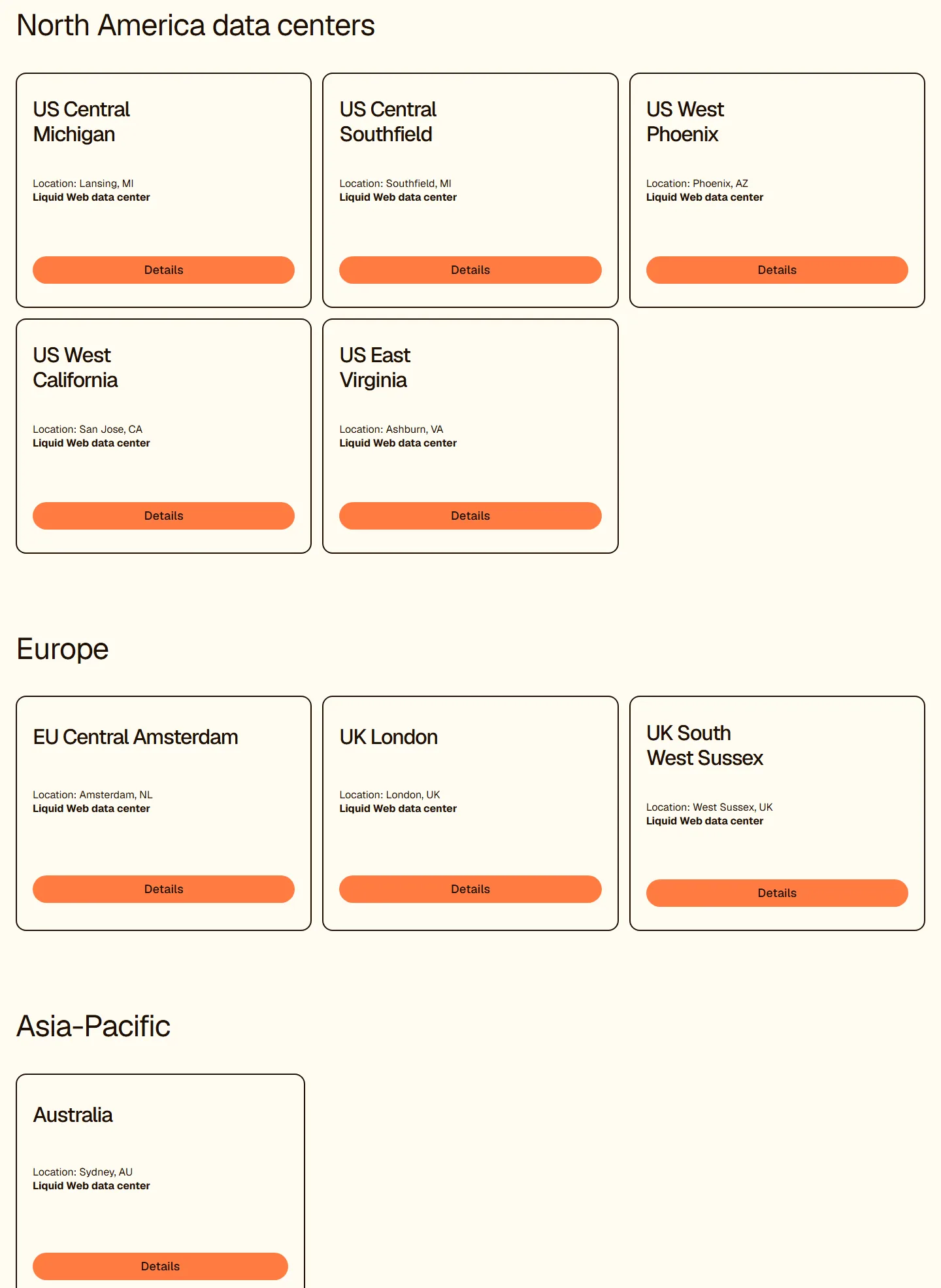
That’s a solid spread if your visitors are in North America, Western Europe or Australia. It’s thin for Asia, Latin America and Africa. The page doesn’t say which products run in which location, so ask which data centers your plan can use before you order, and pick the one nearest most of your visitors.
Support
Support is the reason most people choose Liquid Web, so here’s what the contact page actually offers. Support, billing and sales are all listed as open 24 hours a day, every day. You can chat, open a ticket or call, with phone numbers for the Americas, Australia and the UK. The page says it has “nearly 250+” Red Hat Linux and Windows certified technicians. The VPS page also promises free migrations “for most customers”, handled by specialists.
We didn’t open tickets ourselves, so we can’t tell you how fast the replies come or how good they are. What we’d do is test it before buying: open a pre-sales chat, ask the questions in the next section, and judge the answers. A host that sells on support should handle a few pointed questions well.
Renewal, Cancellation and Refunds
This is the weakest part of the Liquid Web offer, and it’s the section to read twice.
Renewal
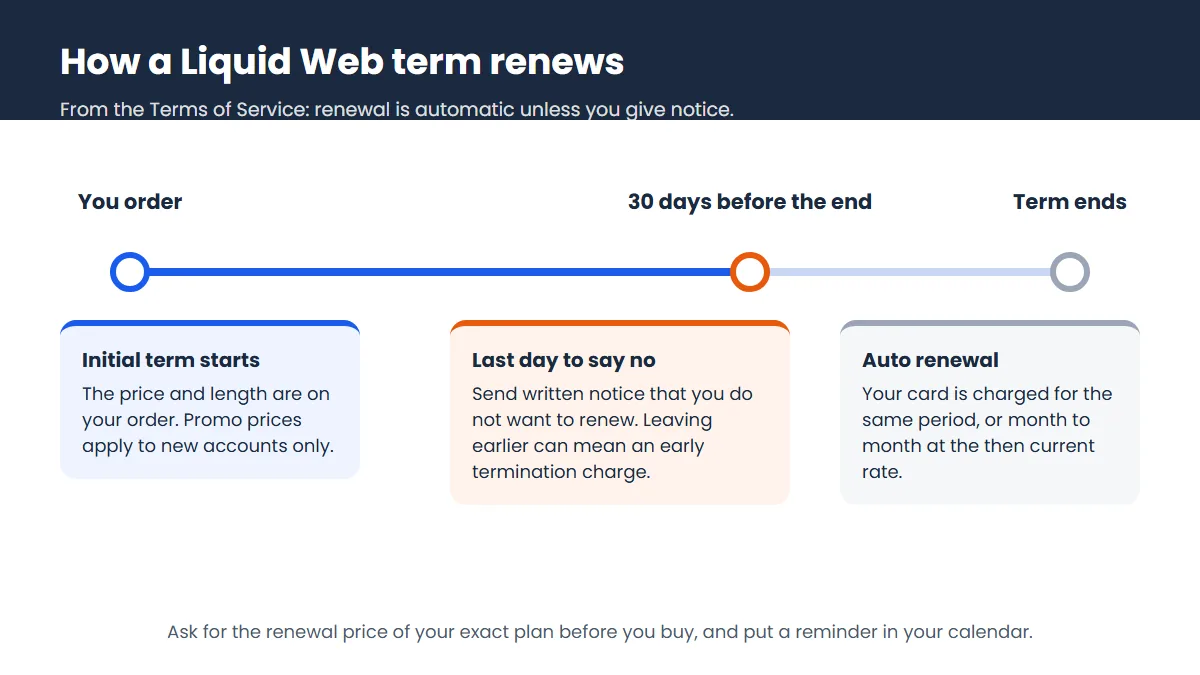
The pricing pages show promo prices but not what you’ll pay once a promo or term ends. The Terms of Service (effective 2024) say your order renews automatically for the same period, or month to month at the then-current rate if no period is set, unless you give written notice at least 30 days before the term ends. They also allow fee increases with 30 days’ notice, taking effect at the next renewal.
Cancellation
You can cancel for convenience with 30 days’ written notice, but the terms then charge an early termination fee. For flat-rate services that’s the monthly charge for every month left in the term, and for prepaid services it’s the full prepaid amount. In plain English: a two-year term is a two-year commitment.
Refunds
The refund policy is unclear, and we can’t give you a firm answer. The Terms of Service say that, except as otherwise provided, services are non-cancellable and fees are non-refundable. An older Liquid Web tariff from 2016, still online, mentions a 30-day money back guarantee for shared hosting only and excludes virtual private and dedicated servers. It says nothing about the managed WordPress plans. Ask Liquid Web for its refund policy for your exact plan, in writing, before you pay.
Pros and Cons
| What we like | What to watch |
|---|---|
| Full product ladder, from an $11 Cloud VPS up to managed dedicated | Renewal prices are not on the pricing pages |
| Fully managed options on VPS and dedicated servers | Refund terms are unclear and the Terms of Service lean non-refundable |
| 24/7 support by chat, ticket and phone | Early termination charges on longer terms |
| Hourly billing on Cloud VPS | Three different uptime promises across the site |
| Managed WordPress with WAF, CDN and Object Cache Pro on every plan | Cheaper Pro tier leaves out human migration and virtual patching |
| Data centers in the US, UK, Netherlands and Australia | Control panel licenses are “available”, not clearly included |
Who Liquid Web Suits, and Who Should Skip It
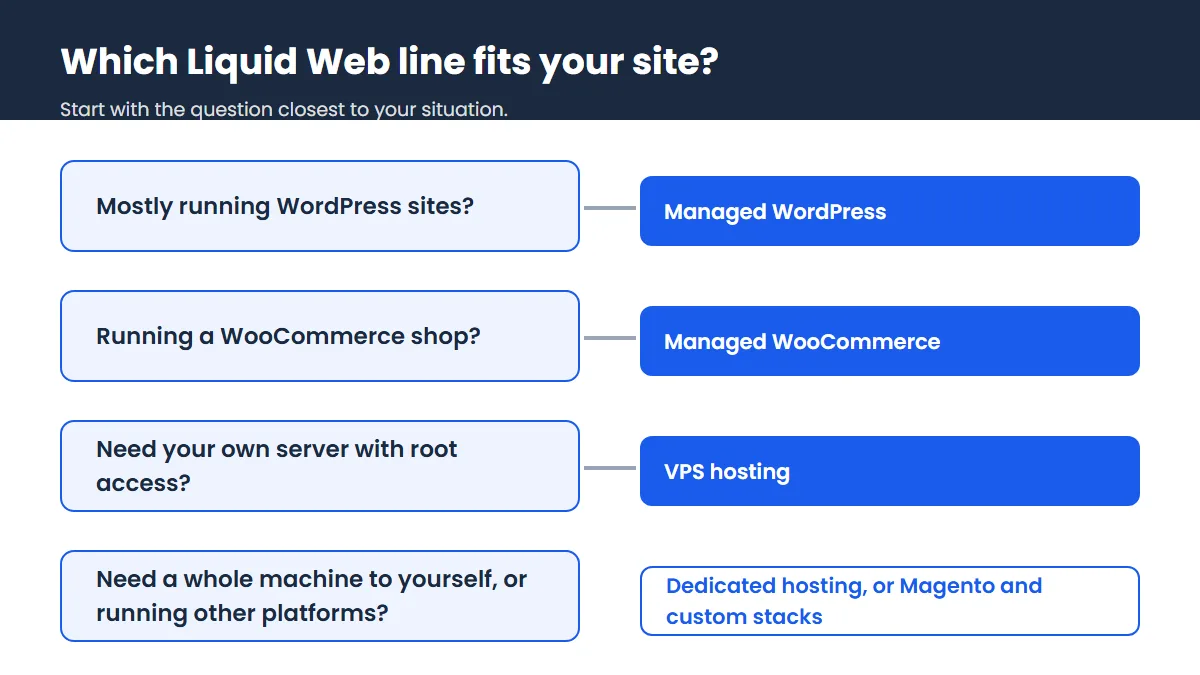
Liquid Web fits a WooCommerce or Magento store that has outgrown shared hosting and needs someone on call at 3 a.m. It fits agencies who’d rather bill clients for design work than spend nights patching servers. And it fits businesses with compliance needs, since the dedicated line talks openly about HIPAA and PCI-DSS assessed data centers.
Skip it if you run one small blog and want the lowest bill. A shared or entry managed WordPress plan elsewhere will do that job for less. Skip it too if you want to try a host risk-free for 30 days, because Liquid Web doesn’t clearly offer that. And if you’re a developer happy to run your own server, a plain unmanaged VPS from a cheaper provider will usually give you more hardware per dollar. Our best VPS hosting list puts Liquid Web side by side with those options.
Our Verdict
Liquid Web is a serious managed host with a clear, wide product range and prices that are easy to read on the first bill. The managed dedicated servers and the Elite WordPress plan are the standouts if you value hands-on help. Our doubts are all about the paperwork. Renewal prices are missing, the refund position is unclear, and longer terms come with early termination charges. None of that is a deal breaker for a business that plans to stay, but it means you should treat the first chat with sales as part of the purchase. Get the renewal price and refund terms in writing, then decide.
Liquid Web FAQ
How much does Liquid Web cost?
Cloud VPS starts at $11 a month, the 4 GB VPS at $17, managed WordPress at $19 and fully managed dedicated servers at $205.70 a month on a two-year term. Those are first-term prices in US dollars checked in 2026, and the renewal rates are not shown.
Does Liquid Web have a money-back guarantee?
It’s unclear. The Terms of Service say fees are generally non-refundable, while an older 2016 tariff mentions a 30-day guarantee for shared hosting only, so ask Liquid Web for the refund policy on your plan in writing before you buy.
Is Liquid Web good for beginners?
Its managed WordPress plans are fine for beginners with a budget, since the host handles updates, backups and security. Its VPS and dedicated servers are better suited to people who know what they need, or who will pay for the fully managed option.
Where are Liquid Web’s data centers?
Liquid Web lists nine of its own: Lansing, Southfield, Phoenix, San Jose and Ashburn in the US, Amsterdam, London and West Sussex in Europe, and Sydney in Australia.
Can I cancel Liquid Web at any time?
You can, with 30 days’ written notice, but the Terms of Service add an early termination charge for the rest of a fixed term. The charge is smallest on monthly billing, since there’s less of a term left to pay, but the monthly rate is higher.
Is Liquid Web the same company as Nexcess?
They are sister brands. Liquid Web’s footer reads “Liquid Web, LLC by Nexcess Corp.”, and its WordPress and WooCommerce support uses nexcess.net email addresses.