
An email address like [email protected] works fine until you start sending quotes, invoices or job offers from it. Then it looks a bit off, and people notice. The fix is cheap: email hosting that runs on your own domain, so every message comes from [email protected].
The hard part is picking the best email hosting for your situation, because prices run from free to more than $20 per person a month, and the cheap options cut corners you might not see until later.
This guide compares 8 email hosts plus the “free” mailbox that comes with most web hosting plans. For each one we checked the official pricing page on the same day and wrote down the per-user price on annual and monthly billing, the mailbox size, how many domains you can add, the apps you get, the security basics (SPF, DKIM, two-factor login) and how hard it is to move your old mail in.
Best Email Hosting: Quick Picks
Short on time? Here’s where we’d start.
| Best for | Provider | Starts at (per user) |
|---|---|---|
| Most small teams | Google Workspace | $7/mo (annual plan), $8.40 month to month |
| Teams that live in Outlook and Office | Microsoft 365 | $4/mo email only, $7/mo with Teams and web apps |
| Lowest cost, plus a free plan | Zoho Mail | Free for up to 5 users, paid from $1/mo |
| The best pure email experience | Fastmail | $5/mo (12-month term) |
| Privacy and encryption | Proton Mail | $6.99/mo (yearly billing) |
| One cheap mailbox for your domain | Namecheap Private Email | $14.88/year for 1 mailbox |
| Cheap add-on next to your website | Hostinger Email | $1.59/mo regular rate (48-month term) |
| Cheapest with a free domain | IONOS Email | $1.10/mo (3-year term), then $2/mo |
The short version: if you also want shared docs, calendars and video calls, pick Google Workspace or Microsoft 365. If you only need email that works well, Fastmail and Zoho Mail give you more for less. And if you have one or two addresses and a tight budget, Namecheap Private Email or Hostinger Email will do the job.
Email From Your Web Host or Dedicated Email Hosting?
Before comparing brands, settle one question: do you need a separate email host at all? Most shared hosting plans include a few mailboxes, and for a hobby site that’s often enough. But the two setups behave very differently once email matters to your business.
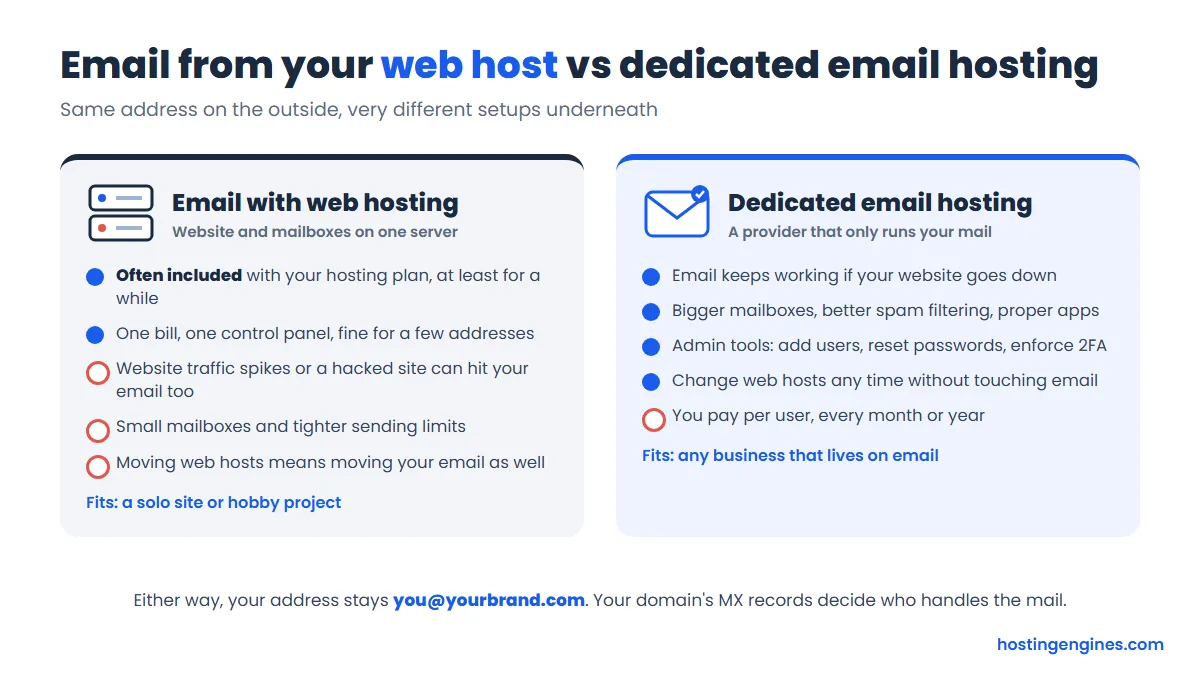
With hosting email, your website and your inbox share one server. If the site gets a traffic spike, gets hacked, or the server’s IP lands on a spam blocklist because of another customer, your email suffers too. Mailboxes are usually small, and moving to a new web host means moving your email at the same time. A dedicated email host keeps mail separate, so you can switch web hosts whenever you like and your inbox never notices.
Our rule of thumb: use the included mailbox for a personal site or a side project. Once clients, payments or support requests arrive by email, pay a few dollars a month for a dedicated host. If you’re still picking a web host, our guide on what to look for in web hosting covers how included email fits into the bigger decision.
How We Picked These Email Hosts
We started with the services people ask us about most and the ones that keep showing up when you search for business email, then checked each official pricing page, plan comparison and help center on the same day. For every provider we looked at:
- The price per user on annual billing and on monthly billing, and what it renews at
- Mailbox storage per user, and whether file storage is included
- How many custom domains and aliases you get
- Which apps come with it (webmail, mobile apps, calendar, documents, video calls)
- Security basics: SPF and DKIM support, two-factor login, spam filtering
- How you move existing mail in (a built-in import tool or a manual IMAP copy)
- Free trials and refund rules
The order reflects value for a typical small business, not a speed test. Where the fine print changes the picture, like a free plan with no IMAP or a low price that needs a 3-year prepay, we say so.
The Best Email Hosting Providers in Detail
1. Google Workspace: Best for Most Small Teams
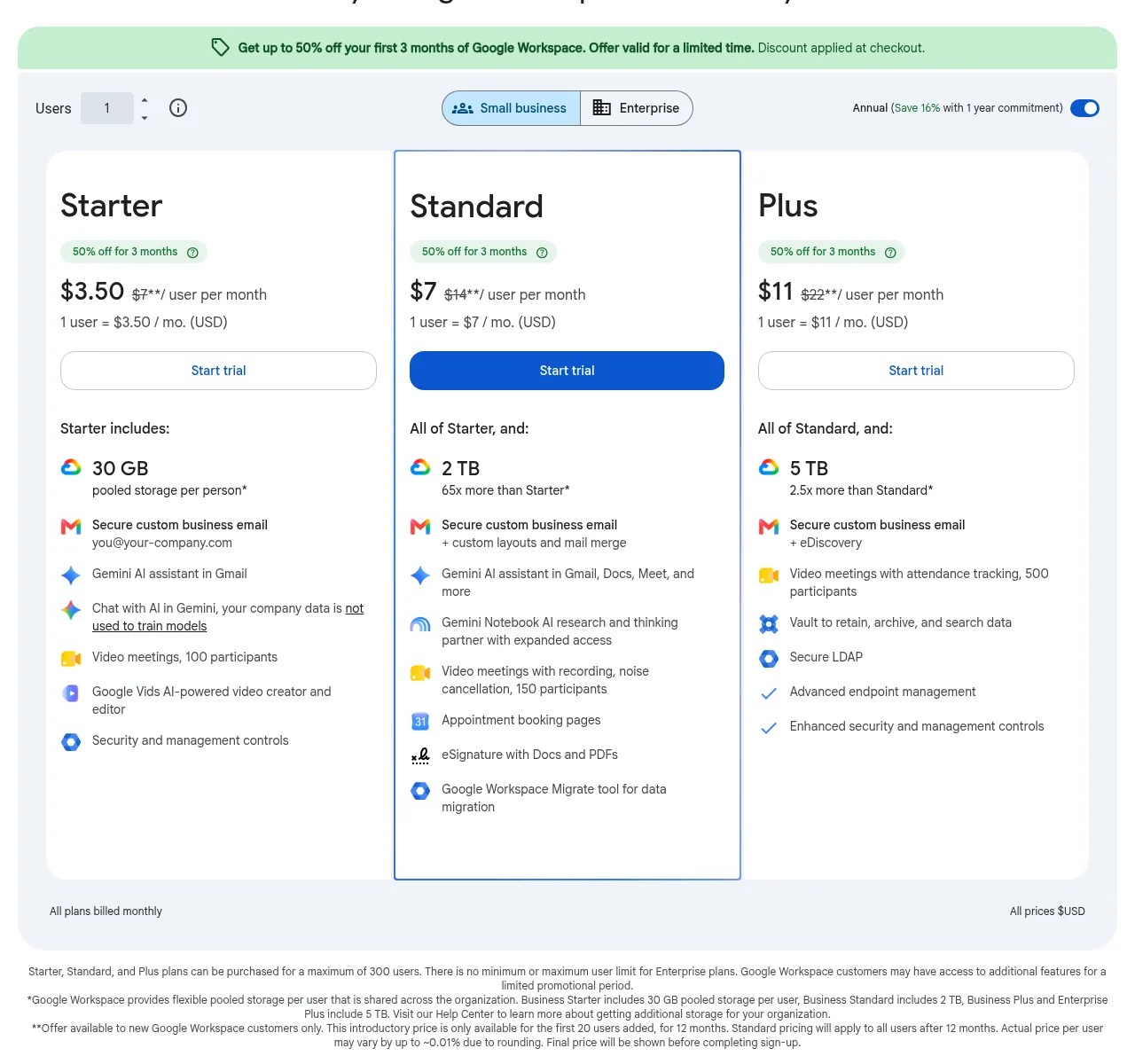
Google Workspace is Gmail with your own domain, plus Drive, Docs, Sheets, Calendar and Meet in one account. If your team already knows Gmail, there’s nothing to learn. Business Starter costs $7 per user a month on the annual plan or $8.40 on the flexible month-to-month plan, according to Google’s own billing help page. Business Standard is $14 ($16.80 flexible) and Business Plus $22 ($26.40 flexible).
Starter gives each person 30 GB of pooled storage shared across the company, which fills up faster than you’d think if people email large files. Standard jumps to 2 TB per person and adds meeting recordings, appointment booking pages and Google’s migration tool. Plans top out at 300 users. Google raised prices in 2025 when it folded its Gemini AI features into every Business plan, so older reviews quoting $6 for Starter are out of date.
New customers currently see a promo on the pricing page: up to 50% off the first 3 months on the annual plan. That’s a nice start, but plan your budget on the full price.
| Cheapest plan | Business Starter: 30 GB pooled storage per user, custom email, Meet for 100 people |
| Price | $7/user/mo on the annual plan, $8.40 on the flexible plan |
| Next plan up | Business Standard: $14/user/mo, 2 TB per user |
| Apps | Gmail, Calendar, Drive, Docs, Sheets, Slides, Meet, Chat, Gemini |
| Free trial | 14 days |
| Limits | Up to 300 users on Business plans |
Pros
- Gmail’s spam filtering and search, with your own domain
- Full office suite and video calls included
- Easy to add or remove people on the flexible plan
Cons
- 30 GB on Starter is shared storage for mail and files
- Annual plan locks you in: you pay for every license until renewal
- Pricier than email-only services if you don’t need the extras
Who it suits: small teams that want email, shared files and video calls from one company, and anyone who already likes Gmail.
2. Microsoft 365: Best for Outlook and Office Users
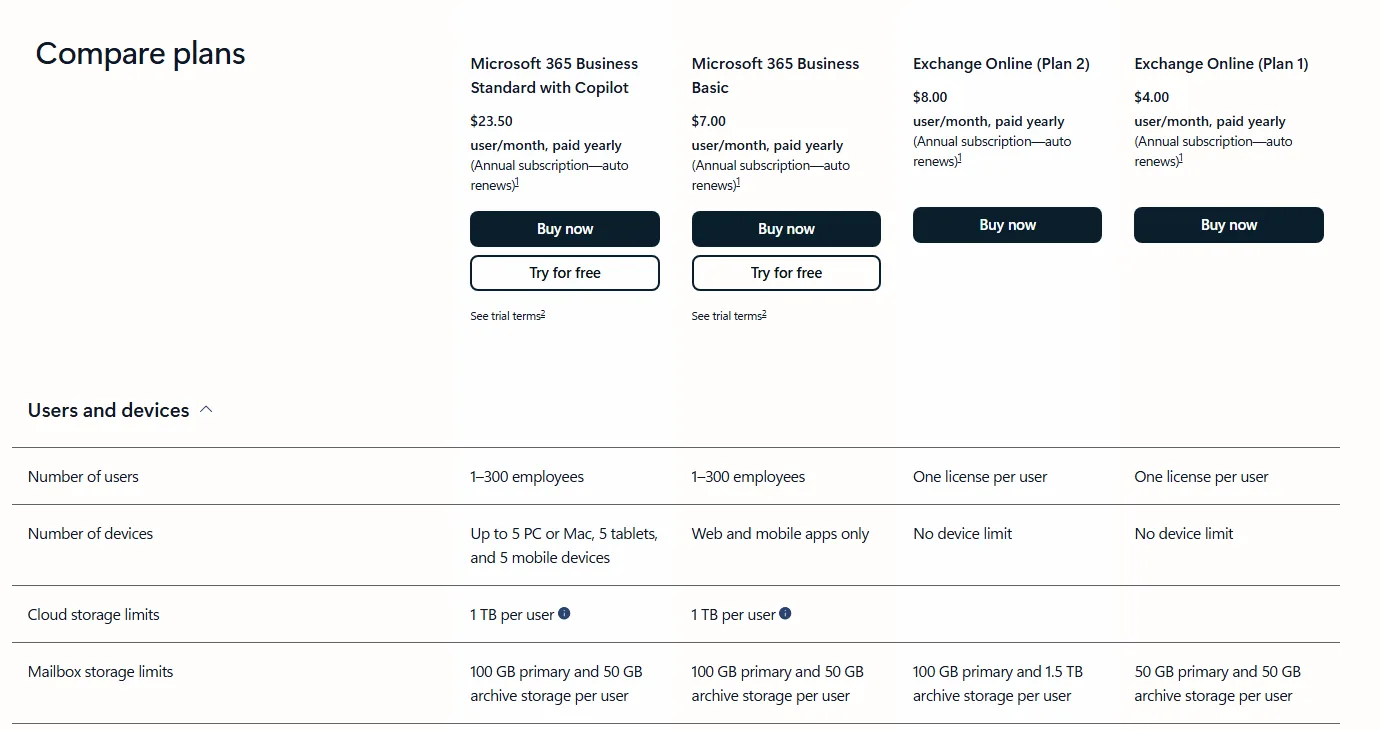
Microsoft 365 runs your mail on Exchange, the same system big companies use, and it’s the natural pick if your team lives in Outlook, Word and Excel. The mailboxes are large: Business Basic gives each user a 100 GB mailbox plus 1 TB of OneDrive storage.
Prices went up on July 1, 2026. Microsoft’s licensing page lists Business Basic rising from $6 to $7 per user a month and Business Standard from $12.50 to $14, both on annual commitment. Existing customers move to the new price at their next renewal. Paying month to month costs more: $8.40 for Basic and $16.80 for Standard. Business Basic only includes the web and mobile versions of the Office apps; you need Standard for the desktop apps.
If you only want email, skip the suites. Exchange Online (Plan 1) is $4 per user a month, paid yearly, with a 50 GB mailbox and 50 GB archive. It’s the cheapest way to get Outlook-grade mail on your domain from Microsoft itself.
| Cheapest plan | Exchange Online (Plan 1): 50 GB mailbox, email only |
| Price | $4/user/mo paid yearly; Business Basic $7 ($8.40 monthly) |
| Mailbox size | 50 GB (Exchange Plan 1), 100 GB (Business plans) |
| Apps | Outlook, Exchange; Business plans add Teams, OneDrive and Office web apps |
| Free trial | One month on Business plans |
| Refunds | 7-day window for a prorated refund after a paid plan starts |
Pros
- Huge mailboxes, even on the cheapest Business plan
- Outlook, Teams and Office in one admin center
- Exchange Online Plan 1 is a cheap email-only option
Cons
- Prices rose in July 2026, and monthly billing costs 20% more
- The admin center is powerful but busy for a two-person shop
- Desktop Office apps need Business Standard or higher
Who it suits: businesses that already use Outlook and Office, or that need large mailboxes and Microsoft’s compliance tools.
3. Zoho Mail: Best Budget Pick With a Free Plan
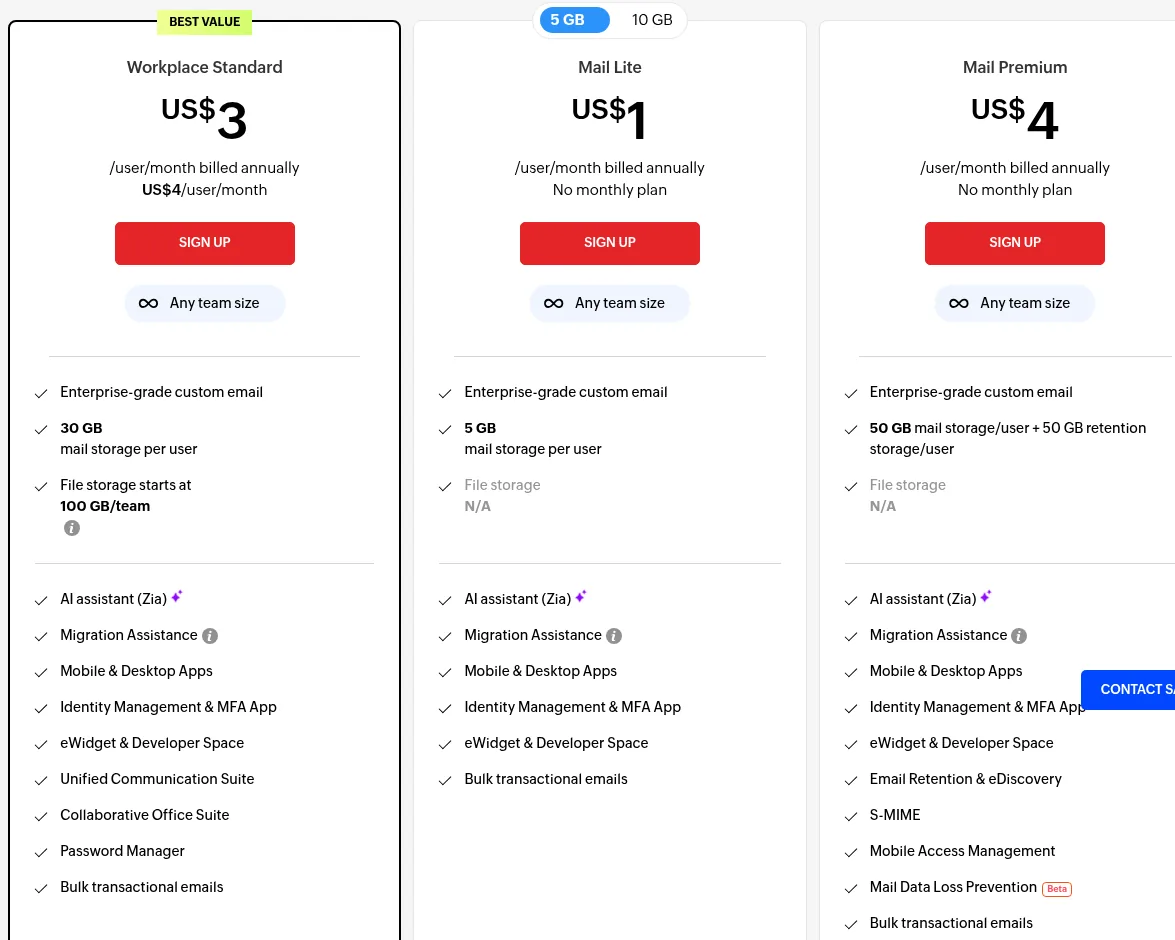
Zoho Mail is the best value on this list. Mail Lite costs $1 per user a month with 5 GB of storage, or $1.25 with 10 GB, billed annually (there’s no monthly option). Mail Premium is $4 with 50 GB of mail storage plus 50 GB of retention storage, S/MIME and eDiscovery. If you want documents and chat too, Workplace Standard bundles mail with 30 GB per user, office apps and team file storage for $3 a user annually or $4 monthly.
Zoho also has a Forever Free plan: email hosting for one domain, up to 5 users, 5 GB per user. The catch is real, though. IMAP, POP and ActiveSync aren’t included, so you can only use Zoho’s webmail and its own mobile apps, not Outlook or Apple Mail. Zoho also says the free plan is only available in select data centers. For a solo founder testing an idea, it’s still a good deal.
Every paid plan includes migration help, an MFA app and 24/7 support by email, chat and phone. You can mix plans in one organization, so the boss can have Workplace while everyone else gets Mail Lite.
| Cheapest plan | Mail Lite: 5 GB per user (10 GB option) |
| Price | $1/user/mo billed annually ($1.25 for 10 GB); Mail Premium $4 |
| Free plan | Up to 5 users, 5 GB each, 1 domain, webmail and Zoho apps only |
| Attachments | 30 MB on Mail Lite and Workplace Standard, 40 MB on higher plans |
| Free trial | 15 days of the top plan, no credit card |
| Security | MFA, SPF and DKIM setup guides, S/MIME on Mail Premium |
Pros
- The cheapest paid plan here, and a real free tier
- Clean, ad-free webmail with a migration tool
- Mix-and-match plans keep costs down
Cons
- Free plan has no IMAP/POP, so no Outlook or Apple Mail
- Mail Lite and Mail Premium are annual only
- The admin console has a learning curve
Who it suits: solo businesses and small teams on a budget who want proper email without paying for a full office suite.
4. Fastmail: Best Pure Email Experience
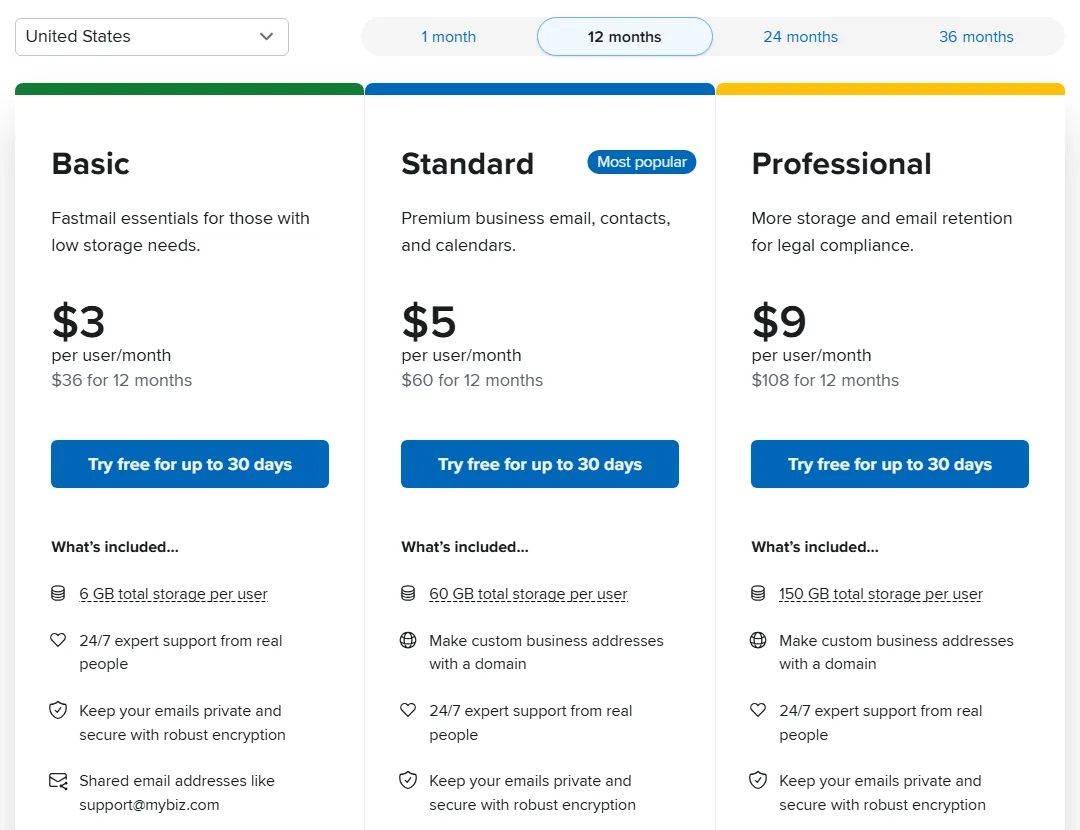
Fastmail does one thing, email (with calendars and contacts), and does it very well. The web app is quick, search is fast, and it works with any mail app over standard protocols. There are no ads and no tracking, and you can choose whether your data lives in the EU or the USA.
For a business on your own domain, Standard is the plan to look at: $5 per user a month on a 12-month term or $6 month to month, with 50 GB for mail, calendar and contacts plus 10 GB of file storage. Fastmail lists custom business addresses with a domain on Standard and Professional. Professional costs $9 ($10 monthly) and adds 150 GB of total storage and an email retention archive for legal compliance. The $3 Basic plan has just 6 GB per user.
Every plan comes with a free trial of up to 30 days and 24/7 support from real people. Shared addresses like [email protected] are built in, which small support teams will like.
| Best plan for a domain | Standard: 60 GB total per user (50 GB mail, 10 GB files) |
| Price | $5/user/mo (12-month term), $6 month to month |
| Apps | Webmail, Fastmail apps, works with Outlook and iPhone Mail |
| Security | Two-step verification, SPF, DKIM and DMARC settings for your domain |
| Migration | Built-in import from other providers |
| Free trial | Up to 30 days |
Pros
- Fast, focused email with excellent search
- Shared addresses and calendars for teams
- Choice of EU or US data residency
Cons
- No office suite or video calls
- Basic plan storage is tight
- Two-step verification is optional, so make sure your team turns it on
Who it suits: small businesses and freelancers who want a fast, private inbox and already use other tools for documents.
5. Proton Mail: Best for Privacy
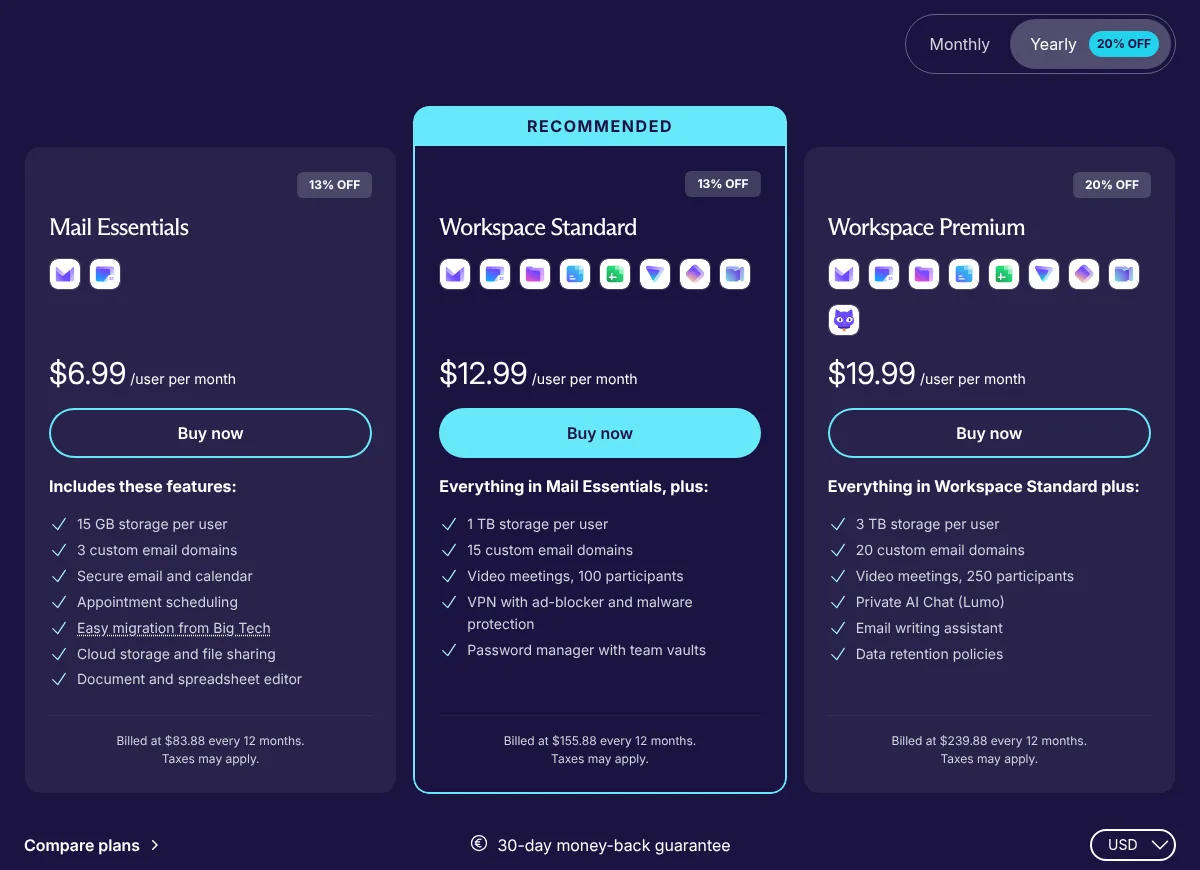
Proton Mail is built around end-to-end and zero-access encryption, so not even Proton can read the mail stored on its servers. It’s a strong choice for lawyers, health practices, journalists, or anyone who handles sensitive information and wants that to be the provider’s main promise.
Mail Essentials costs $6.99 per user a month billed yearly ($83.88 a year) or $7.99 month to month. You get 15 GB per user, up to 3 custom domains, 10 addresses per user, a calendar and Proton’s Easy Switch import tool. Workspace Standard ($12.99 yearly, $14.99 monthly) raises that to 1 TB per user and 15 domains and adds Proton’s VPN, password manager, video meetings and documents.
There’s a 14-day free trial and a 30-day money-back guarantee. Proton sets DKIM up through CNAME records so keys rotate automatically, a nice touch most hosts skip.
| Cheapest plan | Mail Essentials: 15 GB per user, 3 custom domains |
| Price | $6.99/user/mo billed yearly, $7.99 monthly |
| Next plan up | Workspace Standard: $12.99/user/mo yearly, 1 TB per user |
| Security | End-to-end encryption, 2FA with an authenticator app, SPF/DKIM/DMARC guides |
| Migration | Easy Switch import from any IMAP provider |
| Trial and refunds | 14-day free trial, 30-day money-back guarantee |
Pros
- Encryption is the core of the product, not an add-on
- Multiple domains even on the cheapest plan
- Simple import tool for moving from Gmail or Outlook
Cons
- Only 15 GB per user on Mail Essentials
- Encryption limits some third-party integrations
- Pricier than Zoho or Fastmail for basic email
Who it suits: businesses that handle sensitive data and want privacy to be the main feature.
6. Namecheap Private Email: Cheapest Mailbox for Your Domain
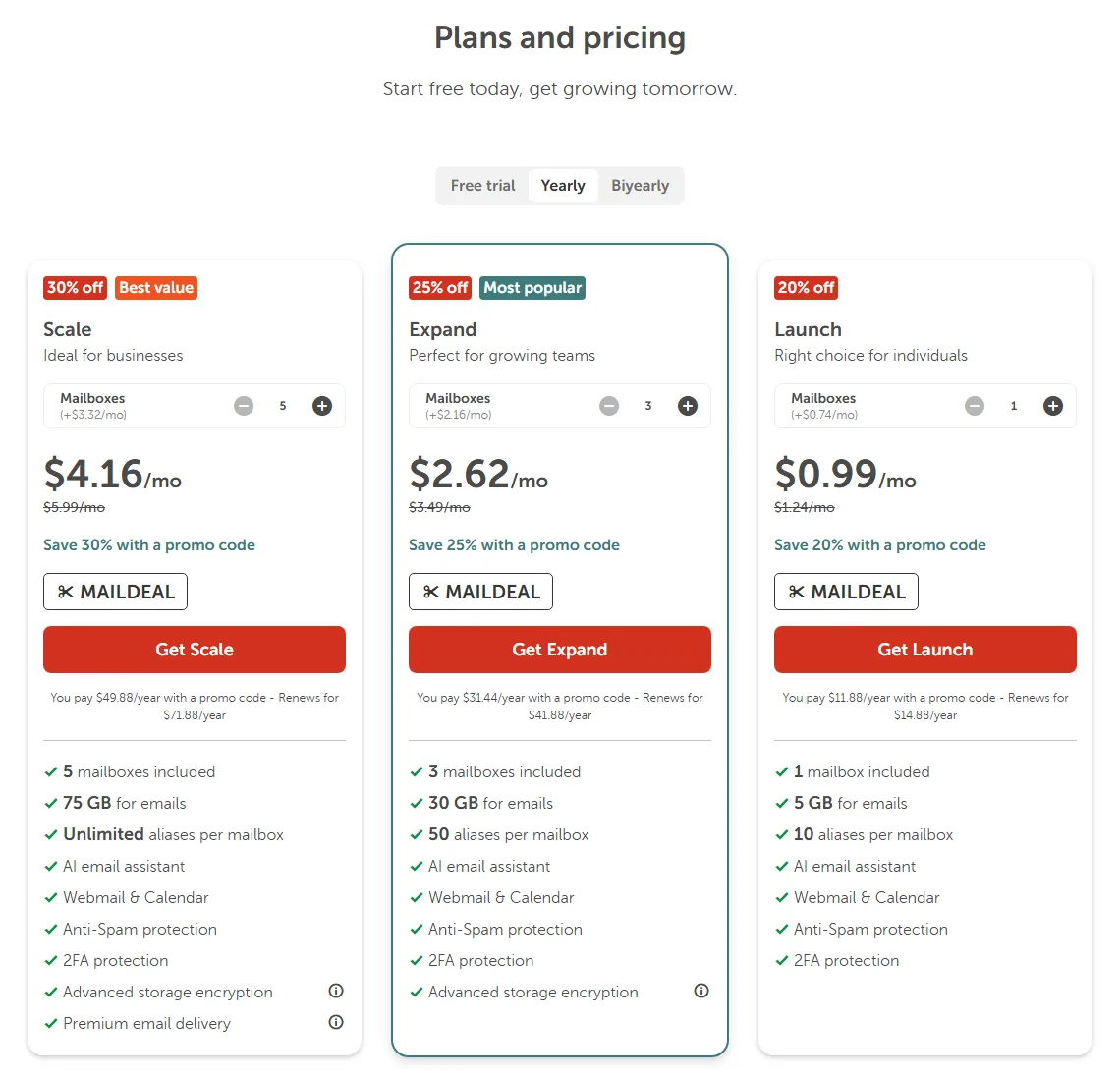
Namecheap Private Email is the simplest way to put one or two mailboxes on a domain you already own, especially if it’s registered at Namecheap. Launch costs $14.88 a year (about $1.24 a month) for 1 mailbox with 5 GB. Expand is $41.88 a year for 3 mailboxes with 10 GB each, and Scale is $71.88 a year for 5 mailboxes with 15 GB each. Extra mailboxes cost $8.88, $25.88 or $39.88 a year depending on the plan.
Those are the regular prices. Right now Namecheap shows a first-year promo code (MAILDEAL) worth 20% to 30% off, and every plan has a 30-day free trial with no credit card. You get webmail with a calendar, IMAP/SMTP/POP3 for your mail apps, CalDAV and CardDAV, anti-spam filtering, 2FA and app passwords.
The weak spot is migration. Namecheap’s own help center says the only way to move old mail in is through an email client, so you’ll be dragging folders between accounts in Thunderbird or Outlook. Fine for one mailbox, tedious for five. Our Namecheap review covers its hosting and domains if you’re thinking of keeping everything in one place.
| Cheapest plan | Launch: 1 mailbox, 5 GB, 10 aliases |
| Price | $14.88/year regular (first-year promo codes available) |
| Bigger plans | Expand $41.88/yr (3 mailboxes), Scale $71.88/yr (5 mailboxes) |
| Apps | Webmail and calendar, IMAP/SMTP/POP3, CalDAV and CardDAV |
| Security | Anti-spam, 2FA, app passwords, DKIM setup guide |
| Trial | 30 days free, converts to a 1-year plan |
Pros
- Very low yearly price for 1 to 5 mailboxes
- Free trial without a credit card
- Works with any mail app over IMAP
Cons
- No import tool, migration is manual
- Small mailboxes on Launch
- Annual or two-year billing only, no monthly plan
Who it suits: freelancers and small shops that need a few addresses on their domain and nothing else.
7. Hostinger Email: Cheap Add-On Next to Your Website
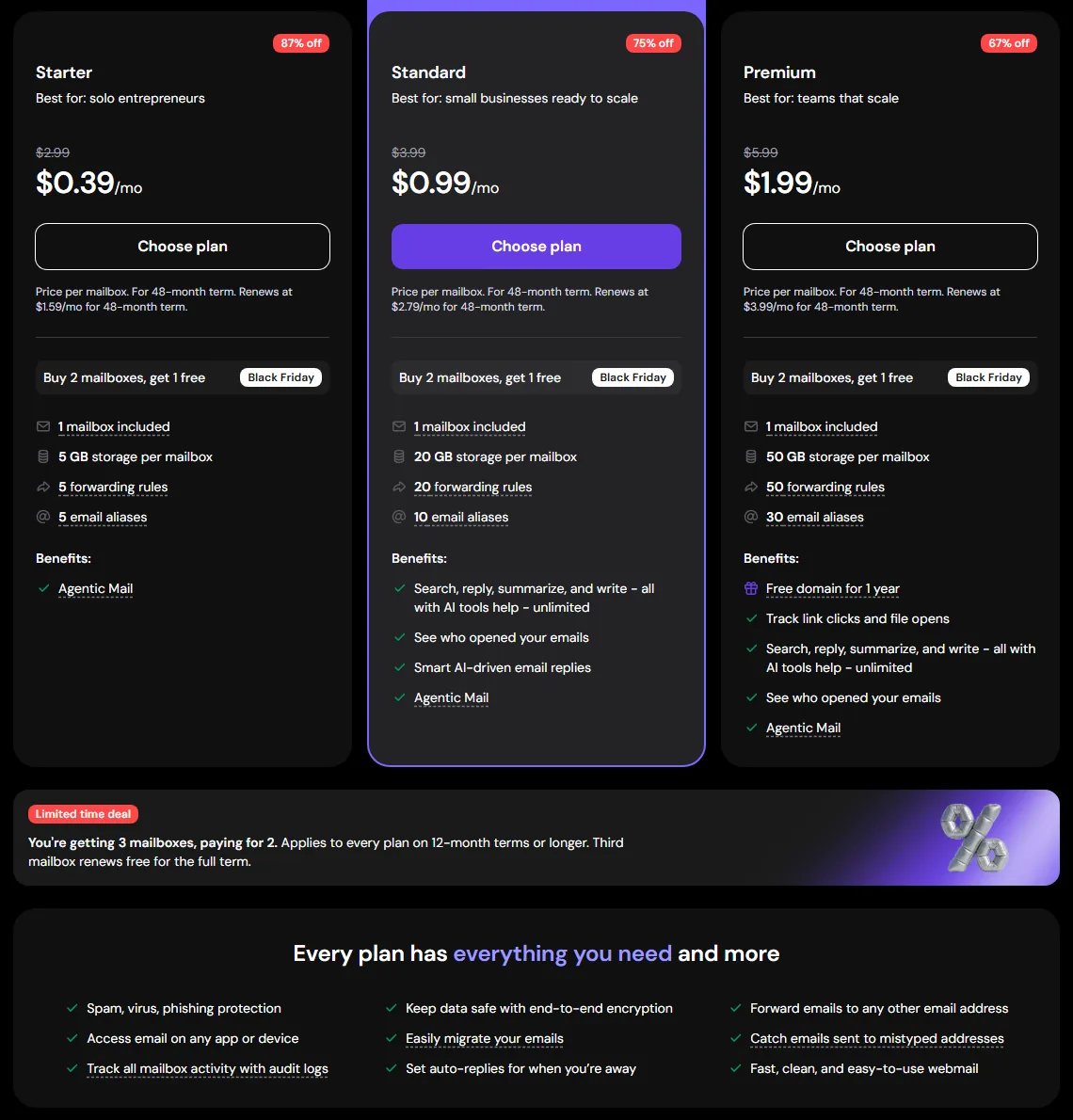
Hostinger Email is a standalone email service, so you can use it whether or not your website is at Hostinger. Prices are per mailbox. On the 48-month term, Starter renews at $1.59 a month with 5 GB, Standard at $2.79 with 20 GB, and Premium at $3.99 with 50 GB and a free domain for a year. Those renewal rates are what you’ll pay long term, so they’re the numbers to compare.
Standard and Premium add AI tools for writing, replying, summarizing and searching mail, plus read tracking. All plans get spam, virus and phishing protection, auto-replies, catch-all addresses and audit logs. Hostinger’s Email Import tool pulls in old mail from another provider, webmail supports 2FA, and its help center has guides for adding SPF and a custom DKIM record. There’s a 30-day money-back guarantee.
Temporary offer: Hostinger’s Black Friday sale is running as we write this. On the 48-month term, Starter shows $0.39 a month, Standard $0.99 and Premium $1.99 per mailbox, and annual or longer plans get a third mailbox free with two paid ones. Sale prices end when the promotion does, and renewals go back to the regular rates above.
| Cheapest plan | Starter: 1 mailbox, 5 GB, 5 aliases |
| Regular price | $1.59/mailbox/mo renewal on the 48-month term |
| Bigger plans | Standard 20 GB ($2.79 renewal), Premium 50 GB ($3.99 renewal) |
| Extras | AI writing tools on Standard and Premium, free domain on Premium |
| Migration | Built-in Email Import tool |
| Refunds | 30-day money-back guarantee |
Pros
- Low price per mailbox, even at renewal
- Simple import tool and friendly dashboard
- Works with any domain, not only Hostinger ones
Cons
- The best rates need a 48-month prepay
- Per-mailbox pricing adds up for a bigger team
- No office suite or video calls
Who it suits: small businesses that want cheap, simple email, especially if their website is already on Hostinger.
8. IONOS Email: Cheapest With a Free Domain
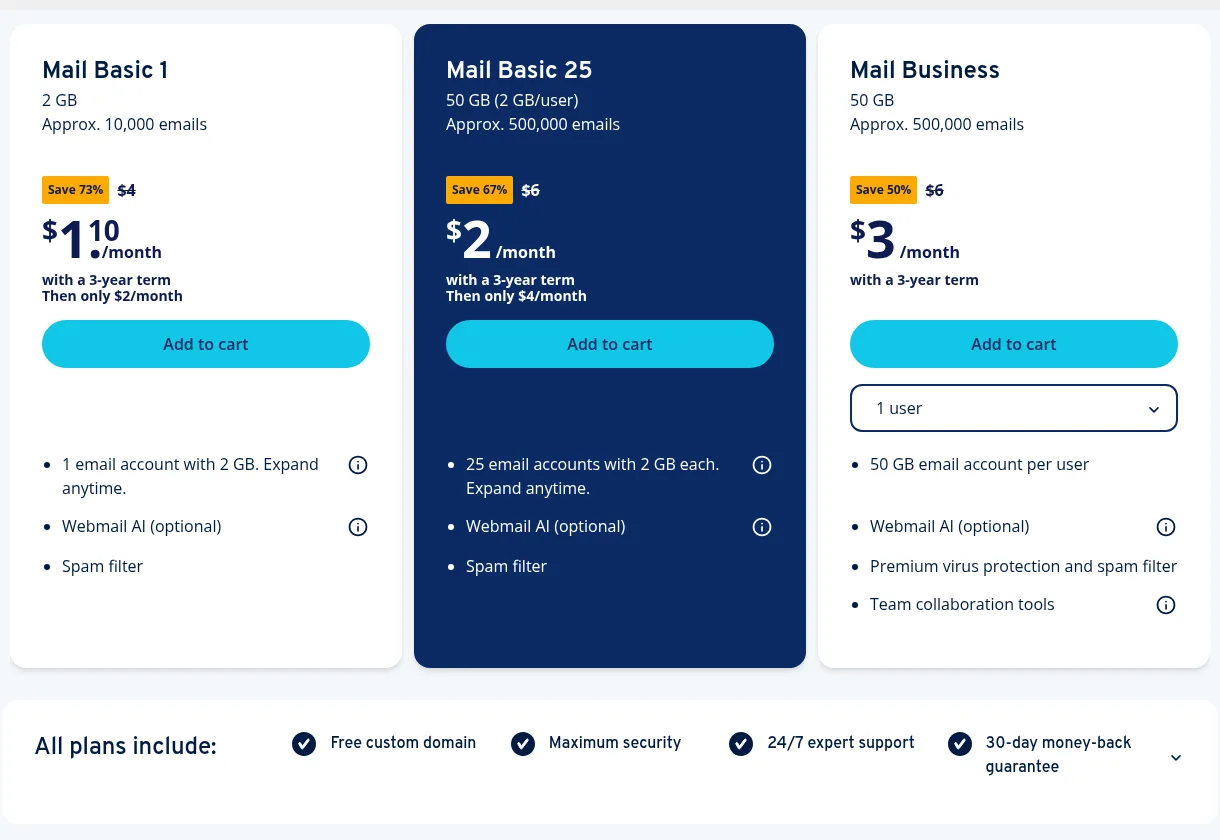
IONOS bundles a free custom domain with its email plans, which makes it a neat all-in-one buy if you don’t own a domain yet. Mail Basic 1 is $1.10 a month for 1 account with 2 GB on a 3-year term, then $2 a month. Mail Basic 25 is $2 a month (then $4) for 25 accounts with 2 GB each. Mail Business, with 50 GB per user, better virus protection and team tools, is $3 per user a month on a 3-year term, against a listed price of $6.
All plans include 24/7 support and a 30-day money-back guarantee. IONOS also resells Microsoft 365 and Google Workspace if you’d like those with IONOS billing and support.
The 2 GB mailboxes on Mail Basic are small. That’s fine for a contact address, not for someone who keeps years of attachments. And the best prices need a 3-year commitment. We also couldn’t find IONOS help docs on DKIM signing for Mail Basic, so ask support before you rely on it for deliverability.
| Cheapest plan | Mail Basic 1: 1 account, 2 GB |
| Price | $1.10/mo on a 3-year term, then $2/mo |
| Business plan | Mail Business: 50 GB per user, $3/user/mo on a 3-year term |
| Extras | Free custom domain, optional webmail AI |
| Support | 24/7 |
| Refunds | 30-day money-back guarantee |
Pros
- Free domain included
- Very cheap entry price
- Can upgrade to Microsoft 365 or Workspace through the same account
Cons
- Tiny 2 GB mailboxes on Mail Basic
- Best prices need a 3-year term
- DKIM details for Mail Basic aren’t clear in IONOS’s help center
Who it suits: people starting from scratch who want a domain and a simple mailbox in one cheap order.
9. Email Included With Your Web Hosting
Most shared hosting plans come with email, and if you already pay for hosting, it costs nothing extra to try. Just read the terms. On Hostinger’s web hosting, for example, Premium includes 2 mailboxes per website, free for the first year, with 1 GB of storage each, and after that each mailbox renews at $0.59 a month on a 12-month term. Other hosts include cPanel email with storage shared with your website files.
It’s a sensible starting point for a personal site. The trade-offs are the ones from the diagram earlier: small mailboxes, tighter sending limits, and your email depends on your web server. When you move to a new host, you’ll need to move your mail too. If you’re comparing web hosts with email in mind, our list of the best web hosting services notes what each one includes.
Email Hosting Comparison Table
Here’s everything side by side. Prices are per user per month unless noted.
| Provider | Entry plan | Annual price | Monthly price | Storage per user | Free option |
|---|---|---|---|---|---|
| Google Workspace | Business Starter | $7 | $8.40 | 30 GB pooled | 14-day trial |
| Microsoft 365 | Exchange Online Plan 1 / Business Basic | $4 / $7 | n/a / $8.40 | 50 GB / 100 GB | 1-month trial (Business) |
| Zoho Mail | Mail Lite | $1 | No monthly plan | 5 GB | Free plan, 5 users |
| Fastmail | Standard | $5 | $6 | 60 GB | 30-day trial |
| Proton Mail | Mail Essentials | $6.99 | $7.99 | 15 GB | 14-day trial |
| Namecheap Private Email | Launch | $14.88/year | No monthly plan | 5 GB | 30-day trial |
| Hostinger Email | Starter | $1.59 renewal (48 mo) | n/a | 5 GB | 30-day refund |
| IONOS | Mail Basic 1 | $1.10 (3 yr), then $2 | n/a | 2 GB | 30-day refund |
How to Choose the Best Email Hosting for You
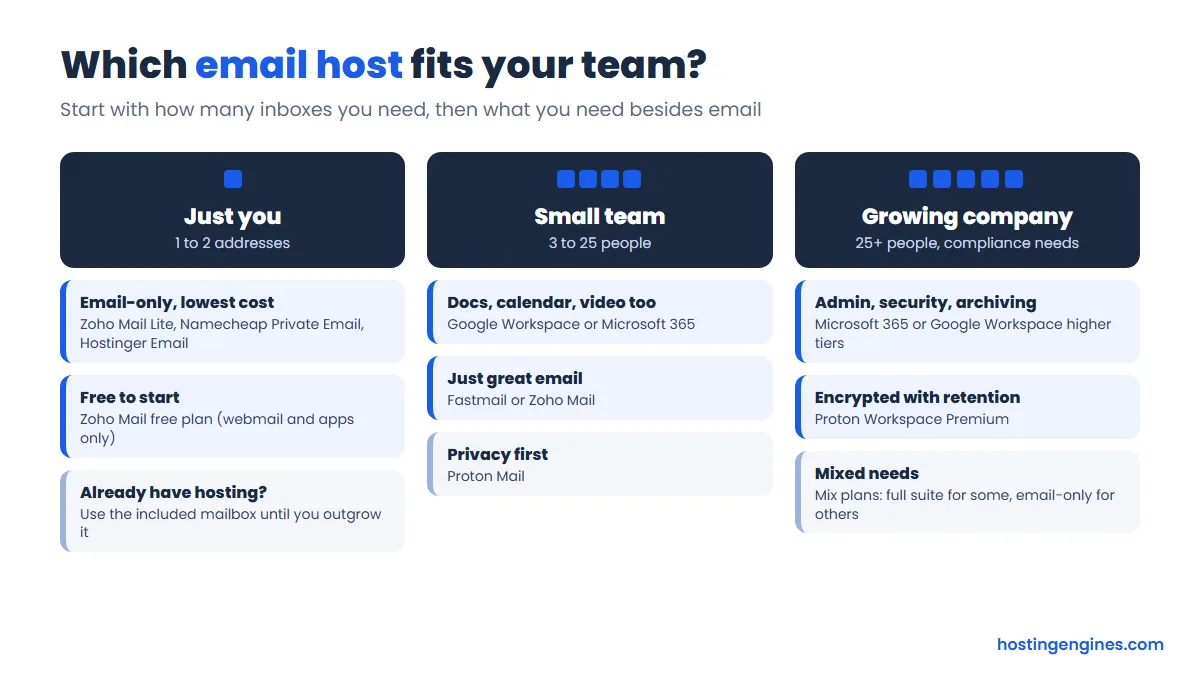
Start with the number of inboxes you need, then ask what else you want besides email.
- Just you, one or two addresses: Zoho Mail Lite, Namecheap Private Email or Hostinger Email cost a dollar or two a month. If money is very tight, Zoho’s free plan works as long as webmail and Zoho’s apps are enough.
- A small team that shares files and meets online: Google Workspace or Microsoft 365. Pick whichever office apps your team already knows; switching habits costs more than the price difference.
- A small team that only needs great email: Fastmail or Zoho Mail Premium. You’ll pay less than a full suite and get a better inbox than most hosting email.
- Sensitive data: Proton Mail, for encryption you don’t have to think about.
A few more things to check before you pay:
- Real price, not the promo. Look at the renewal rate and the term the low price needs. A 3-year or 4-year prepay saves money but locks you in.
- Storage per user. 5 GB fills up in a year or two if people email photos and PDFs. 30 GB and up is comfortable.
- Mail app support. If anyone uses Outlook or Apple Mail, make sure your plan includes IMAP or Exchange (Zoho’s free plan doesn’t).
- Migration. A built-in import tool saves hours. Namecheap is the one host here without one.
- Security. Two-factor login, plus SPF, DKIM and DMARC for your domain. More on those below.
Still choosing where the website itself goes? Our guide on how to choose a web host walks through it step by step.
How to Set Up Email Hosting on Your Domain
Whichever provider you choose, the setup follows the same pattern, and it takes about half an hour.
- Sign up and verify your domain. The provider gives you a TXT record to add in your domain’s DNS. This proves you own it.
- Create the mailboxes and aliases you need (you@, hello@, billing@).
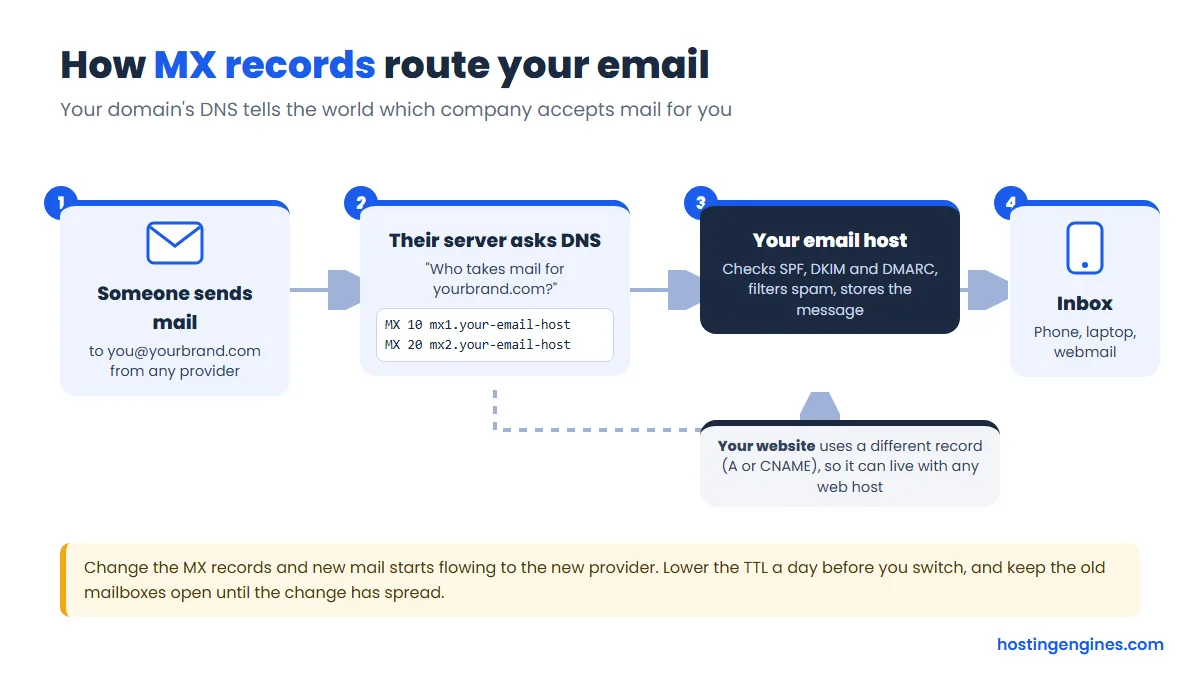
- Change the MX records to the ones your email host gives you. These tell every other mail server where to deliver mail for your domain. Delete the old MX records so mail doesn’t split between two providers.
- Add SPF, DKIM and DMARC. These three records prove your mail is really from you, which keeps it out of spam folders.
- Import your old mail with the provider’s tool, or over IMAP in a mail app.
- Connect your phone and laptop, then turn on two-factor login for every account.
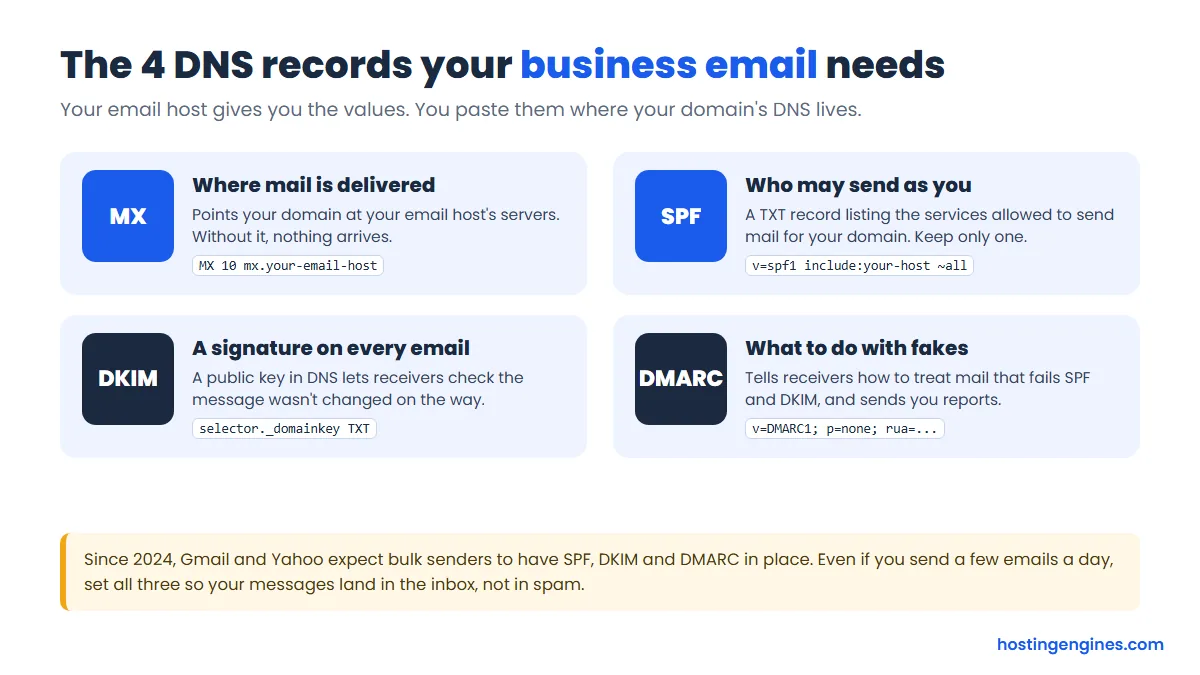
A few tips from experience. Lower your MX record’s TTL a day before you switch, so the change spreads faster. Keep your old mailboxes open for a week or two after switching, because some senders will still use cached records. And keep only one SPF record: if you send through more than one service (say, your email host and a newsletter tool), combine them into a single record.
Start DMARC with a “none” policy so you only get reports, and move to “quarantine” once you see all your real mail passing. Google and Yahoo have required SPF, DKIM and DMARC from bulk senders since 2024, and setting all three helps even a small sender reach the inbox.
FAQ
What is the best email hosting for a small business?
Google Workspace is the best email hosting for most small businesses, because it pairs Gmail on your domain with shared files, calendars and video calls for $7 per user a month on the annual plan. If you only need email, Fastmail or Zoho Mail cost less and still do the job well.
Can I get free email hosting with my own domain?
Yes. Zoho Mail’s Forever Free plan hosts email for one domain with up to 5 users and 5 GB each, though it doesn’t include IMAP or POP, so you’re limited to Zoho’s webmail and apps. Many web hosting plans also include a few mailboxes, often free for the first year.
Is the email that comes with web hosting good enough?
For a personal site or a side project, yes. For a business it’s a weak spot, because mailboxes are small and your email depends on your web server, so a site problem or a host move affects your inbox too. A dedicated email host from about $1 to $5 per user a month avoids that.
Can I use Gmail with my own domain?
Yes, through Google Workspace, which starts at $7 per user a month on the annual plan. A free Gmail account can’t host a mailbox for your domain. It can send as your address through another provider’s mail server, but you still need someone to host that mailbox, so Workspace is the clean way to do it.
Will I lose my emails if I switch email hosts?
No, as long as you import them before closing the old account. Most providers here have an import tool (Google, Zoho, Fastmail, Proton, Hostinger), and with Namecheap you copy folders over IMAP in a mail app. Keep the old account open until the MX change has spread.
What’s the difference between email hosting and email forwarding?
Email hosting gives you a real mailbox on your domain that stores mail and sends from your address. Forwarding only passes incoming mail on to another inbox, like a personal Gmail, and replies usually come from that other address unless you set up extra sending rules. Forwarding is fine for a parked domain, not for daily business email.
Our Verdict
For most small teams, Google Workspace is the best email hosting: familiar Gmail, shared documents and video calls, from $7 per user a month on the annual plan. Choose Microsoft 365 instead if your business runs on Outlook and Office, or Exchange Online Plan 1 at $4 if you only want the mailbox. On a budget, Zoho Mail gives you proper business email from $1 a user (or free for up to 5 users), and Fastmail is the nicest pure email service for $5. Proton Mail is the pick when privacy matters most, while Namecheap, Hostinger and IONOS are the cheapest ways to put a mailbox or two on your domain.