Kinsta is the host people name when they want WordPress to be someone else’s problem. You get a custom dashboard, a Cloudflare-powered CDN and edge cache, daily backups, free migrations and support from WordPress engineers around the clock. You also pay a lot more than you would for shared hosting.
This Kinsta review explains what the plans really include, how the visit and bandwidth limits work, what happens when you go over them, and who should (and shouldn’t) pay for it.
How we put it together: every price, limit and policy below comes from Kinsta’s own pricing page, plan comparison table and documentation, checked in October 2026.
Quick Verdict
Short answer: Kinsta is excellent managed WordPress hosting for sites that make money: shops, lead-generation sites, busy blogs and agency client sites. Plans start at $35/month (or $350/year) for one site, with no intro discount and therefore no renewal shock. The things to watch are the fairly small storage on entry plans and the overage fees if your traffic grows faster than your plan. If your site is a hobby, it’s more than you need.
| Best for | Business WordPress and WooCommerce sites, agencies, anyone who wants hands-off hosting with expert support |
| Hosting type | Managed WordPress hosting only (no cPanel, no email hosting) |
| Starting price | $35/month billed monthly, or $350/year billed annually (Single 20GB or Single 35k plan) |
| Renewal | Same listed price; there’s no first-term discount to lose |
| Free trial / refund | First month free on select plans, then a 30-day money-back guarantee for first-time customers |
| Free extras | Unlimited migrations, CDN and edge caching, wildcard SSL, daily backups, staging, malware removal |
| Data centers | 30 locations across six continents |
| Support | 24/7 chat with WordPress engineers, in 8 languages |
| Our take | Premium price, premium service. Worth it when downtime or slow pages cost you real money. |
About Kinsta
Kinsta was founded in 2013 and built its whole business around WordPress. It says more than 230,000 businesses and brands use it today. It also runs Sevalla, a separate platform for application, database and static site hosting, but this review is about the managed WordPress side, which is what most people mean when they say “Kinsta.”
One thing worth knowing if you’ve read older Kinsta reviews: for years Kinsta ran on Google Cloud and talked a lot about Google’s compute-optimized C2 and C3D machines. That’s no longer the setup. Kinsta now states that it operates on Oracle Cloud Infrastructure (OCI), and its current data center list uses Oracle region names. Each site still runs in its own isolated container, on Nginx with MariaDB, which is the part that actually matters for you day to day.
Not sure what “managed” buys you compared with a normal host? Our guide to what managed hosting is covers the basics.
Pros and Cons
Pros
- No intro pricing trick: the price you see is the price you keep paying.
- Annual billing gives you two months free every year.
- Cloudflare CDN, edge caching, firewall and DDoS protection included at no extra cost.
- MyKinsta is one of the best hosting dashboards around, with a built-in APM tool.
- Unlimited free migrations done by Kinsta’s own team.
- Free malware removal, daily backups and one-click staging on every plan.
- 24/7 support from WordPress engineers in 8 languages.
- 30 data centers to choose from, per site.
Cons
- Expensive next to shared hosting, especially if you run several small sites.
- Only 10 GB of storage on the first four single-site plans.
- Overage fees for visits or bandwidth, storage and CDN if you outgrow your plan.
- No email hosting, so you need Google Workspace, Zoho or similar.
- WordPress only, no cPanel and no root access.
- Some useful extras (Redis, hourly backups, premium staging) are paid add-ons.
Kinsta Plans and Prices
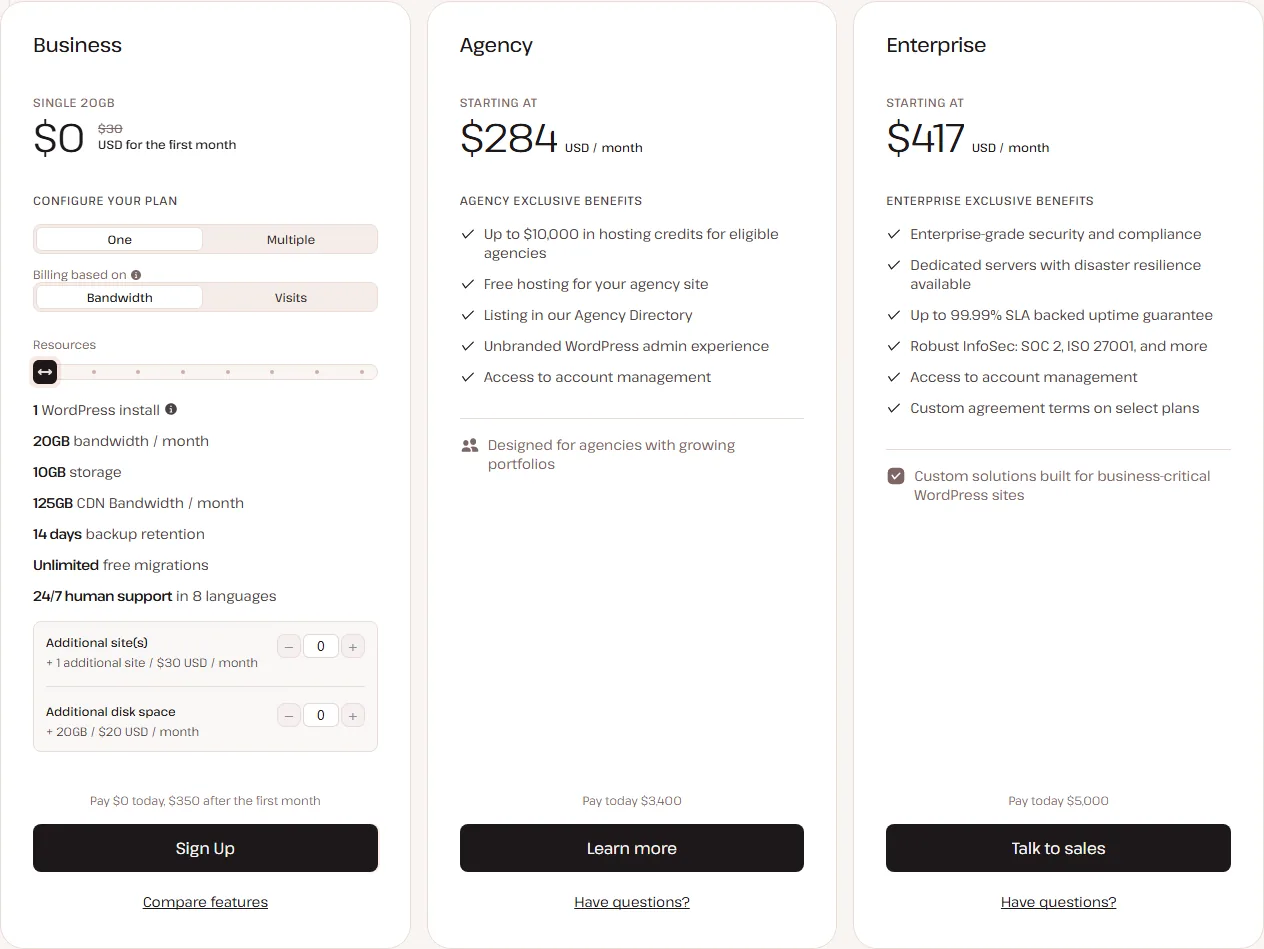
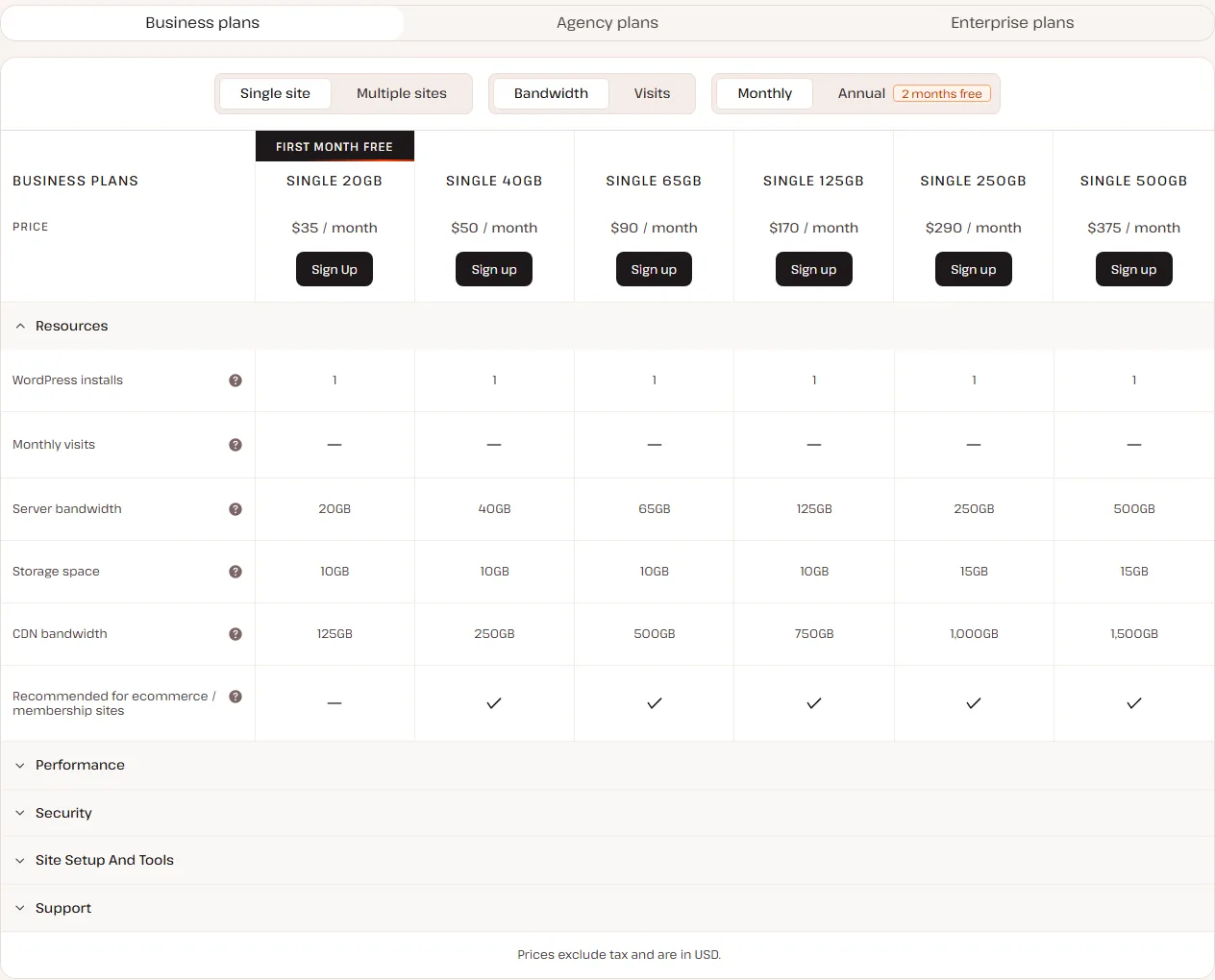
Kinsta’s pricing page is split into three groups: Business, Agency and Enterprise. Most readers will land in Business, which comes in single-site plans and multi-site “WP” plans. For every Business plan you also pick how you want to be measured: by server bandwidth or by monthly visits. The price is the same either way; only the limit changes.
Single-site plans
Each single-site plan has a bandwidth version and a visits version at the same price. Here they are side by side:
| Plan (bandwidth / visits) | Monthly | Annual | Server bandwidth or visits | Storage | CDN bandwidth |
|---|---|---|---|---|---|
| Single 20GB / Single 35k | $35/mo | $350/yr | 20 GB or 35,000 visits | 10 GB | 125 GB |
| Single 40GB / Single 65k | $50/mo | $500/yr | 40 GB or 65,000 visits | 10 GB | 250 GB |
| Single 65GB / Single 125k | $90/mo | $900/yr | 65 GB or 125,000 visits | 10 GB | 500 GB |
| Single 125GB / Single 315k | $170/mo | $1,700/yr | 125 GB or 315,000 visits | 10 GB | 750 GB |
| Single 250GB / Single 500k | $290/mo | $2,900/yr | 250 GB or 500,000 visits | 15 GB | 1,000 GB |
| Single 500GB / Single 750k | $375/mo | $3,750/yr | 500 GB or 750,000 visits | 15 GB | 1,500 GB |
Kinsta marks every single-site plan from Single 40GB / 65k upward as recommended for ecommerce and membership sites. The entry plan isn’t, so if you’re launching a WooCommerce store, budget for the second tier.
Multi-site (WP) plans
| Plan | WordPress installs | Monthly | Annual | Server bandwidth or visits | Storage | CDN bandwidth |
|---|---|---|---|---|---|---|
| WP 2 | 2 | $70/mo | $700/yr | 40 GB or 70,000 visits | 20 GB | 250 GB |
| WP 5 | 5 | $115/mo | $1,150/yr | 65 GB or 125,000 visits | 30 GB | 500 GB |
| WP 10 | 10 | $225/mo | $2,250/yr | 125 GB or 315,000 visits | 40 GB | 750 GB |
| WP 20 | 20 | $340/mo | $3,400/yr | 250 GB or 500,000 visits | 50 GB | 1,000 GB |
| WP 40 | 40 | $450/mo | $4,500/yr | 500 GB or 750,000 visits | 60 GB | 1,500 GB |
The limits are shared across all sites on the plan. You can also bolt an extra site onto any plan for $30/month, which is handy if you have one main site and one small side project.
Agency and Enterprise
Agency plans start at $340/month (Agency 20, 20 installs, 50 GB storage), then Agency 40 at $450/month and Agency 60 at $675/month, with 30-day backup retention and perks such as hosting credits for eligible agencies, a free site for your agency and a listing in Kinsta’s Agency Directory. Enterprise starts at $500/month with custom limits, dedicated machines, SOC 2 and ISO 27001 paperwork and custom contract terms. If you’re in either group you’ll be talking to Kinsta’s sales team anyway.
Monthly vs annual billing
Annual billing costs 10 times the monthly price, so you get two months free. On the entry plan that’s $350 a year instead of $420, a $70 saving. On WP 5 it’s $1,150 instead of $1,380. Since Kinsta doesn’t use first-term discounts, that saving repeats every year rather than vanishing at renewal. The first month free on Single 20GB, Single 35k and WP 2 applies on both billing options for new customers.
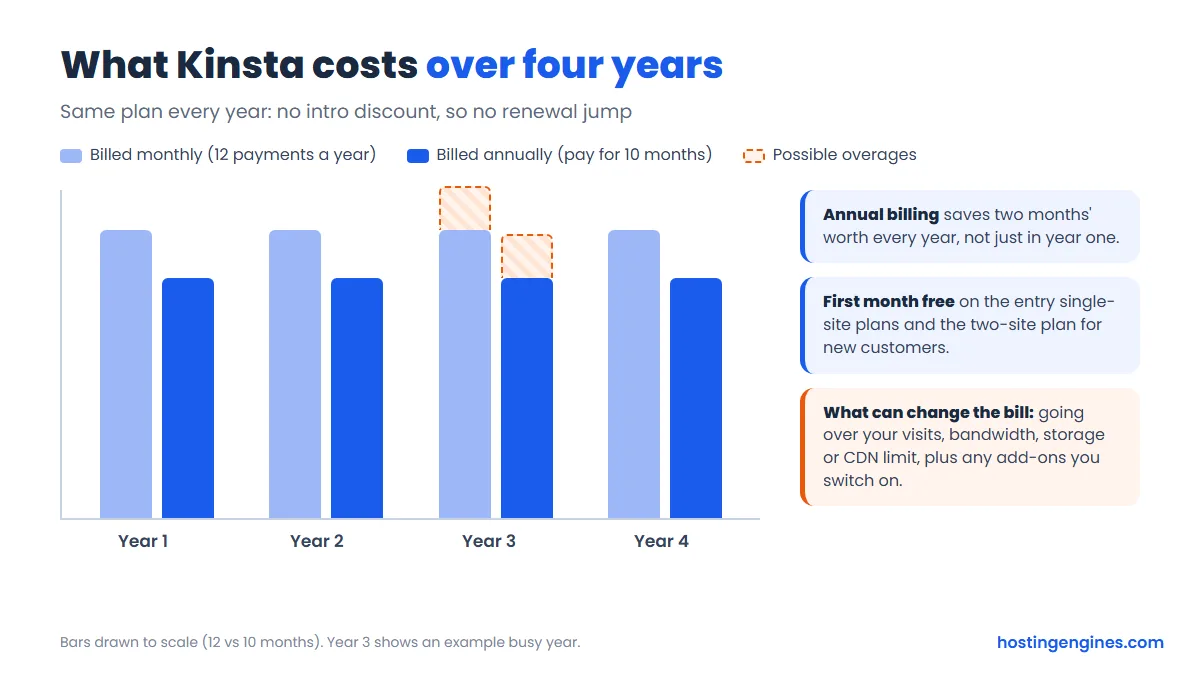
That flat line is the honest upside of Kinsta’s pricing. A budget shared host may cost a few dollars a month in year one, then several times more on renewal. With Kinsta, the year-four bill looks like the year-one bill, unless you grow past your limits.
Visits, Bandwidth and Overage Fees
This is the part of Kinsta that confuses people most, so let’s slow down. You choose one meter for your plan: visits or server bandwidth. Storage and CDN bandwidth have their own limits on top.
How Kinsta counts a visit
Kinsta counts one visit for each unique IP address seen in a 24-hour period, then adds those up for the month across every site on your plan. One person reading five pages in a day is one visit. The same person checking your site from work and then from home is two. Pages served from the edge cache or CDN still count, while well-known bots, wp-login.php hits, staging sites and blocked requests (like 401, 403 and 429 errors) don’t.
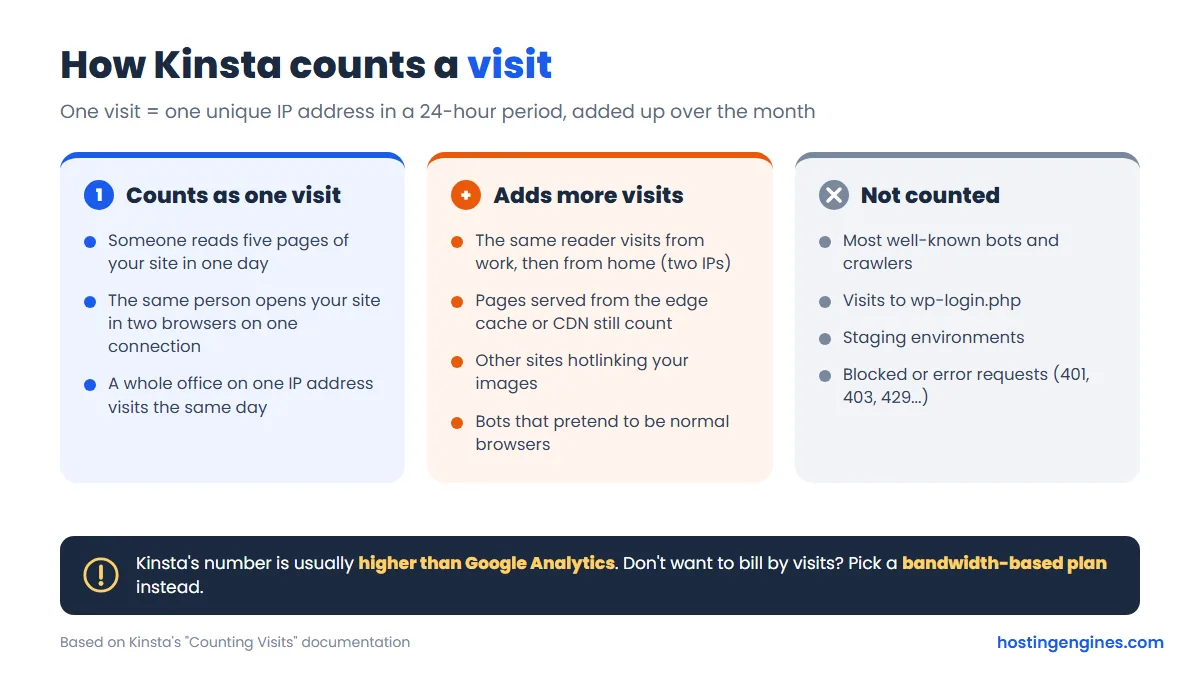
Kinsta itself warns that its number won’t match Google Analytics. Analytics misses visitors with ad blockers and doesn’t count image or file requests; Kinsta’s logs see all of that, plus bots that pretend to be browsers. Expect Kinsta’s figure to be higher. If your site attracts a lot of bot traffic or hotlinked images, a bandwidth-based plan is usually the calmer choice, because you’re billed on data actually served rather than on IP addresses.
What happens when you go over
Your site stays online. Kinsta emails you at 80% and 100% of your limit (and again at 110% for visits), then bills the extra:
| Limit | Overage fee |
|---|---|
| Visits (visits-based plans) | $0.50 per 1,000 visits |
| Server bandwidth (bandwidth-based plans) | $0.50 per GB |
| Disk space | $2 per GB per month, worked out daily |
| CDN bandwidth | $0.05 per GB |
Two details are easy to miss. First, upgrading doesn’t wipe out overages you’ve already run up that month; the new plan only applies from the moment you switch. Second, Kinsta has an “extreme overage” rule: if your overage reaches the cost of your plan or $500, whichever is lower, it can ask for payment right away or require an upgrade, and may limit access until it’s sorted. On the $35 plan that threshold is just $35 of overage, so keep an eye on the Plan usage chart in MyKinsta after you migrate.
Paid add-ons
- Extra WordPress site: $30/month each
- Extra disk space: $20/month per 20 GB
- PHP performance: $10/month per 500 MB of PHP memory
- Redis caching: $100/month per site
- Backups every 6 hours: $20/month per site; hourly: $100/month per site
- External backups to Amazon S3 or Google Cloud Storage: $2/month per site plus $1/GB
- Premium staging environment: $20/month each (up to five per site)
- Kinsta Automatic Updates (plugin and theme updates with visual checks): $3/month per environment
- Reverse proxy: $50/month per site; dedicated servers from $300/month
Most small sites never need any of these. The two you’re most likely to want are extra disk space (if you store lots of images or downloads) and Automatic Updates, which is cheap for what it does.
Performance: Infrastructure, CDN and Edge Caching
Kinsta’s speed story rests on three layers. Your site runs in an isolated container, so a noisy neighbor can’t eat your resources. Pages are cached on the server. Then the Kinsta CDN and edge caching, both built on Cloudflare’s network, push your static files and cached HTML out to locations close to your visitors. Kinsta quotes 300+ CDN locations on most pages and 260+ on its pricing page, so take the exact number loosely; either way, it’s a big global network.
Edge caching is the standout. A normal CDN only caches images, CSS and JavaScript; edge caching also serves your full cached pages from the edge, so a visitor in Sydney doesn’t have to wait for a server in Iowa. It’s free on all plans, needs no plugin, and you can switch it (and mobile caching) on or off in MyKinsta. Kinsta says its own tests across hundreds of sites showed edge caching cutting the time to deliver full pages by more than 50% on average. That’s Kinsta’s figure, not ours, but the idea is sound and it costs nothing to try.
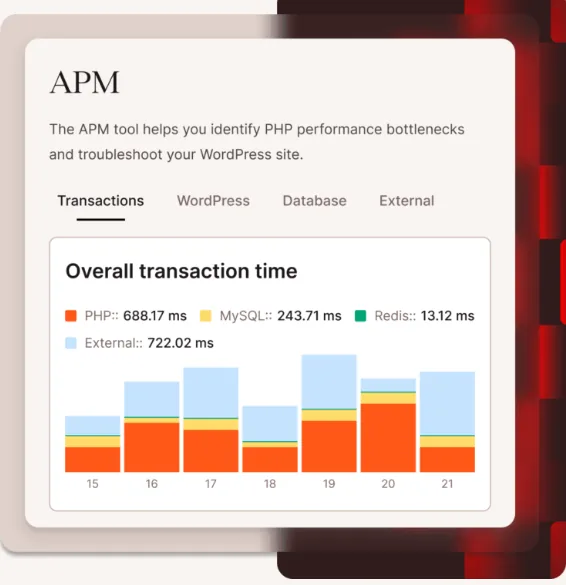
You also get HTTP/3, Brotli compression, Early Hints, free wildcard SSL, and a built-in APM tool that shows which plugins, database queries or external calls slow a page down. Every plan has an SLA-backed 99.9% uptime guarantee, with up to 99.99% for mission-critical setups on higher tiers. Kinsta also checks every site every three minutes.
Data Centers
You choose a data center for each site, and each site can sit in a different one. Kinsta lists 30 locations:
- North America: Ashburn (VA), Chicago (IL), Phoenix (AZ), San Jose (CA), Montreal, Toronto, Monterrey (Mexico)
- South America: Bogota, Santiago, Sao Paulo
- Europe: London, Amsterdam, Frankfurt, Madrid, Milan, Paris, Stockholm, Zurich
- Middle East and Africa: Dubai, Riyadh, Jerusalem, Johannesburg
- Asia Pacific: Tokyo, Osaka, Seoul, Singapore, Batam (Indonesia), Mumbai, Sydney, Melbourne
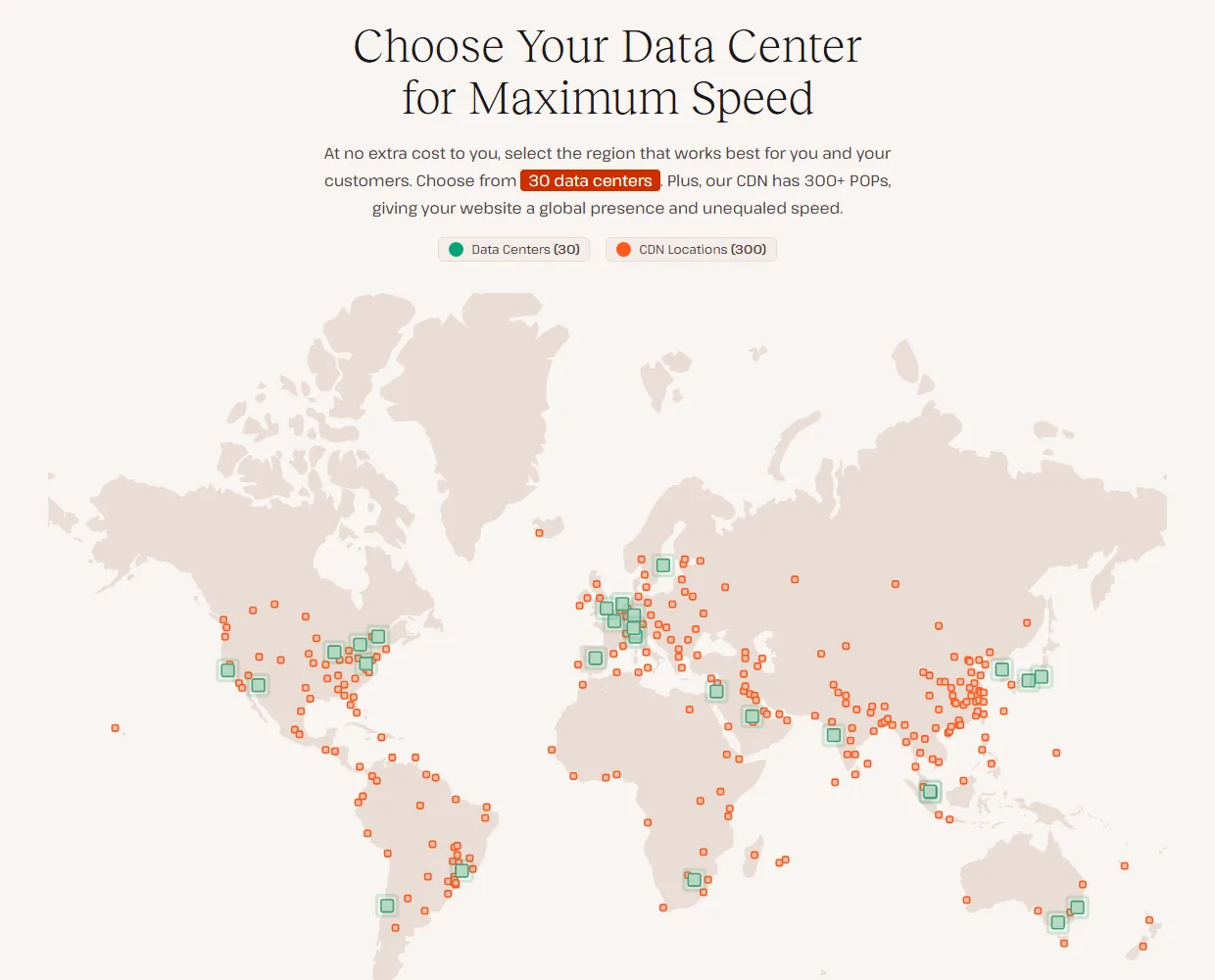
Pick the location closest to most of your visitors. Thanks to edge caching, distant visitors still get cached pages quickly, but things that can’t be cached (checkouts, carts, logged-in pages) always travel back to your data center.
The MyKinsta Dashboard
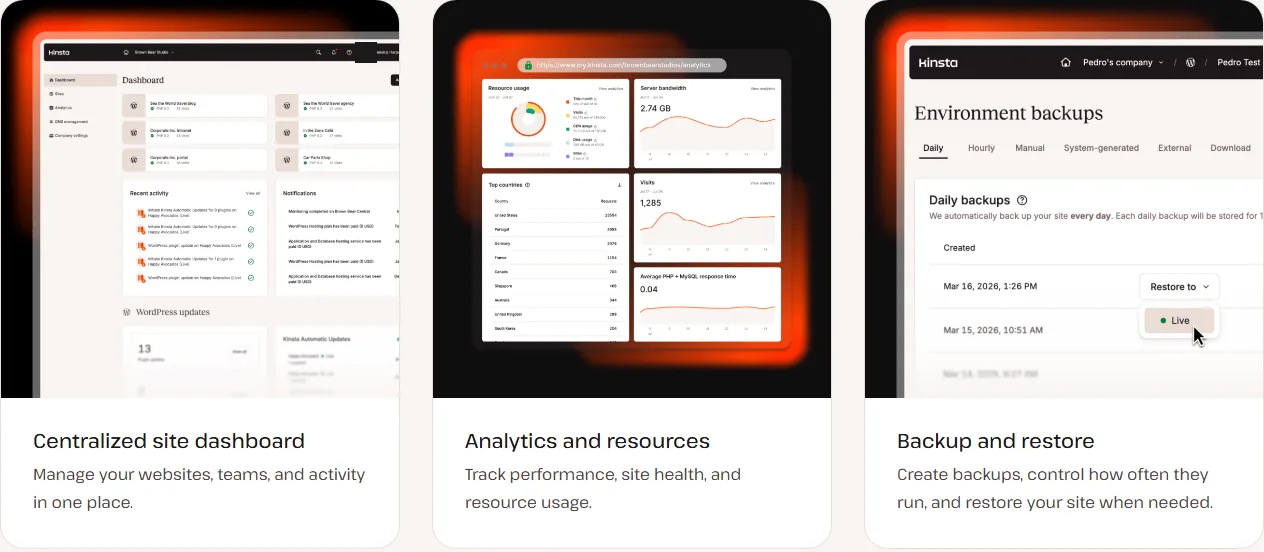
Kinsta doesn’t use cPanel. Everything happens in MyKinsta, its own dashboard, and it’s genuinely pleasant to use. From one screen you can see every site, its PHP version, visits and updates. Select several sites at once and you can clear caches, update plugins and themes, change PHP settings or switch edge caching in bulk, which saves agencies a lot of clicking.
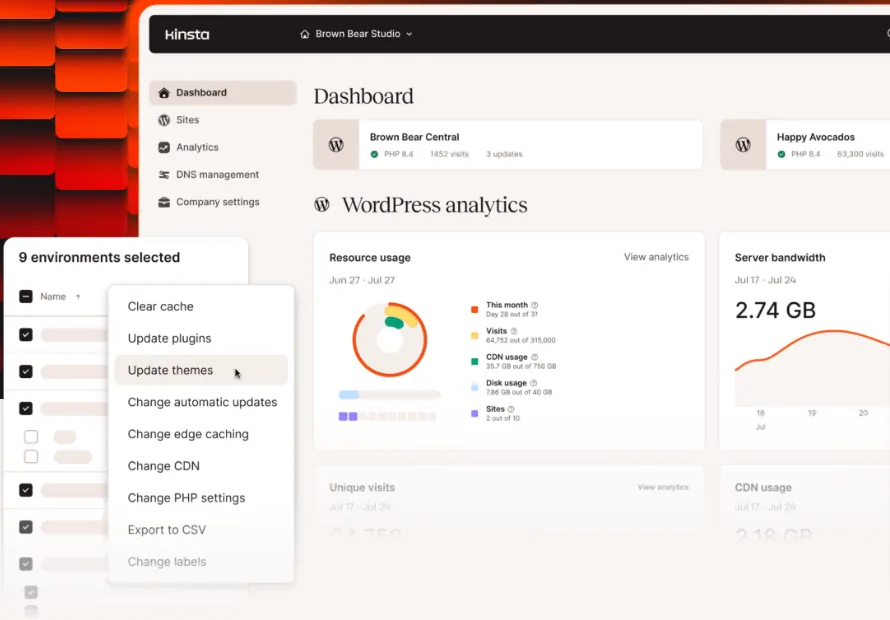
Other things you’ll use:
- Analytics for visits, bandwidth, CDN use, response times and top client IPs, plus a Plan usage chart so you see overages coming.
- One-click access to WP admin and phpMyAdmin, a file manager, and a database search and replace tool.
- SSH, SFTP, WP-CLI and Git for developers.
- DNS management, redirects and an IP deny tool.
- Unlimited users with role-based permissions, two-factor authentication and SAML SSO.
- The Kinsta API for creating sites, clearing caches and pulling site data from your own tools, and DevKinsta, a free app for building WordPress sites locally.
Staging and Backups
Staging
Every plan includes free one-click staging. You can clone your live site, start a blank WordPress install, or create an empty environment for a custom setup like Bedrock. When you’re happy, push staging to live, or use selective push to send only files or only certain database tables. That last option is a lifesaver for WooCommerce, because you can avoid overwriting new orders.
Standard staging has limits: it gets 2 PHP threads, no CDN or edge caching, and it may go to sleep after 24 hours without activity. If you need a staging copy that behaves like production for load testing, premium staging environments ($20/month each) match your live site’s resources.
Backups
Kinsta takes a backup of every site every day and keeps at least 14 days of them (longer on some bigger plans and 30 days on Agency plans). On top of that you get:
- Up to 5 manual backups, handy right before a risky change.
- Automatic system backups before restores, staging pushes, search and replace, and plugin or theme updates.
- A downloadable ZIP of your files and database once a week.
- One-click restore to live or to staging.
One caveat: Kinsta’s backups are stored on the same host machine as your site. For a business site we’d still keep an off-site copy, either through the external backups add-on or a backup plugin that sends copies to your own cloud storage.
Security
Security is where managed hosting earns its keep, and Kinsta covers the basics well. All traffic passes through Cloudflare’s firewall and DDoS protection before it reaches your site. Each site sits in its own container. Bot Protection lets you choose from four preset levels, control AI crawlers and allow trusted bots. You get free wildcard SSL that renews by itself, and there’s vulnerability protection on every plan.

If your site does get hacked, Kinsta’s hack-fix guarantee means its team cleans it up at no extra cost, and it will also remove malware it finds while migrating your site. On the company side, Kinsta lists SOC 2 Type II and ISO 27001 certification and GDPR and CCPA compliance, which matters if you sell to larger clients who send security questionnaires.
Customer Support
Kinsta’s support is chat-based and open 24/7/365, right inside MyKinsta, so you can ask a question from whatever screen you’re on and share screenshots or code. It’s staffed by WordPress engineers, and there’s no tier-one script to get past. Support is available in English, Spanish, German, French, Italian, Dutch, Portuguese and Japanese.
Kinsta says its average first response is under two minutes and its median resolution time is 47 minutes. We haven’t timed it ourselves, so treat those as Kinsta’s numbers. What we can say is that the support model, engineers on chat with access to your logs, is the one most people want when a site breaks at 2 a.m.
Free Migrations
Migrations are free and unlimited on every plan. After you sign up, you request a migration in MyKinsta, pick a date and time if you like, and Kinsta’s migration team moves the site. Without a set date, Kinsta says it’s usually done within one business day, and expedited migrations can be finished in as little as 8 hours. When it’s done, you update your DNS and you’re live.
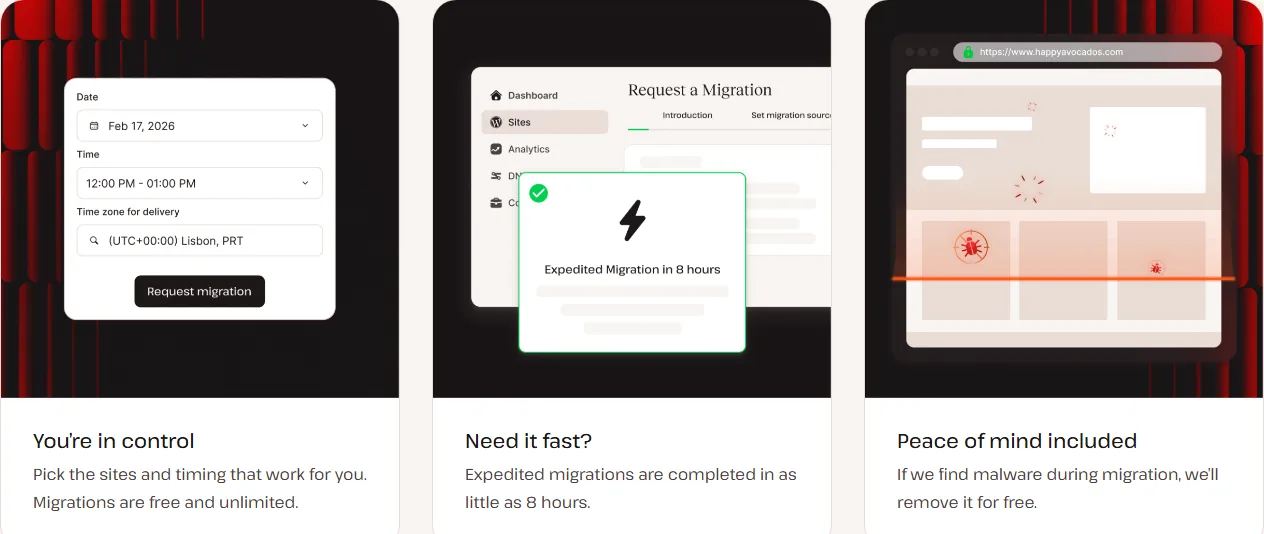
Kinsta can move a site from any host as long as it’s a standard WordPress install, and it handles Bedrock and Trellis setups too. Shops and membership sites need to go into maintenance mode during the move so no orders get lost. Remember that Kinsta doesn’t host email, so leave your MX records pointing at your email provider when you switch DNS.
Free Trial, Refunds and Cancellation
New customers get the first month free on Single 20GB, Single 35k and WP 2. After the free month ends, a 30-day money-back guarantee starts, so you effectively get up to two months to decide. On other plans, the 30 days start when you activate the plan.
The fine print: the guarantee is for first-time customers only, switching plans doesn’t restart the 30 days, and overages, dedicated servers and one-time fees aren’t refunded. After the 30 days, you can cancel any time from Company Settings in MyKinsta; the plan runs to the end of the period you’ve paid for and isn’t renewed. Cancelled add-ons give you a prorated credit, not cash.
Who Kinsta Is For (and Who It Isn’t)
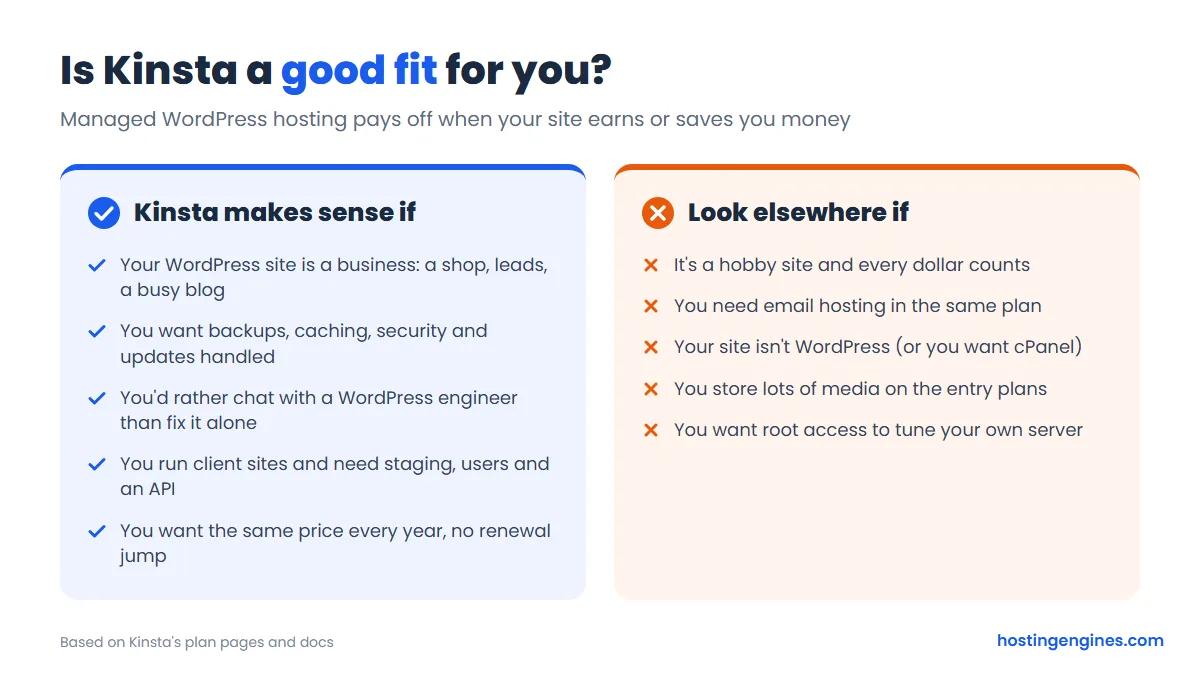
Kinsta is a strong pick if your WordPress site brings in sales or leads, if you’d rather pay for expertise than learn server work, or if you manage client sites and want staging, team access and an API in one place. It’s also a good fit if you hate renewal surprises, since the price doesn’t jump after year one.
It’s a poor fit for a hobby blog, a first site you’re still learning on, or anyone who wants email, cPanel or root access in the same package. Those people are better served by regular WordPress hosting on a shared or cloud plan, at a fraction of the cost.
Kinsta Alternatives
- Cloudways: managed cloud hosting where you pick the server (DigitalOcean, Vultr and others). Plans start from $11/month for a 1 GB DigitalOcean server, it hosts as many sites as the server can handle, and there are no visit limits. You get less hand-holding than Kinsta. Read our Cloudways review.
- WP Engine: Kinsta’s closest rival in premium managed WordPress. Its Essential plan starts at $28/month billed annually (a first-year price for new customers), and phone support comes with the higher Business tier.
- SiteGround: a shared host with good WordPress tools and support. GrowBig is $4.99/month for the first year on a 12-month term, then renews at $29.99/month, so it’s far cheaper to start but the gap narrows later.
Want a wider view? Our list of the best WordPress hosting compares more options at different budgets.
Kinsta Review: Final Verdict
Kinsta is premium hosting that feels premium. The dashboard is excellent, the Cloudflare-backed CDN and edge caching come free, staging and backups are built in, migrations are done for you, and support is staffed by people who know WordPress. The pricing is high but honest: no teaser rate, the same bill each year, and two months free if you pay annually.
Our advice: estimate your traffic using server logs or Cloudflare rather than Google Analytics, pick the bandwidth meter if you get lots of bot traffic, and start on Single 40GB / 65k if you sell anything online. Then use the free month and the 30-day guarantee to see whether the speed and support are worth it for your site. For a business site, they very often are.
FAQ
Is Kinsta worth the money?
Yes, if your WordPress site earns money or supports a business. You pay from $35/month, but you get edge caching, a CDN, daily backups, staging, free migrations, malware removal and 24/7 expert support. For a hobby site, a cheaper shared host makes more sense.
How much does Kinsta cost?
Single-site plans run from $35 to $375 a month, and multi-site plans from $70 (2 sites) to $450 (40 sites). Paying annually costs 10 months’ worth, for example $350 a year on the entry plan. Prices are in USD and exclude tax.
Does Kinsta have a free trial?
Yes, new customers get the first month free on Single 20GB, Single 35k and WP 2. After that, a 30-day money-back guarantee applies for first-time customers.
What happens if I go over my Kinsta plan limits?
Your site stays online and you pay overage fees: $0.50 per 1,000 visits or $0.50 per GB of server bandwidth, $2 per GB of extra disk per month, and $0.05 per GB of CDN bandwidth. Kinsta emails you at 80% and 100% of your limit.
Does Kinsta still use Google Cloud?
No. Kinsta now says it runs on Oracle Cloud Infrastructure; older reviews that mention Google Cloud C2 or C3D machines describe its previous setup. You can choose from 30 data centers.
Does Kinsta include email hosting?
No. Kinsta doesn’t host email accounts and recommends services like Google Workspace. Your site can still send transactional emails such as order confirmations.