
WordPress is a free, open-source, Content Management System (CMS) based on PHP and MySQL (or MariaDB). It currently powers about 40% of all websites on the internet (39.7% in W3Techs’ October 2026 survey).
It has been used to power some of the biggest sites such as TechCrunch, Microsoft’s news site Microsoft Source, Rolling Stone, the White House website, and many more.
People love making their own stuff, not hiring someone to do it, and that’s exactly what WordPress offers, making your own online presence with ease.
But what exactly is WordPress, and why is it the most used ready-made CMS for building websites, for beginners and pros alike?
What is WordPress?
WordPress is a website builder platform with a focus on aesthetics, customization, web and SEO standards, and usability. It’s a PHP software that can be used to create websites and blogs.
It is tremendously easy to use and allows anyone to publish online without needing any technical skills or learning web development.
Not just that, but there are third parties working with WordPress to add more features that are not in there such as plugins and themes, and can be installed and used with one click.
WordPress became an extremely desirable software that has made website creation and editing processes accessible to almost everyone and for free.
It would allow you to manage everything within your website from fonts and headings to the actual media and content in your website without batting an eye because it is unchallenging and easy enough to use.
The best part is that there are a big community and developers behind it. There are regular updates (the current version in October 2026 is WordPress 7.1), as well as a huge knowledge base and questions and answers that have been built by its community.
WordPress History
In 2001, Michel Valdrighi, a French programmer, developed B2/cafelog, but it didn’t go well.
2 years later, two B2/cafelog users “Mike Little and Matt Mullenweg” thought about creating a personal publishing platform based on B2/cafelog program.
On May 27, 2003, the first version of WordPress was released. And from that time until now, WordPress has been growing to change the presence of the internet and to be the No. 1 tool for building websites.
Who Should Use WordPress?
WordPress is the best solution for beginners who want to build their online presence such as portfolio websites and blogs, as well as online stores and small businesses.
WordPress is also a great solution for tech-savvy who want to make some of their projects with WordPress or just want to save time by using a ready-to-use CMS platform.
In addition, it’s extremely helpful for those who want to integrate WordPress into their websites for the blogging sections. This is done by major companies’ websites.
What Can You Do With WordPress?
At the beginning of WordPress’s invention, it was a blogging tool but from there it progressed to be a platform that can build big businesses with it.
With WordPress, you can start a blogging site, create a website, build an online store or you could even commence with online courses. Here is a list of some of what WordPress is capable of:
- Build a website.
- Start a blog.
- Integrate a WordPress blog with your website.
- Make a portfolio website.
- Create an online store.
- Create listing and directories websites.
- Build a membership website.
- Build a Forum.
- Make a community website.
- A platform for online courses.
- And more…
With WordPress, you can build many online platforms with ease and with no big knowledge. You just need to start, and everything you need to know will be on the way.
WordPress Features
There must be good reasons why WordPress is the most popular website builder that dominates the vast majority of websites built with web application builders.
WordPress is COMPLETELY FREE!
There is one thing that everyone agrees on and desires in this world, which is free services. WordPress is open-source software. There are thousands of silent contributors all over the world that are part of this software.
Because it is constantly updated and modified by volunteers WordPress remains free for installation and use. So, if you are to use it, you won’t be charged for WordPress itself.
Easy to Setup:
Setup a WordPress website should not take more than 10 minutes. If you are new to this field, you are probably signed up for a shared hosting provider. If so, you can install WordPress with the 1-click WordPress installation feature.
If you want to use VPS hosting, you can install WordPress from the hosting provider’s marketplace, or download the source code from WordPress itself.
Easy to Use:
We already established that WordPress made editing websites easier for people with no technical background. When you add anything to your website, the code associated with the changes you made is edited automatically by WordPress, thereby bridging the gap between this technical gibberish that most of us do not understand and the frontend of the website.
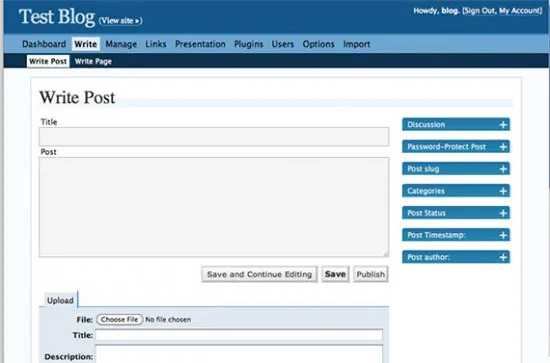
When you access the WordPress admin panel, you are met with a dashboard on the side that has a variety of options you can use to navigate your website.
It is completely easy to use, with no complex steps allowing you to freely create pages, and blog posts, design your website, and more.
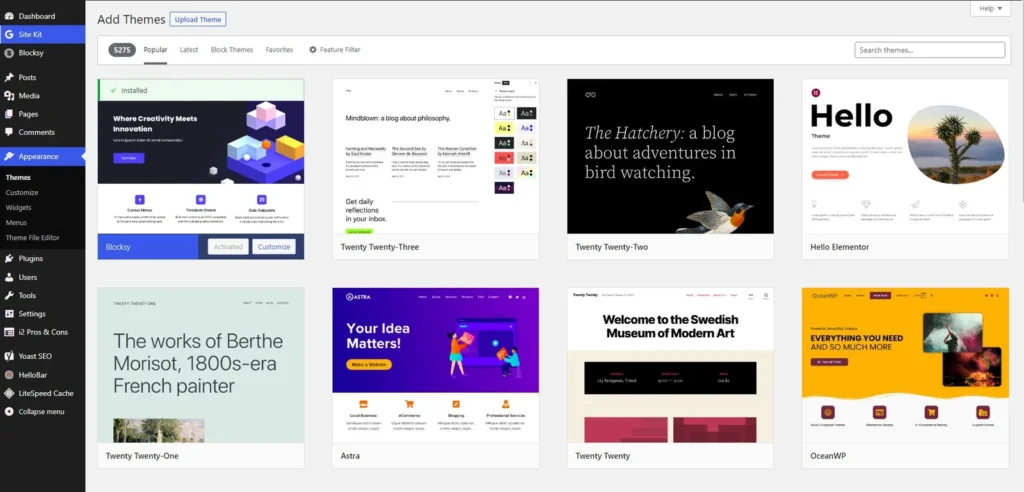
WordPress is simple which allows all beginners to uphold their websites or blog sites without the fear of being met with any technical issues.
Self-hosted CMS:
One of the best facts about WordPress.org is that it’s a self-hosted website builder. That means you can host it on any server machine you own or rent.
Other website creators like Wix and Shopify let you build your website on their platform, but you don’t have full control over it. You get fewer customization options, and moving your site to another hosting platform is much harder.
But with WordPress, you get full control over your website. You can edit the code, customize the front end, and move your website from one host to another. In other words, you own this site and it is entirely at your disposal.
Flexibility:
WordPress is versatile. You can pretty much create almost any type of website you think of from portfolio websites to blogs to online stores.
That’s due to its capability to change the look of a website with one click with the help of thousands of themes and plugins.
Customizability:
Yes, you can change the entire look of your WordPress site in no time and change it from a basic blog to an online store with ease. But you can also customize certain parts of it.
Customizing a website has never been easier before WordPress. Now, you can change certain parts of your WordPress site and make it look different in no time.
The ready-made plugins and themes marketplace inside and outside of WordPress has made this customization process very easy. You just need to install, activate, and start changing without any background knowledge.
And if you have the knowledge, you can edit the WordPress code or edit the theme or the plugins you use by yourself, or even build your own. Since WordPress is built with PHP (an easy language to learn and work with), a lot of people are doing exactly that.
Top-notch security:
You have probably heard about websites being hacked and how cyber attacks happen on them, any rift in website security would just cause a headache to the website owners and returning users visiting the site.
Popular Content Management Systems (CMS) such as WordPress are a prime target for hackers, simply because so many sites use them.
However, WordPress considers security to be a top priority as well which means it is consistently updated to be as safe as possible. Minor security releases install automatically by default, and login sessions expire on their own (after two days, or 14 days if you tick “Remember Me”). Two-step authentication isn’t built in, but the official Two Factor plugin adds it in a few clicks.
Moreover, you can use plenty of free and paid security plugins with one click to strengthen your WordPress website security.
Of course, that doesn’t mean WordPress can’t be hacked at all, but with these steps it can be just as secure as the alternatives, or more.
SEO friendly:
When you create a website you make it with the intent of people visiting it and increasing your traffic, which is the entire purpose of websites. And this is not applicable without considering pleasing search engines such as Google.
Well, with WordPress you do not have to worry about this because it was created with SEO in consideration. To put it quite simply, search engines admire WordPress, which is why if you use WordPress your chances of ranking higher are increased.
That’s because of many reasons like the PHP loading speed, mobile friendly, and many SEO plugins that you can install and use to optimize WordPress.
Mobile friendly:
WordPress is capable of working on any device ranging from your phone to an actual PC regardless of the size of the screen.
The responsive design of a WordPress website that lets you access it from any device is based on the theme you use.
Themes developers are updating their themes regularly to be more responsive and better looking. So, it’s only getting better.
Constantly updated:
WordPress is constantly updated with new features and functions to make the user experience better. This can be seen on your WordPress dashboard, or on the releases page on their website.
Once a new update occurs, the themes and plugins developers hurry to match the new update.
Massive community support:
The WordPress community collaborates on development through public code repositories, public mailing lists, the Make WordPress Slack (which replaced the old IRC chats), meetups, and WordCamps around the world. It’s also the most popular content management system in use on the Internet today.
This community is large and continues growing daily which means that there is endless technical support, if you were ever met with an issue on top of that there are thousands of tutorials, videos, and articles explaining how to do everything within your website from the simplest tasks to the most complex of them.
Tons of Themes and Plugins:
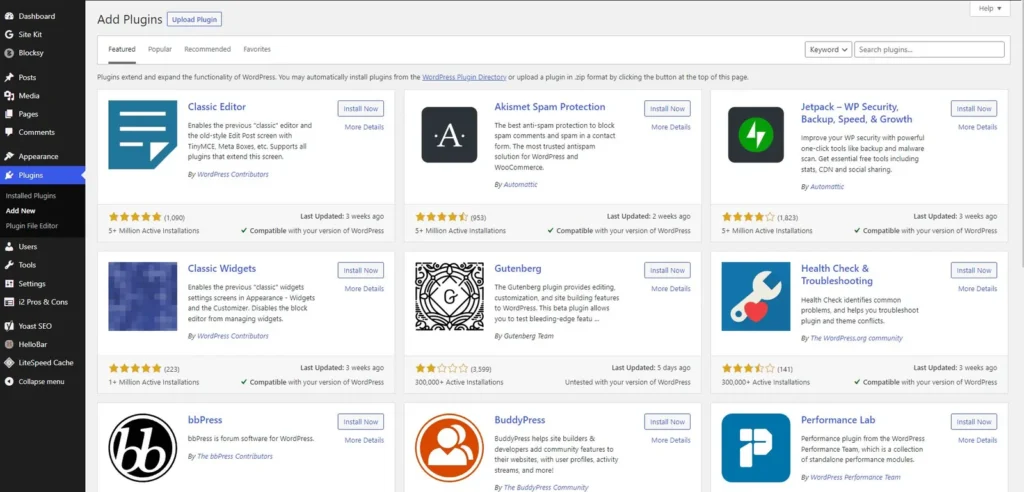
The plugins and themes are software and code snippets that have been designed by PHP developers as add-ons to work on WordPress.
The theme makes the general looking of the website and the main customizations, and the plugins add more features that are not there in the first place.
Using them is easy, you could go to the themes or the plugins sections, add new, choose the one you need, install, and activate, as simple as that. And then you can work on its settings to make the necessary changes.
WordPress.com Vs. WordPress.org
If you were to search for WordPress you would be met with two different options, wordpress.com and wordpress.org. This might be confusing for the first time, so, let’s clear up the confusion.
WordPress.org is a self-hosted website builder that you can install on your own server. It is free to use and you have full control over the code and design.
WordPress.com is a hosted service run by Automattic that offers hosting, domain, and other services. It has a limited free plan, and paid plans start at $4/mo (billed yearly). You need a paid plan to install your own plugins and premium themes.
The difference between WordPress.org Vs WordPress.com is that WordPress.org is free to use and self-hosted while WordPress.com is hosted on their servers, with a limited free plan and paid plans that unlock more features.
Is WordPress Right For Me?
There are many website builders available, some are made to serve beginners such as WIX, Squarespace, and Blogger, and some are programming languages for developers.
WordPress has proved that it is worth the fame it got and continues to do so. So, if you find yourself on one of the choices below, WordPress is definitely the right website builder for you.
- A beginner wants to start a website with no knowledge.
- On a budget and can’t afford to pay much money.
- Want full control over your website.
- The freedom of customizing your website the way you need it.
- A platform that can let you scale up your business when it grows.
- Fast deploying and launching.
- The best platform for blogs.
How Do You Start Using WordPress?
Starting a new WordPress website is easy and no hard coding is needed. All you need to do is to pick a web hosting plan and you are one step ahead. Here are the steps:
1. Sign up for web hosting:
The first thing you would need in order to create your own WordPress is to sign up for a web hosting provider to host your website files and data.
There are a lot of web hosting on the internet, each offers different types of web hosting and has different performance, features, and pricing modules.
Initially, for beginners, we suggest you sign up for Hostinger shared hosting which offers low pricing for good performance (from $2.99/mo on a 48-month term, renewing at $10.99/mo). Read more on how to choose a web host, or compare our picks for the best web hosting for WordPress.
2. Buy a domain name:
The domain name is the web address that you type in order to get to a website. It’s the URL of the website. You will need to get one (if you don’t have one already) to connect it to your WordPress website.
Domain names are usually bought through registrars such as NameCheap, but when you sign up for a web hosting service like Hostinger, you get one free for the first year with the hosting plan package.
3. Install WordPress:
All well-known shared web hosts are beginner friendly. They let you install WordPress with one click, usually called the “1-click WordPress install” feature.
When you install it, you will set the username and password of the WordPress admin panel, or you will be granted these credentials and you can change it by yourself later, it depends on your web hosting provider.
4. Customize WordPress:
Once WordPress is installed and your website is live on the internet, you can start customizing it by accessing the admin panel, installing a theme, and changing the look.
You can learn that by going through the different settings in the admin dashboard or watching some YouTube videos.
Last Thoughts:
WordPress is the most used CMS website builder, running about 40% of all websites, because of its ease of use and flexibility. If you’re still on the fence, here are 12 reasons why WordPress is the best website builder.
Whether you are creating a one-page portfolio, starting a blog, or creating an online store, WordPress is the software you would want to use to build this website.
It’s an open source, free to use, easy to use, customizable, and has massive developers and community behind it.