
Allowed downtime for common SLAs
| SLA | Per day | Per month | Per year |
|---|
This free uptime calculator turns an SLA percentage into the downtime it allows per day, week, month, quarter and year, and works the other way too. No sign-up, and results update as you type.
How to use the uptime calculator
The calculator has four tabs. Everything runs in your browser, so there’s nothing to submit.
- SLA → downtime: type your host’s promise in SLA uptime or tap one of the common values (99% to 99.999%). Add the Cost of one hour of downtime if you want to see what the allowed downtime could cost you.
- Downtime → SLA: enter how long your site was down (seconds, minutes, hours or days) and the period it happened in. You get the uptime percentage you actually got.
- Compare two SLAs: put two percentages side by side, for example two hosts you’re choosing between, and pick a period.
- Uptime history: paste your monthly uptime figures from a monitoring tool or your host’s status page (comma or line separated, oldest first) and the Promised SLA. It checks every month against the promise.
How to read the results
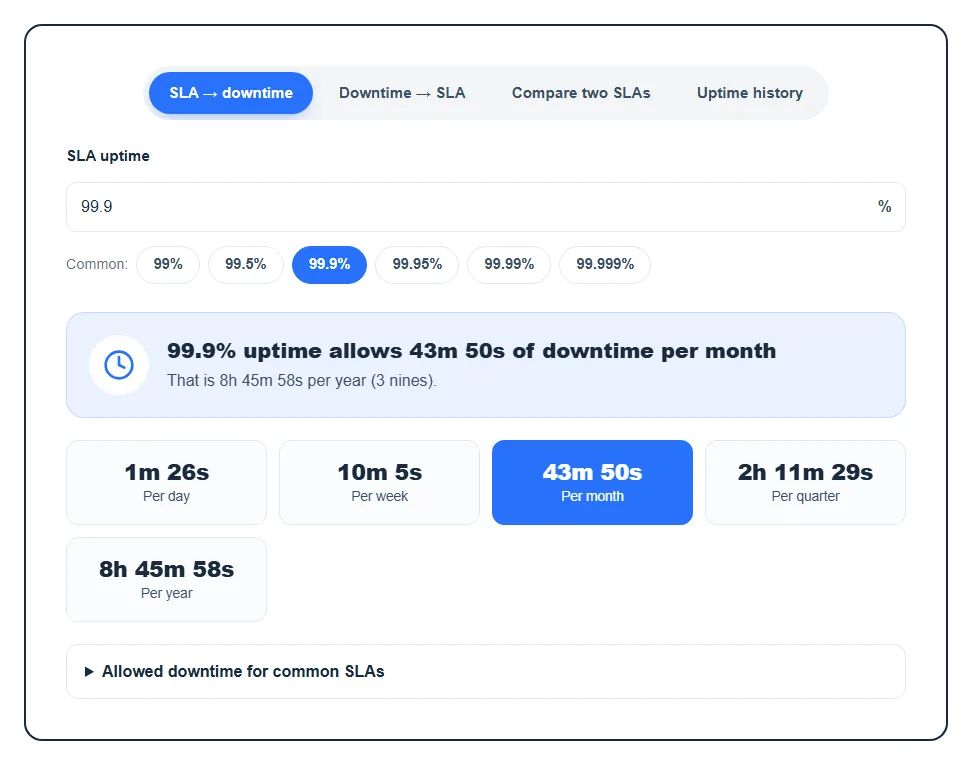
In the SLA → downtime tab, the highlighted line tells you how much downtime per month your SLA allows, the yearly total and the number of “nines”. Below it you see the allowance per day, week, month, quarter and year in days, hours, minutes and seconds. If you entered an hourly cost, a note shows the most that downtime could cost you a year and a month if the host used its full allowance.
Downtime → SLA shows your real Uptime percentage and tells you the highest common SLA it still meets. If you land below 90%, it warns you that’s lower than any SLA hosts usually offer.
Compare two SLAs gives the downtime for each, the Difference, and how many times less downtime the better one allows. Uptime history shows your Average uptime, Worst month, Total downtime and Months below SLA, plus a month-by-month bar chart with missed months in red.
One detail: the calculator uses calendar averages (a 365.25-day year and a 30.44-day month), the same convention most SLA tables use. That’s why its monthly numbers are a little higher than tools that assume a 30-day month.
Allowed downtime for common SLAs
Here’s what the calculator gives for the uptime levels you’ll see most often. You can open the same table under the tool.
| SLA | Per month | Per year |
|---|---|---|
| 99% | 7h 18m 18s | 3d 15h 39m |
| 99.5% | 3h 39m 9s | 1d 19h 49m |
| 99.9% | 43m 50s | 8h 45m 58s |
| 99.95% | 21m 55s | 4h 22m 59s |
| 99.99% | 4m 23s | 52m 36s |
| 99.999% | 26s | 5m 16s |
Notice how each extra nine cuts the allowance by ten. Moving from 99.9% to 99.99% sounds tiny, but it’s the difference between almost 9 hours and under an hour a year.
How uptime is calculated
The formula is simple: Uptime % = (total time − downtime) ÷ total time × 100. Allowed downtime is the reverse: total time × (1 − SLA ÷ 100).
So if your site was down for 2 hours in an average month, that’s 7,200 seconds out of about 2,629,800, which works out to roughly 99.73% uptime. That meets a 99.5% SLA but misses 99.9%.
When this is useful
- Before you buy hosting: see what a host’s uptime guarantee really means in minutes, not just a percentage.
- After an outage: enter the downtime and check whether your host broke its SLA. If it did, many hosts give a credit, but usually only if you ask.
- Reviewing a host over time: paste a few months of monitoring data into Uptime history to spot a pattern instead of one bad day.
You need real downtime numbers for the last two. If your host doesn’t show them, a free monitor like UptimeRobot checks your site and alerts you when it goes down. To understand why every minute counts, read why uptime is important for website hosting.
FAQ
How much downtime is 99.9% uptime?
About 44 minutes a month (43m 50s in an average month, or 43m 12s in a 30-day one), or roughly 8 hours 46 minutes a year. Per day it’s only about 1 minute 26 seconds, so one long outage can use up a whole month’s allowance.
What does “five nines” mean?
Five nines means 99.999% uptime, which allows only about 26 seconds of downtime a month and around 5 minutes a year. That level is rare on regular web hosting and usually needs redundant servers.
Is 99% uptime good for a website?
Not really. 99% allows more than 7 hours of downtime a month, which visitors and search engines will notice. For most sites, look for a host that promises at least 99.9%.
How do I calculate uptime percentage from downtime?
Subtract the downtime from the total time in the period, divide by the total time and multiply by 100. Or open the Downtime → SLA tab, enter the minutes or hours, pick the period and read the result.
Does planned maintenance count as downtime in an SLA?
Usually not. Most hosting SLAs exclude scheduled maintenance that was announced in advance, so read your host’s terms to see what counts. Our guide on what uptime is and how it affects your site covers this in more detail.