
Our free website hosting checker shows who hosts any website, even when the site sits behind Cloudflare if the host leaves a trace. You also get the server IP, network, CDN, DNS provider and email provider, with no sign-up.
How to find out who hosts a website
- Type the website address, like
example.com. A full URL works too; the tool only keeps the hostname. - Click Find host.
- Read the headline answer, then check the two detail panels below it.
Behind the scenes the tool does three things. It looks up the site’s IP address, finds out which network owns that IP (the ASN, from Team Cymru’s public IP to ASN data), and loads the home page to read its response headers. Many hosts add their own headers, and those often survive a CDN. The tool then checks the nameservers and mail servers too.
How to read the results
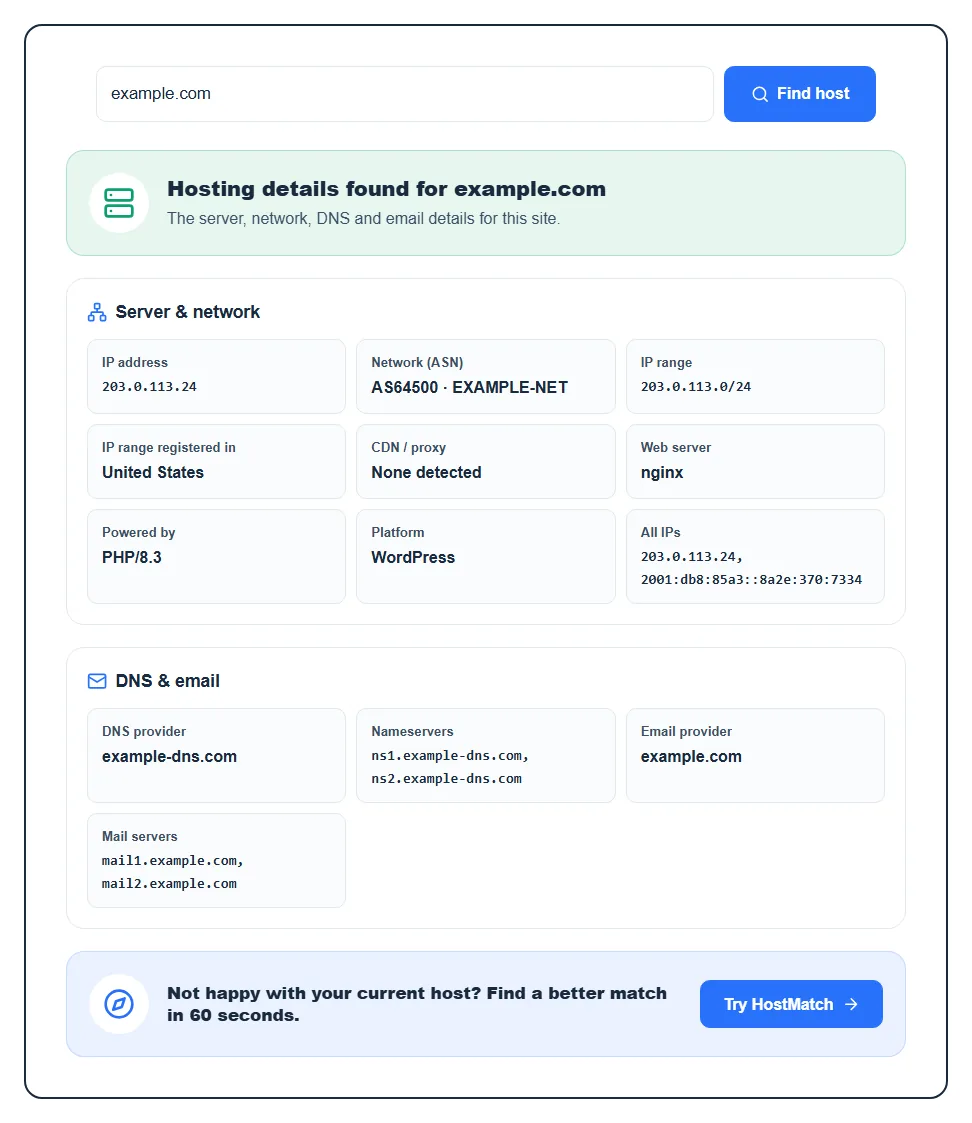
The headline answer
You’ll see one of three answers, and the line under it tells you how the tool got there:
- “Identified from the server’s response headers”: the strongest result. The host’s own fingerprint was found, for example from Hostinger, Kinsta, WP Engine, SiteGround, Vercel, Netlify, GitHub Pages, Wix, Shopify or Squarespace. This works even when the site uses a CDN.
- “The website’s IP address belongs to this provider’s network”: also a solid answer. The IP is owned by a known host or cloud, such as Amazon Web Services, DigitalOcean or Hetzner.
- “Best guess from the network that owns the IP address”: the network isn’t on our list of known hosts, so you see its raw network name. Smaller hosts often rent servers inside bigger data centers, so treat this as a lead, not proof.
If the site is behind a CDN and there’s no host fingerprint, the answer says the site “is behind Cloudflare” (or Fastly, Akamai and so on). That’s not a failure. A CDN proxy is built to hide the origin server, and the tool won’t guess when it can’t know.
Server and network
- IP address and All IPs: the addresses the domain points to. Behind a CDN this changes to Public IP, because it’s the CDN’s address, not the real server’s.
- Network (ASN) and IP range: the autonomous system number and name of the network that owns the IP, plus the block it belongs to. Behind a CDN it’s labeled Edge network.
- Server location: the country the IP range is registered in. It’s a country, not a city or data center, and behind a CDN it shows the Edge location instead.
- CDN / proxy: the CDN in front of the site, or “None detected”.
- Web server, Powered by and Platform: the server software (like nginx or LiteSpeed), the language or stack if the server reveals it, and the CMS found in the page, such as WordPress, Shopify, Wix, Squarespace or Webflow. These rows stay empty when the site hides them.
DNS and email
DNS provider and Nameservers show who runs the domain’s DNS. Email provider and Mail servers show who handles its email, like Google Workspace, Microsoft 365 or Zoho. These three jobs are often split across different companies. A site can be hosted on one host, use Cloudflare for DNS and Google for email, so don’t assume the DNS company is the web host. You can see the full records with our DNS lookup tool.
Errors you might see
- “This domain does not point to any server”: there’s no A or AAAA record, so there’s no website to trace. Check the spelling or try with or without
www. - “This domain points to a private network address”: the record points to an internal IP that isn’t reachable from the internet.
- “Too many requests”: each visitor can run 20 checks every 10 minutes. Results are saved for an hour, so checking the same site again shows the saved answer.
Why people check a website’s host
- Before you buy hosting: see what fast sites in your niche run on. If you’re still picking, our guide on how to choose a web hosting provider helps you compare.
- Taking over a site: a client or a new job often comes with a website and no login details. Knowing the host tells you who to contact.
- After a migration: confirm the domain now resolves to the new host before you cancel the old plan.
- Reporting abuse: phishing or copied content gets taken down fastest when you report it to the real host, not only the CDN.
FAQ
How can I tell who is hosting a website?
Enter the domain in the checker above and it tells you the host in a few seconds. Doing it by hand means looking up the domain’s IP, finding the network that owns it, and reading the server’s response headers, which is exactly what the tool automates.
Why does it say the site is behind Cloudflare?
Because the visible IP belongs to Cloudflare, which proxies traffic and hides the real server. Cloudflare isn’t the host in that case. Some hosts still give themselves away through headers, and the tool shows the host when it finds one. If it doesn’t, the origin is hidden on purpose. Read more in our explainer on what a CDN is.
Is the hosting provider the same as the domain registrar?
Not always. The registrar is where the domain name was bought; the host is where the website files live. Plenty of people buy a domain at one company and host it at another. This tool finds the host, plus the DNS and email providers.
How accurate is the server location?
It’s accurate to the country the IP range is registered in, which usually matches where the server sits. Large clouds can register addresses in one country and use them in another, so take it as a strong hint. Behind a CDN it shows the edge location, not the origin.
Can I find out what a site pays for hosting?
No, no public tool can see a site’s plan or price. You can see the provider, though, and whether it looks like shared hosting, a cloud server or a managed platform. If you want a host matched to your own site, try HostMatch.