
Bluehost and HostGator are both owned by Newfold Digital (the company formed in 2021 when Endurance International Group merged with Web.com). They offer similar services, but there are some real differences.
This comprehensive guide will help you navigate the nuances between BlueHost and HostGator, ensuring you make an informed decision for your website needs.
Key takeaways
Company Overview
While both companies share a parent organization, they maintain separate operations, infrastructure, and customer bases.
Bluehost:

Founded in 2003 by Matt Heaton, BlueHost has grown to become one of the largest and most trusted names in the web hosting industry.
Milestones:
- 2003: Founded in Provo, Utah
- 2010: Acquired by Endurance International Group, already hosting over 2 million domains
- 2021: EIG merged with Web.com to form Newfold Digital, Bluehost’s current owner
- 2025: Moved its VPS and dedicated servers to Oracle Cloud
BlueHost is particularly renowned for its WordPress hosting, earning an official recommendation from WordPress.org. Today only three hosts are listed there: Bluehost, Hostinger and Pressable.
The company has consistently invested in server technology and infrastructure and it is known for its contributions to open-source projects, particularly within the WordPress ecosystem.
Read BlueHost review.
HostGator:
Established in 2002 by Brent Oxley, HostGator has become synonymous with reliable and affordable web hosting.
Milestones:
- 2002: Founded in a Florida Atlantic University dorm room
- 2006: Moved headquarters to Houston, Texas
- 2012: Acquired by Endurance International Group for about $300 million (around $227 million of it in cash)
- 2021: Became part of Newfold Digital after EIG merged with Web.com
HostGator is known for its broad appeal, offering solutions that cater to individual bloggers, small businesses, and larger enterprises alike.
The company has been at the forefront of introducing user-friendly features, such as their website builder and one-click installations for popular applications.
While headquartered in the US, HostGator has expanded its services globally, with a strong presence in Latin America and India.
Read HostGator review.
Ease of Use
Both BlueHost and HostGator have invested in creating user-friendly interfaces, but they take slightly different approaches. Let’s explore the ease of use for both hosts in detail.
Bluehost:
Bluehost has gained a reputation for its clean, intuitive interface.
- Modern Interface: Bluehost’s dashboard features a sleek, modern design with a blue-and-white color scheme that’s easy on the eyes.
- Logical Layout: The main dashboard presents a clear overview of your hosting account, with quick access to features like website management, domain settings, and email accounts.
- Centralized Control: All aspects of your hosting account, including billing, support tickets, and add-on services, are accessible from a single, unified dashboard.
- WordPress Integration: Bluehost offers a seamless WordPress installation process, accessible directly from the main dashboard.
- Website Builder: For those not using WordPress, Bluehost provides a drag-and-drop website builder that’s intuitive and requires no coding knowledge.
- Simplified Domain Tools: Domain registration, transfer, and management are streamlined and integrated directly into the hosting dashboard.
HostGator:
HostGator takes a more traditional approach to its user interface, which may appeal to users familiar with classic hosting control panels.
- Dual Interface: HostGator uses a combination of a custom dashboard for account management and cPanel for hosting management.
- Familiar Design: The interface uses a more conventional design that long-time hosting users will find familiar.
- Comprehensive Overview: The customer portal provides quick access to billing, support, and high-level account management.
- Service Separation: Unlike Bluehost’s all-in-one approach, HostGator separates some services into distinct sections, which can be beneficial for users managing multiple sites or services.
- cPanel Integration: HostGator relies on cPanel for day-to-day website management tasks, which offers powerful features but can have a steeper learning curve for beginners.
- One-Click Installs: While not as seamlessly integrated as BlueHost’s WordPress tools, HostGator offers easy installation of various CMSs and applications through Softaculous.
- Separate Domain Manager: Domain settings are managed through a dedicated domain manager, which is comprehensive but requires navigating away from the main hosting dashboard.
- Extensive cPanel Tools: The use of cPanel provides access to a wide array of advanced features and customization options right out of the box.
Ease of Use Comparison
| Aspect | BlueHost | HostGator |
|---|---|---|
| Overall Interface | Modern, streamlined | Traditional, feature-rich |
| Learning Curve | Gentle, ideal for beginners | Steeper, familiar to cPanel users |
| WordPress Integration | Seamless, built into main dashboard | Available, but less integrated |
| Website Builder | User-friendly, modern | Functional, slightly older design |
| Advanced Features Accessibility | Neatly tucked away | Readily available through cPanel |
| Mobile Responsiveness | Excellent | Good, but some cPanel limitations |
Conclusion on Ease of Use
- BlueHost is the clear winner for beginners and those who prioritize a modern, streamlined experience. Its integrated approach and focus on WordPress make it exceptionally user-friendly for new website owners.
- HostGator appeals more to users who are comfortable with traditional hosting interfaces or require more immediate access to advanced features. Its use of cPanel provides a powerful, if slightly more complex, user experience.
Ultimately, both hosts offer fantastic features and manageable interfaces. The choice between them often comes down to personal preference and specific needs: do you prioritize a modern, simplified experience or a more traditional, feature-rich environment?
Plans and Pricing
Understanding the hosting plans and pricing structures of BlueHost and HostGator is crucial for making an informed decision.
Both providers offer a range of hosting options to cater to different needs and budgets. Let’s break down their shared hosting offerings and compare them in detail.
Shared hosting is the most popular option for small to medium-sized websites. Both BlueHost and HostGator offer tiered shared hosting plans.
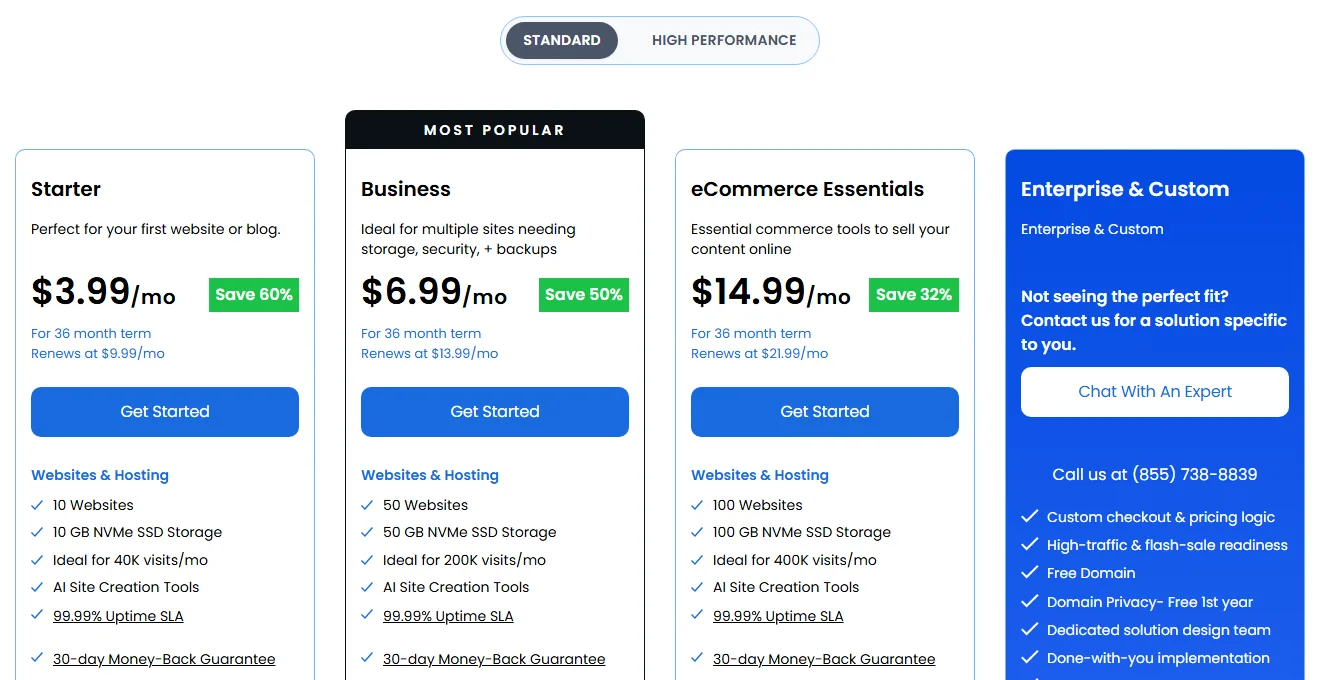
Bluehost Shared Hosting
The shared hosting solution allows multiple websites to utilize a single server, sharing the same resources.
- Starter: Starting at $3.99/month (promotional price, 36-month term). Renews at $9.99/month.
- Business: Starting at $6.99/month (promotional price, 36-month term). Renews at $13.99/month.
- eCommerce Essentials: Starting at $14.99/month (promotional price, 36-month term). Renews at $21.99/month.
- Enterprise & Custom: Priced by quote. (These plans replaced the old Basic, Choice Plus, Online Store and Pro lineup.)
HostGator Shared Hosting
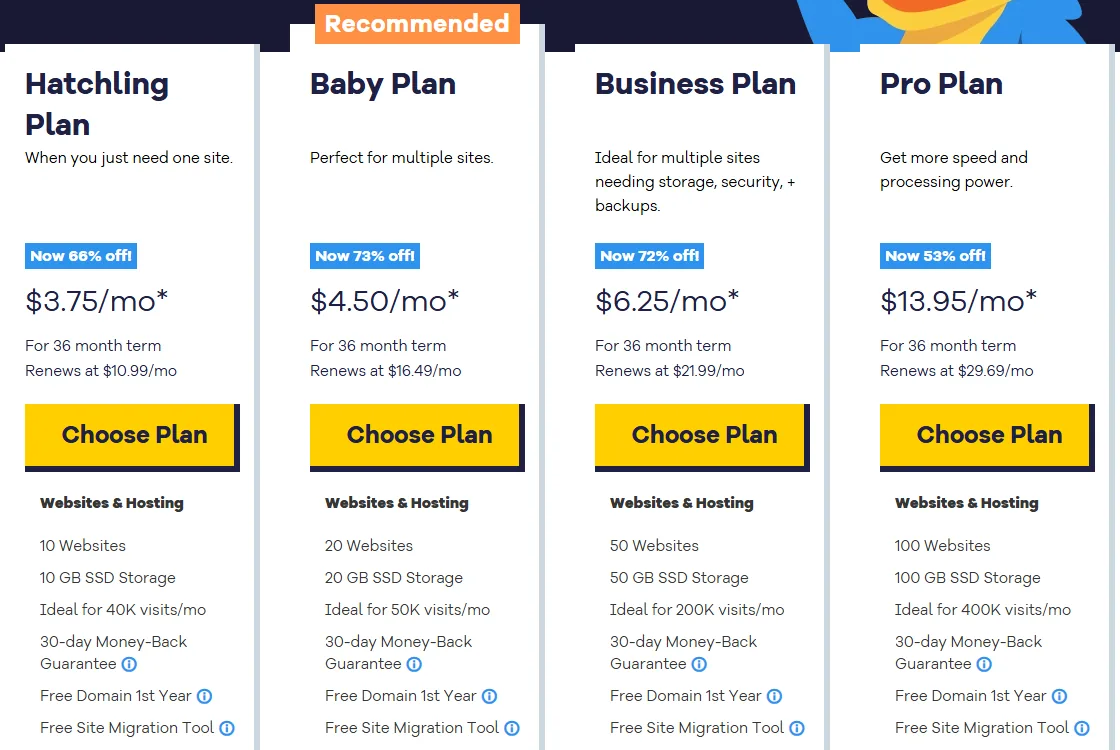
- Hatchling Plan:
- Starting at $3.75/month with a 36-month commitment, renewing at $10.99/month.
- Supports up to 10 websites and around 40K visits a month.
- Includes 10 GB SSD storage, one-click WordPress installs, free domain, SSL, email hosting, Cloudflare CDN, and unmetered bandwidth. Support is chat only.
- Baby Plan:
- Starting at $4.50/month with a 36-month commitment, renewing at $16.49/month.
- Supports 20 websites.
- Includes 20 GB SSD storage, one-click WordPress installs, free domain, SSL, email hosting, CDN, phone support, and unmetered bandwidth.
- Business Plan:
- Starting at $6.25/month with a 36-month commitment, renewing at $21.99/month.
- Supports 50 websites.
- Includes 50 GB SSD storage, one-click WordPress installs, free domain, SSL, email hosting, CDN, phone support, free domain privacy for the first year, and unmetered bandwidth. HostGator also sells a Pro plan (100 websites, 100 GB) from $13.95/month that renews at $29.69/month.
Tiers Comparison
In this pricing comparison, we took the lowest shared hosting plan as an example, Starter on Bluehost and Hatchling on HostGator. Both give you 10 websites and 10 GB of storage. Prices are for the 36-month term, which is the only term both hosts advertise up front.
| Plan Tier | Bluehost Pricing | HostGator Pricing |
|---|---|---|
| 36 months (intro) | $3.99/month | $3.75/month |
| Renewal | $9.99/month | $10.99/month |
| Total for first 3 years | $143.64 | $135.00 |
From the table above, HostGator is a little cheaper for the first three years, while Bluehost renews for a dollar less per month. Over the long run the two come out very close, so price alone shouldn’t decide this one.
Features
Both BlueHost and HostGator offer a robust set of features across their hosting plans. Let’s compare their offerings in detail:
Both hosts offer a comprehensive set of features that cover to a wide range of users, from beginners to advanced developers.
BlueHost tends to include more features in their higher-tier plans, while HostGator offers a consistent feature set across all plans with some advanced features reserved for their Business plan.
| Feature | BlueHost | HostGator |
|---|---|---|
| Free Domain (1st year) | Yes | Yes |
| Free SSL Certificate | Yes | Yes |
| Bandwidth/Visits | 40k visits/mo | Unmetered Bandwidth |
| Website Builder | Yes | Yes |
| One-Click Installer | Yes (automatic WordPress install) | Yes (QuickInstall) |
| cPanel Access | Bluehost dashboard | Standard cPanel |
| Email Accounts | Pro Email – Free Trial | Unlimited on all plans |
| SSH Access | Yes | Yes |
| Automatic Backups | Yes (weekly) | Yes (weekly) |
The choice between the two comes down to specific needs and preferences in terms of control panel layout, development environment, and included marketing tools.
Performance and Reliability
Web hosting performance is a crucial factor in choosing a web host.
The web hosting service should be able to provide high-quality performance and connection between the server and the user.
The performance is not only limited to the speed of your website loading, but also includes a range of other factors like uptime, security, and more.
Uptime:
Uptime is the percentage of time a web server is running. It’s important for your website’s SEO and user satisfaction
HostGator advertises a 99% uptime guarantee, while Bluehost only puts a formal SLA (100%) on its cloud plans. Real-world performance can vary, so here’s what earlier third-party monitoring showed:
- BlueHost: Generally maintains uptime around 99.98% according to third-party monitoring.
- HostGator: Often achieves uptime of 99.99% in independent tests.
Loading speed:
A website’s loading speed has a significant impact on how much time a visitor spends on the site. A slow loading speed will result in fewer page views and conversion rates. As well as a significant decrease in how many Googlebots will likely visit and crawl your website.
Load times can vary significantly based on your web hosting type, plan, website content, and configuration.
BlueHost: Average load times of 1.5 to 2 seconds for optimized websites. HostGator: Slightly faster, with average load times of 1 to 1.5 seconds for similar sites.
Security:
Security is a major concern for any website. Web hosting providers need to be extremely careful about how they store data, and how they protect it.
Both web hosts run malware scans and distributed denial-of-service (DDoS) in addition to the SSL certificate.
Data centers:
Web hosting Data centers are the backbone of a website. They are responsible for storing, processing, and delivering content to the end user.
The closer your website hosting server is to your clients and visitors, the better the loading speed and performance of your website.
Bluehost datacenters:
- Main data center in Utah, USA
- Bluehost now says it has data centers across North America, South America, Europe, and Asia (no exact list)
HostGator data centers:
- Houston, TX Data Center Features
- Provo, UT Data Center Features
Conclusion on Performance
While both hosts offer solid performance, HostGator tends to edge out BlueHost slightly in terms of uptime and response times.
However, BlueHost’s more diverse data center locations may provide better performance for certain global audiences.
| Performance | BlueHost | HostGator |
| Uptime | 99.98% | 99.99% |
| Loading speed | 1.5-2.0 s | 1.0-1.5 s |
| Data centers | North America, South America, Europe, Asia | Not listed |
WordPress Integration
As WordPress powers a significant portion of websites, both hosts have invested in WordPress-specific features and optimizations.
Both Bluehost and HostGator integrate with WordPress websites smoothly, they offer the 1-click WordPress installation on their dashboard so you don’t have to worry about installing WordPress by yourself.
Setup WordPress in Bluehost is very easy and fast, once you enter your account in Bluehost, navigate to (my sites), then add a site, choose WordPress and you are good to go.
In HostGator, it’s a little bit different, you will need to enter your cPanel dashboard. However, you only do it once for any site, once you make your website it’ll be easy to access your WordPress site at any time.
Security Measures
Website security is paramount in today’s digital landscape. Here’s how Bluehost and HostGator approach security:
| Feature | BlueHost | HostGator |
|---|---|---|
| Free SSL Certificates | Yes | Yes |
| DDoS Protection | Yes | Yes |
| Malware Scanning | Yes | Yes |
| Web Application Firewall | Yes | Yes |
| Hotlink Protection | Yes | Yes |
| IP Blocklist | Yes | Yes |
Both hosts offer robust security measures. HostGator now includes a web application firewall, DDoS protection and malware scanning on every shared plan, and both hosts upgrade to AI-powered malware removal on their higher tiers.
Support
Quality customer support is essential for any hosting provider. Let’s compare the support options and quality for BlueHost and HostGator.
Support Channels:
| Channel | BlueHost | HostGator |
|---|---|---|
| 24/7 Live Chat | Yes | Yes |
| Phone Support | Yes | Yes |
| Email/Ticket Support | Yes | Yes |
| Knowledge Base | Extensive | Extensive |
| Video Tutorials | Yes | Yes |
| Community Forums | Yes | Yes |
Bluehost and HostGator provide 24/7 support via live chat, calls, and email. One catch: the cheapest plans (Bluehost Starter and HostGator Hatchling) are chat only, phone support starts on the next plan up. They are both good at that if you are a beginner and you think that you will need some assistance.
Support Quality:
- Bluehost:
- Known for knowledgeable support staff, especially for WordPress issues
- Generally quick response times
- Some users report inconsistent experiences during peak hours
- HostGator:
- Responsive support team with broad knowledge base
- Slightly longer wait times reported during busy periods
- Strong reputation for resolving technical issues
Self-Help Resources:
Both hosts offer comprehensive knowledge bases and tutorials:
- Bluehost: Well-organized resources with a focus on WordPress-related topics
- HostGator: Extensive documentation covering a wide range of hosting and website management topics
Conclusion on Customer Support
Both hosts provide solid customer support options. BlueHost may have a slight advantage for WordPress-specific issues, while HostGator offers consistently good general hosting support.
Backup and Restoration
The backups are what guarantee that if you lose your website data, you can cover it easily.
Without the backup of your website files, if you lose your files for any reason you won’t be able to get your website back.
Bluehost:
- Weekly automated backups on all shared plans (daily backups through the CodeGuard add-on)
- On-demand backups available
- Easy restoration process
HostGator:
- Weekly automated backups
- CodeGuard backup solution available as an add-on
Pros and Cons
Bluehost:
Pros:
- Official WordPress recommendation
- User-friendly interface and control panel
- Comprehensive feature set on higher-tier plans
- Strong performance, especially for WordPress sites
- Multiple global data centers
Cons:
- Higher renewal rates after the initial term
- Some advanced features are limited to higher-tier plans
- Occasional support inconsistencies during peak hours
HostGator:
Pros:
- Competitive long-term pricing
- Consistent feature set across all plans
- Slightly better average uptime and response times
- Flexible hosting options, including cloud hosting
- Strong general hosting support
Cons:
- Less intuitive control panel for beginners
- Fewer global data center options
- Some users report aggressive upselling
User Reviews and Reputation
Bluehost:
4.5 out of 5 on Trustpilot, based on 31,942 reviews (October 2026)
- Generally positive reviews, especially from WordPress users
- Praised for ease of use and WordPress integration
- Some complaints about loading speed and occasional support issues
- Overall reputation as a reliable, beginner-friendly host
HostGator:
4.6 out of 5 on Trustpilot, based on 17,947 reviews (October 2026)
- Mostly positive reviews on Trustpilot
- Appreciated for affordability and reliable uptime
- Some users report issues with site migration and support wait times
- Known for good performance and value for money
Conclusion
Choosing between Bluehost and HostGator depends on your specific needs and priorities.
For WordPress Users: BlueHost is the better choice due to its official WordPress recommendation, integrated WordPress tools, and specialized support.
For Beginners: BlueHost offers a more user-friendly interface and streamlined setup process, making it ideal for those new to web hosting.
For Budget-Conscious Users: Both hosts are cheap at first. HostGator’s Hatchling is slightly cheaper up front ($3.75 vs $3.99 a month on a 36-month term), while Bluehost Starter renews a bit lower.
For Performance: HostGator slightly edges out in general performance metrics, but BlueHost performs exceptionally well for WordPress sites.
For Scalability: Bluehost provides a clearer upgrade path, while HostGator offers more flexible resource allocation with their unmetered plans.
Both hosts are great for small to medium websites and businesses. But, if you are to choose one, we recommend HostGator, because we believe that the Performance of a website is the most important factor.
Read also:
Bluehost vs Dreamhost
Cloudways vs WP Engine
DigitalOcean vs Vultr vs Linode